Understanding REST APIs and REST API Authentication
A REST API lets your script ask a controller for information or request a change in a predictable way. This lesson follows one API call from URL to JSON response, then shows how credentials and tokens keep that conversation secure.
Network Automation and Programmability Series
Move from controller-based networking to repeatable infrastructure automation, one practical concept at a time.
In This Lesson
Build one complete API request, learn how to read the response, and finish with safer authentication habits. Each concept is tied to the decisions you make in real automation.
Quick Learning Map
Keep these three decisions in view as you work through the detailed lesson.
Choose a resource
Identify the interface, device, policy, alarm, or site you need.
Send a request
Combine the resource URL, HTTP method, headers, authentication, and body.
Interpret the response
Read the status code first, then inspect JSON and response headers.
REST APIs at a Glance
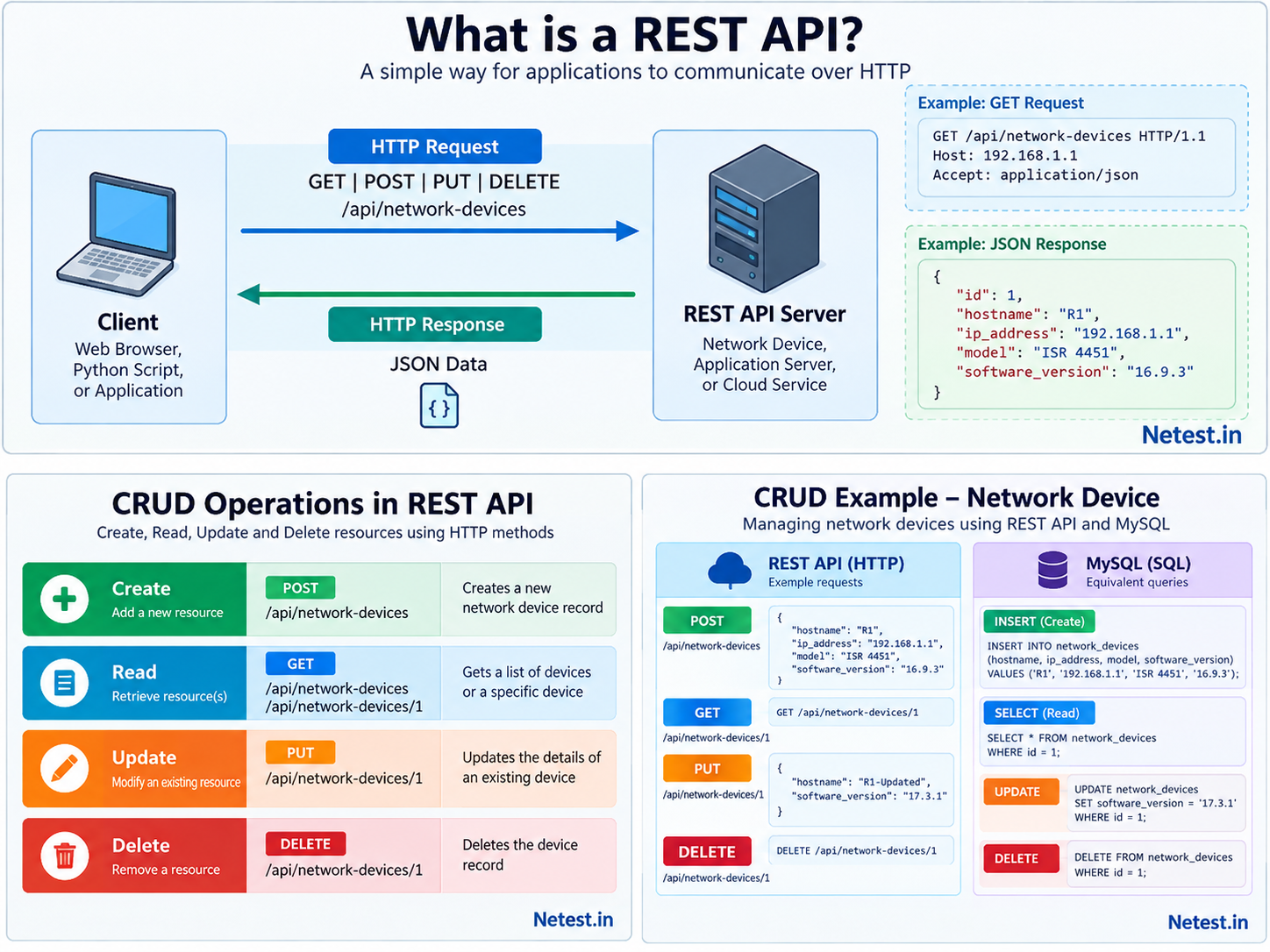
A REST API is a software interface where a client targets a resource, sends an HTTP request, and receives a structured response. For a network engineer, the client might be a Python script, an automation platform, Postman, curl, or another controller.
1. Start with a Familiar Browser Request
You already use HTTP every time you open a website. A REST API uses the same request-and-response foundation, but its audience is usually software rather than a person reading a page.
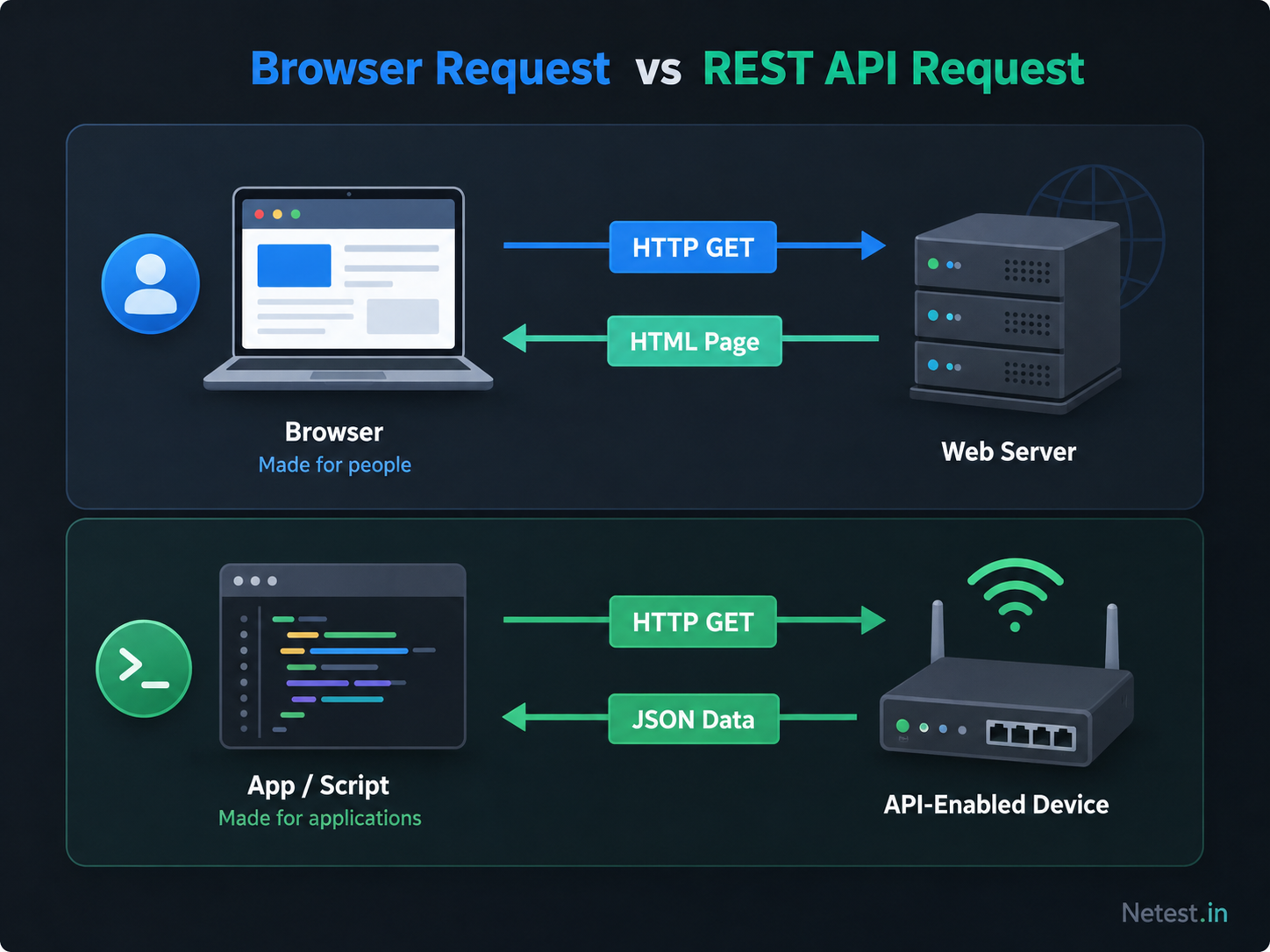
| Flow | Request target | Response | Typical user |
|---|---|---|---|
| Browser | Web page URL | HTML, CSS, JavaScript and images | Human reader |
| REST API | Resource URL or endpoint | JSON or XML representation | Script, app, controller or integration tool |
When browser JavaScript calls an API on another origin, the browser also evaluates CORS response headers. Use the CORS Tester to compare the endpoint's OPTIONS preflight and actual GET policy without supplying tokens or executing state-changing methods.
2. Read One API Request from Start to Finish
Suppose you want to check a loopback interface. Read the request as a short sentence: “Using my token, get the JSON representation of Loopback0 from this controller.”
GET /api/v1/interfaces/loopback0 HTTP/1.1
Host: 192.168.1.1:55443
Accept: application/json
Authorization: Bearer <access-token>- Method:
GETsays you want to read data without changing the resource. - Path:
/api/v1/interfaces/loopback0identifies the resource. - Accept header: the client asks the server to return JSON.
- Authorization header: the bearer token proves the request has access.
- Server response: a status code explains the outcome and the body carries the data or error details.
A successful response could look like this:
HTTP/1.1 200 OK
Content-Type: application/json

{
  "name": "Loopback0",
  "admin_status": "up",
  "oper_status": "up",
  "ipv4_address": "10.10.10.1/32"
}200 OK tells you the request succeeded. The JSON body then gives your script the interface data.3. Match the Resource with the Right HTTP Method
A REST resource is a thing the API exposes. In networking, that could be an interface, VLAN, fabric site, policy, host, alarm, or device. Its URL identifies the object; the HTTP method describes what you want to do with it.
| Method | Intent | Network automation example |
|---|---|---|
| GET | Read a resource without changing it. | Read interface status or device inventory. |
| POST | Create a resource or submit an action. | Create a discovery job or submit configuration intent. |
| PUT | Replace the complete representation of a resource. | Replace an interface object with updated settings. |
| PATCH | Update part of an existing resource. | Change only the description or administrative state. |
| DELETE | Remove a resource. | Delete a temporary policy or stale lab object. |
4. Let the Status Code Guide Your Next Step
When an API call fails, do not start by guessing at the JSON. Read the HTTP status code first. It narrows the problem to the request, authentication, permissions, missing resource, rate limit, or server.
| Status | What it usually means | What to check next |
|---|---|---|
| 200 OK | The request succeeded. | Parse and validate the returned data. |
| 201 Created | A new resource was created. | Read the response or Location header for its identifier. |
| 400 Bad Request | The request syntax or body is invalid. | Check JSON shape, required fields, and data types. |
| 401 Unauthorized | Authentication is missing, invalid, or expired. | Refresh or replace the credential. |
| 403 Forbidden | The identity is known but lacks permission. | Check roles, scopes, and resource policy. |
| 404 Not Found | The endpoint or resource does not exist. | Check the base URL, API version, path, and resource ID. |
| 429 Too Many Requests | The client exceeded a rate limit. | Back off and respect retry guidance. |
| 500–599 | The server could not complete the request. | Capture the request ID and review platform health or logs. |
5. Recognize What Makes an API RESTful
For daily network automation, you do not need to memorize every theory detail before sending your first request. Still, the REST constraints explain why API calls feel predictable.
- Client-server. The client starts requests; the server answers them.
- Stateless. Each request carries enough information for the server to process it.
- Cacheable. Responses can indicate whether clients may reuse data instead of requesting it again.
- Uniform interface. Resources are identified consistently, usually through URLs and standard representations.
- Layered system. Load balancers, proxies or gateways can sit between client and server.
- Code on demand. Optional; a server can send executable code, though API responses are usually static JSON or XML.
6. Choose an Authentication Method Deliberately
An API may expose inventory, topology, policy, and configuration actions. Authentication proves which person, script, or application is making the request before the server returns data or accepts a change.
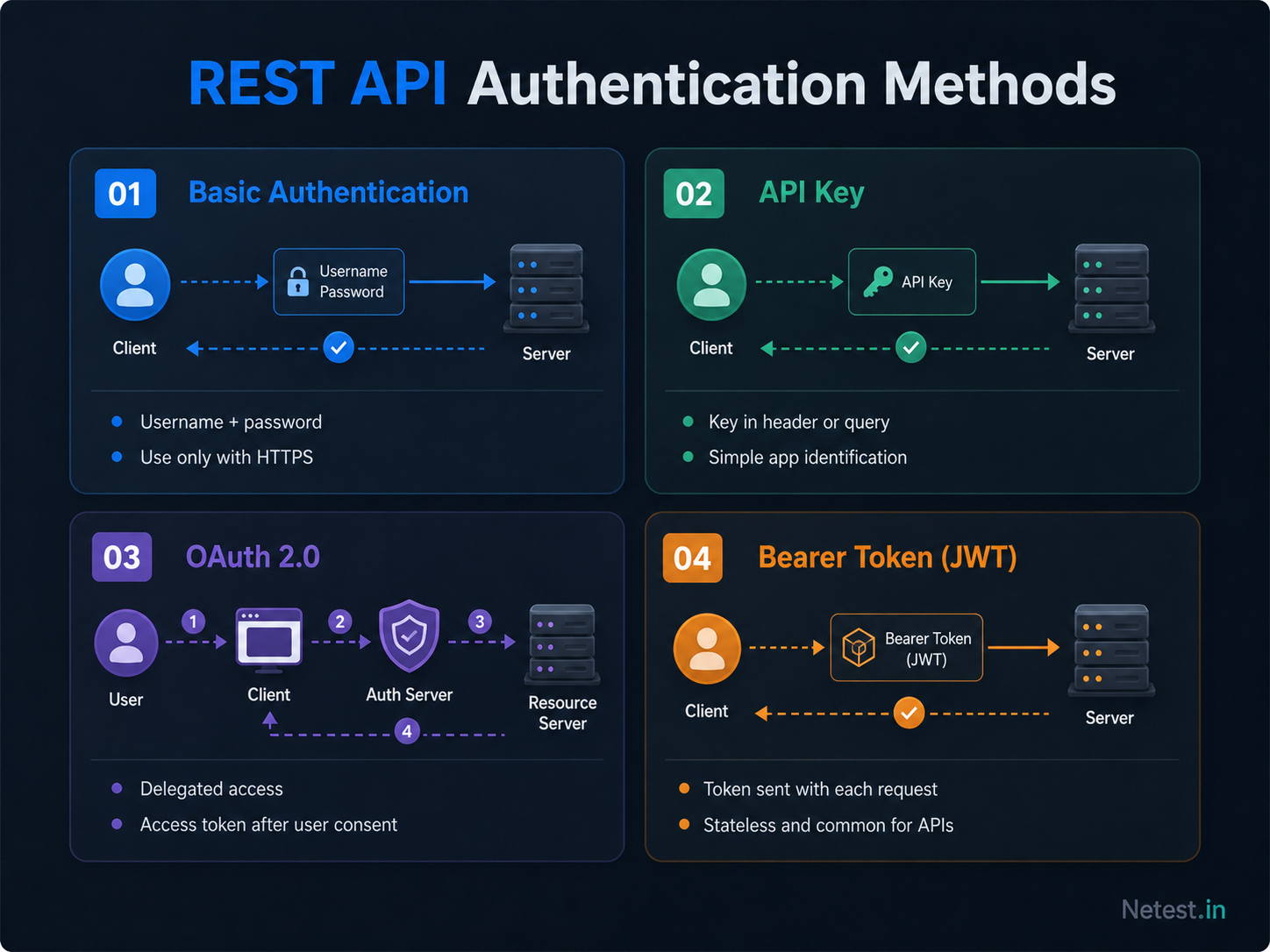
Basic authentication
Sends a username and password in the request header after base64 encoding. It is simple, but should only be used over HTTPS and is often avoided for unattended automation.
API key
Uses a generated secret associated with a client or workflow. Prefer keys with scopes, expiration, rotation, and clear ownership.
Bearer token or JWT
Uses a token issued after authentication or authorization. Tokens commonly expire and travel in the Authorization: Bearer header.
OAuth 2.0
Defines authorization flows for obtaining scoped access tokens without handing the application a user's permanent password.
7. Understand JSON Web Tokens in Plain Language
A JSON Web Token, or JWT, is a compact token with three dot-separated parts: header, payload and signature. The payload can include claims such as issuer, subject, issued-at time and expiration time.
Authorization: Bearer eyJhbGciOiJIUzI1NiIsInR5cCI6IkpXVCJ9...The token is convenient because the client can send it with each request. The risk is also obvious: if someone steals a valid token, they may be able to use the access it grants. That is why expiration, scopes, TLS and careful storage matter.
8. Build Safer API Automation
Before the request
- Use HTTPS and validate the server certificate.
- Give the workflow only the permissions it needs.
- Keep secrets outside source code and version control.
During the request
- Set explicit timeouts and handle connection errors.
- Avoid printing tokens or sensitive response data.
- Validate the target resource before changing state.
After the request
- Check the status code and verify the outcome.
- Log a safe request identifier for troubleshooting.
- Rotate exposed credentials and revoke unused access.
- Prefer scoped tokens or keys over broad administrator credentials.
- Plan for token expiration instead of assuming one token lasts forever.
- Respect rate limits and retry only when the operation is safe to repeat.
- Audit API access and investigate unusual failures or request volume.
9. Check Your Understanding
You send GET /api/v1/devices/42 with an expired bearer token and receive 401 Unauthorized. What should you conclude?
What was the intent?
GET means the client wanted to read device 42 without changing it.
Where did it fail?
The server rejected authentication before returning the protected resource.
What should happen next?
Obtain or refresh a valid token, then retry the safe read request. Changing the resource path would not solve an expired credential.
403 Forbidden, the identity is authenticated but does not have permission to read that resource.11. Frequently Asked Questions
What is a REST API?
A REST API is a standard way for clients and servers to exchange representations of resources using HTTP methods such as GET, POST, PUT and DELETE.
What is an API resource?
A resource is a thing the API exposes, such as an interface, device, VLAN, user, site, alarm or policy object.
Why is JSON common in REST APIs?
JSON is readable for humans and easy for software to parse, which makes it useful for network inventory, interface data and controller responses.
Is Basic authentication safe?
Basic authentication is weak by itself because credentials are only base64 encoded. Use it only over HTTPS and prefer stronger token-based methods when available.
What is an API key?
An API key is a generated secret that identifies a client or application. Good implementations support scopes, expiration and rotation.
What is a bearer token?
A bearer token is a credential sent with API requests, usually in the Authorization header. Whoever holds a valid token can use the access it grants.