Configuration Management Tools for Network Automation
Configuration management tools turn a reviewed desired state into repeatable changes. Compare Ansible, Puppet, Chef and Salt, then see how Git, validation and drift control fit the workflow.
Network Automation and Programmability Series
Move from controller-based networking to repeatable infrastructure automation, one practical concept at a time.
In This Lesson
Connect desired state, configuration management, and Git into one operational workflow. The lesson emphasizes review, traceability, and recovery—not automation for its own sake.
Configuration Management Workflow
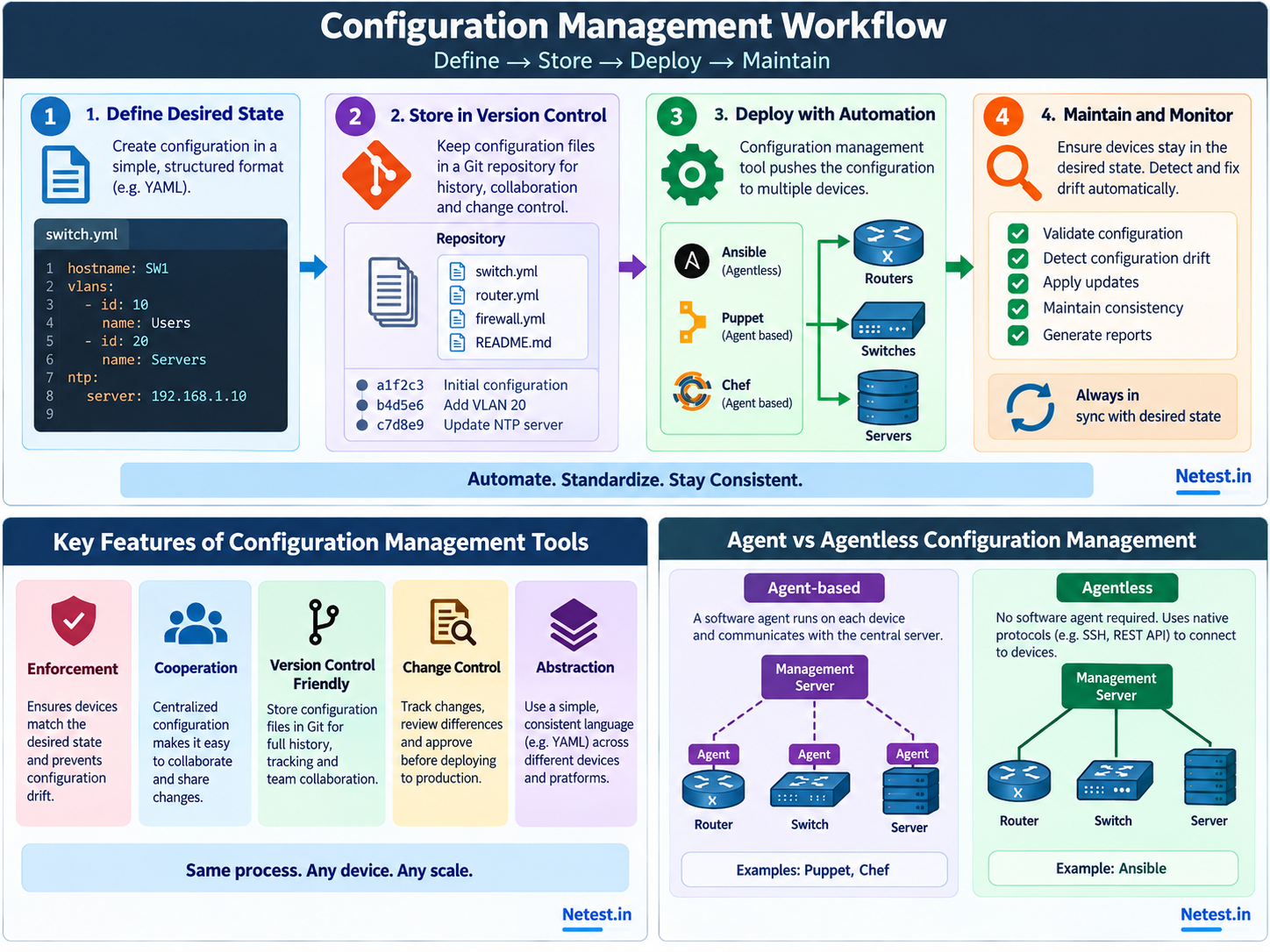
The operational loop is simple: define the desired state, store the change where it can be reviewed, deploy it through automation, and check that the running environment stays aligned.
Desired State and Configuration Drift
Desired state is the configuration an environment should have. It can describe a hostname, VLAN, interface policy, NTP source, access rule or service setting. The important shift is that the intended result becomes explicit and reusable instead of living only in a one-time CLI session.
A Network Change in Real Life
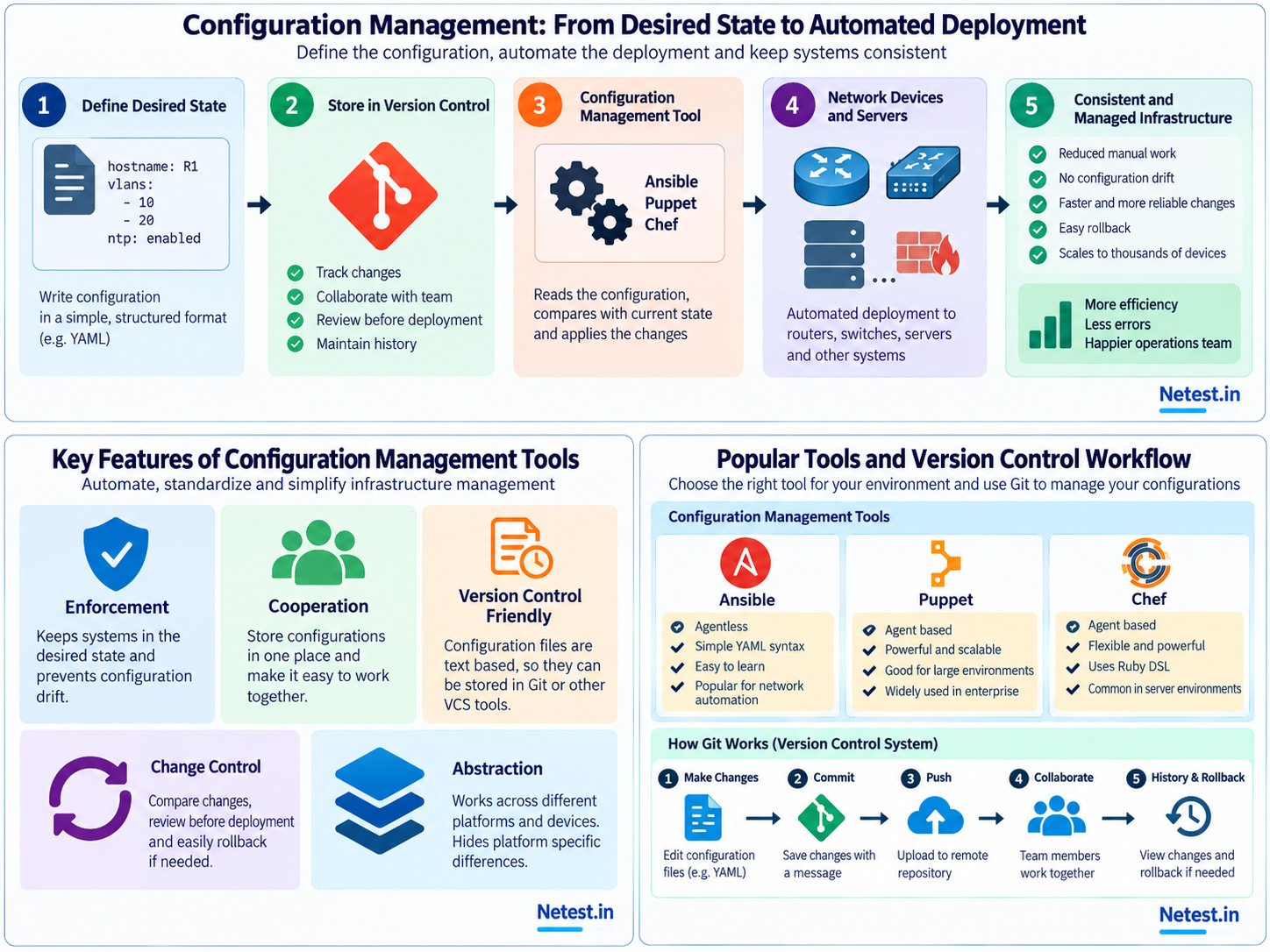
Imagine an operations team needs to add an NTP server and a management VLAN to 40 access switches. A manual approach might mean opening devices one at a time, pasting commands, and keeping notes in a spreadsheet. That process can work for one urgent fix, but it becomes difficult to prove what was changed, which devices were missed, and whether every switch received the same values.
With configuration management, the engineer describes the intended settings once and supplies the device-specific values as data. The tool can check connectivity, apply the change to a small pilot group, show the proposed difference, and then continue through the remaining switches after review. The engineer still decides the scope and approves the change; automation simply makes the approved process consistent.
This distinction matters. Configuration management is not an excuse to press a button against every device. It is a way to make the button operate inside a controlled workflow with an explicit target list, a visible change, and a verification step.
What Belongs in the Source of Truth?
A useful repository contains the information needed to reproduce an approved result. That often includes inventory data, templates, variables, automation tasks, validation checks and documentation. Keeping these pieces together helps another engineer understand both the desired setting and the method used to apply it.
The source of truth should not contain passwords, private keys or long-lived tokens in plain text. Secrets belong in a protected secret store or an approved CI/CD variable system, while the repository contains references to those secrets and the permissions needed to use them. A configuration file that is easy to read but unsafe to protect is not a good automation asset.
What Configuration Management Tools Provide
A configuration management tool gives the workflow an execution and verification layer. It reads variables and templates, connects to targets, applies only the necessary change, and reports what happened.
Enforcement
Apply a defined configuration and check whether the target remains aligned with it.
Abstraction
Use a readable model or task language while the tool handles device-specific connection details.
Repeatability
Run the same workflow across many devices with consistent inputs and predictable validation.
Reporting
Show changed, unchanged, failed or unreachable targets so an operator can act on evidence.
The best result is not always a long list of changes. A healthy run may report that most devices were already correct and required no action. That is useful information: it shows the workflow is idempotent, meaning repeated runs converge on the same intended state instead of adding another change every time.
Configuration Management Tools Compared
Choose a tool from the systems it must control and the operating model your team can support. Network devices often cannot run a general-purpose agent, so connection method and platform support matter more than popularity.
| Tool | Typical operating model | Network use | Check before choosing |
|---|---|---|---|
| Ansible | Agentless execution from a control node with YAML playbooks and collections. | Uses platform modules over SSH, HTTPS, NETCONF, or device APIs. | Confirm the network collection, connection plugin, privilege method, and idempotent resource modules. |
| Puppet | Desired-state enforcement, commonly agent-based for servers, with agentless task options. | Can participate in broader infrastructure policy and orchestration where supported integrations exist. | Confirm device support, enforcement model, reporting needs, and whether persistent agents are practical. |
| Chef | Cookbooks and recipes commonly applied through Chef Infra Client for server configuration. | Best evaluated as part of a wider server or application automation estate rather than assumed to fit every network device. | Confirm target support, client requirements, team Ruby skills, testing, and lifecycle plans. |
| Salt | Event-driven orchestration with minions and proxy patterns for systems that cannot run an agent. | Can automate heterogeneous infrastructure when the required network modules and proxy architecture are supported. | Confirm proxy-minion support, event architecture, operational overhead, and vendor modules. |
How to Choose a Configuration Management Tool
Tool choice should follow the environment and the operating model, not popularity alone. Start with the targets: network operating systems, servers, cloud services and security appliances may expose different connection methods and data models. Then consider whether the team needs continuous enforcement, scheduled runs, event-driven jobs, or an operator-approved change pipeline.
| Question | Why it matters | What to check |
|---|---|---|
| How are targets reached? | Connectivity determines whether an agent or central controller is practical. | SSH, HTTPS, NETCONF, RESTCONF, WinRM, API support and firewall paths. |
| Who approves changes? | A tool should fit the team's review and separation-of-duties process. | Branches, pull requests, change windows, approvals and audit logs. |
| How is state verified? | Deployment without validation can create silent drift. | Read-back checks, command verification, API responses and compliance reports. |
| How is failure handled? | Large changes can produce partial success. | Dry runs, batching, retries, checkpoints, backups and rollback procedures. |
Ansible is often approachable for network teams because it can use existing protocols and readable YAML tasks. Puppet and Chef commonly serve broader server and infrastructure workflows. Evaluate the workflow your organization can operate reliably, including inventory, credentials, logging, support lifecycle, and recovery.
Agent-Based and Agentless Approaches
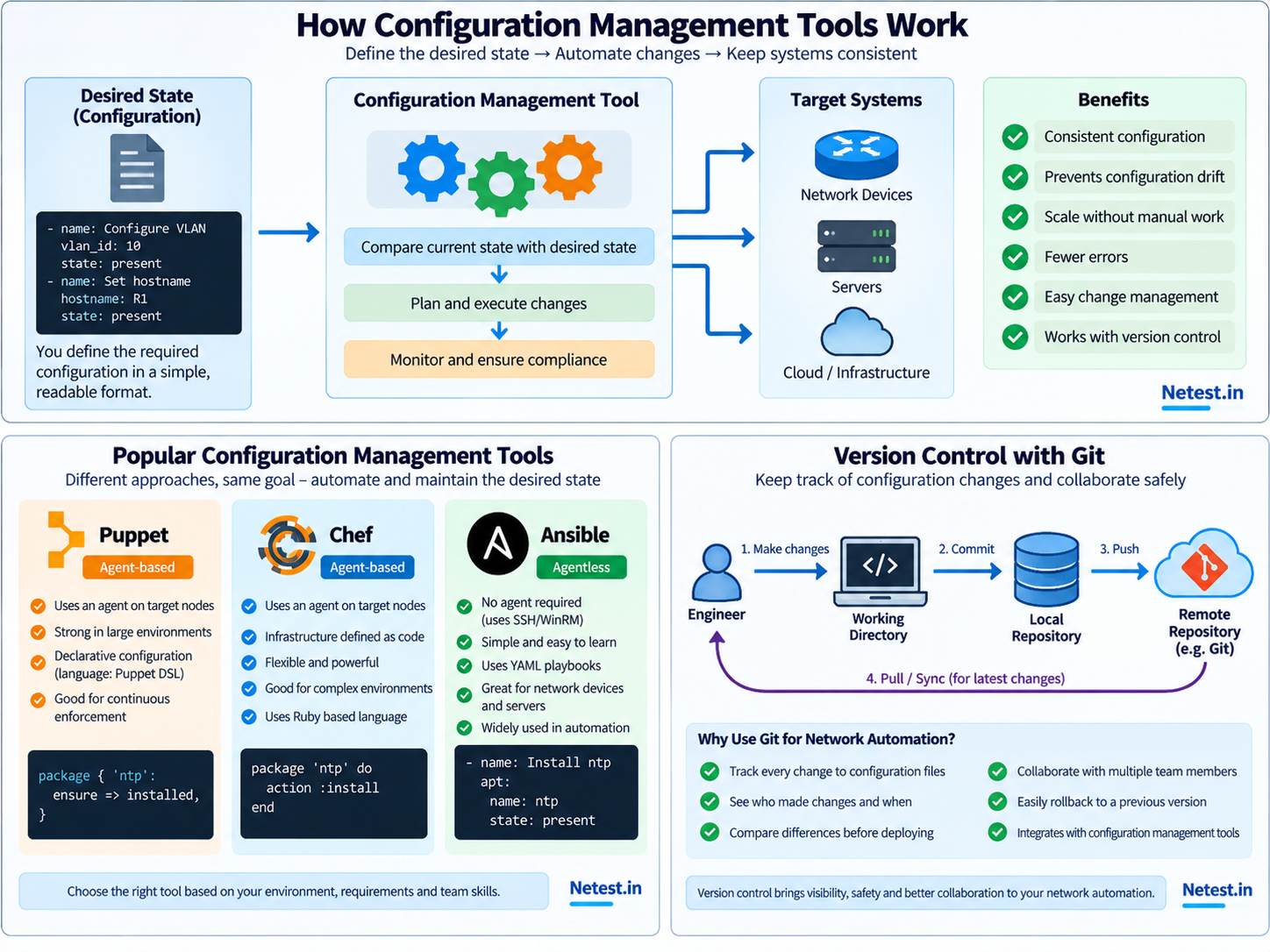
Tools differ in how they reach managed systems. The choice affects installation, connectivity, scale, security boundaries and the kinds of environments they fit best.
| Approach | How it works | Typical consideration |
|---|---|---|
| Agent-based | A service runs on each managed host and communicates with a central system. | Can provide continuous enforcement, but requires lifecycle and software management on targets. |
| Agentless | The controller connects using existing protocols such as SSH, HTTPS or WinRM. | Fast to introduce on network devices, but depends on reachability and appropriate device support. |
Why Git Belongs Beside Automation
Git is the history and collaboration layer for configuration files, templates, variables and automation code. It does not replace a deployment tool. Instead, it gives the team a reviewable source of truth before a tool changes production.
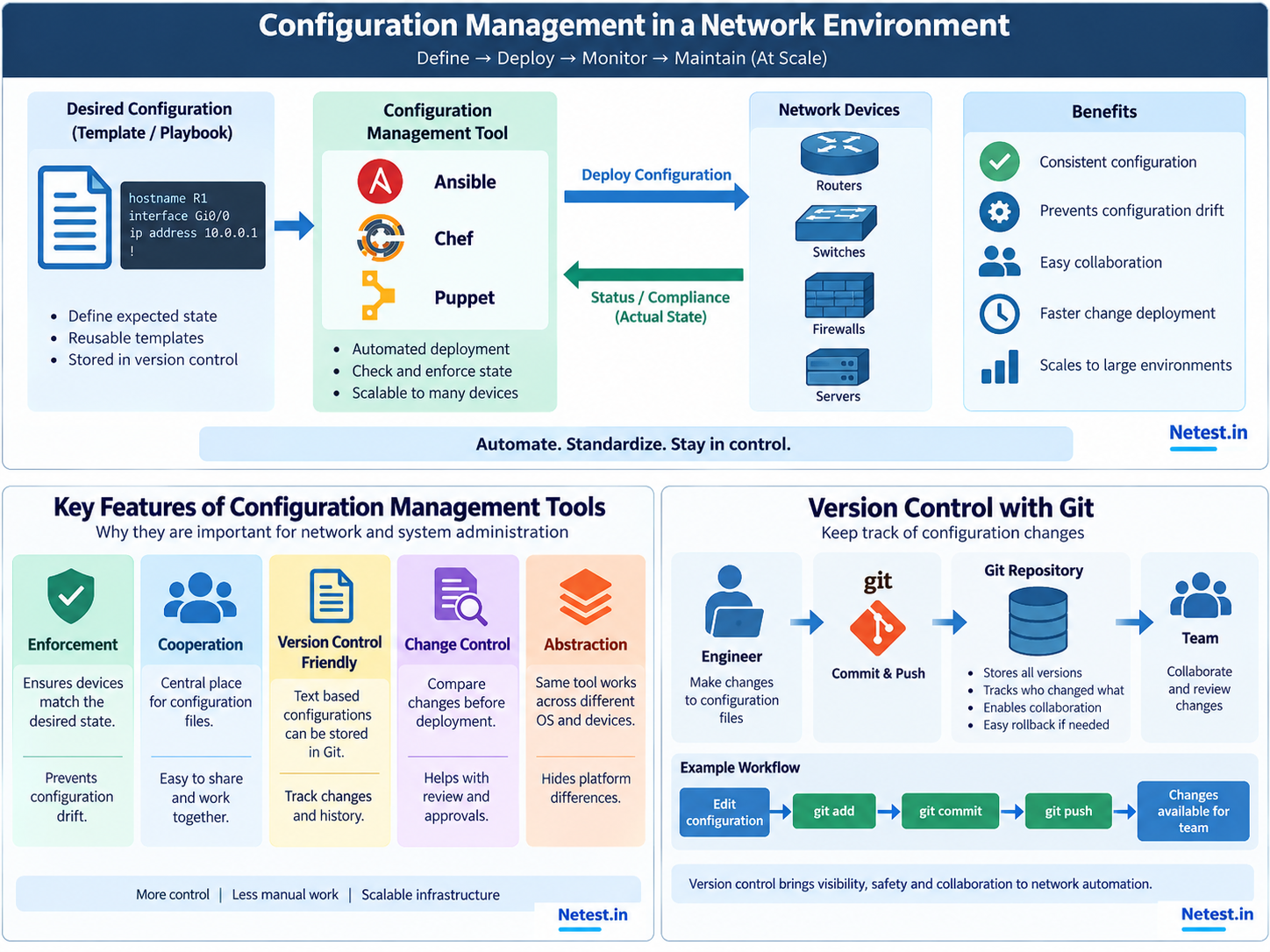
- Edit. Change a template, variable or task in a working branch.
- Review. Compare the difference and ask whether the intended state is correct.
- Commit. Record a focused change with a message that explains the operational reason.
- Share. Push the branch to a remote repository and open a review.
- Deploy. Run validation and the approved automation workflow.
- Recover. Use history to understand what changed or restore a known-good version.
A good commit message answers a future question: what changed and why? “Update access switch template” is better than “fix stuff,” but a message such as “Add NTP source for branch switches” gives reviewers and incident responders much more context. Small commits also make it easier to identify the exact change associated with an outage or an unexpected device result.
git switch -c add-branch-ntp
git diff
git add inventory/branch-switches.yml templates/ntp.yml
git commit -m "Add NTP source for branch switches"
git push -u origin add-branch-ntp
These commands do not deploy anything by themselves. They prepare a change for review. Deployment should happen only after the repository checks, peer review and operational approvals that your environment requires.
A Safer Change Workflow
Before deployment
- Confirm the target inventory and scope.
- Validate syntax, variables and required fields.
- Review the diff and expected operational impact.
After deployment
- Check the tool result and device reachability.
- Read back important state or configuration.
- Record failures and decide whether to retry or roll back.
Use batches when the change affects a large fleet. A pilot group can reveal an unexpected platform difference before it becomes a fleet-wide incident. After the pilot, pause long enough to examine logs and device state, then continue with a deliberate batch size. The exact number depends on the risk of the change, the maintenance window and the quality of the rollback plan.
Verification should check more than a successful connection. A device can accept a command while the resulting service remains unavailable, a route is missing, or a policy has the wrong scope. Pair configuration checks with an operational test such as interface state, reachability, routing neighbors, telemetry or an application health probe.
When Automation Does Not Go as Planned
A mature workflow expects partial results. Some devices may be offline, some may already contain a conflicting manual change, and some platforms may reject a field that another platform accepts. Treating every non-success result as identical makes troubleshooting harder.
| Result | Meaning | Next action |
|---|---|---|
| Unchanged | The target already matches the desired state. | Record it as a successful convergence result. |
| Changed | The tool applied the intended difference. | Run post-change validation and keep the result with the change record. |
| Failed | The target rejected or could not complete the operation. | Pause the batch, inspect the error and decide whether correction or rollback is appropriate. |
| Unreachable | The tool could not establish a session. | Check DNS, routing, ACLs, credentials, maintenance state and device health. |
Rollback is not always a single command. A previous Git version may restore the intended file, but the deployment still needs to be run and verified. Some changes also have dependencies or irreversible effects. That is why backups, pre-change snapshots, staged rollout and a documented recovery decision are more valuable than assuming every change can be instantly undone.
Configuration Management References
The Ansible network automation documentation explains control-node execution and connections over CLI, NETCONF, and HTTP APIs. Cisco Press provides a networking-focused overview of Ansible, Puppet, Chef, and SaltStack. Check each vendor's current support and lifecycle documentation before selecting a platform.
Configuration Management Tools and Version Control with Git Frequently Asked Questions
What is configuration management in networking?
It is the practice of defining, applying and checking device or system settings so infrastructure stays aligned with an intended state.
What do configuration management tools do?
They compare intended and current state, apply required changes and report the result across managed targets.
Why is Git useful for network automation?
Git records changes, supports review and collaboration, and provides history for comparison or rollback.
What is configuration drift?
Drift is the difference between the approved intended state and the settings actually running on a device or system.
Are agentless tools better?
Agentless tools can be convenient for network devices, but the best approach depends on connectivity, target support, security and operational requirements.
Should Git deploy directly to network devices?
Git should provide the reviewed source of truth. A configuration management workflow should validate and deploy the approved change.