CRUD Operations: Create, Read, Update and Delete
CRUD is the small pattern behind a lot of automation work: add something, read it back, change it when needed, and remove it when it should no longer exist. For network engineers, that resource might be a device record, VLAN, interface, site, policy, template or assurance issue.
Network Automation and Programmability Series
Move from controller-based networking to repeatable infrastructure automation, one practical concept at a time.
In This Lesson
Turn create, read, update, and delete into a practical resource lifecycle. You will map each intent to HTTP methods, expected responses, and safe verification.
Quick Learning Map
Keep these three decisions in view as you work through the detailed lesson.
Name the intent
Decide whether the resource must be created, read, changed, or removed.
Send the right method
Match the operation to POST, GET, PUT, PATCH, or DELETE as the API defines.
Confirm final state
Use status codes and a follow-up read to prove the intended result.
CRUD at a Glance
In the previous lesson, REST APIs gave us the request and response model. CRUD explains what the request is trying to do to a resource. The same idea appears whether the application stores data in a database, exposes it through a controller, or lets a script manage objects through an API.
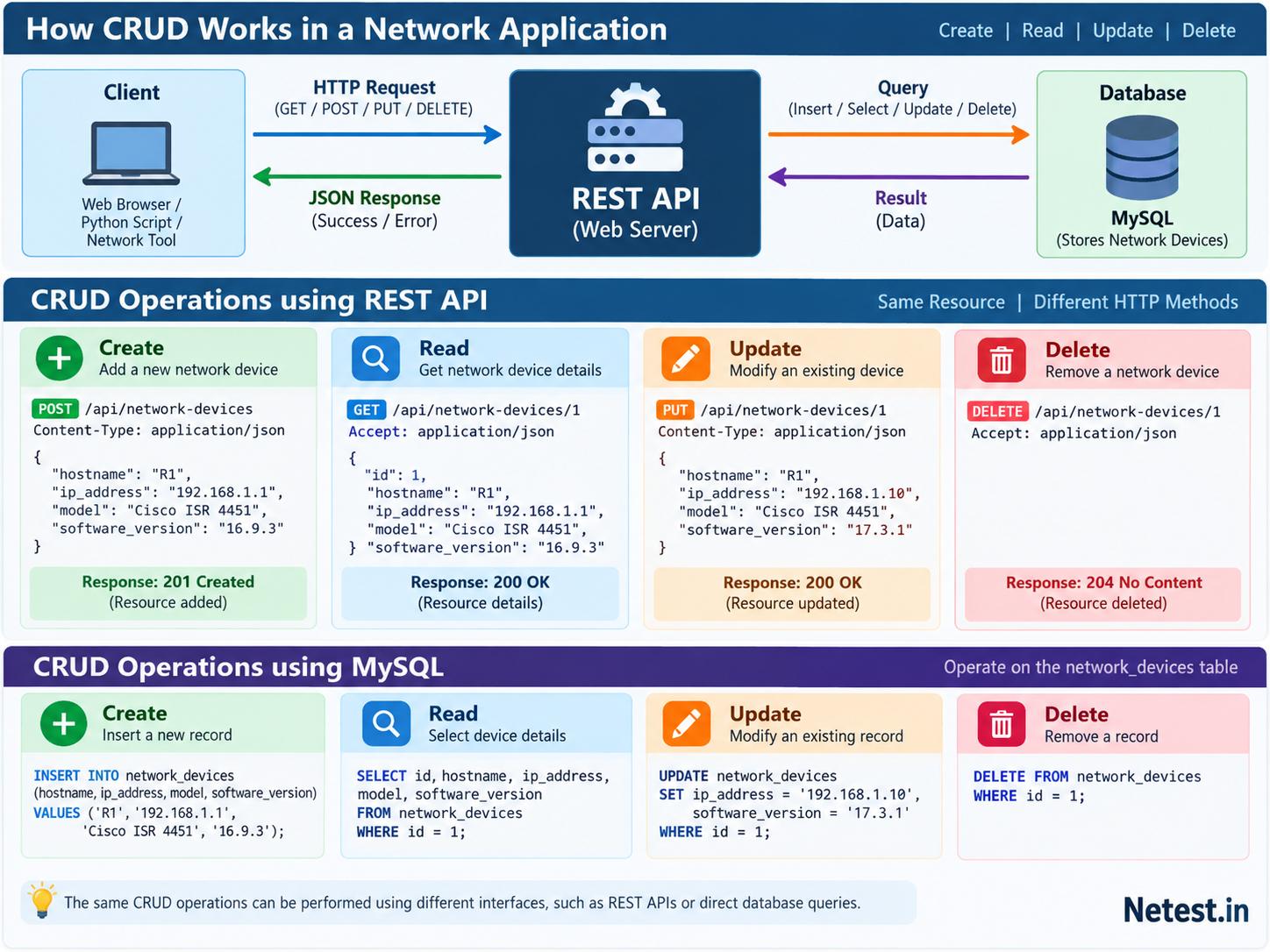
The Resource You Are Changing
CRUD always acts on a resource. In a network automation system, a device inventory record can be modeled as a JSON object with fields such as hostname, management address, platform and software version. The API endpoint identifies the collection or the single item inside that collection.
{
  "hostname": "R1",
  "managementIp": "192.0.2.11",
  "platform": "ISR4451",
  "softwareVersion": "17.9.4"
}CRUD to REST API Method Map
The HTTP method tells the server what kind of action you intend. The URL tells the server which resource or collection you mean. The request body carries data when the action needs extra details.
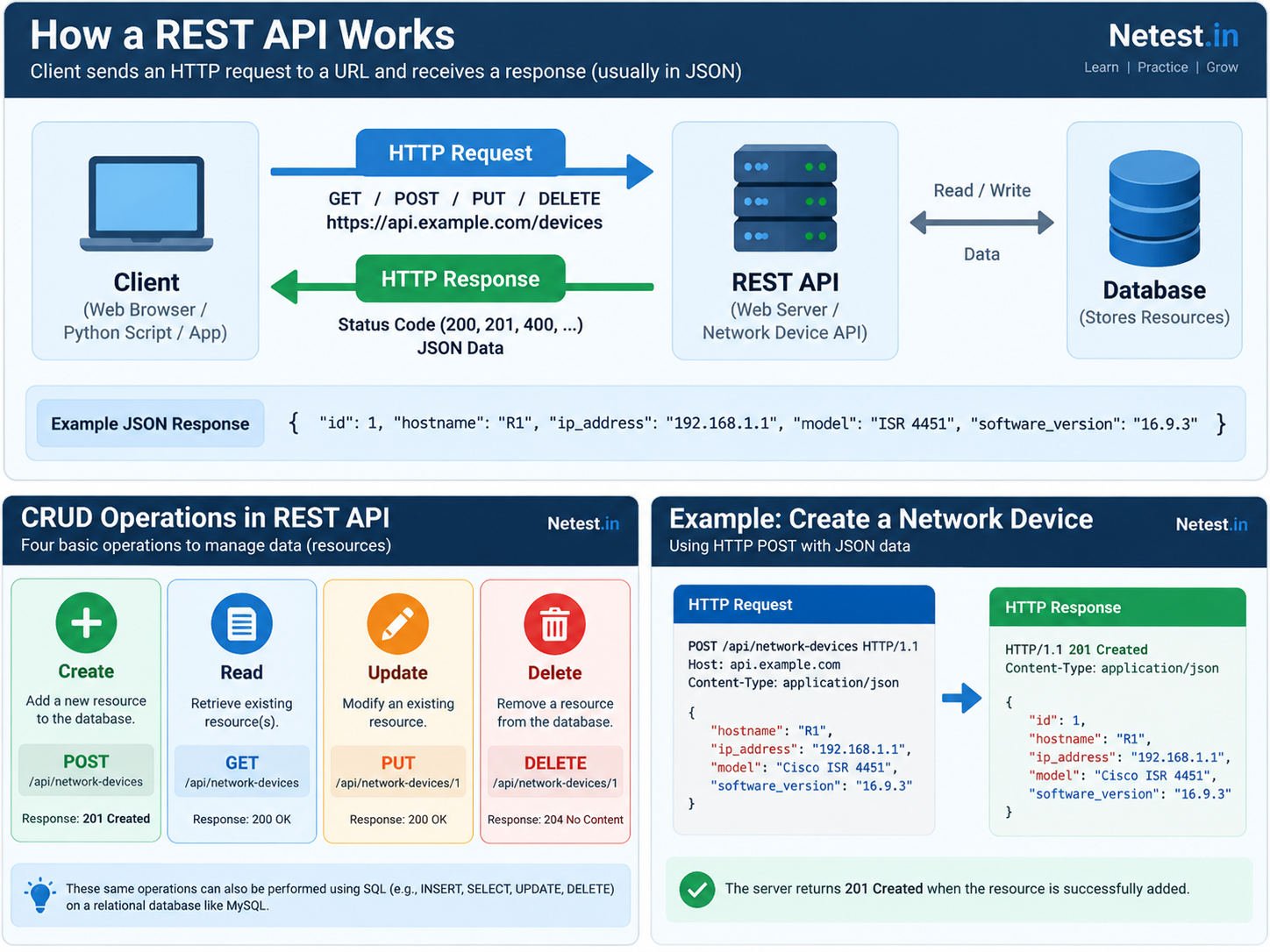
| CRUD action | Common REST method | Network automation example | Common success response |
|---|---|---|---|
| Create | POST | Add a device record, discovery job or site object. | 201 Created |
| Read | GET | Fetch inventory, interface state, templates or events. | 200 OK |
| Update | PUT or PATCH | Change a device attribute, template variable or policy field. | 200 OK or 204 No Content |
| Delete | DELETE | Remove a retired device record or unused test policy. | 204 No Content |
Create: Add a New Resource
Create is used when the client wants the server to add something that does not already exist in that collection. In REST APIs, this is commonly a POST request to the collection endpoint.
POST /api/network-devices
Content-Type: application/json

{
  "hostname": "R1",
  "managementIp": "192.0.2.11",
  "platform": "ISR4451",
  "softwareVersion": "17.9.4"
}
A well-designed API normally returns a success code and either the new object or a location where the new object can be read. Before creating anything, check whether uniqueness rules apply to hostname, serial number, site name or management IP.
Read: Retrieve Current State
Read is the safest starting point because it asks the system what already exists. Scripts often perform a read before any change so they can compare intended state with actual state.
GET /api/network-devices/R1
Accept: application/json
Reads can target one object or a filtered collection. For example, a controller might let you request all devices at a site, all switches running a specific software version, or every interface currently down.
Update: Change an Existing Resource
Update changes an object that already exists. PUT often represents a full replacement, while PATCH often means changing selected fields. Do not assume both are available or identical; API behavior varies by platform.
PATCH /api/network-devices/R1
Content-Type: application/json

{
  "softwareVersion": "17.9.5"
}
Production updates should be boring in the best way: read first, validate the target, submit a narrow change, read again, and log what happened.
Delete: Remove a Resource Carefully
Delete removes a resource from the system. In network automation, deletion deserves extra caution because objects may be attached to templates, policies, sites, access rules or reporting workflows.
DELETE /api/network-devices/R1REST API Actions and Stored Data
The API is not the database, but the two ideas are connected. A client talks to the API; the API validates permissions and business rules; then the application stores or retrieves data behind the scenes. That separation is why automation should use the supported API instead of trying to touch a product database directly.
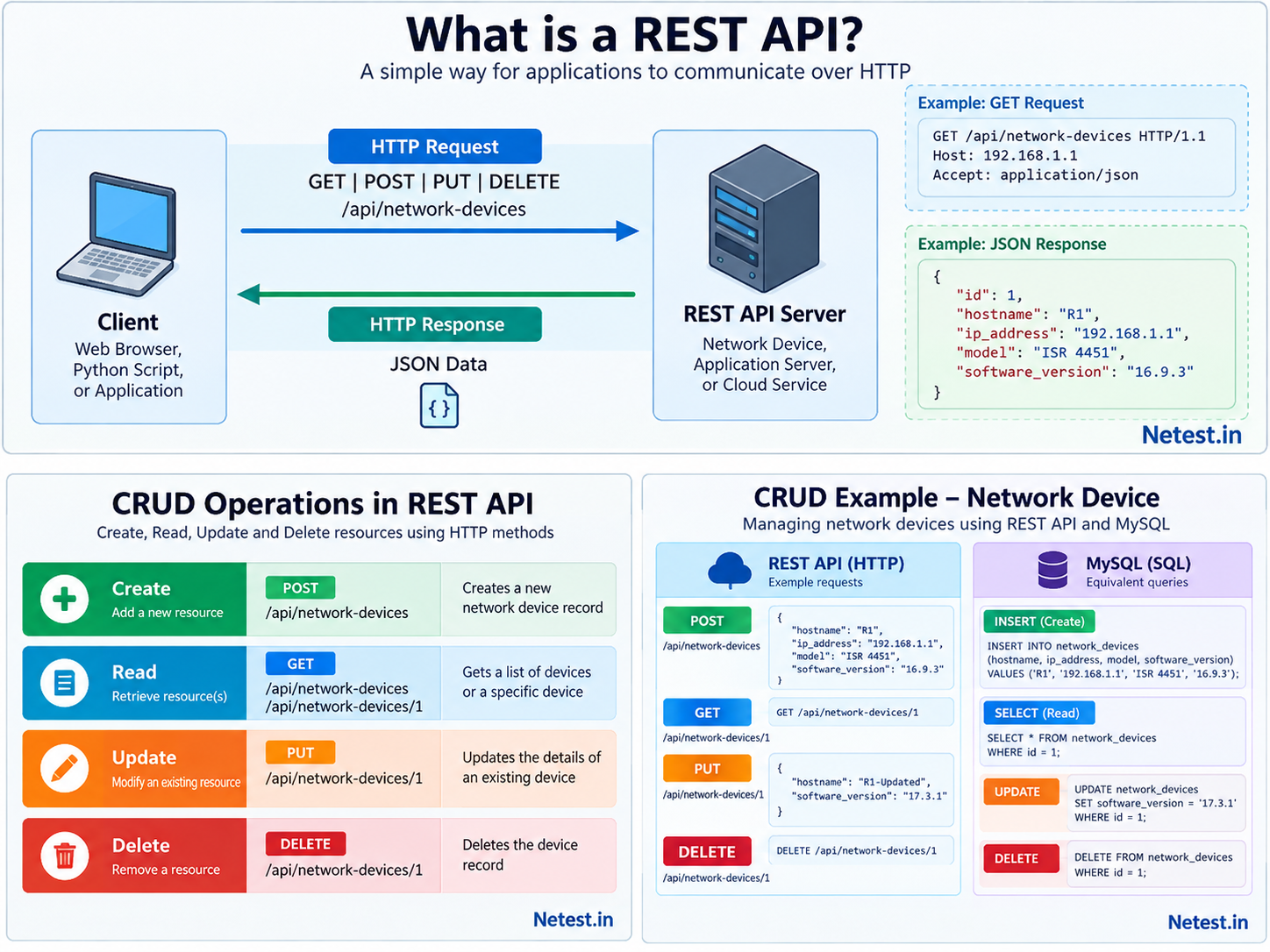
A Safe CRUD Workflow for Network Automation
- Discover the resource. Read the current object or collection before changing it.
- Validate intent. Confirm the target, payload fields, permissions and expected status code.
- Apply the smallest useful change. Use POST, PUT, PATCH or DELETE only after the read step proves the action is needed.
- Read back the result. Confirm the controller now reports the intended state.
- Record the change. Save the request, response, ticket, commit or automation run output for troubleshooting.
CRUD Operations Frequently Asked Questions
What does CRUD mean?
CRUD means Create, Read, Update and Delete. It describes the four core actions used to manage stored resources.
Which REST method creates a resource?
POST commonly creates a resource inside a collection, such as adding a new device record or starting a discovery job.
Which CRUD action should an automation script do first?
Read is usually first. It lets the script understand current state before deciding whether a create, update or delete action is needed.
What is the difference between PUT and PATCH?
PUT is commonly used for replacing a resource, while PATCH is commonly used for changing selected fields. Always check the platform behavior.
Why is DELETE risky in automation?
DELETE can remove objects that other workflows depend on. Confirm the exact resource and dependencies before deleting anything.
How does CRUD connect to data models?
CRUD defines the action. The data model defines the structure, fields and allowed values of the resource being acted on.