Python Bitwise Operators
Compare, invert, and shift the individual bits in Python integers while learning when binary operations matter in network automation.
Python Bitwise Operators at a Glance
Bitwise operators act on the binary representation of integers. They are uncommon in everyday network scripts, but they are useful for subnet calculations, protocol flags, permissions, and some cryptographic operations.
Compare bits
&, |, and ^ combine corresponding bits from two integers.
Invert bits
~ flips the bit pattern and follows Python's signed-integer rules.
Shift bits
<< moves bits left; >> moves them right.
In This Lesson
1. Bitwise Operators Cheat Sheet
Use this reference to compare the six operators, their truth tables, binary examples, and common low-level use cases.
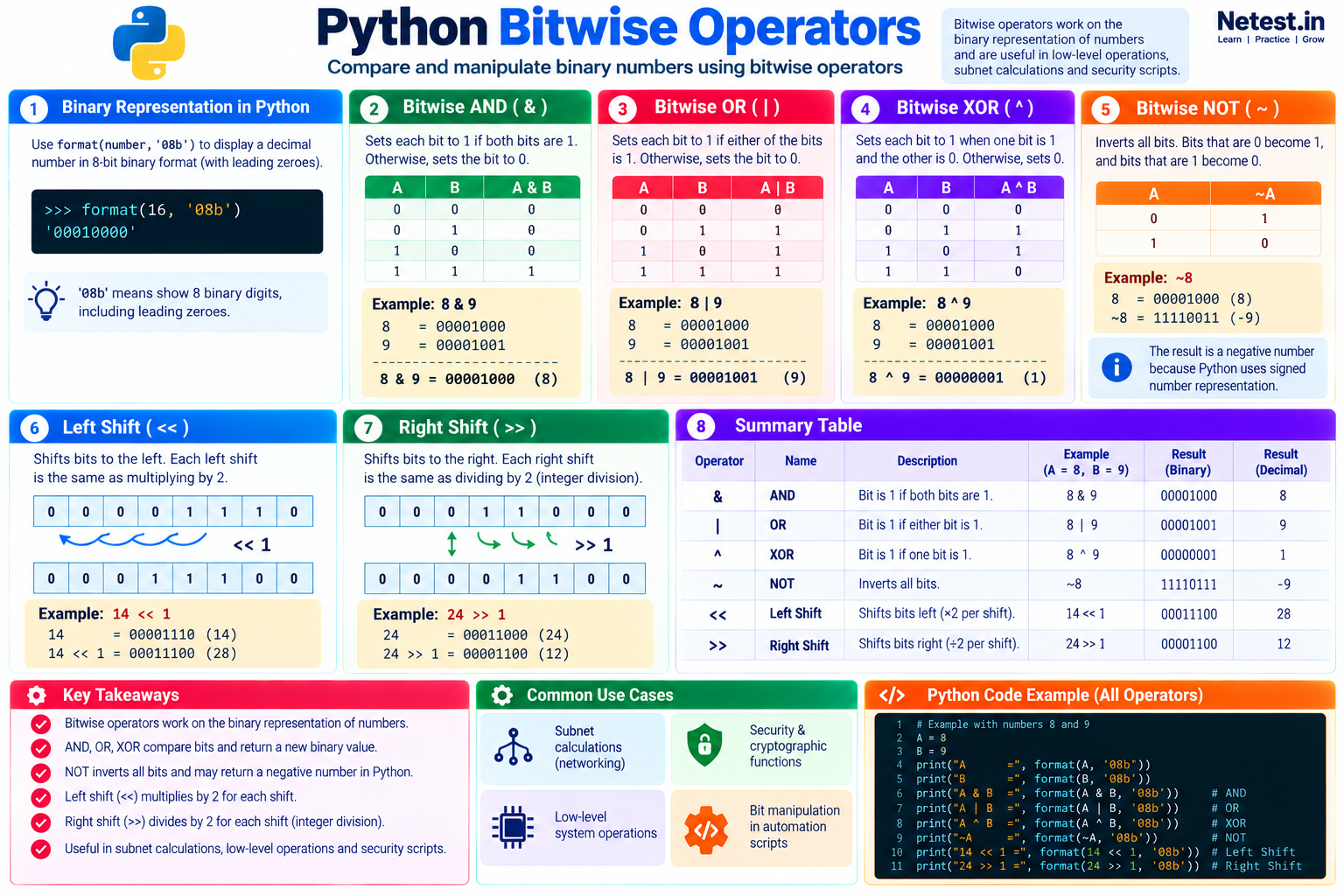
2. Show Integers as Binary
Binary output makes bit-by-bit comparisons easier to follow. Python's format() function can display a decimal integer as an eight-bit value with leading zeroes:
Format decimal 16 as eight binary digits
>>> format(16, '08b')
'00010000'
The format specifier 08b requests binary output padded to eight characters. The width is useful for teaching and display; it does not limit the size of Python's integer.
3. AND
The AND operator uses &. A result bit becomes 1 only when both input bits in that position are 1; every other combination produces 0.
Compare 8 and 9 with AND
>>> print(format(8, '08b'))
00001000
>>> print(format(9, '08b'))
00001001
>>> and_result = 8 & 9
>>> binary_and_result = format(and_result, '08b')
>>> print(binary_and_result)
00001000
Only the bit representing decimal 8 is set in both values, so the result is binary 00001000, or decimal 8.
4. OR
The OR operator uses |. A result bit becomes 1 when either input bit—or both input bits—is 1.
Compare 8 and 9 with OR
>>> print(format(8, '08b'))
00001000
>>> print(format(9, '08b'))
00001001
>>> or_result = 8 | 9
>>> binary_or_result = format(or_result, '08b')
>>> print(binary_or_result)
00001001
The final bit is set in 9, and the bit representing 8 is set in both values. OR keeps both positions, producing decimal 9.
5. XOR
The XOR operator uses ^. A result bit becomes 1 when the two input bits differ. When both bits are 0 or both are 1, the result bit is 0.
Compare 8 and 9 with XOR
>>> print(format(8, '08b'))
00001000
>>> print(format(9, '08b'))
00001001
>>> xor_result = 8 ^ 9
>>> binary_xor_result = format(xor_result, '08b')
>>> print(binary_xor_result)
00000001
Only the final bit differs, so XOR returns binary 00000001, or decimal 1.
6. NOT
The NOT operator uses ~ and inverts the bits. Python integers are signed, so the result follows ~x == -(x + 1). Applying NOT to 8 therefore returns -9.
Invert decimal 8
>>> print(format(8, '08b'))
00001000
>>> not_result = ~8
>>> print(not_result)
-9
>>> print(format(not_result, '08b'))
-00010010xff: format((~8) & 0xff, '08b') returns 11110111.7. Shift Operators
Shift operators move an integer's bits left or right. For non-negative integers, shifting left by one place multiplies the value by two, while shifting right by one place performs whole-number division by two.
| Operator | Movement | Common arithmetic effect |
|---|---|---|
<< | Bits move left | Multiply by 2 per position |
>> | Bits move right | Floor-divide by 2 per position |
8. Shift Left
The left-shift operator uses <<. The value on its right states how many positions to move the bits.
Shift 14 left by one position
>>> print(format(14, '08b'))
00001110
>>> shift_left = 14 << 1
>>> print(format(shift_left, '08b'))
00011100
>>> print(shift_left)
28
Each bit moves one place to the left, so decimal 14 becomes decimal 28.
9. Shift Right
The right-shift operator uses >>. Bits that move beyond the right edge are discarded.
Shift 24 right by one position
>>> print(format(24, '08b'))
00011000
>>> shift_right = 24 >> 1
>>> print(format(shift_right, '08b'))
00001100
>>> print(shift_right)
12
Each bit moves one position to the right, so decimal 24 becomes decimal 12.
10. Network Automation Example
A subnet mask and an IPv4 address can be treated as integers. Bitwise AND keeps only the address bits selected by the mask, which reveals the network address.
Calculate a /24 network address
ip_address = 0xC0A8012A   # 192.168.1.42
subnet_mask = 0xFFFFFF00  # 255.255.255.0

network_address = ip_address & subnet_mask
octets = [str((network_address >> shift) & 0xff) for shift in (24, 16, 8, 0)]

print(".".join(octets))
# 192.168.1.0
The AND operation clears the host portion while retaining the masked network bits. In production code, Python's standard ipaddress module is clearer and safer for ordinary subnet work; this low-level example shows the binary principle underneath it.
11. Guided Practice
Task 1: Predict each comparison
- Write
12and10as eight-bit binary values. - Predict
12 & 10,12 | 10, and12 ^ 10. - Run each expression and format the result with
08b.
Expected result: The decimal results are 8, 14, and 6.
Task 2: Shift and verify
- Predict
5 << 2. - Predict
40 >> 2. - Run both expressions and compare them with
5 * 4and40 // 4.
Expected result: The expressions return 20 and 10.
12. Conclusion
You learned how Python's bitwise operators compare and manipulate integer bits:
- AND:
&sets a result bit only when both input bits are1. - OR:
|sets a result bit when either input bit is1. - XOR:
^sets a result bit when the input bits differ. - NOT:
~inverts the bits and produces-(x + 1). - Shift operators:
<<moves bits left, and>>moves them right.
Bitwise operations are specialized, but understanding them helps when you encounter subnet masks, bit flags, protocol fields, or security code. I hope you enjoyed this lesson. If you have any questions, please leave a comment.
Python Bitwise Operators Frequently Asked Questions
What do Python bitwise operators work on?
They work on the binary representation of integers, comparing, inverting, or shifting individual bits.
Why does Python bitwise NOT return a negative number?
Python models integers with signed arithmetic, so ~x follows -(x + 1). For example, ~8 returns -9.
When are bitwise operators useful in network automation?
They can help with subnet masks, flags, permissions, protocol fields, and security-related code. For common IP address tasks, prefer the standard ipaddress module.