Python Data Types: Numeric Types and Strings
Choose the right type for counters and text, convert values safely, and create network messages that are easy to read.
Numeric Types and Strings at a Glance
Choose a data type that matches the job: numbers support calculations, while strings represent text such as hostnames, interfaces, addresses, and messages.
Integers
Use int for whole-number values such as VLAN IDs, retry limits, and device counts.
Floating-point values
Use float for decimal values such as response times, percentages, and thresholds.
Strings
Use str for text, then concatenate or format values into readable output.
In This Lesson
1. Python Data Types
A data type tells Python what a value represents and which operations are allowed. A number can be used in a calculation. Text can be joined. A collection can hold several related values.
Numeric
Integers, floating-point values, and complex numbers.
String
An ordered sequence of characters used for text.
List
An ordered, mutable collection of items.
Tuple
An ordered collection that cannot be changed in place.
Dictionary
A collection of unique keys mapped to values.
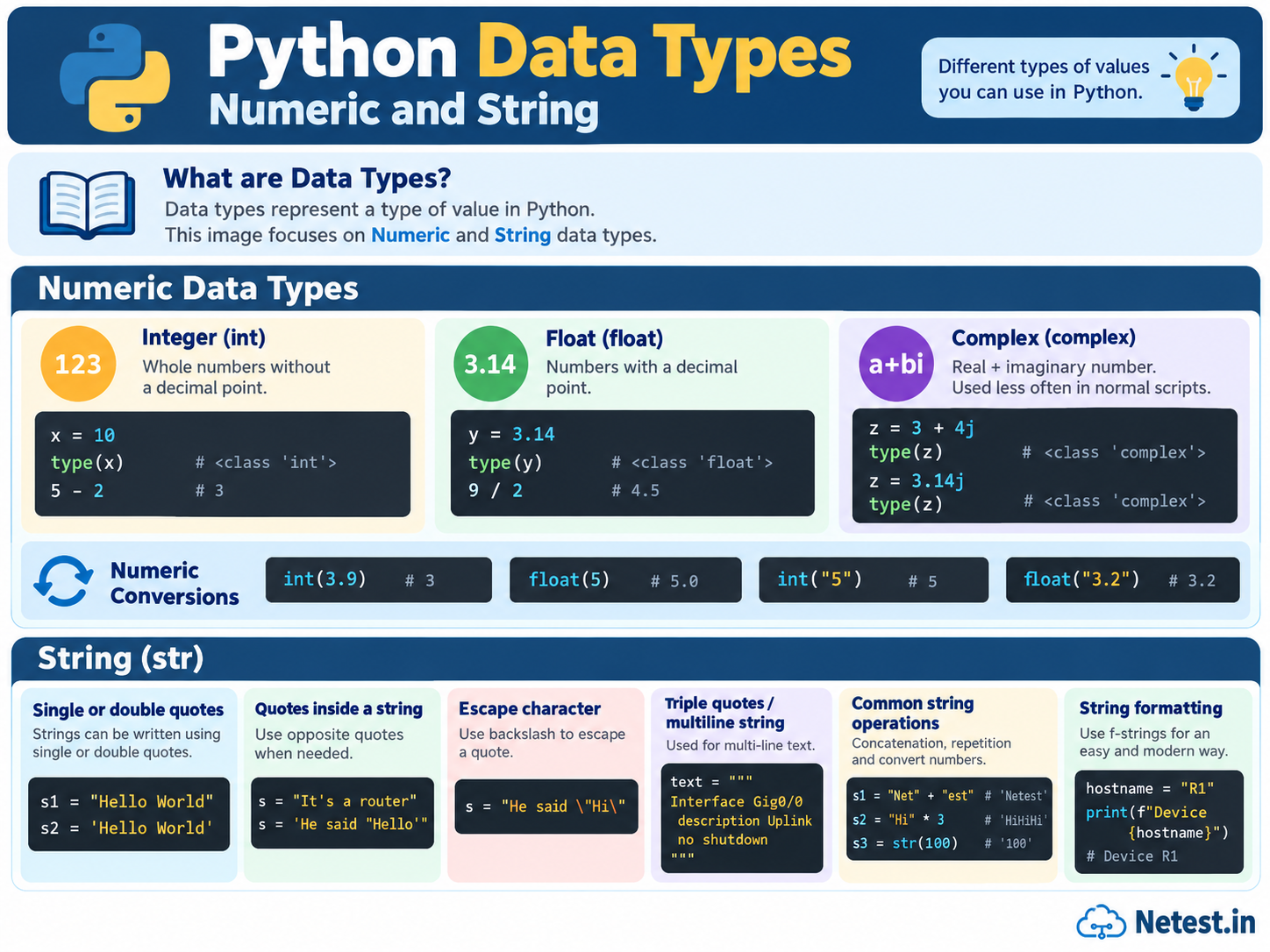
2. Python Numeric Types
Python has three built-in numeric types. Network scripts mainly use integers and floats. Complex numbers are uncommon in daily network work. Use type() to check a value.
Integer (int)
A positive or negative whole number without a decimal point.
Float (float)
A real number represented with a decimal point.
Complex (complex)
A real and imaginary component, mainly used for advanced calculations.
Integers and arithmetic
>>> type(-5)
<class 'int'>
>>> 5 - 2
3
Floats and division
>>> type(2.0)
<class 'float'>
>>> 5.0 / 1.3
3.846153846153846
>>> 9 / 2
4.5
Complex numbers
>>> type(3.14j)
<class 'complex'>
>>> z = 3 + 4j
>>> type(z)
<class 'complex'>
3. Numeric Conversion
Data from a file, prompt, or API may arrive as text. Conversion functions create a number when a calculation is required. Converting a float with int() removes the decimal part; it does not round the value.
Convert numbers and numeric text
>>> my_float = 1.9
>>> my_int = int(my_float)
>>> print(my_int)
1
>>> float(5)
5.0
>>> int("5")
5
>>> float("3.2")
3.2int("3.2") raises a ValueError. Convert it to a float first if decimal text is allowed.Real-world example: count failed checks
Convert text before arithmetic
total_checks = "24"
passed_checks = "21"
failed_checks = int(total_checks) - int(passed_checks)

print(failed_checks)
The output is 3. Without int(), both values remain text and cannot be subtracted.
4. Python Strings
A string is text. Network scripts use strings for hostnames, interface names, IP addresses, configuration lines, and command output. Create a string with matching single or double quotes.
Single and double quotes
>>> "hello world"
'hello world'
>>> 'hello world'
'hello world'
>>> "This is my router's output"
"This is my router's output"
>>> 'My router is the "best" there is'
'My router is the "best" there is'
A backslash lets a quote appear inside matching quotes. Triple quotes are useful for text that spans several lines.
Escape characters and multiline strings
>>> print('My router is the \'best\' there is')
My router is the 'best' there is

>>> print("""This is the output of R1:
... Interface GigabitEthernet0/1
... IP address 192.168.1.1 255.255.255.0""")
This is the output of R1:
Interface GigabitEthernet0/1
IP address 192.168.1.1 255.255.255.0
5. String Operations
Use + to join strings and * to repeat them. Both values joined with + must be strings.
Concatenate, repeat, and convert
>>> "Router " + "R1"
'Router R1'
>>> "Error " * 4
'Error Error Error Error '
>>> "Error Code: " + str(3)
'Error Code: 3'str() matters: "Error Code: " + 3 fails because Python will not implicitly concatenate a string and an integer.6. String Formatting
F-strings are the clearest way to place values inside a message. Start the string with f and put each variable or expression inside braces.
| Method | Example | Guidance |
|---|---|---|
% operator | "Host: %s" % hostname | Common in older code. |
str.format() | "Host: {}".format(hostname) | Readable, but more verbose. |
| F-string | f"Host: {hostname}" | Preferred for most modern Python code. |
Format network values with f-strings
>>> hostname = "SW1"
>>> vendor = "Cisco"
>>> platform = "Catalyst"
>>> print(f"Switch {hostname} from {vendor} is a {platform} switch.")
Switch SW1 from Cisco is a Catalyst switch.

>>> uptime = 28800
>>> print(f"Router has an uptime of {uptime / 3600} hours.")
Router has an uptime of 8.0 hours.
An f-string can calculate a value before displaying it. Keep the expression short so the message remains easy to understand.
Real-world example: maintenance result
Format a clear status line
device = "SW1"
changed_ports = 4
failed_ports = 1

print(f"{device}: {changed_ports - failed_ports} ports passed, {failed_ports} failed")
The output is SW1: 3 ports passed, 1 failed. It includes the device and both results in one line.
7. Conclusion
- Python numeric values include integers, floats, and complex numbers.
int(),float(), and related functions convert compatible values.- Strings use single, double, or triple quotes and can contain escaped characters.
- Concatenation joins strings, while
str()converts other values for text output. - F-strings keep formatted output concise and readable.
Python Numeric and String Data Types FAQ
What are Python's main built-in data types?
This learning path introduces numeric values, strings, lists, tuples, and dictionaries as five commonly used Python data types.
What is the difference between an integer and a float?
An integer is a whole number without a decimal point. A float represents a number with a decimal point, including results such as 9 / 2.
What is the recommended way to format strings in modern Python?
For Python 3.6 and newer, f-strings are usually the clearest option because variables and expressions appear directly inside the text.