Python Collections
Group device data with lists, tuples, and dictionaries, then choose the simplest collection for each network task.
Python Collections at a Glance
Collections keep related values together. Choose the structure according to whether order matters, values may change, or each value needs a descriptive key.
List
Ordered and mutable. Use a list when items may be added, removed, or updated.
Tuple
Ordered and immutable. Use a tuple for a fixed group of values that should not change.
Dictionary
Key-value data. Use a dictionary to describe a device with named attributes such as IP, model, and site.
In This Lesson
1. Collection Data Types
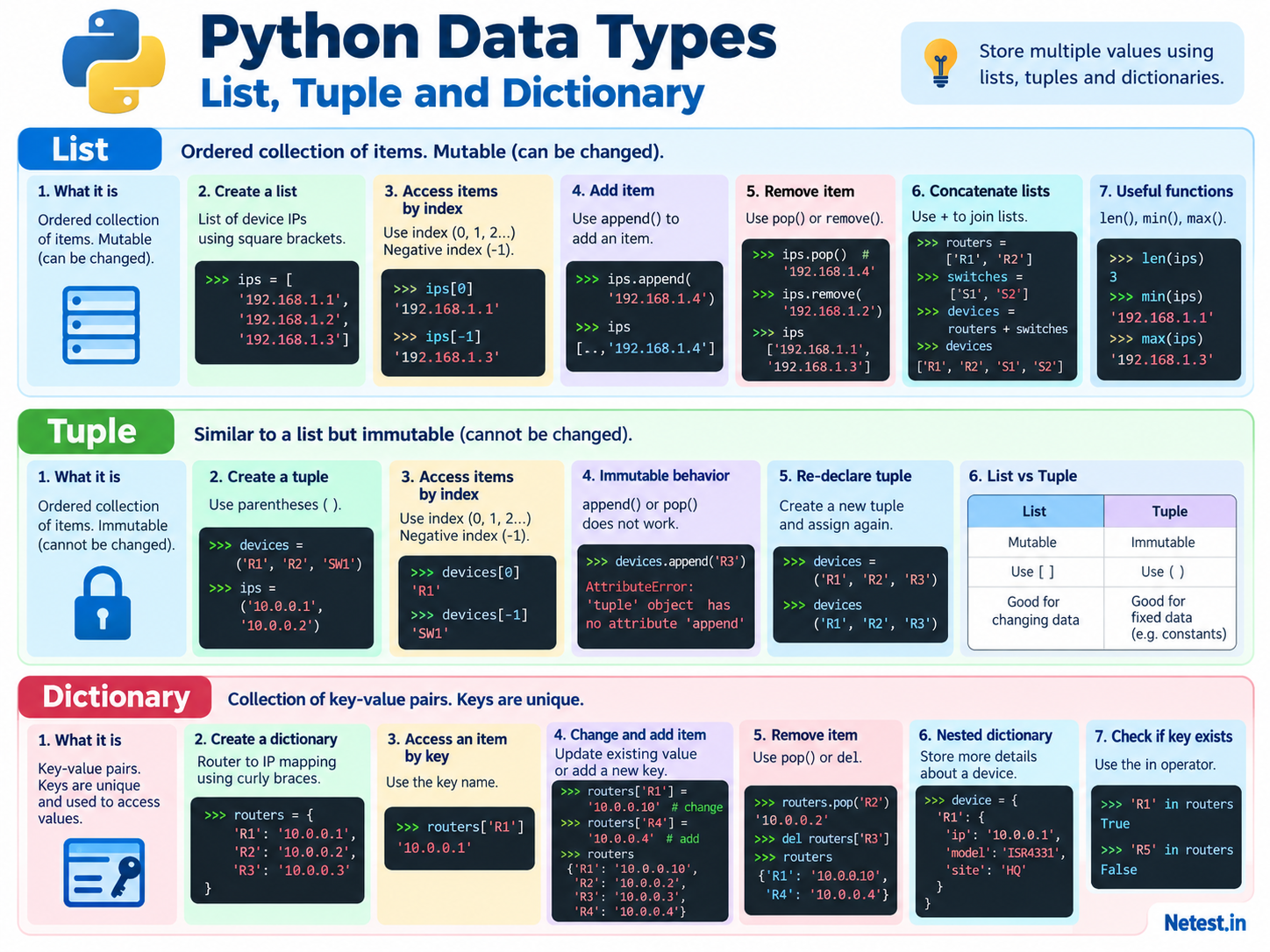
A collection keeps related values together. A list can hold devices waiting to be checked. A tuple can hold fixed interface details. A dictionary can describe one device with names such as ip, model, and site.
List
Ordered and mutable. Use square brackets: [].
Tuple
Ordered and immutable. Use parentheses: ().
Dictionary
Key-value pairs with unique keys. Use curly braces: {}.
2. Python Lists
A list is an ordered group that can change. Use it when items may be added, removed, or updated while the script runs.
Create lists
>>> router_ip_addresses = ["192.168.1.1", "192.168.1.2", "192.168.1.3"]
>>> switch_ip_addresses = ["172.16.1.1", "172.16.1.2", "172.16.1.3"]
>>> my_numbers = [1, 2, 3, 4, 5, 6]
>>> random_stuff = ["R1", 5, "SW1", 7]
List positions start at 0, so index 0 selects the first item. Index -1 selects the last item.
Create and access a list
>>> ips = ["192.168.1.1", "192.168.1.2", "192.168.1.3"]
>>> ips[0]
'192.168.1.1'
>>> ips[-1]
'192.168.1.3'0, 1, and 2. Accessing ips[3] raises an IndexError.3. List Operations
Use append() to add an item. Use pop() to remove by index and return the removed value, or remove() to delete the first matching value.
Add and remove list items
>>> ips.append("192.168.1.4")
>>> ips
['192.168.1.1', '192.168.1.2', '192.168.1.3', '192.168.1.4']
>>> ips.pop()
'192.168.1.4'
>>> ips.remove("192.168.1.2")
>>> ips
['192.168.1.1', '192.168.1.3']
The + operator joins lists. The len() function counts their items.
Combine and inspect lists
>>> routers = ["R1", "R2"]
>>> switches = ["S1", "S2"]
>>> devices = routers + switches
>>> devices
['R1', 'R2', 'S1', 'S2']
>>> len(devices)
4
A list can contain another list. This can keep two groups separate:
Build a nested list
>>> router_ips = ["192.168.1.1", "192.168.1.2", "192.168.1.3"]
>>> switch_ips = ["172.16.1.1", "172.16.1.2", "172.16.1.3"]
>>> routers_switches = [router_ips, switch_ips]
>>> routers_switches
[['192.168.1.1', '192.168.1.2', '192.168.1.3'], ['172.16.1.1', '172.16.1.2', '172.16.1.3']]
min() and max() find the lowest and highest comparable items. split() is useful when one line of text contains values separated by commas.
List functions and text conversion
>>> min([1, 2, 3, 4, 5, 6])
1
>>> max([1, 2, 3, 4, 5, 6])
6
>>> list("Router")
['R', 'o', 'u', 't', 'e', 'r']
>>> "R1,192.168.1.1,IOS XE".split(",")
['R1', '192.168.1.1', 'IOS XE']
4. Python Tuples
A tuple is ordered but fixed. You cannot add, remove, or replace an item in the tuple. Use it when the group should not change during the program.
Create and access a tuple
>>> devices = ("R1", "R2", "SW1")
>>> devices[0]
'R1'
>>> devices[-1]
'SW1'
>>> devices.append("R3")
AttributeError: 'tuple' object has no attribute 'append'
The same applies to removal methods such as pop(): those methods are available on mutable lists, not tuples.
To represent a changed set, create a new tuple and assign it to the variable:
Reassign a new tuple
>>> devices = ("R1", "R2", "R3")
>>> devices
('R1', 'R2', 'R3')
The main benefit is clear intent: a tuple tells the reader that these ordered values should stay fixed.
5. Python Dictionaries
A dictionary stores a value behind a unique key. A key such as "site" is easier to understand than a numeric position.
Create and access a dictionary
>>> routers = {
...     "R1": "10.0.0.1",
...     "R2": "10.0.0.2",
...     "R3": "10.0.0.3"
... }
>>> routers["R1"]
'10.0.0.1'
A dictionary value can be text, a number, a list, or another dictionary:
Store a list as a dictionary value
>>> switches = {
...     "SW1": ["172.16.1.1", "3750"],
...     "SW2": ["172.16.1.2", "3850"]
... }
>>> switches["SW2"]
['172.16.1.2', '3850']routers["R5"] raises a KeyError when the key is absent. Use routers.get("R5") when a missing key is an expected possibility.6. Dictionary Operations
Assign a value to an existing key to update it. Assign a value to a new key to add it. Use pop() or del to remove an entry.
Update, add, remove, and check keys
>>> routers["R1"] = "10.0.0.10"
>>> routers["R4"] = "10.0.0.4"
>>> routers.pop("R2")
'10.0.0.2'
>>> "R1" in routers
True
>>> "R5" in routers
False
A value can itself be a dictionary. Nested dictionaries keep related details together for each device.
Store nested device details
>>> devices = {
...     "R1": {
...         "ip": "10.0.0.1",
...         "model": "ISR4331",
...         "site": "HQ"
...     }
... }
>>> devices["R1"]["site"]
'HQ'
Real-world example: create a change target
Describe one device clearly
target = {
    "name": "SW1",
    "ip": "192.0.2.20",
    "site": "Branch-01",
    "interfaces": ["GigabitEthernet1/0/1", "GigabitEthernet1/0/2"],
}

print(target["name"], target["site"], len(target["interfaces"]))
The output is SW1 Branch-01 2. The dictionary keeps the device facts together, while the list holds the interfaces included in the task.
7. Choosing the Right Collection
| Type | Access | Mutable? | Good fit |
|---|---|---|---|
| List | Numeric index | Yes | A device queue that changes while the script runs. |
| Tuple | Numeric index | No | Fixed values such as an interface identity or coordinate. |
| Dictionary | Unique key | Yes | Named device attributes such as IP, model, and site. |
8. Conclusion
- Lists are ordered, mutable collections that use square brackets.
- Tuples are ordered, immutable collections that use parentheses.
- Dictionaries store values behind unique keys and use curly braces.
- Lists and tuples use indexes; dictionaries use keys.
- Nested dictionaries can model detailed network-device records.
Python Collection Data Types FAQ
When should I use a list instead of a tuple?
Use a list when items may be added, removed, or changed. Use a tuple for an ordered group that should remain fixed.
How is a dictionary different from a list?
A list retrieves items by numeric index. A dictionary retrieves values by unique, meaningful keys such as a hostname.
Can a dictionary contain another dictionary?
Yes. Nested dictionaries are useful for grouping several attributes for each device, site, interface, or automation job.