Python PIP
Install and manage Python packages with PIP, find trusted projects on PyPI, and use the networkparse package to read a Cisco IOS configuration.
Python PIP at a Glance
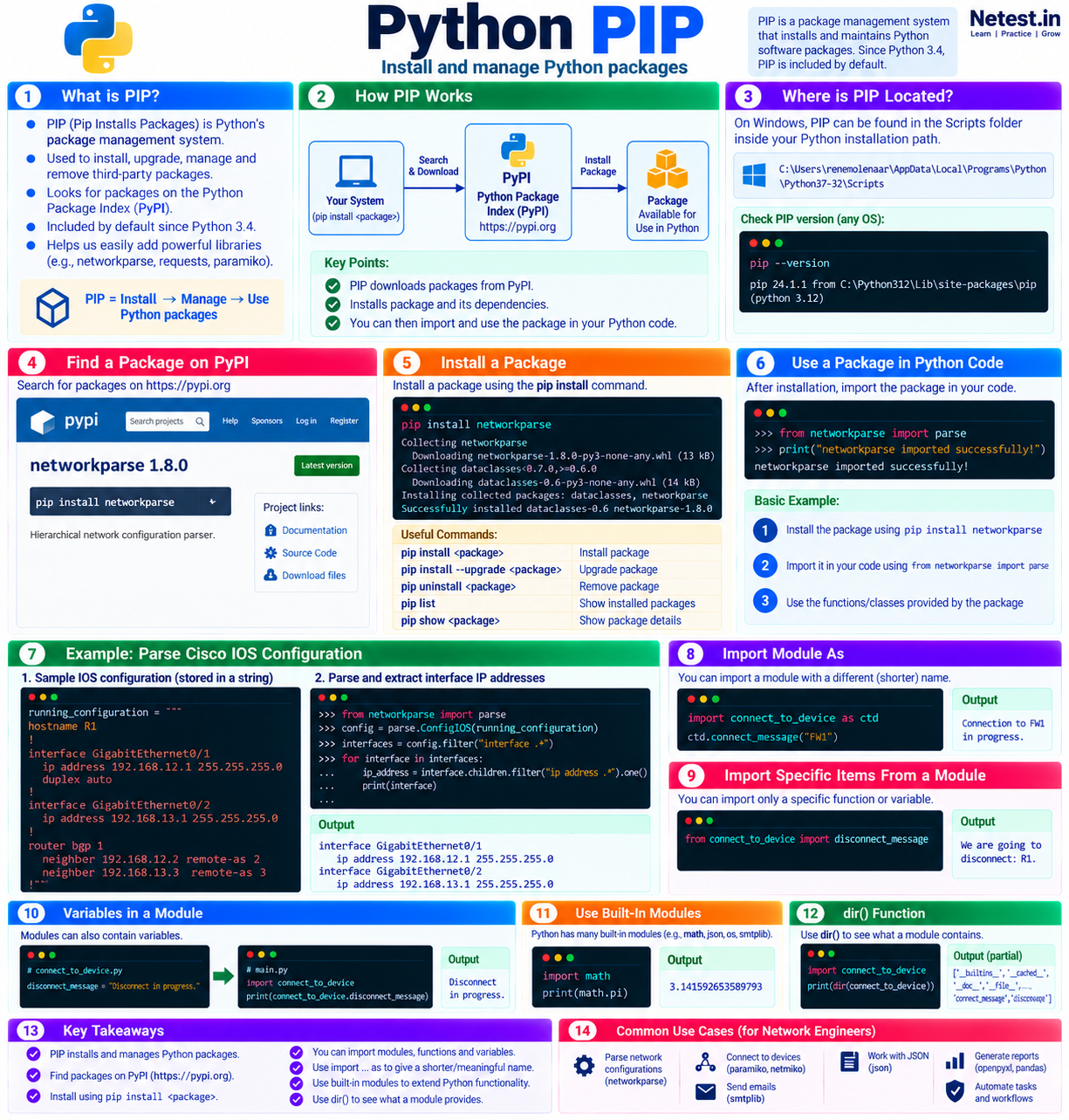
PIP is a package-management system that installs and maintains Python software packages. Standard Python distributions have included PIP by default since Python 3.4.
Find
Search the Python Package Index, or PyPI, for a package that solves a specific task.
Install
Run PIP through the intended Python interpreter so the package enters the correct environment.
Use
Import the installed package in a script and apply its documented functions or classes.
In This Lesson
1. Understand PIP and PyPI
PIP installs, upgrades, and removes third-party Python packages. These packages extend Python with ready-made code for jobs such as parsing configurations, connecting to devices, calling APIs, processing structured data, and creating reports.
By default, PIP looks for public packages on the Python Package Index (PyPI). Think of PyPI as a catalog: a project page describes a package, shows its releases, and links to its documentation and source.
2. Locate and Verify PIP
On Windows, PIP is normally stored in the Scripts folder inside the selected Python installation. One example is:
Example Windows path
C:\Users\renemolenaar\AppData\Local\Programs\Python\Python37-32\ScriptsYour path may differ because it depends on the Python version, installation method, and user account. Verify the active PIP installation instead of relying on a copied path:
Check the PIP version
python -m pip --versionThe output shows the PIP version, its installation directory, and the Python interpreter it belongs to. On systems where python3 selects Python 3, use python3 -m pip --version.
3. Find a Package on PyPI
Network engineers often need to work with hierarchical device configurations. The networkparse package turns indented configuration text into objects that can be searched by parent and child relationships.
Open the networkparse project page on PyPI to review its description, supported Python versions, release history, documentation, and source links before installing it.
4. Install the networkparse Package
Run the installation command in a terminal. Using python -m pip makes the relationship between PIP and the selected interpreter explicit:
Install the package
python -m pip install networkparseAn older installation session may display output like this:
Example installation output
Collecting networkparse
  Downloading networkparse-1.8.0-py3-none-any.whl (13 kB)
Collecting dataclasses<0.7.0,>=0.6.0
  Downloading dataclasses-0.6-py3-none-any.whl (14 kB)
Installing collected packages: dataclasses, networkparse
Successfully installed dataclasses-0.6 networkparse-1.8.05. Parse a Cisco IOS Configuration
First, import the package's parse module:
Import networkparse
from networkparse import parseNext, store a sample Cisco IOS running configuration in a triple-quoted string. Triple quotes preserve the line breaks and indentation that describe the configuration hierarchy.
Sample running configuration
running_configuration = """
hostname R1
!
boot-start-marker
boot-end-marker
!
no aaa new-model
!
mmi polling-interval 60
no mmi auto-configure
no mmi pvc
mmi snmp-timeout 180
!
ip cef
no ipv6 cef
!
multilink bundle-name authenticated
!
redundancy
!
interface GigabitEthernet0/1
 ip address 192.168.12.1 255.255.255.0
 duplex auto
 speed auto
 media-type rj45
!
interface GigabitEthernet0/2
 ip address 192.168.13.1 255.255.255.0
 duplex auto
 speed auto
 media-type rj45
!
router bgp 1
 bgp log-neighbor-changes
 network 1.1.1.1 mask 255.255.255.255
 neighbor 192.168.12.2 remote-as 2
 neighbor 192.168.13.3 remote-as 3
!
ip forward-protocol nd
!
no ip http server
no ip http secure-server
!
ipv6 ioam timestamp
!
control-plane
!
line con 0
line aux 0
line vty 0 4
 login
 transport input none
!
no scheduler allocate
!
end
"""
Parse the string and assign the resulting configuration object to config:
Build the configuration object
config = parse.ConfigIOS(running_configuration)Filter for every interface, find one child line beginning with ip address, and print both lines:
Extract interface IP addresses
interfaces = config.filter("interface .+")

for interface in interfaces:
    ip_address = interface.children.filter("ip address .*").one()
    print(interface)
    print(ip_address)
Output for this sample
interface GigabitEthernet0/1
ip address 192.168.12.1 255.255.255.0
interface GigabitEthernet0/2
ip address 192.168.13.1 255.255.255.0
The result proves that the parser understands the indented IP address lines as children of their interface sections. In real data, an interface may have no IPv4 address, so production code should handle a missing match instead of assuming .one() always succeeds.
6. Use Third-Party Packages Safely
A package becomes part of your program's trust boundary. Review it before use and keep each project isolated from unrelated Python work.
- Confirm the exact project name on PyPI to reduce the risk of installing a similarly named package.
- Review the maintainer, source repository, documentation, release history, license, and supported Python versions.
- Create a virtual environment for each project and run PIP through that environment's Python interpreter.
- Record tested dependency versions so another engineer can reproduce the environment.
- Test configuration parsers with saved data and read-only workflows before using their results in a change process.
7. Conclusion
You now know how PIP connects a Python environment to packages published on PyPI and how an installed package can add useful network-engineering capabilities.
- Verify which Python interpreter and PIP installation you are using.
- Review packages and their documentation on PyPI before installation.
- Install a package with
python -m pip install package_name. - Import the package and connect its API to a small, observable task.
- Handle missing or unexpected configuration data before expanding the script.
8. Python PIP Frequently Asked Questions
What is PIP in Python?
PIP is Python's package-management tool. It installs, upgrades, and removes packages, normally using PyPI as its source.
Is PIP included with Python?
Standard Python installations have included PIP by default since Python 3.4. An operating system or custom installation can package Python differently, so verify it with python -m pip --version.
Why use python -m pip instead of pip?
The command runs PIP through the selected Python interpreter. This helps prevent a package from being installed into a different interpreter or environment than the one used to run the script.
What does networkparse do?
It turns hierarchical network configuration text into searchable objects. A script can then find parent sections such as interfaces and child lines such as IP addresses.