Python Comparison Operators
Compare two values and use the resulting True or False value to make clear decisions in Python programs.
Python Comparison Operators at a Glance
Comparison operators are one of the main Python operator types. They compare two values and always return a boolean result: True or False.
Equality
Use == and != to ask whether two values are equal or different.
Ordering
Use > and < to test which of two compatible values is larger or smaller.
Inclusive limits
Use >= and <= when the boundary value itself should also pass the test.
In This Lesson
1. Comparison Operator Cheat Sheet
Use this visual reference to connect each comparison symbol with its syntax, boolean result, and common purpose.
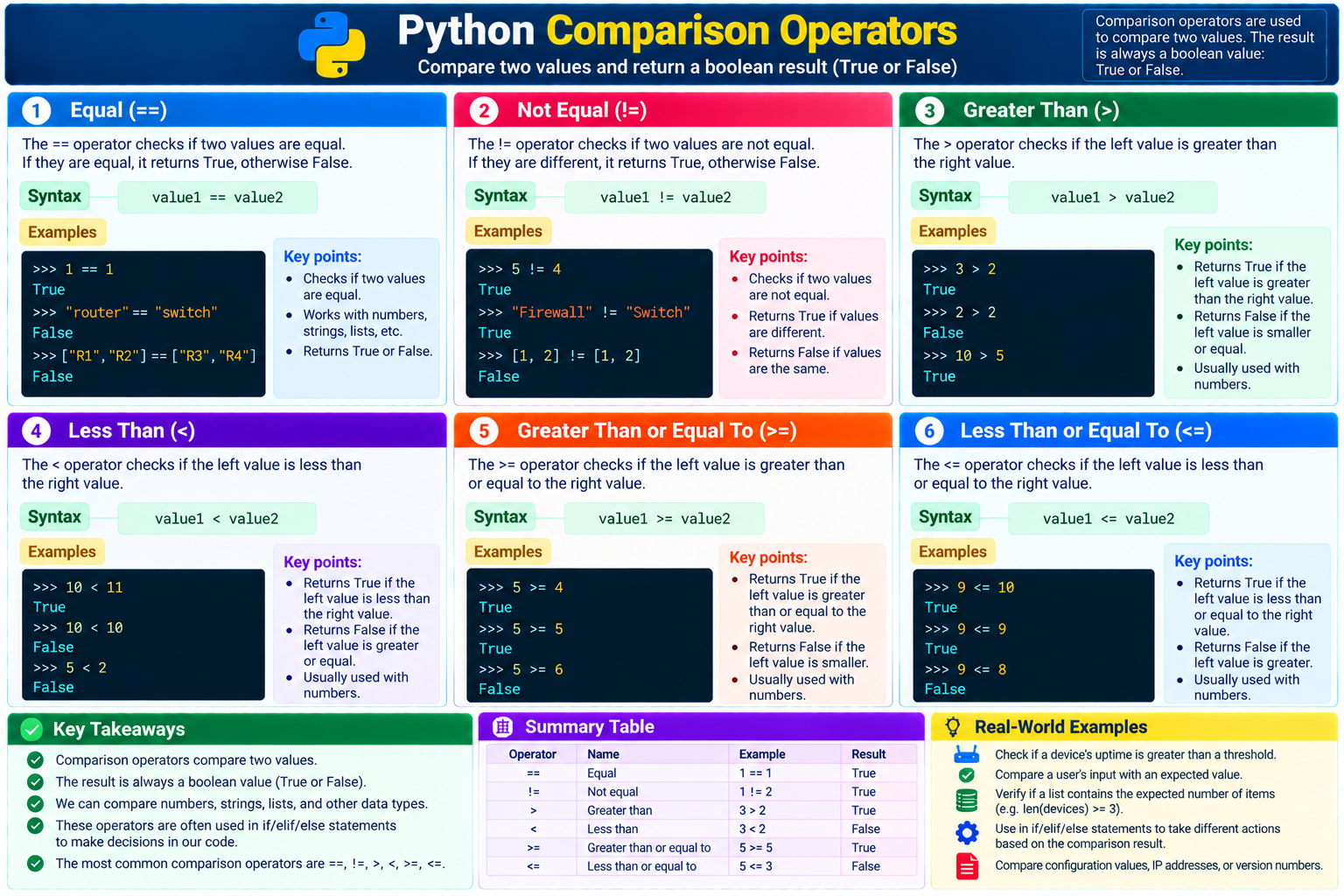
True or False.2. Equal (==)
The equality operator checks whether two values are equal. Two equal numbers return True:
Compare two numbers
>>> 1 == 1
True
Equality also works with other values. The two strings below are different, so the result is False:
Compare two strings
>>> "router" == "switch"
False
Lists are equal only when their corresponding items and order match:
Compare two lists
>>> ["R1", "R2"] == ["R3", "R4"]
False
3. Not Equal (!=)
The inequality operator is the opposite of equality. It returns True when two values are different:
Compare numbers
>>> 5 != 4
True
Compare strings
>>> "Firewall" != "Switch"
True
4. Greater Than (>)
The greater-than operator checks whether the value on the left is larger than the value on the right:
Larger value
>>> 3 > 2
True
Equal values
>>> 2 > 2
False
Equal values do not pass a strict greater-than test. Use >= when equality should count.
5. Less Than (<)
The less-than operator checks whether the value on the left is smaller than the value on the right:
Smaller value
>>> 10 < 11
True
Equal values
>>> 10 < 10
False
6. Greater Than or Equal To (>=)
This operator returns True when the left value is larger than or equal to the right value:
Test an inclusive minimum
>>> 5 >= 4
True
>>> 5 >= 5
True
>>> 5 >= 6
False
The middle expression passes because equality is included in the test.
7. Less Than or Equal To (<=)
This operator returns True when the left value is smaller than or equal to the right value:
Test an inclusive maximum
>>> 9 <= 10
True
>>> 9 <= 9
True
>>> 9 <= 8
False
The last expression is false because 9 is neither smaller than nor equal to 8.
8. Network Automation Example
Comparison operators become most useful when a script checks measured state against an expected value. This read-only example evaluates interface availability and response time:
Check saved interface results
expected_status = "up"
actual_status = "up"
response_ms = 42
warning_threshold_ms = 50

print(actual_status == expected_status)
print(response_ms <= warning_threshold_ms)
Both lines print True. The first confirms that the saved status matches the expected state; the second confirms that the response time is within the allowed threshold.
"42" to an integer before comparing it with the number 50.9. Guided Practice
Task 1: Predict each result
- Predict
24 == 24. - Predict
"Gi0/1" != "Gi0/2". - Predict
75 <= 70. - Run all three expressions in the interpreter.
Expected result: The expressions return True, True, and False.
Task 2: Check a device count
- Set
devices_foundto4. - Set
minimum_devicesto3. - Compare them with
>=. - Print the boolean result.
Expected result: The expression prints True because four meets the minimum of three.
== for comparison. A single = assigns a value and cannot replace the equality operator in a comparison expression.10. Conclusion
You learned how to compare two values with Python comparison operators:
- Equal:
==checks whether two values are equal. - Not equal:
!=checks whether two values are different. - Greater than:
>checks whether the left value is larger. - Less than:
<checks whether the left value is smaller. - Greater than or equal to:
>=includes the boundary value. - Less than or equal to:
<=includes the boundary value.
Each expression returns True or False, which a later lesson can use in conditional logic to choose what a program should do next.
Python Comparison Operators Frequently Asked Questions
What do Python comparison operators return?
Every comparison expression returns one of Python's two boolean values: True or False.
What is the difference between = and == in Python?
A single equals sign assigns a value to a variable. A double equals sign compares two values for equality.
Can Python compare strings and lists?
Yes. Equality and inequality can compare strings, lists, numbers, and many other values. Use ordering comparisons with compatible value types.