Python Operators
You can use operators in Python to perform a variety of operations.
Python Operators at a Glance
Operators turn values and variables into expressions that calculate results, update stored data, compare state, and answer true-or-false questions.
Calculate and assign
Arithmetic operators produce numeric results, while assignment operators store or update values.
Compare and combine
Comparison and logical operators evaluate conditions and combine boolean results.
Test and inspect
Membership, identity, and bitwise operators answer more specialized questions about values and objects.
In This Lesson
1. Python Operator Overview
Here is an overview:
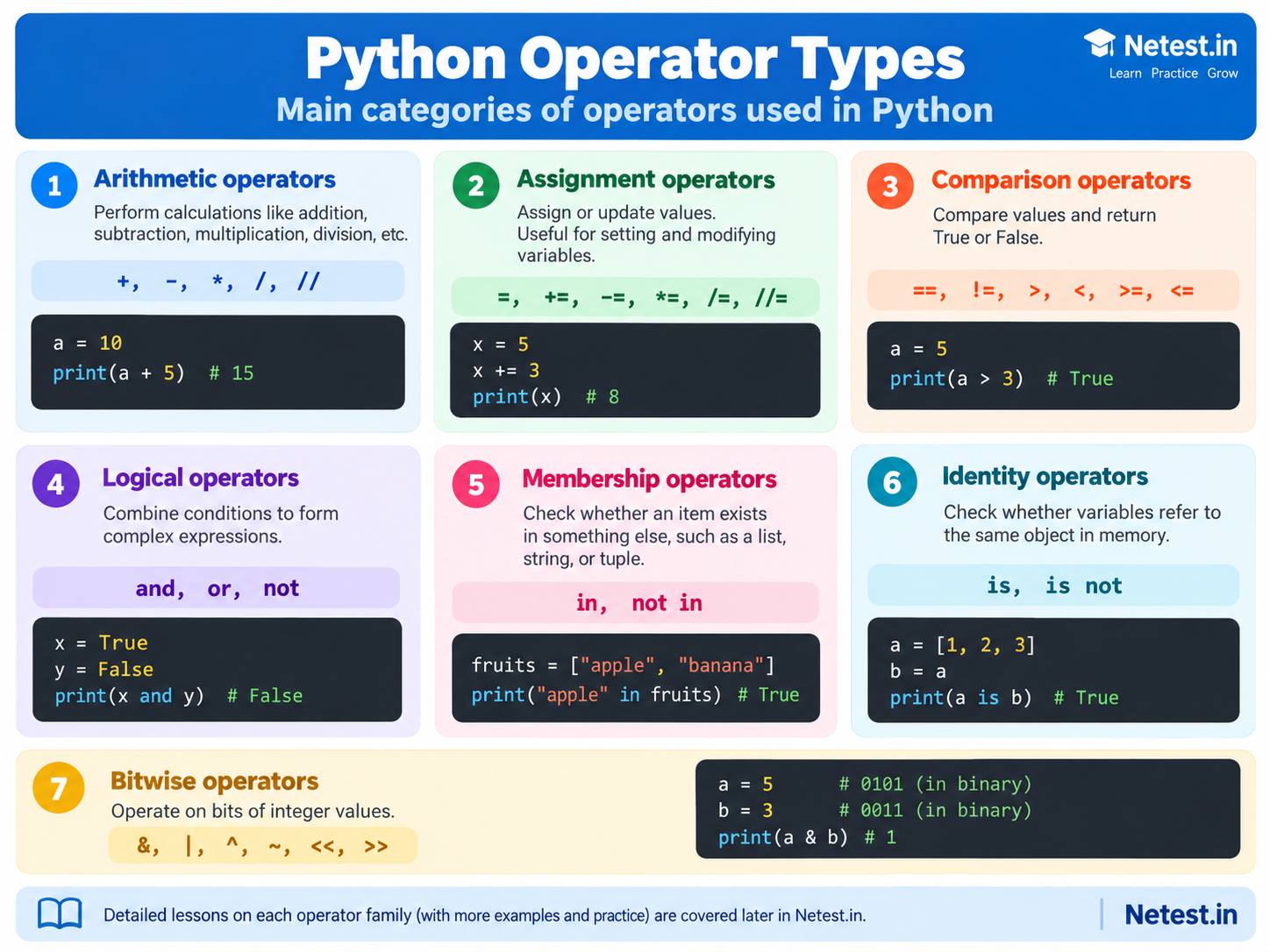
- Arithmetic operators: With these operators, we can perform calculations like addition, subtraction, multiplication, etc.
- Assignment operators: This operator assigns values to variables.
- Comparison operators: The comparison operator compares two values and returns a boolean result (
TrueorFalse). - Logical operators: With logical operators, we can combine conditional statements.
- Membership operators: These operators check if an item exists in another item like a string, list, tuple, or dictionary.
- Identity operators: The identity operators check if variables point to the same object in memory.
- Bitwise operators: These operators compare, invert, and shift the bits in integer values.
2. Seven Python Operator Types
Use this visual summary to connect each operator family with its purpose and a small Python example.
3. How Operators Build Expressions
An operator works with one or more values. These values are called operands. Together, the operands and operator form an expression that Python evaluates to produce a result.
In 12 - 2, the numbers are operands and the minus sign is the operator. Python evaluates the expression and returns 10. A script can store that result in a variable and use it later.
Calculate a device-check result
total_devices = 12
failed_devices = 2
reachable_devices = total_devices - failed_devices
success_rate = reachable_devices / total_devices * 100

print("Reachable devices:", reachable_devices)
print(f"Success rate: {success_rate:.1f}%")
The subtraction operator calculates that 10 devices are reachable. Division and multiplication then convert that result into a success rate of 83.3%. Each line answers one clear question, which makes the calculation easy to check.
4. Operators in a Network Automation Script
Network scripts often need to decide whether a device is ready for the next step. One condition may check reachability. Another may confirm that the platform is supported. Logical and membership operators can combine those checks into one readable decision.
Check whether a device is ready
platform = "iosxe"
reachable = True
supported_platforms = {"iosxe", "nxos", "junos"}

platform_supported = platform in supported_platforms
ready = reachable and platform_supported

print("Platform supported:", platform_supported)
print("Ready for a read-only check:", ready)
The membership operator in checks the platform name. The logical operator and then requires both conditions to be true. The output is True for both lines, so the script can safely continue to its read-only task.
Assignment operators are useful when a value changes during a run. For example, attempts += 1 increases a retry counter by one. Comparison operators can then test attempts < max_attempts before another connection attempt.
5. Common Operator Mistakes
Most operator errors come from choosing a symbol that looks similar but answers a different question. Check the intent of the expression before checking its syntax.
| Mistake | What it means | Better approach |
|---|---|---|
Using = instead of == | = assigns a value. == compares two values. | Use status == "up" when asking whether two values are equal. |
Using is for normal value comparison | is checks object identity, not value equality. | Use == for strings and numbers. Use is None when checking for None. |
| Combining conditions without parentheses | A long mix of and and or can be hard to read correctly. | Group related conditions with parentheses and give intermediate results clear variable names. |
| Testing the wrong collection value | For a dictionary, in checks keys by default. | Use value in device.values() when you intend to search dictionary values. |
6. Guided Practice: Summarize a Device Check
This short exercise combines arithmetic, comparison, logical, and membership operators. Read the data first, predict each result, and then run the code.
Build the summary
- Create the device list and the set of failed devices.
- Calculate how many checks passed.
- Compare the passed count with the total count.
- Confirm that
SW1needs review.
device_check.py
devices = ["R1", "R2", "SW1", "FW1"]
failed = {"SW1"}

checked = len(devices)
passed = checked - len(failed)
all_healthy = passed == checked
needs_review = "SW1" in failed and not all_healthy

print("Checked:", checked)
print("Passed:", passed)
print("All healthy:", all_healthy)
print("SW1 needs review:", needs_review)
Expected result: The script prints 4 checked devices, 3 passed devices, False for all healthy, and True for the SW1 review check.
Next, replace {"SW1"} with an empty set by using set(). Predict how the two boolean results will change before running the script again.
7. Conclusion
Operators turn stored data into useful decisions and results. Arithmetic operators calculate values. Assignment operators store changes. Comparison and logical operators answer questions about state, while membership and identity operators perform more specific checks.
Start by asking what the expression should prove. Then choose the operator that matches that purpose, keep the expression readable, and confirm the result with a small test. This habit becomes especially important when a script uses the result to decide whether a network task should continue.
Python Operators Frequently Asked Questions
What are operators in Python?
Operators are symbols or keywords that tell Python to calculate, assign, compare, combine, test, or manipulate values.
Which Python operators return True or False?
Comparison, logical, membership, and identity operators commonly produce boolean results.
What is the difference between equality and identity?
The equality operator == checks whether values are equal. The identity operator is checks whether two variables refer to the same object.