Python Identity Operators
Use is and is not to check whether two variables refer to the same object in memory—and learn why value comparisons normally require == or !=.
Python Identity Operators at a Glance
Every Python value is an object. A variable holds a reference to an object, and identity operators ask whether two references lead to that exact same object.
is
Returns True when both operands refer to one object.
is not
Returns True when the operands refer to different objects.
== and !=
Compare values or content rather than object identity.
In This Lesson
1. Identity Operators Infographic
Use this visual reference to compare is, is not, object identity, and value equality.
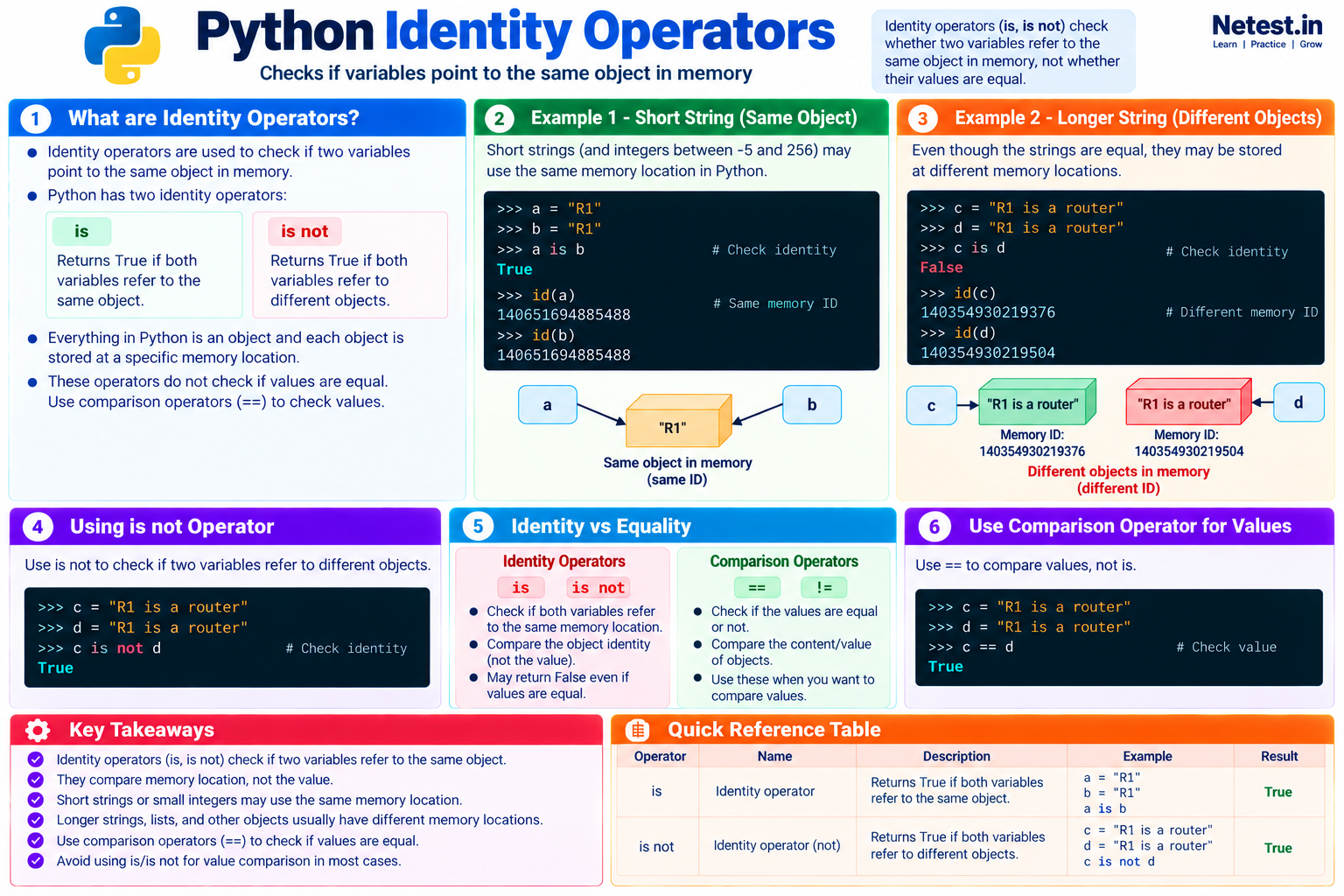
2. Using the IS Operator
Start with two variables containing the same short string:
Compare two references
>>> a = "R1"
>>> b = "R1"
>>> a is b
True
This interpreter reused one string object, so both variables refer to the same identity. That result may look like a value comparison, but it is not.
Equal values can be different objects
>>> c = " ".join(["R1", "is", "a", "router"])
>>> d = "R1 is a router"
>>> c == d
True
>>> c is d
False
The strings contain the same characters, but they were created as different objects. Equality is true while identity is false.
is results for separately written strings and integers can vary by implementation, version, and execution context. Never make program logic depend on that reuse.3. Inspecting Object Identity with id()
The built-in id() function returns an integer that uniquely identifies an object during its lifetime. Matching IDs prove that two references point to the same object.
Same object
>>> a = "R1"
>>> b = a
>>> id(a) == id(b)
True
>>> a is b
True
Assigning b = a makes both names refer to exactly the same string object.
Different objects, equal values
>>> c = ["R1", "R2"]
>>> d = ["R1", "R2"]
>>> id(c) == id(d)
False
>>> c == d
True
Each list has its own identity even though their elements are equal.
The exact integers returned by id() are runtime-specific, so your output will not match another session's numbers. Compare the results; do not memorize them.
4. Using the IS NOT Operator
The is not operator asks the opposite identity question: do these references point to different objects?
Check for different list objects
>>> expected = ["R1", "R2"]
>>> discovered = ["R1", "R2"]
>>> expected is not discovered
True
>>> expected != discovered
False
The two lists are different objects, so is not returns True. Their values are equal, so != returns False.
5. Identity vs Equality
Choose the operator from the question you actually need to answer. Identity and equality sometimes produce the same result, but they mean different things.
| Question | Operator | Typical use |
|---|---|---|
| Are these the same object? | is, is not | Check a singleton sentinel such as None. |
| Do these values contain equal data? | ==, != | Compare hostnames, IP strings, interface lists, counters, or parsed results. |
Compare string values
>>> c = " ".join(["R1", "is", "a", "router"])
>>> d = "R1 is a router"
>>> c == d
True
Use == here because the intent is to compare the text, not the objects that store it.
6. Network Automation Example
Identity operators are appropriate when a function uses None to mean “no result.” This distinguishes a missing response from valid but empty data.
Check a missing device response
def read_saved_output(hostname):
    saved_outputs = {
        "R1": "show ip interface brief output",
        "R2": ""
    }
    return saved_outputs.get(hostname)

result = read_saved_output("R3")

if result is None:
    print("No saved output exists for R3")
else:
    print(result)
The dictionary method returns the singleton object None when R3 is missing. The check result is None clearly expresses that sentinel test.
R2 is a real stored value. It is not the same as None, so the script can handle “empty output” and “no record” separately.7. Common Mistakes and Limits
Using is for values
Use hostname == "R1", not hostname is "R1".
Trusting interning
Object reuse is an optimization, not a promise that application code should test.
Comparing ID numbers later
An ID is guaranteed unique only while its object exists; Python may reuse it afterward.
Using == None
Prefer value is None. It states the singleton check directly and avoids custom equality behavior.
8. Guided Practice
Task 1: Compare two inventories
- Create
first = ["R1", "R2"]. - Create
second = ["R1", "R2"]. - Predict
first == secondandfirst is second. - Run both expressions.
Expected result: Equality is True; identity is False.
Task 2: Check a sentinel
- Set
device_output = None. - Test
device_output is None. - Change the value to an empty string and run the test again.
Expected result: The first check is True; the second is False.
9. Conclusion
Python's is and is not operators check whether references point to the same object. They do not check whether two values are equal or unequal.
- Use
isandis notfor identity checks, especially withNone. - Use
==and!=for strings, numbers, lists, and other value comparisons. - Use
id()for learning and debugging object identity, not as a stored business identifier. - Do not depend on Python's reuse of short strings or small integers.
I hope you enjoyed this lesson. If you have any questions, please leave a comment.
Python Identity Operators Frequently Asked Questions
What do Python identity operators compare?
is and is not compare whether two references point to the same object. They do not compare the objects' values.
Should I use is to compare strings or numbers?
No. Use == or != to compare values. Reuse of immutable objects is an implementation detail and can make incorrect identity code appear to work.
When is the is operator appropriate?
The most common use is checking a singleton sentinel, especially value is None or value is not None.