Python If, Elif, Else
Make decisions in your code by running specific blocks only when their conditions match.
Python Conditionals at a Glance
Until now, every line of code ran sequentially. The if, elif, and else statements let a program choose which code to run by evaluating comparison and logical expressions.
if
Tests the first condition and runs its block only when the result is True.
elif
Tests another condition when the preceding if or elif did not match.
else
Provides the fallback block when none of the earlier conditions match.
In This Lesson
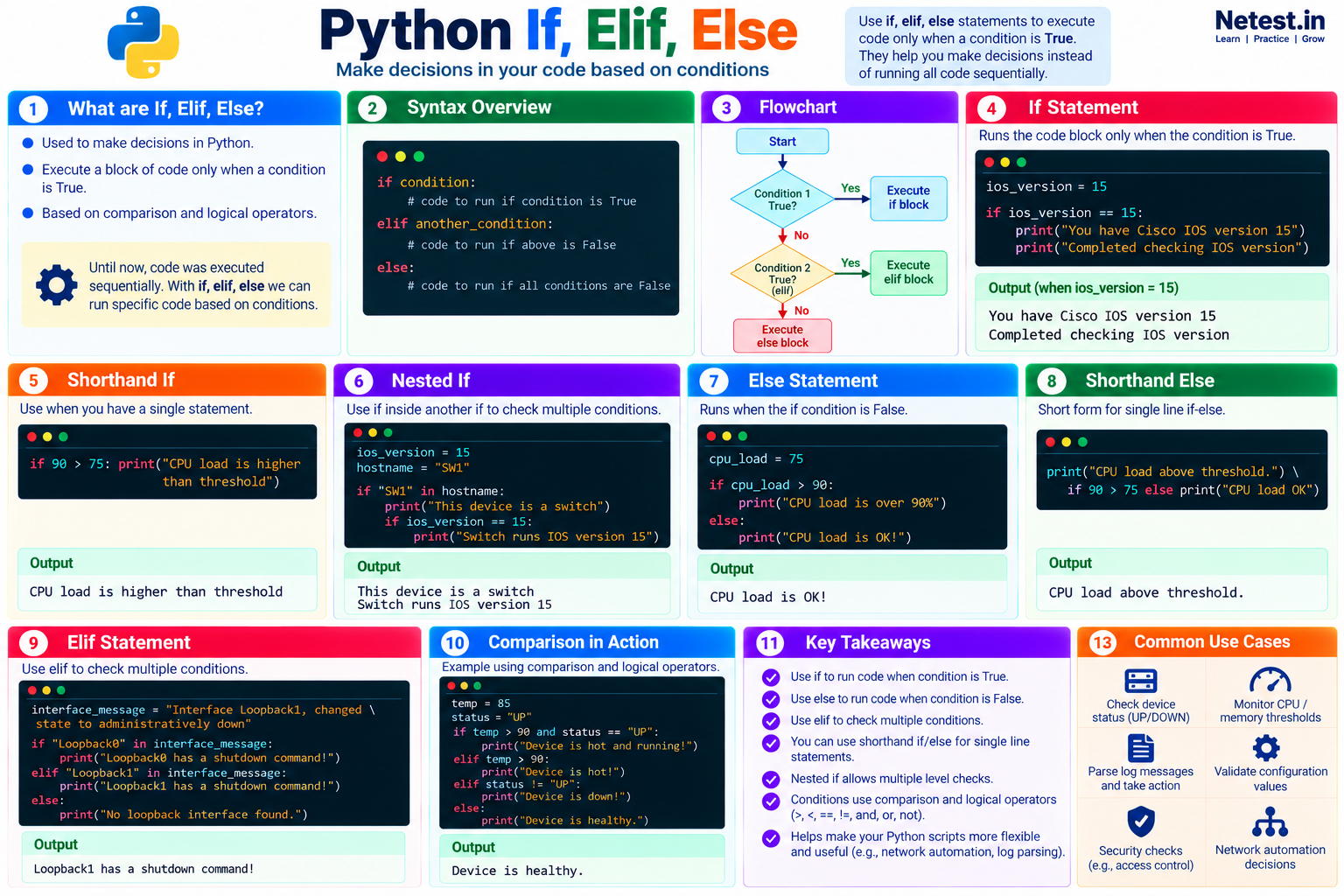
1. If, Elif, Else Infographic
Use this visual summary to review conditional syntax, program flow, examples, expected output, and common network automation use cases.
2. If
An if statement runs its indented block when its condition is True. Take a look at the code below:
Match an IOS version
ios_version = 15
if ios_version == 15:
    print("You have Cisco IOS version 15")
    print("Completed checking IOS version")
It shows this output:
Output
You have Cisco IOS version 15
Completed checking IOS version
The variable ios_version stores the integer 15. The condition checks whether that value equals 15. Because it does, Python runs both indented print() calls.
If the condition does not match, Python skips the entire indented block:
A condition that is false
ios_version = 12.4
if ios_version == 15:
    print("You have Cisco IOS version 15")
print("Completed checking IOS version")12.4 == 15 is False.3. Shorthand If
When an if statement has a single action, you can write it on one line:
One-line if statement
>>> if 90 > 75: print("CPU load is higher than threshold")
CPU load is higher than threshold
This compact form can save space, although the standard multi-line form is often easier to extend and review.
4. Nested If
A nested if places one condition inside another. The inner check runs only after the outer condition matches:
Check the device, then its IOS version
ios_version = 15
hostname = "SW1"

if "SW1" in hostname:
    print("This device is a switch")
    if ios_version == 15:
        print("Switch runs IOS version 15")
It shows this output:
Output
This device is a switch
Switch runs IOS version 15
The outer condition matches the hostname, so Python prints the first message and evaluates the nested version check. The inner condition also matches, so it prints the second message.
5. Else
When the if condition is false, an else block provides the fallback action:
Check a CPU threshold
cpu_load = 75
if cpu_load > 90:
    print("CPU load is over 90%")
else:
    print("CPU load is OK!")
It shows this output:
Output
CPU load is OK!The CPU load is not greater than 90, so the if condition is false and Python runs the else block.
6. Shorthand Else
A conditional expression can place a simple if/else decision on one line:
One-line if/else expression
>>> print("CPU load above threshold.") if 90 > 75 else print("CPU load OK")
CPU load above threshold.
This form is useful for one small choice. Prefer a normal multi-line statement when either branch needs several actions.
7. Elif
Use elif to test another condition when the earlier condition did not match. You can include multiple elif branches:
Identify a loopback interface
interface_message = "Interface Loopback1, changed state to administratively down"

if "Loopback0" in interface_message:
    print("Loopback0 has a shutdown command!")
elif "Loopback1" in interface_message:
    print("Loopback1 has a shutdown command!")
else:
    print("No loopback interface found.")
It shows this output:
Output
Loopback1 has a shutdown command!The first condition is false, but the elif condition matches. Python runs that branch and skips the final else.
8. Guided Practice
Task 1: Change the decision
- Run the CPU-load example with
cpu_load = 75. - Change the value to
95. - Predict which message will appear before running it again.
Expected result: The first run prints CPU load is OK!; the second prints CPU load is over 90%.
Task 2: Add another interface
- Add an
elifbranch forLoopback2. - Change the saved message so it names
Loopback2. - Run the program and confirm the new branch matches.
Expected result: Exactly one shutdown message appears for Loopback2.
9. Conclusion
Python conditionals turn comparisons and logical expressions into decisions. Start with if, add elif for alternative tests, and use else when a fallback action is needed. Keep each block correctly indented, and use shorthand only when it remains easy to read.
Python If, Elif, Else Frequently Asked Questions
What is the difference between if, elif, and else in Python?
if tests the first condition, elif tests another condition when earlier tests are false, and else runs when none of the preceding conditions match.
Can a Python if statement omit else?
Yes. An if statement can stand alone when no fallback action is required.
Why is indentation important in Python conditionals?
Indentation defines which statements belong to each conditional block. Incorrect indentation can change the program's behavior or cause an error.