Python Print Function
Use print() to show clear status messages, values, and results while a network script runs.
Python Print Function at a Glance
The print() function makes a program's work visible by displaying text, stored values, and readable status messages.
Call the function
Write print() and place the value or message to display inside the parentheses.
Show useful context
Label device names, addresses, counters, and results so the output explains itself.
Observe the script
Use output to follow progress, confirm assumptions, and locate the step that produced an unexpected result.
In This Lesson
1. What is the print function?
The print() function writes information to the screen. It helps a user see what a script is checking and whether the check passed or failed.
Write print followed by parentheses. Put the value you want to display inside the parentheses.
Basic syntax
print(value)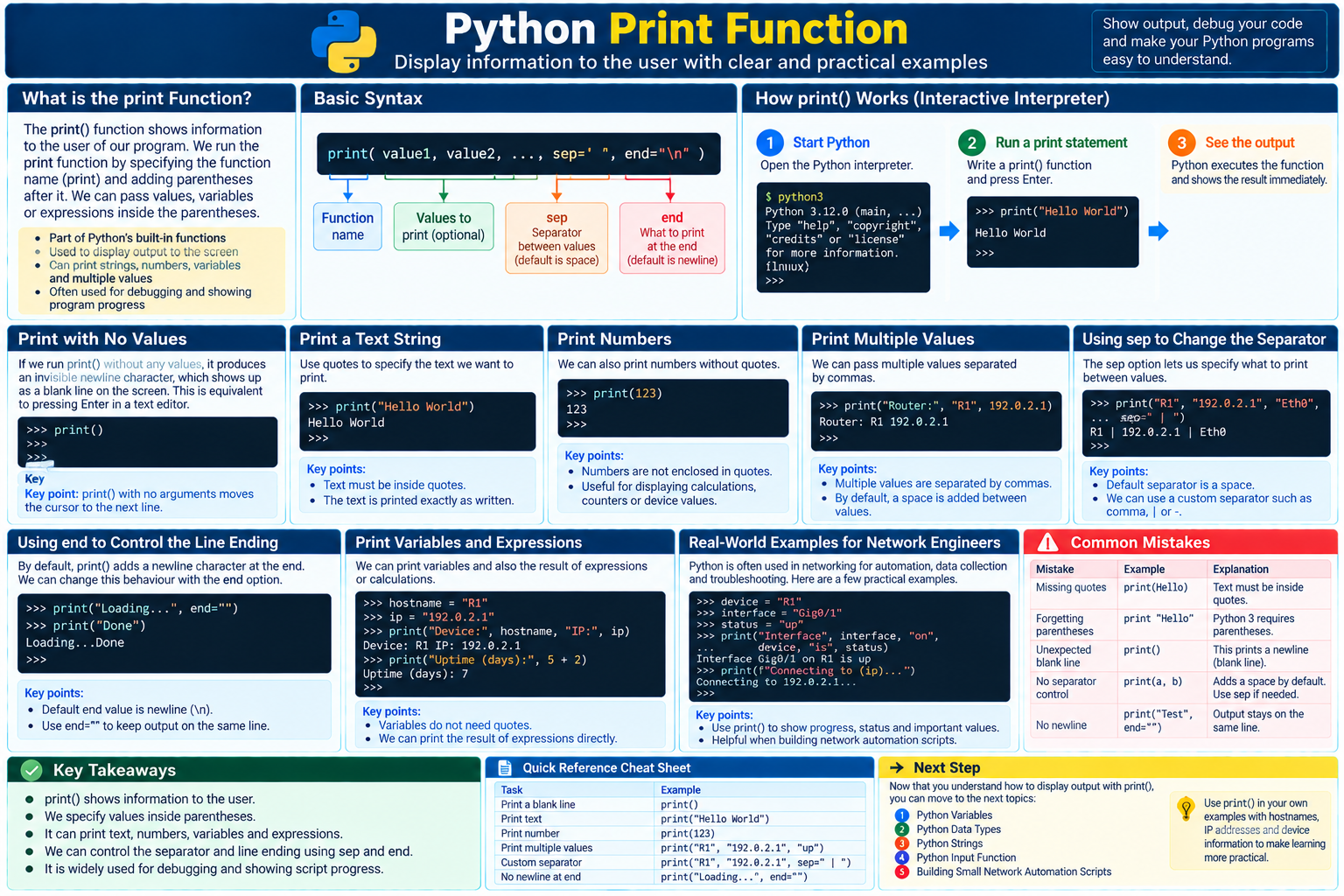
print() at a glance, from a blank line and Hello World to separators, variables, and practical network automation output.2. Open the Python interpreter
Open the Python interactive interpreter. Its prompt looks like this:
Interpreter prompt
>>>When you see >>>, Python is ready for a statement. Type each example after the prompt and press Enter. Do not type the prompt itself.
3. Print a blank line
First, call the function without giving it a value:
Empty print call
>>> print()

>>>
No word or number is supplied, so Python writes only a newline. The result appears as one blank line.
print() is not doing nothing. Its default line ending moves the cursor to the next line.4. Print text
Put text inside matching quotes. The quotes tell Python that the characters are a string, which means text.
Hello World
>>> print("Hello World")
Hello World
Python displays the text without showing the surrounding quotes.
5. Guided practice
A useful status line should name the device, the check, and the result. This makes logs easier to read during a fault or maintenance window.
Display a device message
- Open the Python interpreter.
- Enter the statement below.
- Press Enter and compare the output.
- Replace
R1with another hostname.
>>> print("Connecting to R1")
Connecting to R1
Expected result: Python displays the text exactly as it appears between the quotes.
Create visual spacing
- Print one status message.
- Call
print()with no value. - Print a second status message.
>>> print("Starting check")
Starting check
>>> print()

>>> print("Check complete")
Check complete
Expected result: the empty call creates one blank output line between the messages.
Real-world example: interface check
Print a readable result
device = "R1"
interface = "GigabitEthernet0/1"
state = "up"

print(f"{device} | {interface} | state: {state}")
The output is R1 | GigabitEthernet0/1 | state: up. A network engineer can understand it without opening the script.
Python Print Function Frequently Asked Questions
What does the Python print function do?
It displays text, numbers, variables, and other values as output for the user. It is also useful while learning and debugging a program.
Why does print() show a blank line?
Even with no values, print() writes its default newline character. That moves the cursor to the next line, so the result looks blank.
Why does text need quotes in print()?
Quotes tell Python that the characters form a string literal. Without quotes, Python treats the text as a name such as a variable and may report a NameError.