EIGRP Packet Types: See How Routers Communicate
Follow EIGRP packets through neighbor discovery, route exchange, acknowledgement, and failure recovery. Learn what each packet means in a capture or troubleshooting session.
Packet Types Overview
The five core packet types do different jobs. Hello finds a neighbor. Update shares route information. Query and Reply help DUAL search for a path. ACK confirms reliable delivery.
In This Lesson
- Read a complete packet exchange
- Compare the core packet types
- Understand Hello packets
- Understand Update packets
- Follow reliable delivery and ACKs
- Follow Query and Reply during failure
- Recognize SIA-Query and SIA-Reply
- Compare multicast and unicast delivery
- Read packet and command evidence
- Troubleshoot from the observed packet
- Complete guided packet labs
- Review the frequently asked questions
1. Read a Complete Packet Exchange
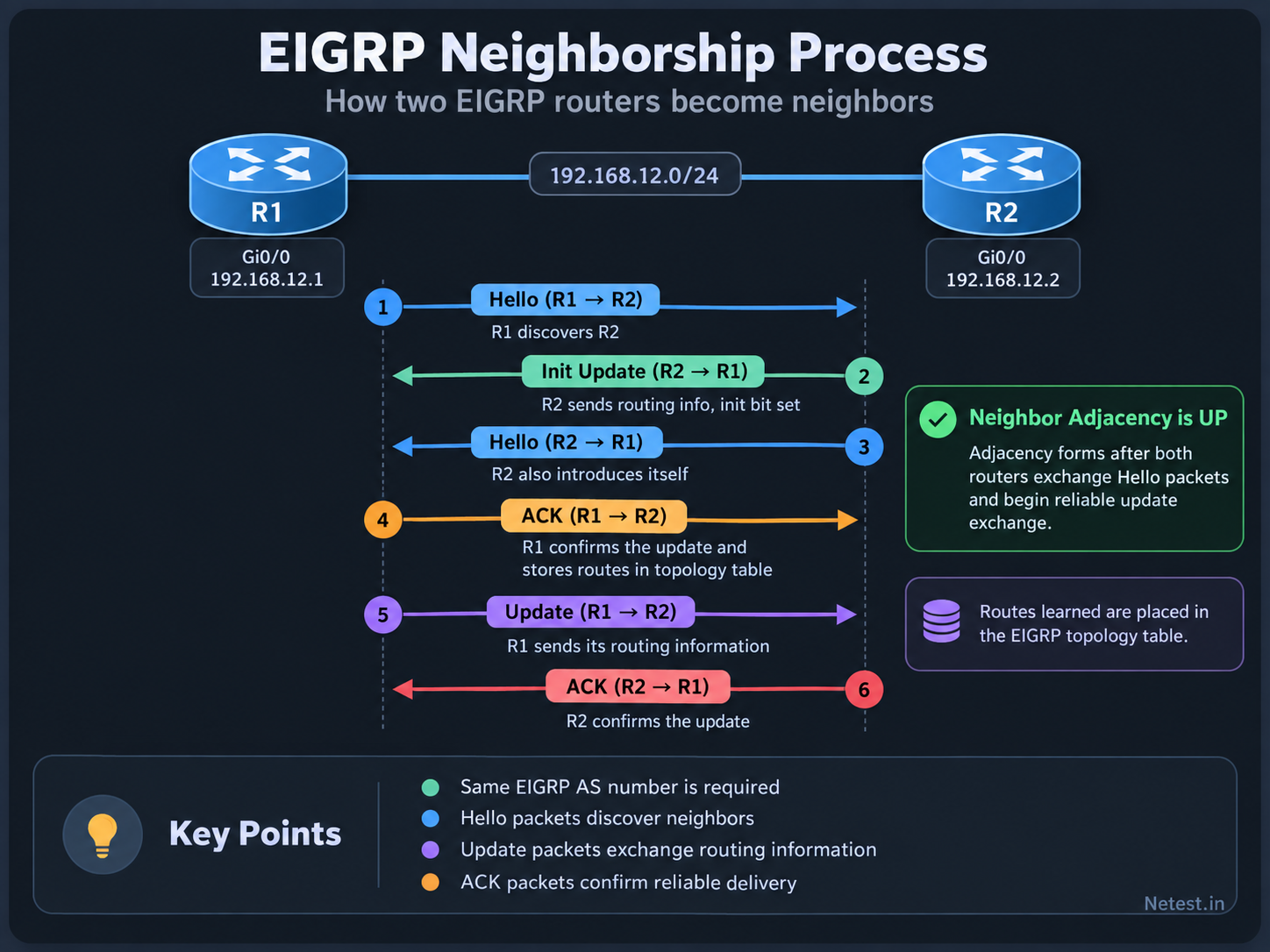
Follow the numbered arrows from 1 to 6. R1 and R2 first discover each other with Hello packets, then exchange their initial routing information with reliable Update and ACK packets.
2. Compare the Core Packet Types
Start with purpose, then add delivery behavior. This prevents the common mistake of assuming that every EIGRP packet is multicast or reliable.
| Packet | Main job | Reliable? | Typical timing |
|---|---|---|---|
| Hello | Discover and maintain neighbors | No | Sent periodically |
| Update | Share route and metric information | Yes when reliable delivery is used | Initial synchronization or route change |
| Query | Ask whether a neighbor has another path | Yes | No feasible successor is available |
| Reply | Answer a Query | Yes | After checking local topology and downstream answers |
| ACK | Confirm receipt of a reliable packet | No acknowledgement of the ACK | After Update, Query, or Reply delivery |
3. Understand Hello Packets
Hello packets discover neighbors and keep them alive. IPv4 EIGRP normally sends them to multicast address 224.0.0.10. EIGRP for IPv6 uses FF02::A.
Common LAN defaults
Hello interval: 5 seconds
Hold time:     15 seconds
IPv4 group:    224.0.0.10
IP protocol:   88
Neighbor requirements
Compatible primary subnet
Matching EIGRP AS
Matching K-values
Matching authentication
Interface is not passive- Hold time: A router advertises how long its neighbor should keep the relationship without another valid Hello.
- Timers may differ: EIGRP Hello and hold timers do not have to match between neighbors.
- Passive interface: The connected network can still be advertised, but no Hello is sent and no neighbor forms there.
4. Understand Update Packets
New neighbors use Update packets to synchronize topology information. After that, EIGRP sends partial, bounded updates: only changed information goes to routers that need it.
Neighbor forms
Both routers pass the Hello checks and create a neighbor entry.
Topology sync
Update packets carry destinations, metric components, and route attributes.
Stable state
Later updates are triggered by changes instead of a full periodic table refresh.
| Situation | What the Update carries | Operational meaning |
|---|---|---|
| New neighbor | Initial topology information | The peers build a shared routing view |
| Metric changes | Changed destination and metric data | DUAL checks whether the best path changed |
| Route withdrawal | Destination marked unreachable | The old path cannot remain the successor |
5. Follow Reliable Delivery and ACKs
EIGRP's Reliable Transport Protocol (RTP) tracks selected packets with sequence numbers. The receiver sends an ACK, and the sender can retransmit if the acknowledgement does not arrive.
Send
R1 sends a reliable packet with a sequence number.
Acknowledge
R2 sends an ACK for that sequence number.
Retransmit if needed
R1 retries if the expected ACK is missing.
In show ip eigrp neighbors, SRTT is the measured smooth round-trip time and RTO is the retransmission timeout. A queue count that stays above zero is more concerning than a brief change during normal convergence.
6. Follow Query and Reply During a Failure
When a successor fails, DUAL first looks for a feasible successor. If none exists, the route becomes Active and the router asks eligible neighbors for help.
Successor fails
The current best path is no longer usable.
Check backup
DUAL looks for a feasible successor.
Send Query
No safe backup exists, so neighbors are asked.
Collect Replies
DUAL waits for every required answer before finishing.
| Neighbor result | Reply meaning | What happens next |
|---|---|---|
| Has another path | Returns reachable metric information | DUAL evaluates the new path |
| Has no path | Reports the destination unreachable | The search continues through other required neighbors |
| Must ask downstream | Keeps its own route Active | Reply waits until downstream answers arrive |
7. Recognize SIA-Query and SIA-Reply
The traditional list has five core packets. Modern EIGRP also uses SIA-Query and SIA-Reply packets to show that a neighbor is still working on an outstanding route query.
- SIA-Query: Asks whether the neighbor is still processing the original Query.
- SIA-Reply: Confirms that the search is still in progress, helping preserve the neighbor relationship.
- Still investigate: Repeated SIA behavior can point to excessive query scope, packet loss, slow links, CPU pressure, or an unstable design.
8. Compare Multicast and Unicast Delivery
Do not identify a packet only by its destination address. EIGRP can use multicast for a group of neighbors and unicast for one specific peer or retransmission.
| Delivery | Typical use | Troubleshooting clue |
|---|---|---|
Multicast 224.0.0.10 | IPv4 Hellos and efficient delivery to several EIGRP peers | Check multicast filtering and interface participation |
IPv6 multicast FF02::A | EIGRP for IPv6 neighbor communication | Check link-local addressing and IPv6 multicast handling |
| Unicast | ACKs, selected exchanges, or retransmission to one neighbor | Check two-way unicast reachability and interface errors |
EIGRP is carried directly in IP protocol 88. It does not use TCP or UDP ports, so a firewall or ACL must permit the IP protocol itself.
9. Read Packet and Command Evidence
Begin with show commands. Use a controlled debug or packet capture only when the neighbor and topology output cannot explain the problem.
Safe first checks
show ip eigrp neighbors
show ip eigrp interfaces detail
show ip eigrp topology
show ip protocols
show interfaces counters errors
Focused lab debug
debug eigrp packets hello
debug eigrp packets update
debug eigrp packets query
debug eigrp packets reply

undebug all| Field | Meaning | Healthy pattern |
|---|---|---|
| Hold | Time before the peer is declared down | Counts down, then refreshes |
| Uptime | Age of the neighbor relationship | Increases without frequent resets |
| SRTT | Smoothed reliable-packet round-trip time | Reasonable and stable for the link |
| RTO | Time before retransmitting | Tracks link conditions without repeated expiry |
| Q count | Reliable packets waiting to be sent | Normally zero |
| Seq Num | Last reliable sequence received | Changes as reliable traffic is exchanged |
undebug all.10. Troubleshoot from the Observed Packet
The packet pattern tells you how far EIGRP progressed. Match the observation to the next evidence to collect.
| Observed pattern | Likely layer | Check next |
|---|---|---|
| No Hellos | EIGRP not enabled, passive interface, ACL, or link issue | Interface state and EIGRP interface list |
| Hellos seen, no neighbor | AS, K-value, authentication, or subnet mismatch | show ip protocols and both interface configurations |
| Updates retransmitted | Missing ACK, loss, congestion, or one-way filtering | Q count, RTO, interface errors, and both traffic directions |
| Many Queries | No feasible successor or query domain too large | Topology table, summaries, stubs, and failure location |
| Query without final Reply | Downstream delay, packet loss, or overloaded neighbor | Active topology entries and the named outstanding peer |
| Neighbor repeatedly resets | Hold timer expiry or reliable transport failure | Logs, link stability, CPU, and packet counters |
- State exactly which packet is present, missing, or repeating.
- Check the neighbor and topology state at the same time.
- Compare both ends; one-way evidence is not enough.
- Repair one confirmed cause and repeat the same capture or show command.
11. Guided Packet Labs
Use two or three routers in an isolated EIGRP AS 100 lab. Restore the healthy baseline after each task.
Task 1: Observe Neighbor Startup
- Enable EIGRP on one link.
- Capture or debug Hello packets briefly.
- Enable the second router.
- Record when the neighbor appears and when Updates begin.
- Stop the debug.
Expected result: You separate Hello discovery from topology synchronization.
Task 2: Find an AS Mismatch
- Change one router from AS 100 to AS 200.
- Confirm Hellos exist but no neighbor forms.
- Compare
show ip protocolson both routers. - Restore AS 100.
- Confirm the exchange completes.
Expected result: You avoid blaming the physical link when EIGRP parameters disagree.
Task 3: Trigger a Query
- Build a three-router path with no feasible successor.
- Remove the successor link.
- Watch the route become Active.
- Identify the Query direction and Reply source.
- Confirm the route returns to Passive.
Expected result: You connect DUAL state to Query and Reply packets.
Task 4: Investigate Reliability
- Record SRTT, RTO, and Q count in the healthy state.
- Introduce controlled loss only if your lab supports it.
- Watch for retransmission or queue changes.
- Restore the link.
- Confirm Q count returns to zero.
Expected result: You use neighbor-table evidence before enabling a broad debug.
12. Frequently Asked Questions
Are there five or seven EIGRP packet types?
Hello, Update, Query, Reply, and ACK are the five traditional core types. Modern EIGRP also uses SIA-Query and SIA-Reply to manage long-running route searches.
Does EIGRP use TCP or UDP?
No. EIGRP is carried directly in IP protocol 88. Its own Reliable Transport Protocol handles acknowledgements and retransmissions.
Are Hello packets acknowledged?
Normal periodic Hello packets are not acknowledged. An EIGRP ACK uses the Hello opcode, but it contains an acknowledgement number and no routing payload.
When does EIGRP send a Query?
A route sends Queries when its successor is lost and no feasible successor can be used immediately. DUAL asks eligible neighbors for another path.
Does every route change trigger a network-wide Query?
No. A feasible successor can avoid a Query, and summaries or EIGRP stub boundaries can stop Queries from spreading unnecessarily.
Why can an Update be unicast?
EIGRP can target one neighbor during selected exchanges or retransmissions. Multicast is efficient for several peers, but unicast is useful when only one peer needs the packet.
What does a nonzero Q count mean?
It means reliable packets are waiting in the neighbor queue. A brief value can occur during change; a value that stays above zero can indicate loss, congestion, or acknowledgement trouble.