Python Try Except
Handle expected errors without losing control of your program, respond to specific exception types, and always perform essential cleanup.
Python Try Except at a Glance
An exception interrupts the normal flow of a program. A structured error handler lets the script react deliberately instead of ending with an unhandled traceback.
Protect risky work
Place only the operation that may fail inside try, such as opening a file or converting input.
Handle known failures
Use specific except blocks for errors such as NameError, ValueError, or OSError.
Finish predictably
Use else for success-only work and finally for cleanup that must always run.
In This Lesson
1. Understand Exceptions
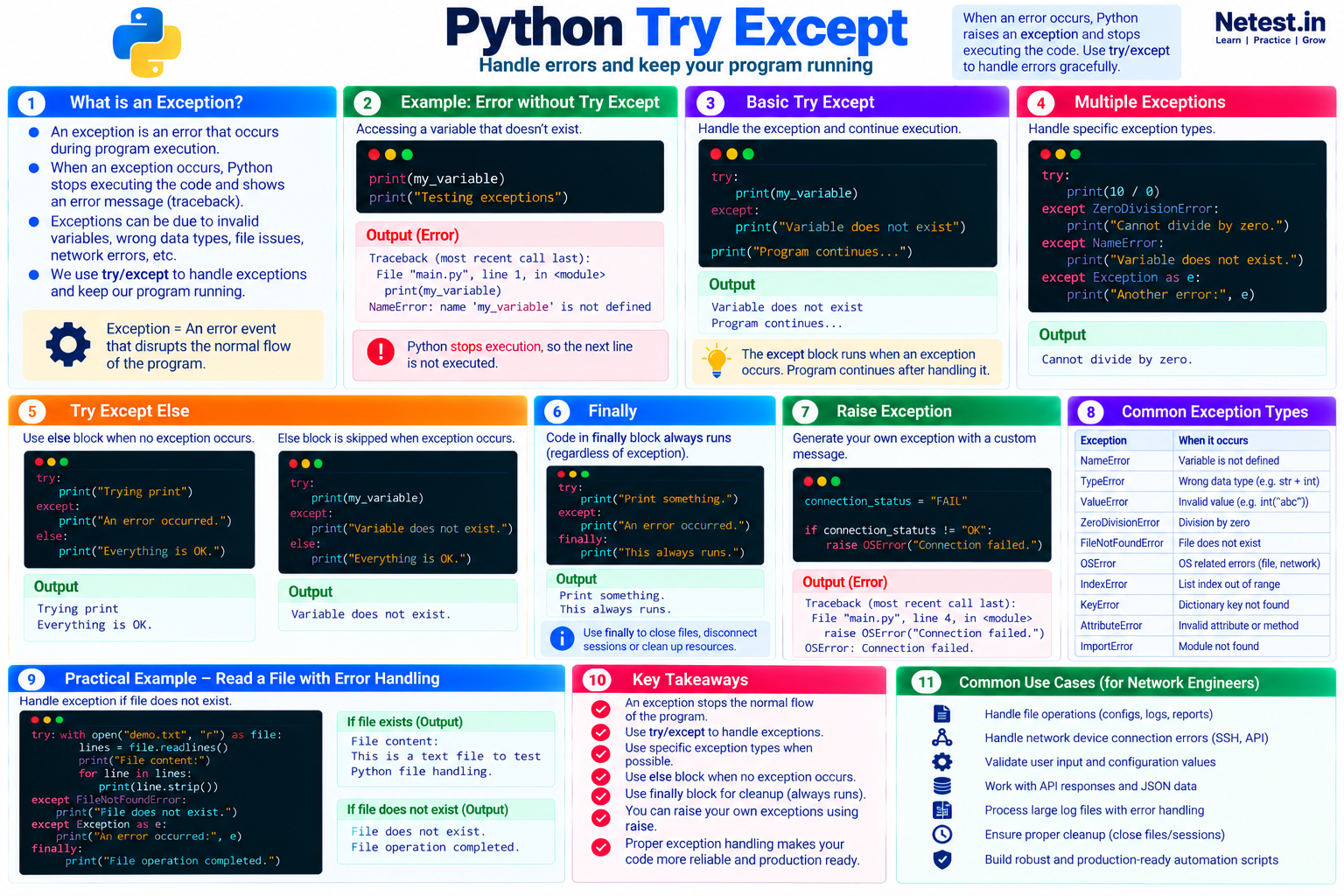
When an error occurs while Python is running your code, Python raises an exception. If nothing handles it, execution stops and Python displays a traceback that identifies the exception type and the line that failed.
A missing variable
print(my_variable)
print("Testing exceptions")
Output
Traceback (most recent call last):
  File "main.py", line 1, in <module>
    print(my_variable)
NameError: name 'my_variable' is not defined
The variable does not exist, so Python raises NameError. The second print() call never runs. A different mistake produces a different exception:
Mixing incompatible types
"This is the HTTP status code: " + 404Output
TypeError: can only concatenate str (not "int") to strThis time Python raises TypeError because a string and an integer cannot be joined directly. Fix mistakes you control, but also prepare for external failures that can happen even when the code is correct, such as an unavailable device, a timeout, or a missing file.
2. Use try and except
Put the operation that might fail under try. If that operation raises a matching exception, Python skips the remaining statements in the try block and runs the corresponding except block.
Handle a missing variable
try:
    print(my_variable)
except NameError:
    print("Variable does not exist")

print("Program continues")
Output
Variable does not exist
Program continues
The exception is handled, so the program continues after the block. Catching NameError explicitly also tells the reader which failure this code expects.
except: catches almost every exception, including mistakes you did not intend to handle. Prefer a specific exception type whenever possible.3. Handle Multiple Exceptions
One operation can fail in more than one expected way. Add separate handlers when each failure needs a different message or recovery action.
Match a specific exception
try:
    result = 10 / 0
except ZeroDivisionError:
    print("Cannot divide by zero.")
except NameError:
    print("A variable does not exist.")
except Exception as error:
    print(f"Another error occurred: {error}")
Output
Cannot divide by zero.Python uses the first matching handler. Put specific exceptions first and a broader Exception handler last. The as error form stores the original message so a log can retain useful diagnostic detail.
4. Run Success-Only Code with else
The optional else block runs only when the try block completes without raising an exception.
Successful attempt
try:
    print("Trying print")
except Exception:
    print("An error occurred.")
else:
    print("Everything is OK.")
Output: Trying print, followed by Everything is OK.
Failed attempt
try:
    print(my_variable)
except NameError:
    print("Variable does not exist.")
else:
    print("Everything is OK.")
Output: Variable does not exist. The else block is skipped.
Keep success-only processing in else. This makes the protected try block smaller and prevents an unrelated error in later processing from being mistaken for the original expected failure.
5. Always Clean Up with finally
The finally block runs whether the protected code succeeds or raises an exception. It is useful for releasing resources, closing a connection, or recording that an operation finished.
Cleanup that always runs
try:
    print("Print something.")
except Exception:
    print("An error occurred.")
finally:
    print("This always runs.")
Output
Print something.
This always runs.
If the try block fails, the matching handler runs first and finally still runs afterward. For ordinary files, a with open(...) context manager is usually clearer because it closes the file automatically.
6. Raise Your Own Exception
Use raise when your program detects a condition that makes it unsafe or meaningless to continue. Choose an exception type that describes the problem.
Stop on a failed connection state
connection_status = "FAIL"

if connection_status != "OK":
    raise OSError("Connection failed.")
Output
Traceback (most recent call last):
  File "main.py", line 4, in <module>
    raise OSError("Connection failed.")
OSError: Connection failed.
A precise type such as OSError communicates more than a general Exception. In a larger project, a custom exception can describe a domain-specific failure, but built-in types are a good starting point.
7. Handle a File Error in a Network Script
Network automation often begins with saved configurations, inventories, or logs. The following read-only example handles a missing file and reports completion without changing a device.
Read a configuration safely
try:
    with open("router-config.txt", "r", encoding="utf-8") as file:
        config = file.read()
except FileNotFoundError:
    print("Configuration file was not found.")
except PermissionError:
    print("Permission denied while reading the file.")
else:
    print(f"Loaded {len(config.splitlines())} configuration lines.")
finally:
    print("File check completed.")
If the file exists
Loaded 87 configuration lines.
File check completed.
If the file is missing
Configuration file was not found.
File check completed.8. Recognize Common Exception Types
The exception type helps you decide whether the script can recover, should ask for different input, or must stop safely.
| Exception | When it occurs | Network automation example |
|---|---|---|
NameError | A variable name is not defined. | A misspelled inventory variable. |
TypeError | An operation receives an incompatible type. | Joining an integer status code to a string. |
ValueError | A value has the right type but invalid content. | Converting "ten" with int(). |
ZeroDivisionError | A number is divided by zero. | Calculating a percentage when the device total is zero. |
FileNotFoundError | The requested file does not exist. | An inventory path or saved configuration is wrong. |
OSError | An operating-system or I/O operation fails. | A local file, socket, or network-related operation fails. |
KeyError | A dictionary key is missing. | A device record has no management_ip key. |
ImportError | A module or imported name cannot be loaded. | A required automation library is unavailable. |
9. Guided Practice
Task 1: Validate a Device Count
- Prompt for the number of devices.
- Convert the response with
int(). - Catch
ValueErrorand print a clear retry message. - Use
elseto print the valid count.
Expected result: digits produce a count; other text produces a controlled message rather than a traceback.
Task 2: Protect a Dictionary Lookup
- Create a device dictionary with a
hostnamekey. - Try to read a missing
management_ipkey. - Catch
KeyErrorand identify the missing field. - Add the key and run the script again.
Expected result: the first run reports the missing key; the second run prints the address.
10. Conclusion
Python raises an exception when an operation cannot continue normally. Use try around a focused risky operation, catch the specific exceptions you expect, place success-only work in else, and reserve finally for cleanup that must always happen. Use raise when your own validation detects an unsafe state.
- Unhandled exceptions stop the current program flow.
- Specific handlers are clearer and safer than a bare catch-all block.
- Error messages should help the operator decide what to check next.
- Robust automation fails safely before it acts on missing or invalid data.
Python Try Except Frequently Asked Questions
What is an exception in Python?
An exception is an error event raised while a program runs. If it is not handled, Python stops the program and displays a traceback.
Should I use a bare except block?
Usually no. Catch the specific exceptions you expect so programming errors are not hidden and each failure can receive a useful response.
What is the difference between else and finally?
The else block runs only when the try block succeeds. The finally block runs whether the protected code succeeds or raises an exception.
When should a network automation script raise an exception?
Raise an exception when a required condition is not met and continuing would produce an incorrect or unsafe result, such as an invalid connection state or missing configuration.