Python For Loop
Iterate through a sequence, run code for every item, control individual iterations, and combine loops for practical network automation work.
Python For Loops at a Glance
A for loop takes one item at a time from a sequence and runs its indented body for that item. This repeated processing is called iteration.
Sequence
Start with an iterable such as a string, list, tuple, dictionary, set, or range.
Item
A loop variable refers to the current item and changes automatically on every iteration.
Action
The indented block runs once for each item unless break or continue changes the flow.
In This Lesson
1. Python For Loop Visual Summary
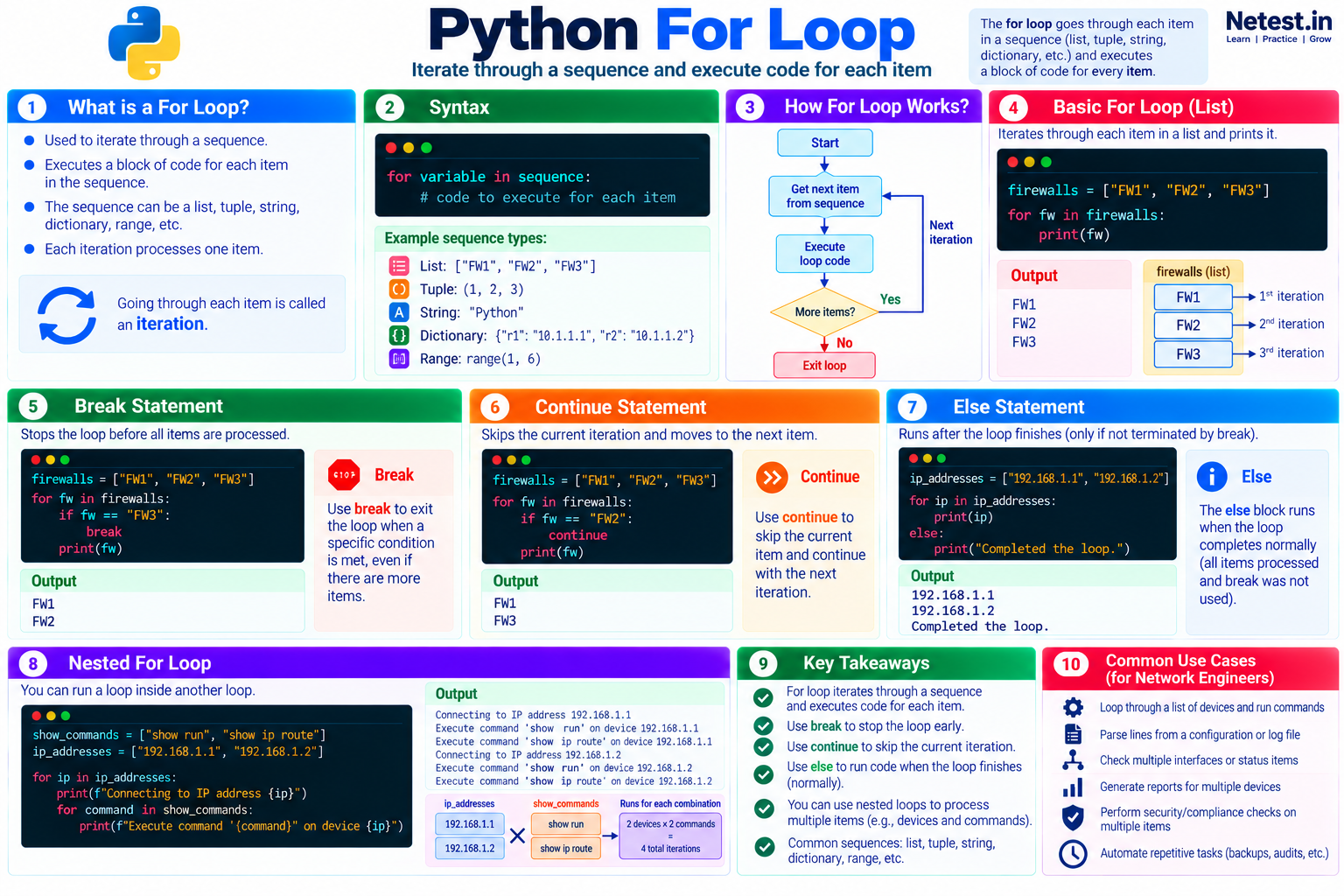
Use this infographic to review the loop flow, syntax, control statements, nested loops, and common network automation uses.
2. For Loop
Python supports two common loop types: while and for. A for loop is the natural choice when you want to process each item in a sequence. The sequence can be a string, list, tuple, dictionary, or another iterable.
Start with a list of firewall names:
Iterate through a device list
firewalls = ["FW1", "FW2", "FW3"]

for fw in firewalls:
    print(fw)
The code produces this output:
Output
FW1
FW2
FW3
The loop starts with for, followed by a new variable named fw. On each iteration, fw represents the next item in firewalls. The indented print() call therefore runs three times.
firewall, device, or ip_address are clearer than a generic name such as x.3. Break Statement
The break statement exits the nearest loop before all items have been processed. It is useful when a search has found its target or a condition makes further work unnecessary.
Stop before FW3 is printed
firewalls = ["FW1", "FW2", "FW3"]

for fw in firewalls:
    if fw == "FW3":
        break
    print(fw)
Output
FW1
FW2
The loop prints FW1 and FW2. When fw equals FW3, break exits the loop before the final print() call.
4. Continue Statement
The continue statement stops only the current iteration. Python skips the remaining statements in the loop body and moves to the next item.
Skip FW2
firewalls = ["FW1", "FW2", "FW3"]

for fw in firewalls:
    if fw == "FW2":
        continue
    print(fw)
Output
FW1
FW3
The iteration for FW2 reaches continue, so its print() call is skipped. The loop itself continues and processes FW3.
5. Else Statement
A for loop can include an else block. It runs when the sequence is exhausted and the loop finishes normally.
Confirm normal completion
ip_addresses = ["192.168.1.1", "192.168.1.2"]

for ip in ip_addresses:
    print(ip)
else:
    print("Completed the loop.")
Output
192.168.1.1
192.168.1.2
Completed the loop.
The final message appears because the loop processed both addresses without encountering break. If break exits the loop, the else block does not run. This behavior is useful when searching a sequence: the else block can report that no matching item was found.
6. Nested Loop
A nested loop is a loop inside another loop. The inner loop runs once for every iteration of the outer loop. In this example, every show command is paired with every IP address:
Pair devices with commands
show_commands = ["show run", "show ip route"]
ip_addresses = ["192.168.1.1", "192.168.1.2"]

for ip in ip_addresses:
    print("Connecting to IP address %s" % ip)
    for command in show_commands:
        print("Execute command '%s' on device with IP: %s" % (command, ip))
Output
Connecting to IP address 192.168.1.1
Execute command 'show run' on device with IP: 192.168.1.1
Execute command 'show ip route' on device with IP: 192.168.1.1
Connecting to IP address 192.168.1.2
Execute command 'show run' on device with IP: 192.168.1.2
Execute command 'show ip route' on device with IP: 192.168.1.2
The outer loop iterates over ip_addresses, and the inner loop iterates over show_commands. Two devices multiplied by two commands produce four command-and-device combinations.
7. Guided Practice
Task: Review Interface States
- Create
interfaces = ["up", "down", "administratively down", "up"]. - Use a
forloop to process every state. - Use
continueto skip"administratively down". - Increase a counter whenever the current state equals
"up". - Use loop
elseto print"Review complete".
Expected result: the script reports 2 active interfaces and prints Review complete after normal loop completion.
break when the first "down" state appears. Run the script again and observe that the loop else block is skipped.8. Conclusion
You learned how to use Python for loops:
- A
forloop iterates through a sequence and executes code for each item. breakstops the loop before it processes every item.continueskips the current iteration and moves to the next item.- A loop
elseblock runs after normal completion, but not afterbreak. - A nested
forloop runs one loop inside another.
These patterns let network automation scripts process device inventories, configuration lines, interfaces, commands, and validation results without repeating the same code by hand.
Python For Loop Frequently Asked Questions
What can a Python for loop iterate over?
A for loop can iterate over any iterable, including strings, lists, tuples, dictionaries, sets, range objects, and many file or API result objects.
What is the difference between break and continue in a for loop?
break exits the nearest loop immediately. continue skips the rest of the current iteration and moves to the next item.
When does the else block of a for loop run?
It runs when the sequence is exhausted and the loop finishes normally. It does not run when break exits the loop.
What is a nested for loop?
It is a for loop inside another loop. The inner loop completes for every item selected by the outer loop, so use nesting deliberately when every combination is required.