Python Assignment Operators
Assign values to variables and update existing values with concise arithmetic assignment operators.
Python Assignment Operators at a Glance
Assignment operators store values in variables. The basic = operator assigns a value, while compound operators combine an arithmetic operation with reassignment.
Assign
x = 4 gives the variable x its current value.
Update
x += 1 calculates a new value from the current value and stores it back in x.
Read clearly
Use a compound operator when the same variable appears on both sides of a simple arithmetic assignment.
In This Lesson
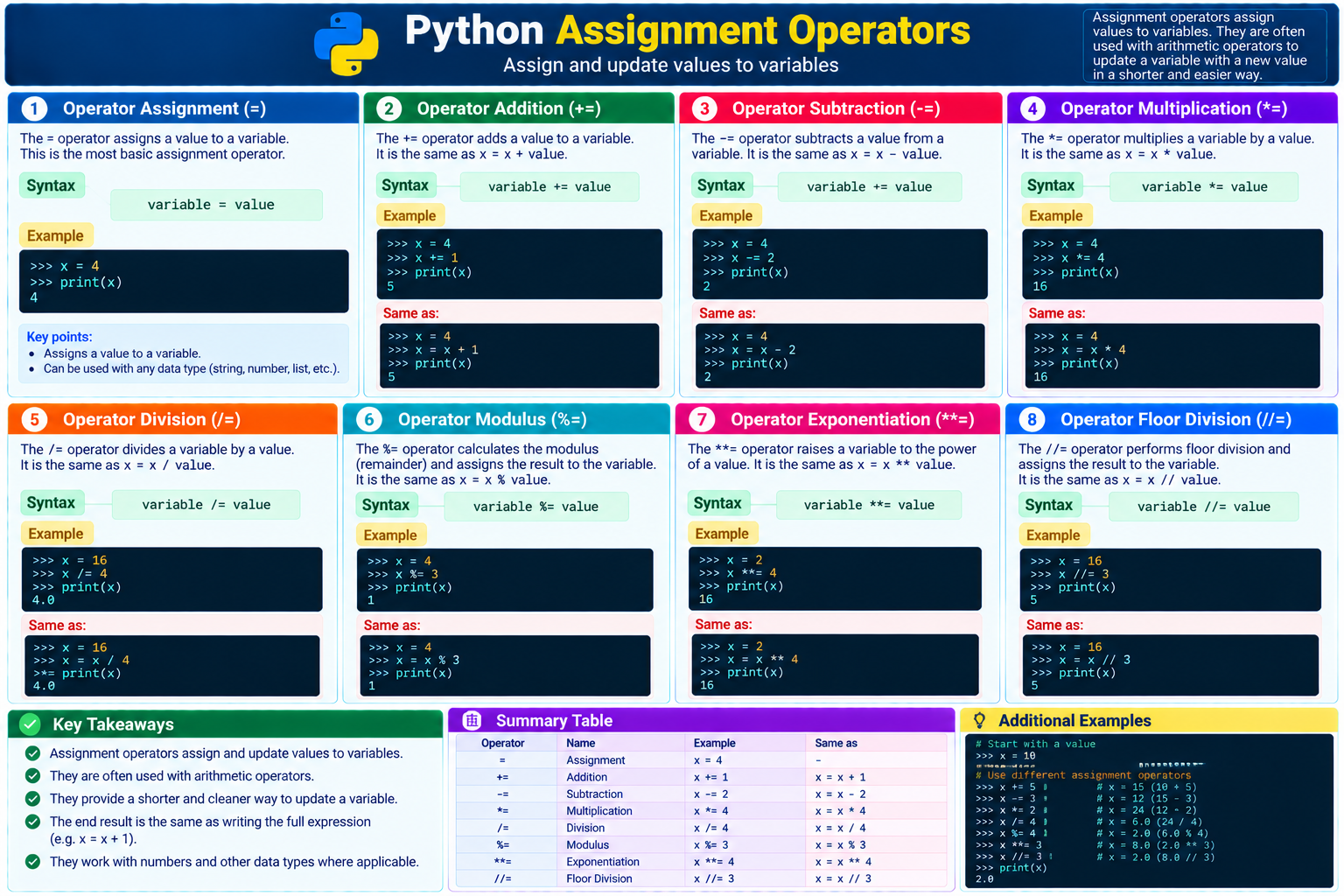
1. Assignment Operator Cheat Sheet
Use this visual reference to connect each operator with its syntax, a runnable example, and the equivalent full assignment.
2. Operator Assignment (=)
This is the most basic assignment operator. It stores the value on the right in the variable on the left:
Assign an integer
>>> x = 4
>>> print(x)
4
After the first line runs, the name x refers to the integer 4. The print() call confirms the stored value.
3. Operator Addition (+=)
Add a number to the current value and assign the result back to the same variable:
Compound assignment
>>> x = 4
>>> x += 1
>>> print(x)
5
Equivalent expression
>>> x = 4
>>> x = x + 1
>>> print(x)
5
The += form is shorter, but both examples produce the same integer result.
4. Operator Subtraction (-=)
Subtract a value from the current value and store the result:
Compound assignment
>>> x = 4
>>> x -= 2
>>> print(x)
2
Equivalent expression
>>> x = 4
>>> x = x - 2
>>> print(x)
2
5. Operator Multiplication (*=)
Multiply the current value by another value:
Compound assignment
>>> x = 4
>>> x *= 4
>>> print(x)
16
Equivalent expression
>>> x = 4
>>> x = x * 4
>>> print(x)
16
6. Operator Division (/=)
Divide the current value and assign the quotient:
Compound assignment
>>> x = 16
>>> x /= 4
>>> print(x)
4.0
Equivalent expression
>>> x = 16
>>> x = x / 4
>>> print(x)
4.04.0 rather than 4.7. Operator Modulus (%=)
Calculate the remainder after division and store it in the variable:
Compound assignment
>>> x = 4
>>> x %= 3
>>> print(x)
1
Equivalent expression
>>> x = 4
>>> x = x % 3
>>> print(x)
1
8. Operator Exponentiation (**=)
Raise the current value to a power and store the result:
Compound assignment
>>> x = 2
>>> x **= 4
>>> print(x)
16
Equivalent expression
>>> x = 2
>>> x = x ** 4
>>> print(x)
16
9. Operator Floor Division (//=)
Perform floor division and assign the rounded-down quotient:
Compound assignment
>>> x = 16
>>> x //= 3
>>> print(x)
5
Equivalent expression
>>> x = 16
>>> x = x // 3
>>> print(x)
5
10. Network Automation Example
A read-only validation script can update counters as it checks saved device results. Each counter starts at zero, and += records another outcome.
Count interface checks
interfaces_checked = 0
interfaces_up = 0

interfaces_checked += 1
interfaces_up += 1

interfaces_checked += 1

print("Checked:", interfaces_checked)
print("Up:", interfaces_up)
print("Down:", interfaces_checked - interfaces_up)
The expected output is Checked: 2, Up: 1, and Down: 1. The assignments update the running totals without repeating the variable names in longer expressions.
11. Guided Practice
Task 1: Update a failure counter
- Set
failed_checksto2. - Use
+=to add one failure. - Use
-=to remove one false alarm. - Print the final value.
Expected result: The final value is 2.
Task 2: Predict before running
- Set
portsto8. - Apply
ports *= 3. - Apply
ports //= 5. - Predict and then print the result.
Expected result: Multiplication produces 24; floor division then stores 4.
count += 1 before assigning count causes a NameError. Initialize the variable first.12. Conclusion
You have learned how Python assignment operators assign values to variables and combine reassignment with arithmetic. The compound forms are concise when a calculation updates the same variable.
- Use
=to assign an initial or replacement value. - Use
+=,-=,*=, and/=for common updates. - Use
%=,**=, and//=for remainder, power, and floor-division updates. - Initialize a variable before using a compound assignment operator.
Python Assignment Operators Frequently Asked Questions
What does an assignment operator do in Python?
The = operator stores a value in a variable. A compound assignment operator performs a calculation with the current value and stores the updated result.
Is x += 1 the same as x = x + 1?
For the integer examples in this lesson, yes. Both forms increase x by one. The compound form is shorter and makes the update intent clear.
Why does the division assignment operator return a decimal?
Python 3 regular division uses floating-point division. Therefore, x /= 4 stores 4.0 when x starts at 16.