Python Modules
Organize Python code across multiple files, import reusable functions and variables, and explore the built-in modules that make automation scripts easier to maintain.
Python Modules at a Glance
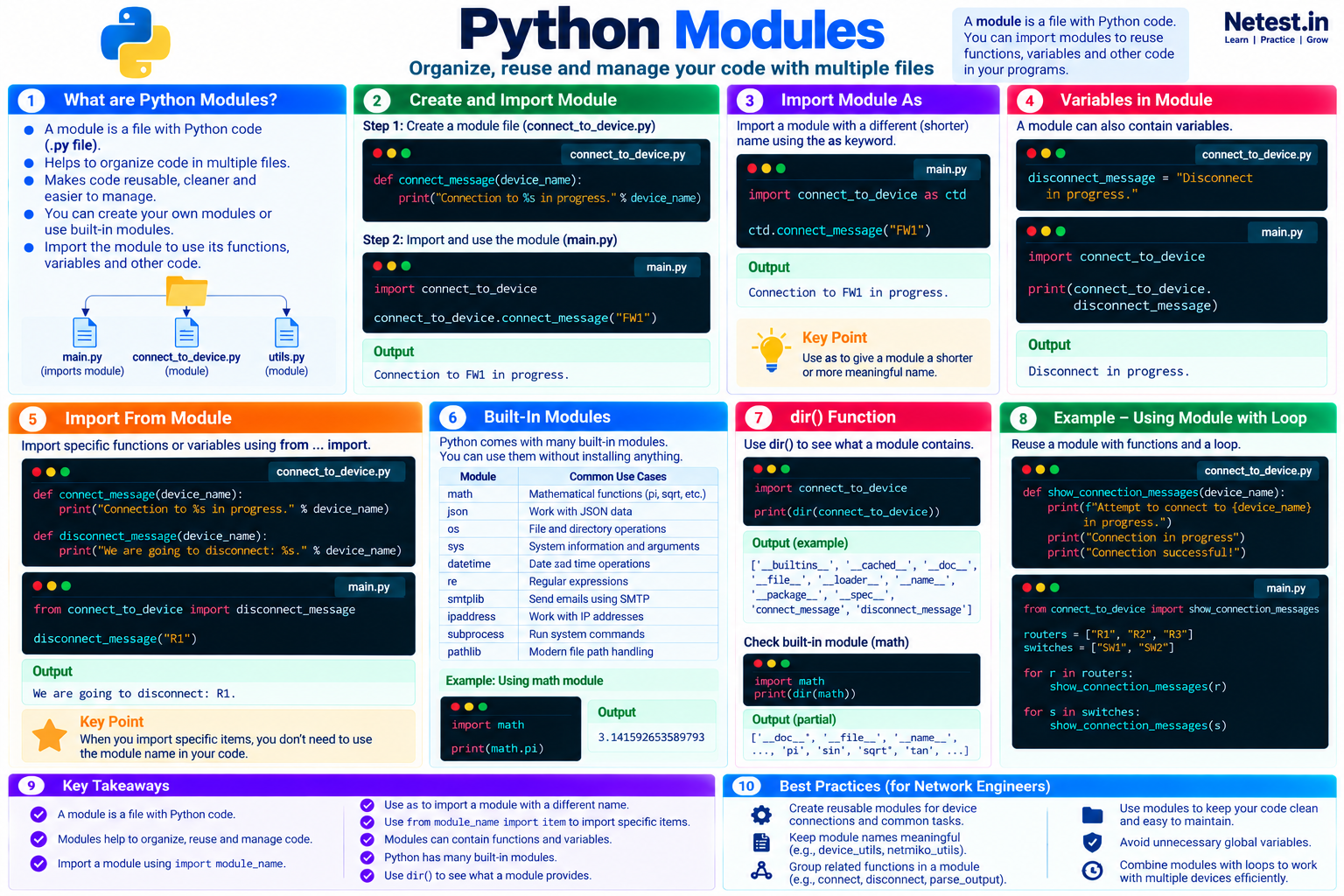
A module is a .py file containing Python code. Importing modules lets a program reuse functions, variables, and other definitions without keeping every task in one large file.
Organize
Separate connection helpers, parsers, validation, and reporting into focused files.
Reuse
Import the same tested function into several scripts instead of copying its code.
Discover
Use Python's standard library and inspect available module names with dir().
In This Lesson
1. Create and Import a Module
Create a module by saving Python code in a separate file. The example below keeps the reusable function in connect_to_device.py and calls it from main.py.
connect_to_device.py
def connect_message(device_name):
    print("Connection to %s in progress." % device_name)
main.py
import connect_to_device

connect_to_device.connect_message("FW1")
Output
Connection to FW1 in progress.The import statement uses the filename without the .py extension. Keep both files in the same project directory for this first example. The module name becomes a namespace, so the function is called as connect_to_device.connect_message().
2. Import a Module with an Alias
The as keyword gives a module a shorter or more meaningful local name. Use a clear alias and keep it consistent throughout the file.
main.py
import connect_to_device as ctd

ctd.connect_message("FW1")
Output
Connection to FW1 in progress.The alias changes only how this file refers to the imported module. It does not rename connect_to_device.py.
3. Variables in a Module
A module can contain variables as well as functions. Access an imported variable through the module namespace to show exactly where the value came from.
connect_to_device.py
disconnect_message = "Disconnect in progress."main.py
import connect_to_device

print(connect_to_device.disconnect_message)
Output
Disconnect in progress.4. Import Specific Names from a Module
You do not have to import the entire module namespace. The from ... import ... form brings selected functions or variables directly into the current file.
connect_to_device.py
def connect_message(device_name):
    print("Connection to %s in progress." % device_name)

def disconnect_message(device_name):
    print("We are going to disconnect: %s." % device_name)
main.py
from connect_to_device import disconnect_message

disconnect_message("R1")
Output
We are going to disconnect: R1.import connect_to_device makes the source of each name more obvious. Avoid wildcard imports because they can hide where names came from and overwrite existing names.5. Built-In Modules
Python includes a large standard library, so many common jobs do not require an external package. Examples include math for calculations, json for JSON data, os and pathlib for file-system work, sys for interpreter information, datetime for dates and times, re for regular expressions, smtplib for SMTP, ipaddress for IP networks, and subprocess for running system commands.
Use the math module
import math

print(math.pi)
Output
3.141592653589793Python can also list discoverable modules with help("modules"), although the result can be very long and may include third-party packages installed in the environment. Official documentation is usually easier to search.
6. Explore a Module with dir()
The dir() function returns the names available on an object. It is a quick way to see a module's functions, variables, constants, and Python-managed attributes.
Inspect a custom module
import connect_to_device

print(dir(connect_to_device))
Example output
['__builtins__', '__cached__', '__doc__', '__file__',
 '__loader__', '__name__', '__package__', '__spec__',
 'connect_message', 'disconnect_message']
Inspect a built-in module
import math

print(dir(math))
Partial output
['__doc__', '__file__', '__loader__', '__name__',
 '__package__', '__spec__', 'acos', 'ceil', 'cos',
 'factorial', 'floor', 'pi', 'sin', 'sqrt', 'tan']
Use dir() for quick exploration, then consult the module documentation to understand parameters, return values, exceptions, and examples.
7. Reuse a Module with a Loop
A focused module becomes more useful when a program applies the same tested behavior to multiple devices.
connect_to_device.py
def show_connection_messages(device_name):
    print(f"Attempt to connect to {device_name} in progress.")
    print("Connection in progress")
    print("Connection successful!")
main.py
from connect_to_device import show_connection_messages

routers = ["R1", "R2", "R3"]
switches = ["SW1", "SW2"]

for router in routers:
    show_connection_messages(router)

for switch in switches:
show_connection_messages(switch)8. Conclusion
Modules turn one large script into smaller files with clear responsibilities. They make functions and variables reusable, expose Python's standard library, and help network automation projects stay easier to test and maintain.
- A module is a file containing Python code.
- Use
import module_nameto keep names under a clear namespace. - Use
asto assign a sensible local alias. - Use
from module_name import itemwhen a direct name improves readability. - Use built-in modules before rebuilding common functionality.
- Use
dir()for quick discovery and documentation for complete guidance.
Python Modules Frequently Asked Questions
What is a Python module?
A Python module is a file containing Python code that another program can import and reuse. A module may define functions, variables, classes, and executable statements.
Do I include .py when importing a module?
No. Import a local module by its filename without the .py extension, such as import connect_to_device.
What is the difference between import and from import?
import connect_to_device keeps names under the module namespace. from connect_to_device import disconnect_message brings the selected function directly into the current namespace.
What does dir() show for a module?
dir() returns the names available on the module, including functions, variables, constants, and Python-managed attributes. It shows names, not full usage documentation.