What Is Wi-Fi DevOps? A Practical Guide to Running Wireless Like Code
Bring version control, guarded automation, repeatable testing and real user-experience data to the network everyone uses but few teams fully automate.
In This Lesson
Understand the Wi-Fi DevOps operating model, compare it with manual WLAN management, see the pipeline in code, and build a low-risk adoption plan.
Quick Learning Map
Think of Wi-Fi DevOps as one closed loop with three operational decisions.
Define and review
Express WLAN intent as YAML or JSON, store it in Git and require a peer-reviewed change.
Validate and release
Lint, plan and test the change before sending it to a canary site and then a wider ring.
Measure and improve
Use client tests, telemetry, SLOs and drift checks to confirm the result or trigger rollback.
Wi-Fi DevOps at a Glance
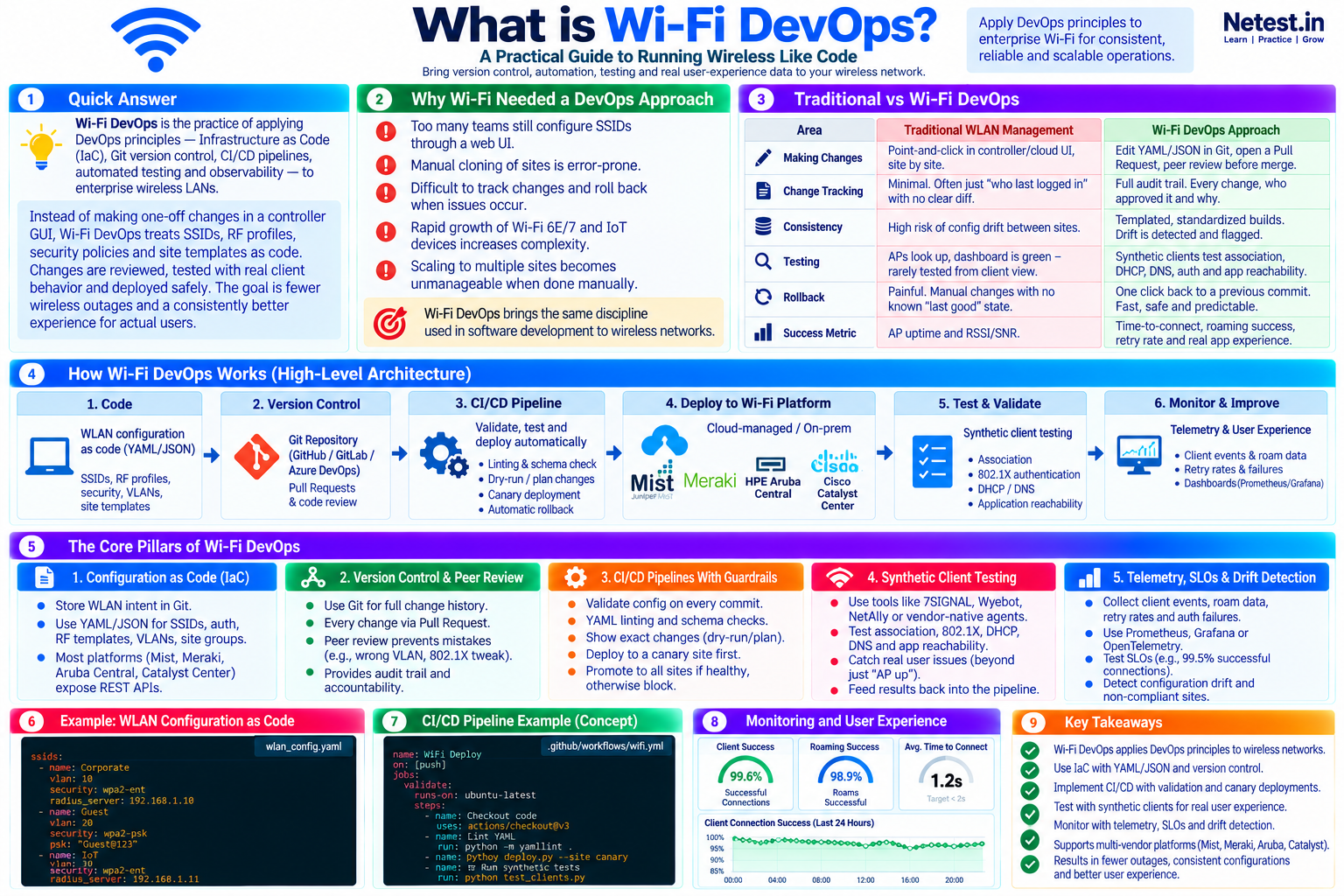
Wi-Fi DevOps applies infrastructure as code, Git version control, CI/CD pipelines, automated testing and observability to enterprise wireless LANs. SSIDs, RF profiles, security policies and site templates become reviewed, testable and reversible artifacts instead of one-off controller changes.
Why Wi-Fi Needs a DevOps Approach
Wireless is often still managed site by site through a graphical interface. That can work for a small environment, but the risk grows quickly when the same SSID, authentication or RF change must reach dozens of locations. Manual cloning creates drift, emergency edits lose context, and rollback becomes guesswork.
Manual work does not scale
Repeating the same controller clicks across 40, 80 or 150 sites invites omissions and inconsistent settings.
Wireless complexity is growing
Wi-Fi 6E and Wi-Fi 7, IoT devices, identity policy and multi-site operations add more dependencies to every change.
Controller health is incomplete
An access point can be online while clients fail association, authentication, DHCP, DNS, roaming or application access.
Wi-Fi DevOps brings the discipline used to ship software safely into wireless operations: a declared source of truth, small reviewed changes, automated guardrails, staged rollout, measurable outcomes and a known path back.
Traditional WLAN Management vs Wi-Fi DevOps
The difference is not simply GUI versus API. It is an operating model built around evidence, consistency and recovery.
| Area | Traditional WLAN management | Wi-Fi DevOps approach |
|---|---|---|
| Making changes | Point-and-click in a controller or cloud UI, often site by site. | Edit YAML or JSON in Git, open a pull request and require review before merge. |
| Change tracking | Limited history, sometimes only the last login or a high-level audit event. | A full diff, author, approval and reason for every controlled change. |
| Consistency | Configuration drift accumulates between sites. | Reusable templates define the standard and scheduled checks flag drift. |
| Testing | Success may mean only that access points are online and dashboards are green. | Synthetic clients test association, 802.1X, DHCP, DNS, roaming and application reachability. |
| Rollback | Engineers manually reverse settings without a dependable last-known-good state. | Teams restore a previous Git version and run the same guarded deployment path. |
| Success metric | AP uptime, RSSI and SNR dominate the view. | Time to connect, roaming success, retry rate and real application experience define success. |
The Five Core Pillars of Wi-Fi DevOps
No single product creates Wi-Fi DevOps. The value comes from practices that reinforce one another.
1. Configuration as Code
Keep WLAN intent in a Git repository with reviewed change history. Model SSIDs, authentication, RF templates, VLANs, rate limits and site groupings in readable YAML or JSON, then translate that intent through a secured wireless platform API.
Control: keep secrets out of configuration files and inject them at runtime from an approved secrets manager.
2. Version Control and Peer Review
Make every production edit a pull request. The diff shows exactly what will change, while a second engineer can catch a wrong VLAN, an unsafe authentication edit or a simple typo before deployment.
Control: protect the main branch, require approvals and connect each change to a ticket or operational reason.
3. CI/CD Pipelines with Guardrails
Run formatting, YAML linting, schema validation and a dry-run or plan on every change. Deploy to one low-risk canary site first, observe it, and promote only when defined health checks pass.
Control: define stop conditions and test rollback before using the pipeline across a large site group.
4. Synthetic Client Testing
Use wireless sensors or vendor test agents as real clients. They should associate, complete 802.1X when applicable, receive DHCP, resolve DNS, reach an application and measure each stage.
Control: treat a successful API response as delivery evidence, not proof of user success.
5. Telemetry, SLOs and Drift Detection
Collect client events, roaming data, retries and authentication failures. Track service level objectives such as connection success and time to connect, then compare live settings with Git on a schedule.
Control: investigate out-of-band changes and either codify the approved state or return the platform to the declared standard.
How Wi-Fi DevOps Works
A practical delivery loop moves intent through six controlled stages and feeds production evidence back into the next change.
1. Code
Describe SSIDs, security, VLANs, RF profiles and site templates in a structured configuration format.
2. Version control
Commit to Git, open a pull request and capture the diff, discussion and approval.
3. Validate
Run linting, schema checks, policy checks and a plan that exposes the intended change.
4. Deploy
Call the cloud-managed or on-premises platform API, beginning with a canary site.
5. Test
Verify association, authentication, DHCP, DNS, roaming and application reachability as a client.
6. Observe
Watch telemetry and SLOs, detect drift, promote healthy changes or restore the last-known-good state.
Configuration and Pipeline Examples
These conceptual examples show how WLAN intent and deployment checks can become reviewable text. Adapt field names, authentication models and API calls to your platform.
wlan_config.yaml — declare wireless intent
Purpose: keep the desired SSID, VLAN and authentication policy readable and diffable without placing secrets in the repository.
ssids:
  - name: Corporate
    vlan: 10
    security: wpa2-enterprise
    radius_servers:
      - 192.168.1.10
  - name: Guest
    vlan: 20
    security: wpa2-personal
    secret_ref: wifi/guest-psk
  - name: IoT
    vlan: 30
    security: wpa2-enterprise
    radius_servers:
      - 192.168.1.11
Precaution: secret_ref should identify a protected runtime secret. Never commit RADIUS shared secrets, pre-shared keys, private keys or API tokens in plain text.
.github/workflows/wifi.yml — validate before deployment
Purpose: run predictable checks on pull requests, show a canary plan, and execute client validation after an approved deployment.
name: Wi-Fi validation
on:
  pull_request:
  push:
    branches: [main]

jobs:
  validate:
    runs-on: ubuntu-latest
    steps:
      - uses: actions/checkout@v4
      - run: yamllint .
      - run: python scripts/validate_wlan.py
      - run: python scripts/plan.py --site canary
      - run: python scripts/test_clients.py --site canary
Precaution: separate validation from production deployment, require environment approvals, use least-privilege credentials and stop promotion when a canary or client test fails.
Popular Tools for Wi-Fi DevOps
Start with tools your infrastructure team already operates. The best stack is the smallest one that provides source control, safe delivery and trustworthy feedback.
| Tool category | Where it fits | Practical note |
|---|---|---|
| GitHub, GitLab, Azure DevOps or Bitbucket | Source of truth and change review | Use protected branches, pull requests, approvals and a clear commit history. |
| Terraform or Ansible | Declarative resources and API-driven configuration | Use the provider or module coverage that matches the exact WLAN platform and release. |
| Python and HTTP libraries | Vendor-specific checks, reports and drift detection | Keep scripts small, idempotent where possible and explicit about failure. |
| GitHub Actions, GitLab CI or Jenkins | Validation and staged deployment | Store credentials securely and gate production environments with approvals. |
| 7SIGNAL, Wyebot, NetAlly or vendor test agents | Client-side synthetic testing | Place sensors where important user journeys and RF conditions can be measured. |
| Prometheus, Grafana, OpenTelemetry or platform APIs | Telemetry, SLO dashboards and alerting | Prefer client-experience indicators that lead to a clear operational action. |
How to Get Started Without Boiling the Ocean
A small, boring and reversible workflow earns more trust than a global automation project with too many moving parts. Use the network automation roadmap to place this first WLAN workflow in a broader adoption plan.
1. Export a baseline
Pull current SSID, authentication and site configuration through the platform API and commit a known-good snapshot.
2. Standardize one template
Choose a common site type, such as a small branch, and remove unnecessary configuration differences.
3. Automate one low-risk change
Use code for a limited Guest SSID change and prove both deployment and rollback.
4. Add a canary and client test
Deploy to one representative site and require a synthetic user journey to pass before promotion.
5. Detect drift
Schedule a live-versus-Git comparison and review every console edit until ownership is clear.
6. Grow gradually
Expand to another site group only after the earlier workflow is predictable, documented and trusted.
Common Wi-Fi DevOps Pitfalls to Avoid
- Ignoring RF physics: version control cannot fix poor access-point placement, co-channel interference or an inadequate RF design.
- Trusting HTTP 200 as success: controller acceptance does not prove that a client can authenticate, obtain an address, roam or reach an application.
- Over-engineering too early: a small script that enforces one standard can be more valuable than a framework nobody feels comfortable changing.
- Committing secrets: keep pre-shared keys, RADIUS secrets and API credentials in a secrets manager and inject them only at runtime.
- Forgetting the people: teach Git and review habits in pairs, document the recovery path and make failures safe to investigate.
Final Take: Make One Change Boring and Repeatable
Wi-Fi is often the network users notice first, yet it is still commonly operated with less change discipline than servers or applications. Wi-Fi DevOps closes that gap by versioning intent, testing from the client perspective and releasing in small, reversible stages.
Start with one Guest SSID, one canary site and one synthetic test. Run that loop until the evidence, approvals and rollback feel routine. Then expand the same operating model to another policy, another site group and eventually the wider WLAN.
Wi-Fi DevOps Frequently Asked Questions
What is Wi-Fi DevOps in simple terms?
Wi-Fi DevOps manages wireless configuration like software: keep WLAN intent in Git, review and test changes, deploy in small stages, measure the client experience and retain a dependable rollback path.
Is Wi-Fi DevOps the same as NetDevOps?
Wi-Fi DevOps is a focused part of NetDevOps. It uses the same automation and change-control ideas but adds wireless-specific concerns such as RF conditions, association, 802.1X, roaming, DHCP, DNS and client experience.
Do I need to know how to code to start Wi-Fi DevOps?
No. Basic Git and readable YAML or JSON are enough for a useful first project. Teams can add Python or platform SDKs later when a real workflow requires them.
Which wireless platforms can support Wi-Fi DevOps?
Any platform with stable, documented APIs and enough configuration and telemetry coverage can participate. Common enterprise starting points include cloud-managed and controller-based platforms from Juniper Mist, Cisco Meraki, HPE Aruba and Cisco.
Will Wi-Fi DevOps replace wireless engineers?
No. It reduces repetitive clicking and makes changes more consistent, but engineers are still needed for RF design, capacity, roaming, authentication, troubleshooting and risk decisions.