Wi-Fi 6 vs Wi-Fi 6E vs Wi-Fi 7
Wi-Fi 6 made wireless networks work better with many devices. Wi-Fi 6E added the cleaner 6 GHz band. Wi-Fi 7 keeps those bands and adds wider channels, Multi-Link Operation and more efficient data transmission for higher capacity and lower delay.
Wi-Fi 6 vs Wi-Fi 6E vs Wi-Fi 7: Quick Answer
Better efficiency
Uses 2.4 and 5 GHz. A strong choice for normal homes, offices and many connected devices.
Adds clean spectrum
Uses Wi-Fi 6 technology and adds 6 GHz for compatible devices, reducing competition with older clients.
More speed and flexibility
Adds 320 MHz channels, 4096-QAM and Multi-Link Operation on compatible equipment.
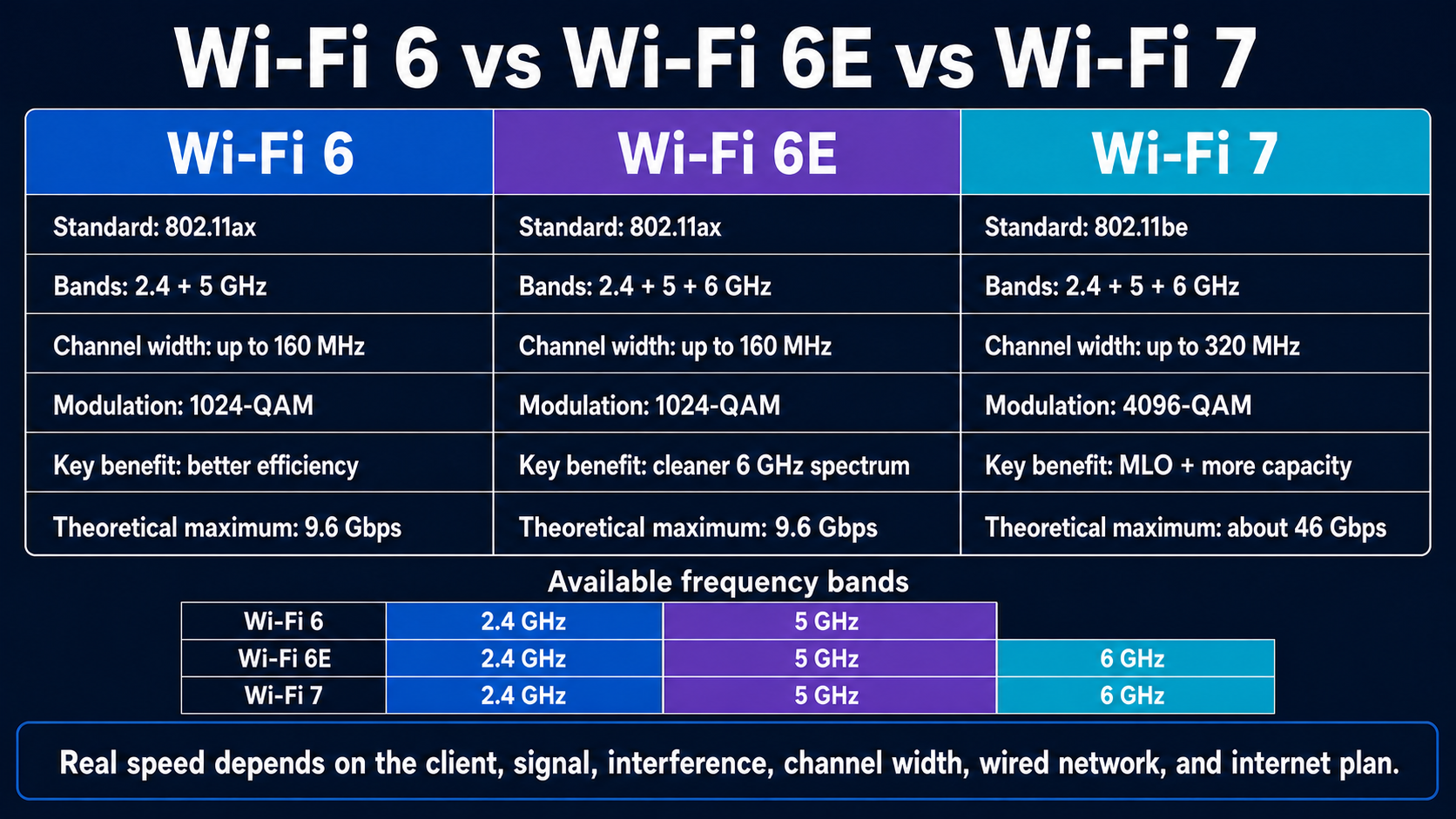
Wi-Fi 6, Wi-Fi 6E and Wi-Fi 7 Comparison Table
| Feature | Wi-Fi 6 | Wi-Fi 6E | Wi-Fi 7 |
|---|---|---|---|
| IEEE technology | 802.11ax | 802.11ax extended to 6 GHz | 802.11be |
| Frequency bands | 2.4 GHz and 5 GHz | 2.4, 5 and 6 GHz on tri-band equipment | 2.4, 5 and 6 GHz |
| Maximum channel width | 160 MHz | 160 MHz | 320 MHz in supported 6 GHz spectrum |
| Highest modulation | 1024-QAM | 1024-QAM | 4096-QAM |
| Multi-Link Operation | No | No | Yes, on compatible APs and clients |
| Theoretical maximum data rate | Up to about 9.6 Gbps | Up to about 9.6 Gbps | Up to about 46 Gbps |
| Main improvement | Efficiency and capacity in busy networks | More clean channels in 6 GHz | More capacity, wider channels and link coordination |
| Best fit | Everyday homes and offices | 6 GHz clients needing cleaner spectrum | New multi-gigabit, dense or latency-sensitive networks |
Wi-Fi 6 Explained
Wi-Fi 6 is based on IEEE 802.11ax. It works in the familiar 2.4 GHz and 5 GHz bands. Its biggest improvement is not simply a higher top speed; it uses airtime more efficiently when many devices share one wireless network.
OFDMA
Splits a channel into smaller resource units so an access point can serve multiple devices more efficiently.
MU-MIMO
Allows compatible access points to communicate with several devices in the same time period.
Target Wake Time
Helps supported devices schedule activity and save battery instead of waking for every transmission.
Wi-Fi 6 is a good upgrade from older Wi-Fi 5 equipment when a home or office has many phones, laptops, TVs, cameras and smart devices. The 2.4 GHz band usually gives better reach, while 5 GHz offers more capacity and less interference in many environments.
Wi-Fi 6E Explained
The letter E means Extended. Wi-Fi 6E uses the same 802.11ax features as Wi-Fi 6 but extends them into the 6 GHz band. Only 6E and newer clients use that band, so old Wi-Fi devices do not consume its airtime.
More spectrum can mean less congestion, more non-overlapping channels and a better chance of using 80 MHz or 160 MHz channels. However, 6 GHz signals weaken faster through walls than lower frequencies, and both the router and client need 6 GHz support.
WPA3 security is required for 6 GHz operation. Available 6 GHz spectrum, permitted power levels and channel choices vary by country, so products and results differ between regions.
Wi-Fi 7 Explained
Wi-Fi 7 is based on IEEE 802.11be and is also called Extremely High Throughput. It keeps the efficiency ideas from Wi-Fi 6 and adds new ways to use spectrum.
320 MHz channels
A supported 6 GHz channel can be twice as wide as the 160 MHz maximum used by Wi-Fi 6 and 6E.
Multi-Link Operation
MLO allows compatible devices to coordinate multiple links, which can improve throughput, reliability or latency.
4096-QAM
Can carry more information per symbol than 1024-QAM when the signal is very strong and clean.
Channel puncturing
Lets a transmission use the clean portions of a wide channel instead of abandoning the whole channel because one part is busy.
Multi-RU support
Can allocate multiple resource units to a device for more flexible use of channel capacity.
Better responsiveness
More link and spectrum options can help games, calls, XR and other delay-sensitive traffic.
Wi-Fi 7 does not make every connection four times faster. Its largest gains need a Wi-Fi 7 router, a Wi-Fi 7 client, clean spectrum, wide channels, strong signals and a fast wired network behind the access point.
Wi-Fi 6 vs Wi-Fi 6E vs Wi-Fi 7 Speed and Latency
Wi-Fi 6 and Wi-Fi 6E share the same standard-level maximum. Wi-Fi 6E can still feel faster because the 6 GHz band often has fewer competing networks and no legacy clients. Wi-Fi 7 raises the theoretical ceiling with wider channels, denser modulation and multiple coordinated links.
| Question | Simple answer |
|---|---|
| Which has the highest possible speed? | Wi-Fi 7, when both ends support its advanced features. |
| Which usually has the cleanest spectrum? | Wi-Fi 6E or Wi-Fi 7 on 6 GHz, depending on local usage. |
| Which has the best range? | No generation automatically wins. A 2.4 GHz link usually reaches farther than 5 or 6 GHz. |
| Which can offer the lowest latency? | Wi-Fi 7 has the most tools, especially MLO, but configuration and congestion decide actual results. |
| Will faster Wi-Fi improve a slow internet plan? | No. Wi-Fi cannot make the provider connection faster than the service purchased. |
Latency is an end-to-end measurement. The wireless hop is only one part. Internet routing, the remote server, packet loss, buffers and the application can all add delay.
Should You Upgrade to Wi-Fi 7?
Keep Wi-Fi 6 when…
Your current network is stable, most clients use Wi-Fi 5 or 6, internet speed is modest, and you mainly browse, work and stream video.
Choose Wi-Fi 6E when…
You own 6E devices, need clean 6 GHz channels and can buy good equipment at a lower price than Wi-Fi 7.
Choose Wi-Fi 7 when…
You have compatible clients, multi-gig internet or local storage, crowded airspace, demanding games or XR, or want a longer upgrade cycle.
- Check client support. A new router cannot give Wi-Fi 7 features to an older phone or laptop.
- Check wired ports. Gigabit Ethernet can limit a wireless link that is capable of more than 1 Gbps.
- Plan access point placement. One expensive router cannot overcome distant rooms, thick walls or poor placement.
- Check regional 6 GHz rules. Available channels and power levels differ by country.
- Update security and firmware. Use WPA3 where appropriate, strong administrator credentials and supported software.
Wi-Fi 6E vs Wi-Fi 7 for Business
Wi-Fi 6E is useful when an organization wants to move newer laptops and collaboration devices into cleaner 6 GHz spectrum. Wi-Fi 7 can add more capacity and resiliency for high-density offices, healthcare, education, warehouses, design work, video production and low-latency applications.
An enterprise upgrade is more than changing access points. Teams should review controller and switch support, multigigabit Ethernet, PoE requirements, cabling, site surveys, RF design, 6 GHz client readiness, authentication, roaming, monitoring and internet capacity.
Wi-Fi 6, Wi-Fi 6E and Wi-Fi 7 FAQs
What is the main difference between Wi-Fi 6, Wi-Fi 6E and Wi-Fi 7?
Wi-Fi 6 uses 2.4 and 5 GHz. Wi-Fi 6E extends the same technology into 6 GHz. Wi-Fi 7 uses all three bands and adds MLO, 320 MHz channels, 4096-QAM and other improvements.
Is Wi-Fi 6E faster than Wi-Fi 6?
Their theoretical maximum is similar, but Wi-Fi 6E can perform better when 6 GHz has less congestion. Both the access point and client must support the band.
Which is better, Wi-Fi 6E or Wi-Fi 7?
Wi-Fi 7 has more advanced capabilities. Wi-Fi 6E remains a good value when clean 6 GHz access is the main goal and Wi-Fi 7 clients are limited.
Does Wi-Fi 7 have better range?
Not automatically. Frequency, permitted power, antennas, walls, placement and client design control range. The lower 2.4 GHz band normally reaches farther.
Do old devices work with Wi-Fi 7?
Normally yes on compatible 2.4 and 5 GHz radios. Older clients operate using their own supported generation and cannot use Wi-Fi 7-only features.
Why is 6 GHz useful?
It adds more channels and keeps legacy devices off that band, which can reduce contention. Its effective range is usually shorter, and availability varies by region.
Does Wi-Fi 7 reduce latency?
It can improve latency and reliability through MLO and better spectrum use. It cannot guarantee low end-to-end latency when the internet, server or application is slow.
Is WPA3 required for Wi-Fi 6E?
WPA3 is required for secured 6 GHz Wi-Fi operation. Older WPA2-only devices must use compatible 2.4 or 5 GHz networks.