Configure Cisco Catalyst 9800 WLC From Scratch
Build the wired and controller foundation first: VLANs, trunks, WMI, secure administration, routing, regulatory country, DNS and accurate time.
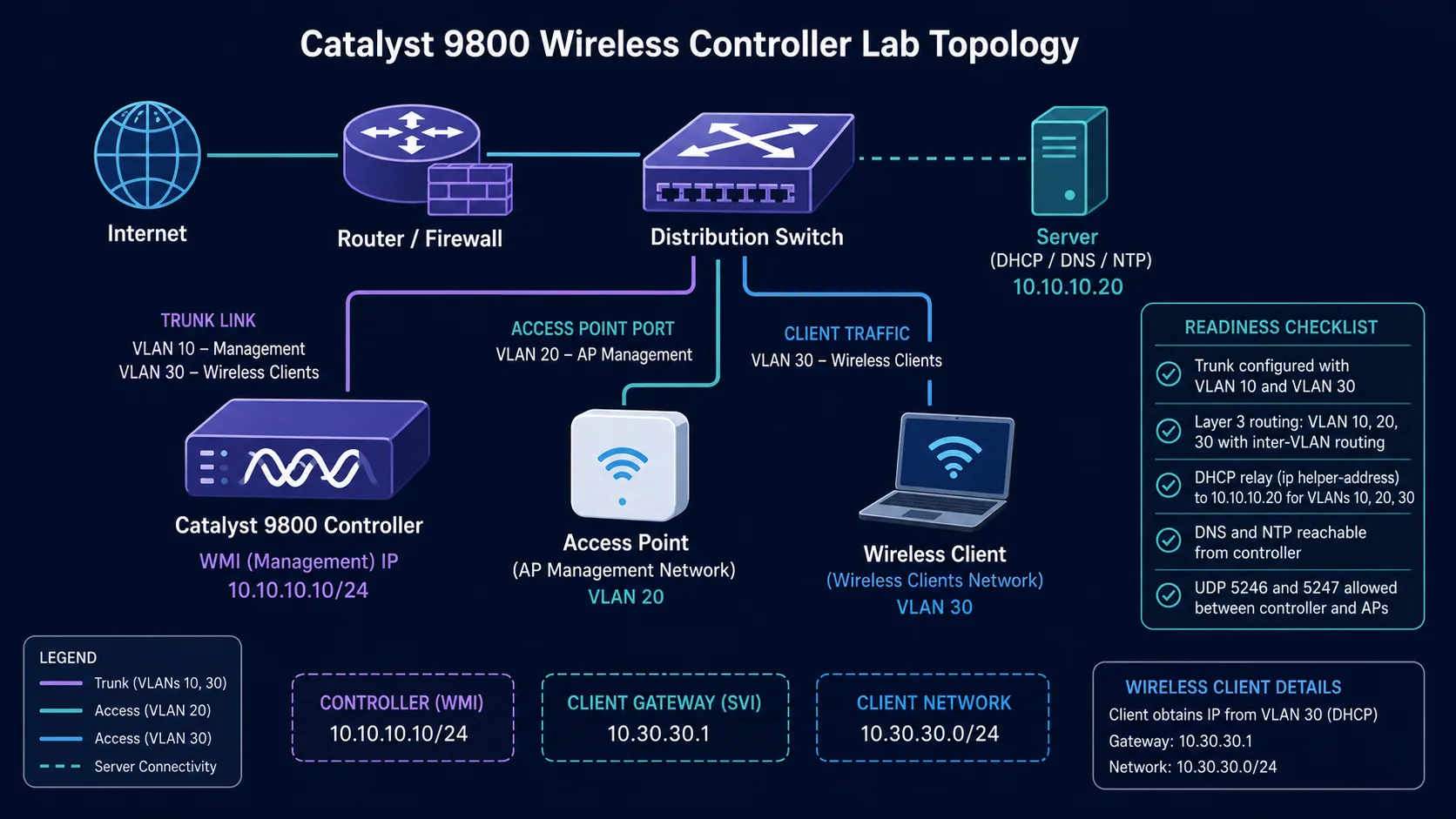
Catalyst 9800 Configuration Series
Build the controller in a practical order: architecture, base setup, AP onboarding, WLAN policy, branch security, and troubleshooting.
In This Lesson
Build the controller foundation in a safe order, from switch connectivity to management services. Each stage includes a check so later wireless work starts from a known-good base.
Workflow: Prepare the network → Verify dependencies
Keep this three-step view in mind as you work through the detailed lesson.
Prepare the network
Create the required VLANs, trunk, and management reachability.
Secure management
Configure administrative access before exposing the controller to normal operations.
Verify dependencies
Confirm country, time, DNS, routing, and the wireless management interface.
Configure Cisco Catalyst 9800 WLC From Scratch Overview
Use this summary to establish the big picture before moving into the detailed explanations, commands, and checks.
Core focus
Build the controller foundation in a safe order, from switch connectivity to management services.
Key connection
Prepare the network → Secure management → Verify dependencies
Practical outcome
Each stage includes a check so later wireless work starts from a known-good base.
Lab addressing
| Component | VLAN | Address |
|---|---|---|
| WLC management | 10 | 10.10.10.10/24 |
| AP management | 20 | DHCP |
| Wireless clients | 30 | 10.30.30.0/24 |
| Client gateway | 30 | 10.30.30.1 |
| DHCP/DNS/NTP server | 10 | 10.10.10.20 |
1. Configure switch VLANs and ports
configure terminal
vlan 10
 name WLC-MANAGEMENT
vlan 20
 name AP-MANAGEMENT
vlan 30
 name WIFI-CLIENTS

interface TenGigabitEthernet1/0/1
 switchport mode trunk
 switchport trunk allowed vlan 10,30
 spanning-tree portfast trunk
 no shutdown

interface GigabitEthernet1/0/10
 switchport mode access
 switchport access vlan 20
 spanning-tree portfast
 no shutdown
Use the real interface names from show interfaces status. A local-mode AP usually uses an access port; a FlexConnect AP with local switching usually needs a trunk.
2. Configure secure controller access
configure terminal
hostname C9800-WLC
username admin privilege 15 secret Use-A-Strong-Admin-Password
ip domain name netest.local
crypto key generate rsa modulus 2048
ip ssh version 2
ip http authentication local
ip http secure-server
aaa new-model
aaa authentication login default local
aaa authorization exec default local
line vty 0 15
 login authentication default
 transport input ssh
Replace the sample password. In production, restrict SSH and HTTPS to trusted management networks.
3. Create the WMI and trunk
vlan 10
 name WLC-MANAGEMENT
vlan 30
 name WIFI-CLIENTS

interface Vlan10
 description WIRELESS-MANAGEMENT
 ip address 10.10.10.10 255.255.255.0
 no shutdown
wireless management interface Vlan10

interface TenGigabitEthernet0/0/0
 switchport mode trunk
 switchport trunk allowed vlan 10,30
 no shutdown
ip route 0.0.0.0 0.0.0.0 10.10.10.1show ip interface brief and show interfaces status.4. Set country, NTP and DNS
wireless country IN
ntp server 10.10.10.20
ip name-server 10.10.10.20
end
write memory

show wireless country configured
show clock
show ntp associations
show wireless management interface
The country controls legal radio channels and power. Correct time is also essential for certificates, AP join and 802.1X authentication.
Practical Deployment Notes
A controller installation is easier to troubleshoot when each dependency is confirmed in order. Start with management reachability and time synchronization before creating wireless policy. If the controller clock is wrong, certificates, logs and authentication failures can all appear more confusing than they really are.
Keep the first wireless test deliberately small: one AP, one test SSID and one client. Confirm that the AP joins, the WLAN is enabled, the policy is mapped, DHCP responds and the client can reach its intended gateway. Only after that path works should you add guest segmentation, high availability or production RF changes.
When a step fails, record the exact command, response and device state. A short change log is much more useful than repeating the entire setup from memory.
Implementation Checklist
Before connecting production APs, save the controller configuration and confirm that the management interface, gateway, DNS and NTP values are correct. Confirm the software release and licensing state as well. A clean baseline gives the team something useful to compare when a later wireless change behaves unexpectedly.
For the first test, use a known switchport, one AP and a test client whose expected VLAN and DHCP scope are already documented. Verify the controller dashboard, AP join state, WLAN policy, client address and gateway reachability. Only then widen the scope. This order keeps a basic connectivity problem from being mistaken for a radio or policy problem.
Configure Cisco Catalyst 9800 WLC From Scratch Frequently Asked Questions
Why is the WMI required?
It is the controller's in-band address for CAPWAP, administration and network services including AAA, SNMP and syslog.
Does AP VLAN 20 need to exist on the controller?
Not necessarily. If the AP can route from VLAN 20 to the WMI, the AP management VLAN does not need to be present on the WLC trunk.