Catalyst 9800 WLAN, Policy Profile and Policy Tag
Create the NETEST-CORP SSID, place its clients in VLAN 30, deliver it to an AP and verify authentication, DHCP and routing.
Catalyst 9800 Configuration Series
Build the controller in a practical order: architecture, base setup, AP onboarding, WLAN policy, branch security, and troubleshooting.
In This Lesson
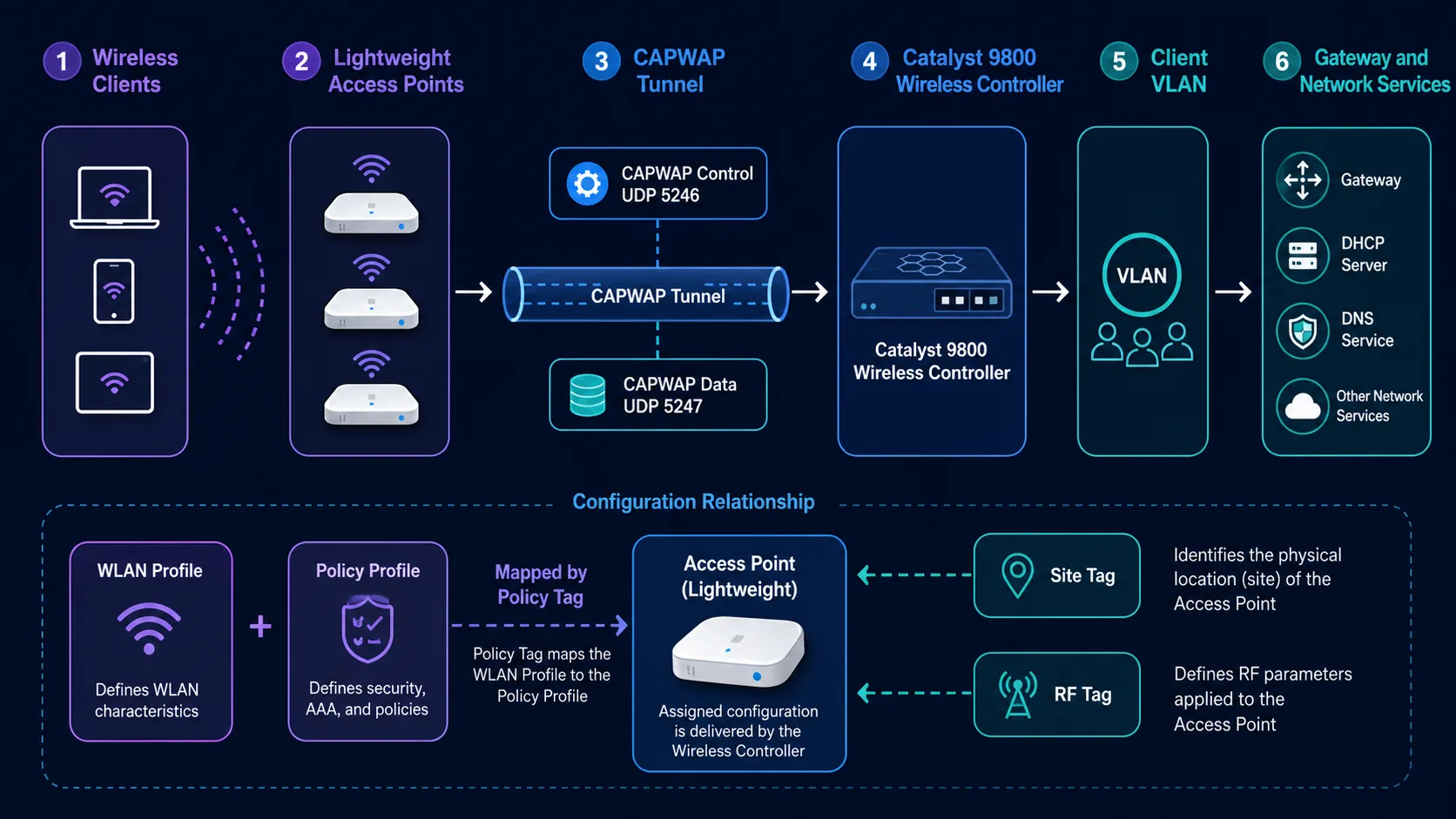
Turn an SSID into a usable service by joining the WLAN, policy profile, and policy tag correctly. You will configure the chain and prove it works from AP advertisement to client DHCP.
Workflow: Create the WLAN → Assign and test
Keep this three-step view in mind as you work through the detailed lesson.
Create the WLAN
Define the SSID, WLAN ID, status, and Layer 2 security.
Attach client policy
Map the WLAN to a policy profile that supplies VLAN and forwarding behavior.
Assign and test
Apply the policy tag to the AP, connect a client, and verify DHCP and access.
Catalyst 9800 WLAN, Policy Profile and Policy Tag Overview
Use this summary to establish the big picture before moving into the detailed explanations, commands, and checks.
Core focus
Turn an SSID into a usable service by joining the WLAN, policy profile, and policy tag correctly.
Key connection
Create the WLAN → Attach client policy → Assign and test
Practical outcome
You will configure the chain and prove it works from AP advertisement to client DHCP.
The object chain
NETEST-CORP
WLAN ID 10, SSID NETEST-CORP, WPA2-PSK and AES.
NETEST-CORP-POLICY
Central switching, association and DHCP; client VLAN 30.
NETEST-POLICY-TAG
Maps the WLAN profile to the policy profile and is assigned to the AP.
1. Create the WLAN profile
configure terminal
wlan NETEST-CORP 10 NETEST-CORP
 security wpa wpa2 ciphers aes
 security wpa psk set-key ascii 0 Replace-With-A-Strong-PSK
 no security wpa akm dot1x
 security wpa akm psk
 no shutdown
Set the PSK before enabling the PSK AKM. Use a unique 8-63 character ASCII key or a 64-character hexadecimal key; never deploy the sample text as a production secret.
2. Create and map the policy
wireless profile policy NETEST-CORP-POLICY
 vlan 30
 central switching
 central association
 central dhcp
 no shutdown
 exit

wireless tag policy NETEST-POLICY-TAG
 wlan NETEST-CORP policy NETEST-CORP-POLICY
 exit
end
write memory3. Assign the policy tag to the AP
show ap summary
configure terminal
ap aaaa.bbbb.cccc
 policy-tag NETEST-POLICY-TAG
end

show ap tag summary
show ap name AP-FLOOR-1 tag info
Replace the sample MAC with the AP's wired Ethernet MAC. A tag change can briefly make the AP disassociate and rejoin.
GUI workflow
- Configuration → Tags & Profiles → WLANs: add NETEST-CORP, WLAN ID 10, WPA2/AES/PSK, then enable it.
- Tags & Profiles → Policy: add NETEST-CORP-POLICY, enable it, select central switching and VLAN 30.
- Tags & Profiles → Tags → Policy: map NETEST-CORP to NETEST-CORP-POLICY.
- Wireless → Access Points → AP → Tags: select NETEST-POLICY-TAG and apply.
Exact labels can vary slightly by IOS XE release.
DHCP and end-to-end test
ip dhcp excluded-address 10.30.30.1 10.30.30.20
ip dhcp pool WIFI-CLIENTS
 network 10.30.30.0 255.255.255.0
 default-router 10.30.30.1
 dns-server 8.8.8.8 1.1.1.1
 lease 1

show wlan summary
show wireless profile policy detailed NETEST-CORP-POLICY
show wireless tag policy detailed NETEST-POLICY-TAG
show wireless client summary- Join NETEST-CORP and receive 10.30.30.x/24.
- Ping 10.30.30.1.
- Resolve a DNS name.
- Test internal and Internet access.
- Move between APs and verify roaming.
Design and Verification Tips
The policy object chain separates reusable wireless intent from the AP groups that consume it. Build names that explain purpose and location, such as a corporate WLAN profile, a branch policy profile and a branch policy tag. Clear names reduce mistakes when several similar objects appear in the controller.
Verify the chain from both directions. Confirm that the AP has the expected policy tag, inspect the tag mappings, and then test from a client. Check the VLAN, address assignment, default gateway and reachability. A green controller status alone does not prove that the client data path is correct.
Introduce changes with a pilot AP or test site. Wireless problems can be caused by a correct policy applied to the wrong location, so scope and assignment deserve the same attention as the WLAN settings.
Implementation Checklist
Before enabling a policy tag broadly, write down the expected result for an associated client: SSID, authentication method, VLAN, address range, gateway, DNS and permitted destinations. This gives the verification process a concrete target and makes a change review more useful than checking only that the object was accepted.
Keep a test tag separate from the production tag when possible. It allows the team to change a WLAN or policy mapping without affecting every AP. Once the client path is proven, promote the reviewed mapping in a controlled window and record which APs received it.
Catalyst 9800 WLAN, Policy Profile and Policy Tag Frequently Asked Questions
Why does the AP join but not show the SSID?
Confirm both profiles are enabled, the policy tag contains the mapping, and the correct policy tag is assigned to the AP.
Where is VLAN 30 configured?
It is configured under the policy profile and must also be reachable on the central data path and WLC trunk.