Catalyst 9800 AP Discovery and Join Guide
Move an access point from power-on to Registered state, understand every discovery method, and verify that CAPWAP and tag delivery are working.
Catalyst 9800 Configuration Series
Build the controller in a practical order: architecture, base setup, AP onboarding, WLAN policy, branch security, and troubleshooting.
In This Lesson
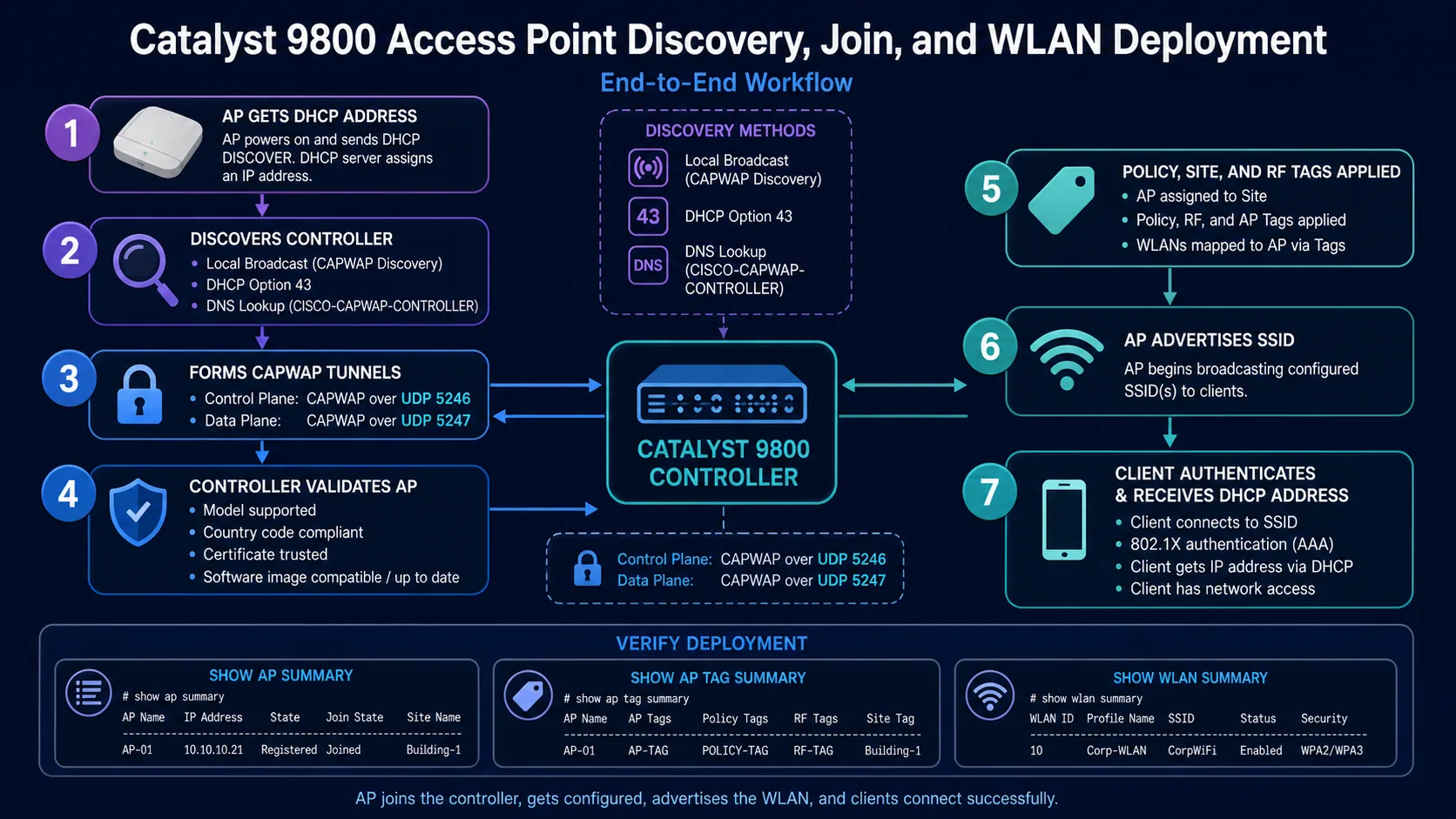
Follow an access point from IP addressing through discovery, CAPWAP join, and registration. The checks separate reachability failures from certificate, software, and policy problems.
Workflow: Give the AP reachability → Confirm registration
Keep this three-step view in mind as you work through the detailed lesson.
Give the AP reachability
Validate addressing, gateway, DNS, and the path to the controller.
Discover and join
Use a supported discovery method and permit CAPWAP control traffic.
Confirm registration
Check AP state, software, country, and assigned tags on the controller.
Catalyst 9800 AP Discovery and Join Guide Overview
Use this summary to establish the big picture before moving into the detailed explanations, commands, and checks.
Core focus
Follow an access point from IP addressing through discovery, CAPWAP join, and registration.
Key connection
Give the AP reachability → Discover and join → Confirm registration
Practical outcome
The checks separate reachability failures from certificate, software, and policy problems.
Before discovery begins
- The AP has a valid IP address, mask, default gateway and DNS server.
- The AP can route to the WLC management address, 10.10.10.10 in this lab.
- UDP 5246 and 5247 are permitted end to end.
- The controller country matches the AP regulatory domain.
- The installed IOS XE release supports the AP model.
- NTP time is correct for certificate validation.
Choose the right discovery method
Local broadcast
Useful when the AP and WMI share a broadcast domain. It needs no extra discovery configuration.
DHCP Option 43
Common for routed AP networks. Encode the WLC address in the AP DHCP scope according to the DHCP server and AP family.
DNS
Create CISCO-CAPWAP-CONTROLLER.localdomain and point it to 10.10.10.10.
Manual primary
Useful for controlled testing, but DHCP or DNS scales better for production.
capwap ap primary-base C9800-WLC 10.10.10.10
capwap ap restartWhat happens during CAPWAP join
- The AP sends discovery messages and selects a controller.
- A CAPWAP control session forms on UDP 5246.
- The controller validates the AP certificate, model, country and authorisation.
- The controller compares software and downloads a compatible image when needed.
- The AP receives its join profile plus policy, site and RF tags.
- When the WLAN mapping is valid, the AP begins advertising the SSID.
Verify the registered AP
show ap summary
show ap name AP-FLOOR-1 config general
show ap name AP-FLOOR-1 tag info
show ap name AP-FLOOR-1 tag detail
show ap uptime
show wireless stats ap discovery
show wireless stats ap join summary
show ap summary should list the AP in Registered state. Record its wired Ethernet MAC because CLI tag assignment uses that identifier.
Discovery Checks That Save Time
AP discovery is often blamed on the controller when the real problem is upstream. Check the AP address, default gateway, DNS response, DHCP options, routing path and firewall rules between the AP and controller. These checks separate an address problem from a CAPWAP problem.
Use the discovery method that matches the site. DNS is convenient when names and resolver paths are dependable, while DHCP options are useful when address assignment is centrally controlled. Static priming can help in a lab, but it adds a value that must be documented.
After the AP joins, verify more than registration. Confirm the software image, country setting, tags, radios, time and intended site assignment before declaring it ready for users.
Implementation Checklist
Prepare an AP join worksheet with serial number, site, switchport, expected management VLAN, address source, controller name and intended tag. This prevents an AP from appearing healthy while being assigned to the wrong location or policy group.
After a successful join, test a client on the assigned WLAN and confirm both control-plane and data-plane behavior. If the AP joins but users cannot connect, return to policy, DHCP and authentication rather than repeating discovery steps. Good records make the next AP installation faster and reduce guesswork during remote work.
Catalyst 9800 AP Discovery and Join Frequently Asked Questions
Which discovery method should I use?
Use broadcast for a same-subnet lab, and DHCP Option 43 or DNS for routed, repeatable deployments.
Why does the AP discover but fail to join?
Check model support, regulatory domain, country, certificate validity, NTP, AP authorisation, capacity, MTU and software download failures.
Does an AP use TCP for CAPWAP?
No. CAPWAP normally uses UDP 5246 for control and UDP 5247 for data.