Catalyst 9800 Troubleshooting and Verification Guide
Stop guessing. Find the first failing stage—discovery, join, SSID, authentication, DHCP or routing—and test only the dependencies for that stage.
Catalyst 9800 Configuration Series
Build the controller in a practical order: architecture, base setup, AP onboarding, WLAN policy, branch security, and troubleshooting.
In This Lesson
Troubleshoot the wireless service in the same order a client depends on it. You will use focused checks to isolate discovery, policy, authentication, DHCP, and forwarding failures.
Workflow: Locate the failed stage → Change and re-test
Keep this three-step view in mind as you work through the detailed lesson.
Locate the failed stage
Start with AP join, then SSID delivery, authentication, addressing, and reachability.
Collect focused evidence
Use show commands, counters, logs, and a single-client trace instead of broad guesses.
Change and re-test
Correct one cause at a time and verify the full client path after each change.
Catalyst 9800 Troubleshooting and Verification Guide Overview
Use this summary to establish the big picture before moving into the detailed explanations, commands, and checks.
Core focus
Troubleshoot the wireless service in the same order a client depends on it.
Key connection
Locate the failed stage → Collect focused evidence → Change and re-test
Practical outcome
You will use focused checks to isolate discovery, policy, authentication, DHCP, and forwarding failures.
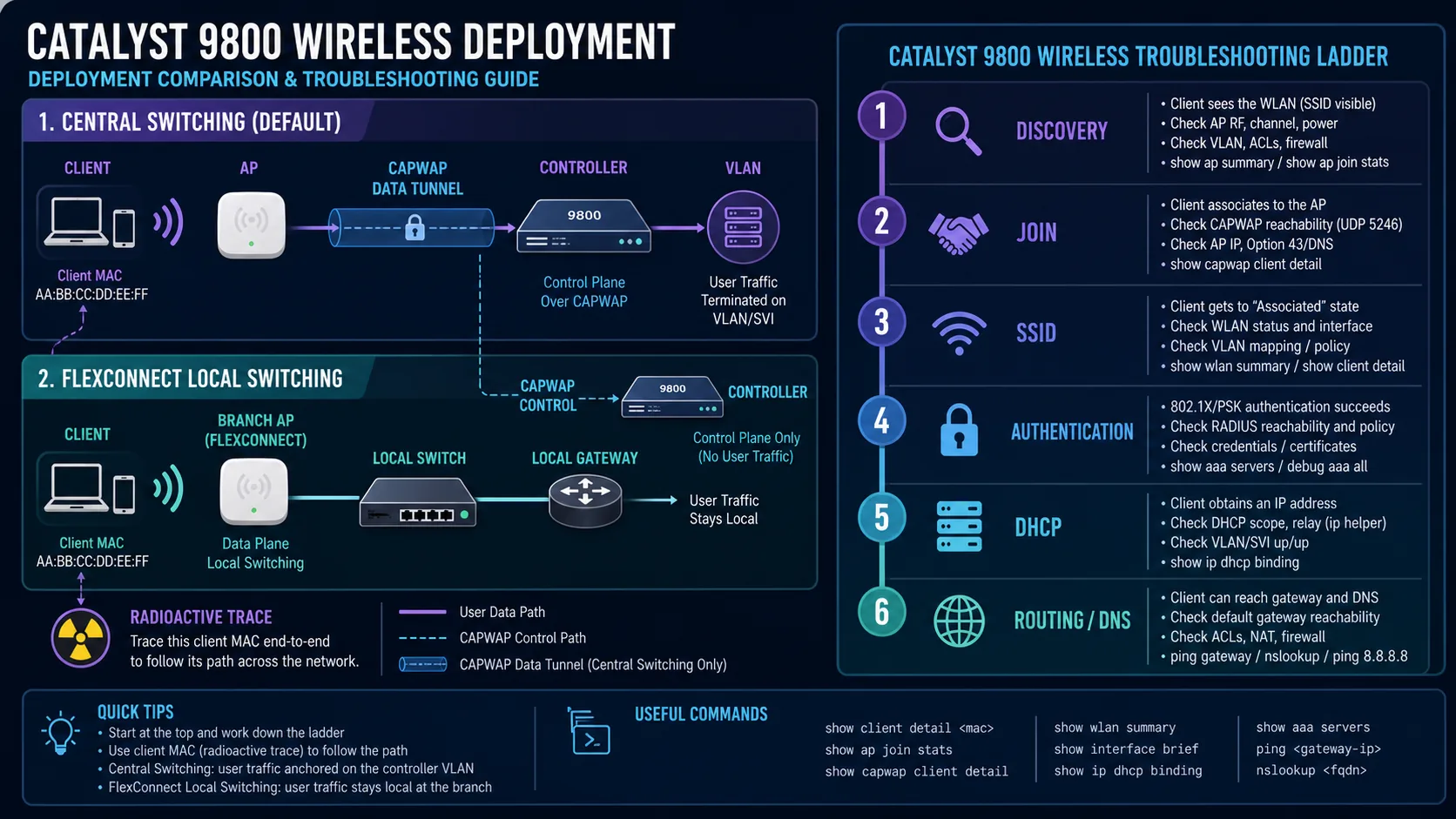
The six-stage troubleshooting ladder
- Discovery: does the AP have an IP, route and WLC discovery method?
- Join: do CAPWAP, certificate, country, software and capacity checks pass?
- SSID: are WLAN, policy mapping, AP tag and radio enabled?
- Authentication: do PSK or 802.1X credentials and policies succeed?
- DHCP: is the client VLAN usable from the chosen switching point?
- Routing and DNS: can the client reach its gateway, internal services and resolver?
AP cannot discover or join
# On the AP
show ip interface brief
show ip route
ping 10.10.10.10
show capwap client config

# On the WLC
show wireless stats ap discovery
show wireless stats ap join summary
show wireless stats ap history
show wireless management trustpoint
show wireless dtls connections
show logging | include AP
If discovery works but join fails, check AP support, regulatory domain, controller country, certificate validity, NTP, authorisation, AP capacity, CAPWAP MTU and software download.
AP joins but the SSID is missing
show wlan summary
show ap tag summary
show wireless tag policy summary
show wireless profile policy summary
show ap name AP-FLOOR-1 tag detail- WLAN and policy profile are enabled.
- Policy tag maps the correct WLAN to the correct policy profile.
- The policy tag is assigned to this AP.
- Country permits the radio and channel.
- Radio policy includes the desired band and the radio is enabled.
Authentication or DHCP fails
show wireless client summary
show wireless client mac aaaa.bbbb.cccc detail
show wireless exclusionlist
show wireless device-tracking database mac aaaa.bbbb.cccc
show wireless vlan details
show ip dhcp binding
PSK or 802.1X
Check saved client credentials, AES and WPA compatibility, exclusion status, RADIUS reachability, method list, shared secret, certificates and server logs.
No client IP
Check policy VLAN, WLC trunk or Flex local trunk, gateway SVI, relay, free DHCP addresses and ACLs that could block UDP 67/68.
Client has an IP but no access
Test in order: client gateway, internal IP, public IP, DNS lookup, then HTTP/HTTPS. Verify default gateway, routing, firewall policy, NAT, policy-profile ACL and upstream security rules.
show ip route
show interfaces trunk
show wireless client mac aaaa.bbbb.cccc detail
ping 10.30.30.1
nslookup example.com
Use radioactive tracing for one client
debug wireless mac aaaa.bbbb.cccc monitor-time 600
# Reproduce the issue
dir bootflash: | include ra_trace
more bootflash:ra_trace_MAC_*.log

no debug wireless mac aaaa.bbbb.cccc
clear platform condition all
undebug allFast verification set
show wireless management interface
show clock
show ntp associations
show ap summary
show ap tag summary
show wlan summary
show wireless profile policy summary
show wireless tag policy summary
show wireless client summary
show logging
Make Troubleshooting Evidence Driven
Start with one affected client and one affected AP. Capture the time, username, SSID, AP name, client address and symptom before changing anything. This prevents the common mistake of solving a different problem from the one the user reported.
Move through the path in order: association, authentication, policy assignment, DHCP, gateway reachability, DNS and application access. At each stage, collect evidence and decide whether the next stage is possible. If a client has no address, testing an application server only adds noise.
Use debugs and radioactive tracing for a short, controlled window. Start them for a known client, reproduce the issue, save the output and stop them. Pair controller evidence with switch, RADIUS, DHCP or endpoint checks.
Catalyst 9800 Troubleshooting and Verification Frequently Asked Questions
What should I check first when an AP will not join?
Check AP IP settings, route to the WMI, discovery, CAPWAP UDP ports, controller time, country, certificate and software support.
Why does a client authenticate but receive no IP address?
The client VLAN, trunk, gateway, relay, scope or DHCP-permitting ACL is often missing or incorrect.
When should I use radioactive tracing?
Use it after normal state and configuration checks need deeper per-MAC evidence for join, authentication, roaming or mobility problems.