Breaking Down VXLAN vs VRF Lite
Modern data centers and cloud networks depend on network virtualization to provide scalable, isolated connectivity. VXLAN and VRF Lite both help separate traffic, but they solve different problems at different network layers.
In This Lesson
Separate two technologies that solve different isolation and scale problems. You will compare their control, forwarding, operational scope, and the designs where VXLAN and VRF can work together.
Quick Learning Map
Keep this three-step view in mind as you work through the detailed lesson.
Identify the boundary
Decide whether isolation is local to a device or must span a larger fabric.
Choose the mechanism
Use VRF Lite for local routing separation and VXLAN for scalable overlay segments.
Plan operations
Account for underlay reachability, control plane, gateways, visibility, and troubleshooting skills.
Breaking Down VXLAN vs VRF Lite at a Glance
Use this summary to establish the big picture before moving into the detailed explanations, commands, and checks.
Core focus
Separate two technologies that solve different isolation and scale problems.
Key connection
Identify the boundary → Choose the mechanism → Plan operations
Practical outcome
You will compare their control, forwarding, operational scope, and the designs where VXLAN and VRF can work together.
Breaking Down VXLAN vs VRF Lite: Overview
Traditional VLAN designs provide Layer 2 separation, but a VLAN identifier is only 12 bits and the Layer 2 domain is normally limited by the physical topology. Large virtualized data centers need more segments, flexible workload placement, and an IP-routed underlay that can use equal-cost multipath routing.
VXLAN addresses overlay scale and workload mobility. VRF Lite provides multiple independent IP routing tables on a shared Layer 3 device. The correct choice depends on whether the design needs an overlay across the network, local routing separation, or both.
VXLAN (Virtual Extensible LAN)
VXLAN is an overlay encapsulation technology that carries Layer 2 Ethernet frames across a Layer 3 IP network. A VXLAN tunnel endpoint, or VTEP, adds VXLAN, UDP, and IP headers before sending traffic through the routed underlay. The remote VTEP removes those headers and delivers the original Ethernet frame.
This approach allows a logical Layer 2 segment to extend between VTEPs without requiring the entire physical network to operate as one Layer 2 domain. The underlay can use normal IP routing, link aggregation, and ECMP to use multiple available paths.
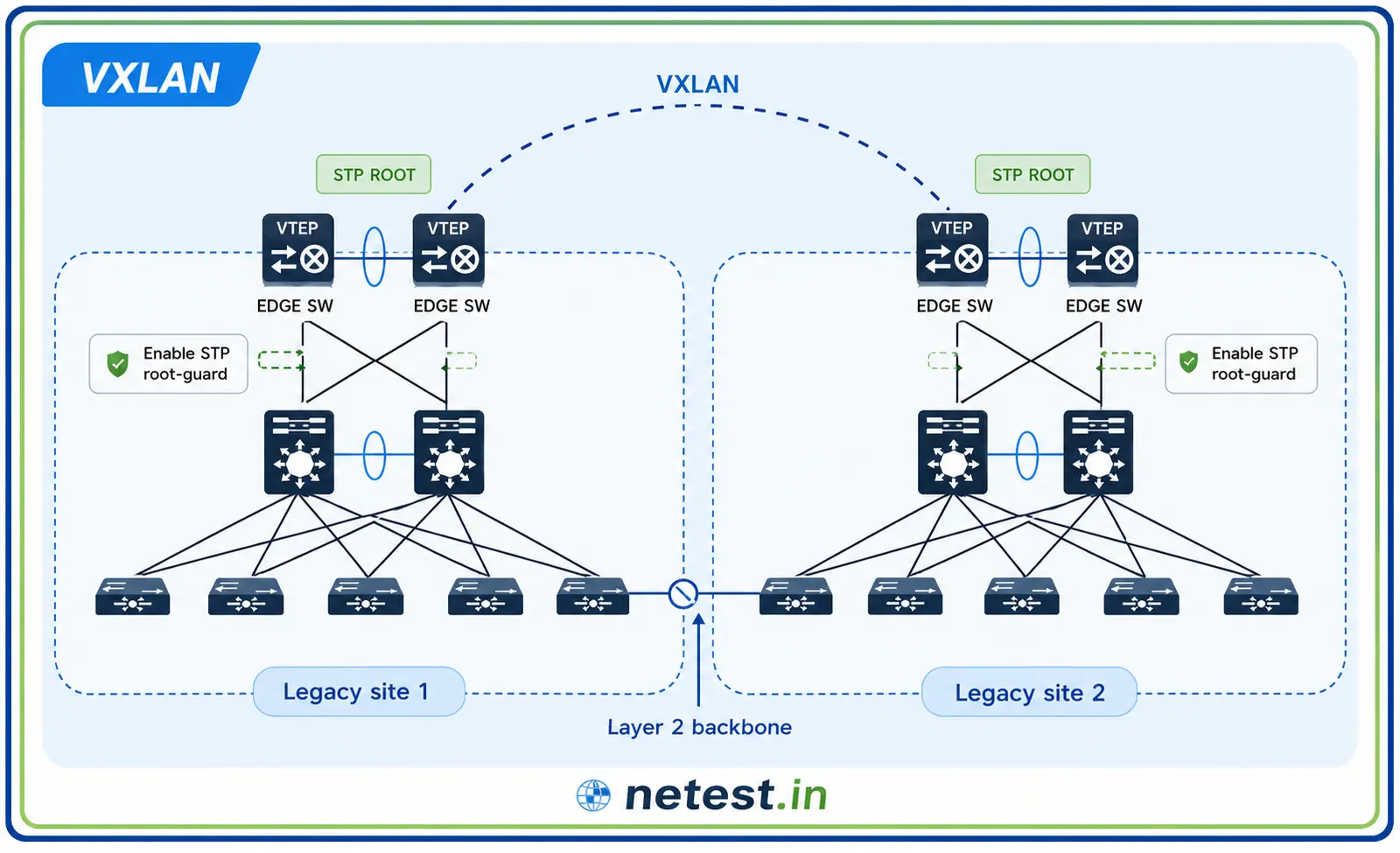
VXLAN Network Identifier
Each VXLAN segment is identified by a 24-bit VXLAN Network Identifier, also called a VNI or VNID. The 24-bit field provides approximately 16 million possible segment values, compared with about 4,000 usable VLAN identifiers in a traditional 12-bit VLAN design.
Key VXLAN Characteristics
- Overlay technology: builds logical networks over a routed IP underlay.
- UDP encapsulation: commonly uses destination UDP port 4789.
- Large segment space: uses a 24-bit VNI.
- ECMP support: encapsulated packets can use multiple equal-cost underlay paths.
- Flexible workload placement: logical segments can extend between VTEPs in different racks or pods.
- Common control plane: modern fabrics frequently combine VXLAN with BGP EVPN.
VRF Lite
Virtual Routing and Forwarding, or VRF, allows one physical router or multilayer switch to maintain multiple separate routing tables. Each VRF acts as an independent Layer 3 routing domain with its own interfaces, routes, and forwarding decisions.
VRF Lite provides this isolation without requiring MPLS. It is also called multi-VRF CE because it is commonly implemented on a customer-edge device. A physical routed port, subinterface, tunnel, loopback, or switched virtual interface can be assigned to a VRF, but one Layer 3 interface belongs to only one VRF at a time.
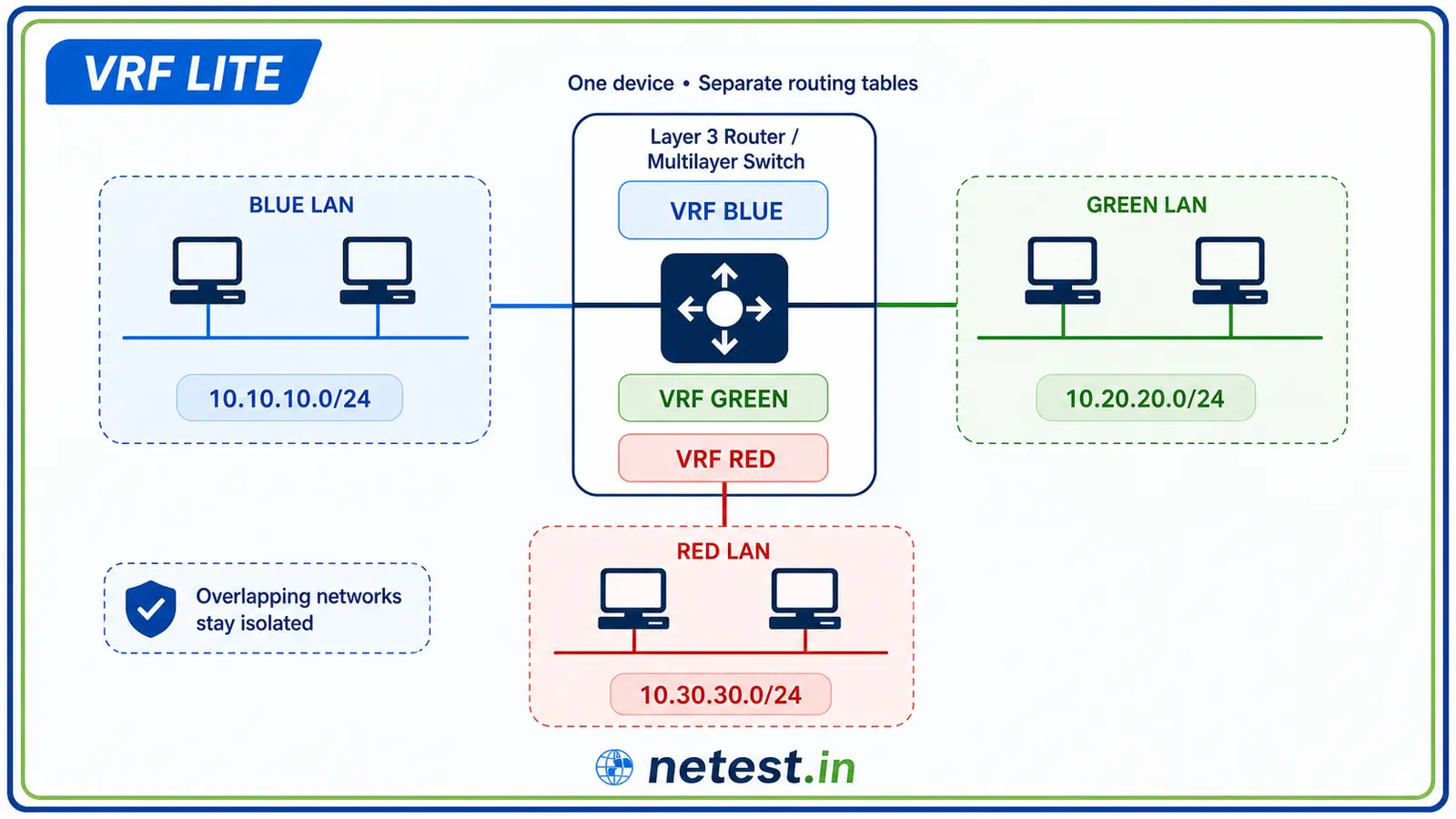
Key VRF Lite Characteristics
- Layer 3 isolation: each VRF has an independent routing and forwarding table.
- No MPLS requirement: isolation is provided directly on the router or multilayer switch.
- Overlapping addresses: different VRFs can use the same IP prefixes because their routing tables are separate.
- Routing flexibility: each VRF can use static routes or supported dynamic routing protocols.
- Controlled route exchange: communication between VRFs requires deliberate route leaking or an external security device.
- Common use cases: campus segmentation, shared services, management networks, branch separation, and multi-tenant routing.
VXLAN vs VRF Lite
VXLAN and VRF Lite are not direct replacements for each other. VXLAN provides scalable overlay segments across an IP network. VRF Lite separates Layer 3 routing contexts on a device. One focuses on transporting virtual networks across a fabric; the other focuses on independent IP forwarding tables.

Important Differences
- Network function: VXLAN is an overlay encapsulation; VRF Lite is routing-table virtualization.
- Scope: VXLAN can span an entire data-center fabric; VRF Lite is configured on participating Layer 3 devices.
- Identifier: VXLAN separates segments with VNIs; VRF Lite separates traffic with named VRF instances and interface assignments.
- Forwarding: VXLAN traffic crosses an IP underlay after encapsulation; VRF Lite performs normal IP routing inside the selected routing table.
- Scale: VXLAN is designed for large multi-tenant fabrics; VRF Lite is often used for smaller or device-local segmentation designs.
- Typical environment: VXLAN is common in modern data centers and cloud fabrics; VRF Lite is common in campus, enterprise, branch, and customer-edge networks.
Using VXLAN and VRF Together
VXLAN and VRF concepts are commonly combined in an EVPN-VXLAN fabric. Layer 2 VNIs identify bridge domains, while Layer 3 VNIs can associate tenant traffic with separate VRF routing instances. This provides both scalable overlay connectivity and tenant-specific routing isolation.
For example, two tenants can use separate VNIs and separate VRFs across the same leaf-and-spine fabric. The IP underlay transports the VXLAN packets, while the overlay keeps the tenants isolated. If shared services are required, the network team can introduce controlled route exchange through policy or a firewall.
Which One Should You Choose?
Choose VXLAN when:
- You need a scalable overlay across a routed data-center fabric.
- You need more logical segments than traditional VLANs can provide.
- Workloads must keep logical connectivity across racks, pods, or sites.
- You are building an EVPN-based leaf-and-spine network.
Choose VRF Lite when:
- You need separate routing tables on a router or multilayer switch.
- You need Layer 3 segmentation without deploying MPLS.
- Different departments, tenants, or services require isolated routing.
- You need to support overlapping IP address space in separate contexts.
Use both when a large virtualized fabric needs scalable VXLAN transport and separate Layer 3 routing domains for tenants or security zones.
Breaking Down VXLAN vs VRF Lite: Frequently Asked Questions
Is VXLAN a Layer 2 or Layer 3 technology?
VXLAN carries Layer 2 Ethernet frames inside UDP/IP packets. It provides a Layer 2 overlay while using a Layer 3 routed underlay for transport.
Does VRF Lite require MPLS?
No. VRF Lite creates separate routing tables without MPLS labels or an MPLS provider core.
Can two VRFs use the same IP subnet?
Yes. Separate VRFs can contain overlapping prefixes because each VRF has its own routing and forwarding table.
Can VXLAN and VRF Lite work together?
Yes. A network can use VXLAN for overlay transport and VRF routing instances for tenant or security-zone isolation.
What is the difference between a VLAN ID and a VNI?
A VLAN ID is a 12-bit identifier used for traditional Ethernet segmentation. A VNI is a 24-bit VXLAN segment identifier used across the overlay.
Breaking Down VXLAN vs VRF Lite: Conclusion
VXLAN and VRF Lite both support segmentation, but at different scopes. VXLAN creates scalable virtual networks across an IP fabric. VRF Lite creates isolated Layer 3 forwarding tables on shared routing hardware.
For a data-center overlay, VXLAN is usually the foundation. For straightforward Layer 3 separation on enterprise or customer-edge devices, VRF Lite may be sufficient. In larger designs, combining VXLAN with VRF-based routing provides both scalable connectivity and strong tenant isolation.
Breaking Down VXLAN vs VRF Lite: Tags and Keywords
VXLAN, VRF Lite, VXLAN vs VRF Lite, Cisco, data center, VTEP, VNI, VNID, EVPN, network virtualization, routing isolation, multi-VRF CE, cloud networking.