Malware: Definition, Types, Detection and Prevention
Learn how malware infects systems, how to recognize warning signs, and which controls help prevent, detect, isolate, and remove malicious software.
In This Lesson
Understand malware by behavior rather than memorizing labels alone. You will connect infection methods and warning signs to layered prevention, detection, containment, and recovery.
Quick Learning Map
Keep this three-step view in mind as you work through the detailed lesson.
Limit entry points
Patch systems, filter content, control applications, and reduce unnecessary privilege.
Detect behavior
Correlate endpoint, identity, network, and file signals instead of trusting one alert.
Contain and recover
Isolate affected assets, preserve evidence, remove persistence, and restore from trusted sources.
Malware: Definition, Types, Detection and Prevention at a Glance
Use this summary to establish the big picture before moving into the detailed explanations, commands, and checks.
Core focus
Understand malware by behavior rather than memorizing labels alone.
Key connection
Limit entry points → Detect behavior → Contain and recover
Practical outcome
You will connect infection methods and warning signs to layered prevention, detection, containment, and recovery.
What Is Malware?
Malware is malicious software built to damage systems, steal information, spy on users, encrypt files, disrupt operations, or give attackers unauthorized access. The word covers many threat types, including viruses, worms, trojans, spyware, ransomware, adware, rootkits, keyloggers, cryptojacking malware, rogue software, and scareware.
In a business network, malware can start on one endpoint and quickly become an enterprise incident. It may arrive through phishing, infected downloads, unsafe browser extensions, unpatched software, exposed services, removable media, file shares, or compromised third-party access.
Signs of Malware Infection
Some malware is noisy and obvious. Other malware hides quietly so it can steal credentials, collect data, or wait for a later attack. The signs below do not always prove malware is present, but they are strong reasons to investigate.
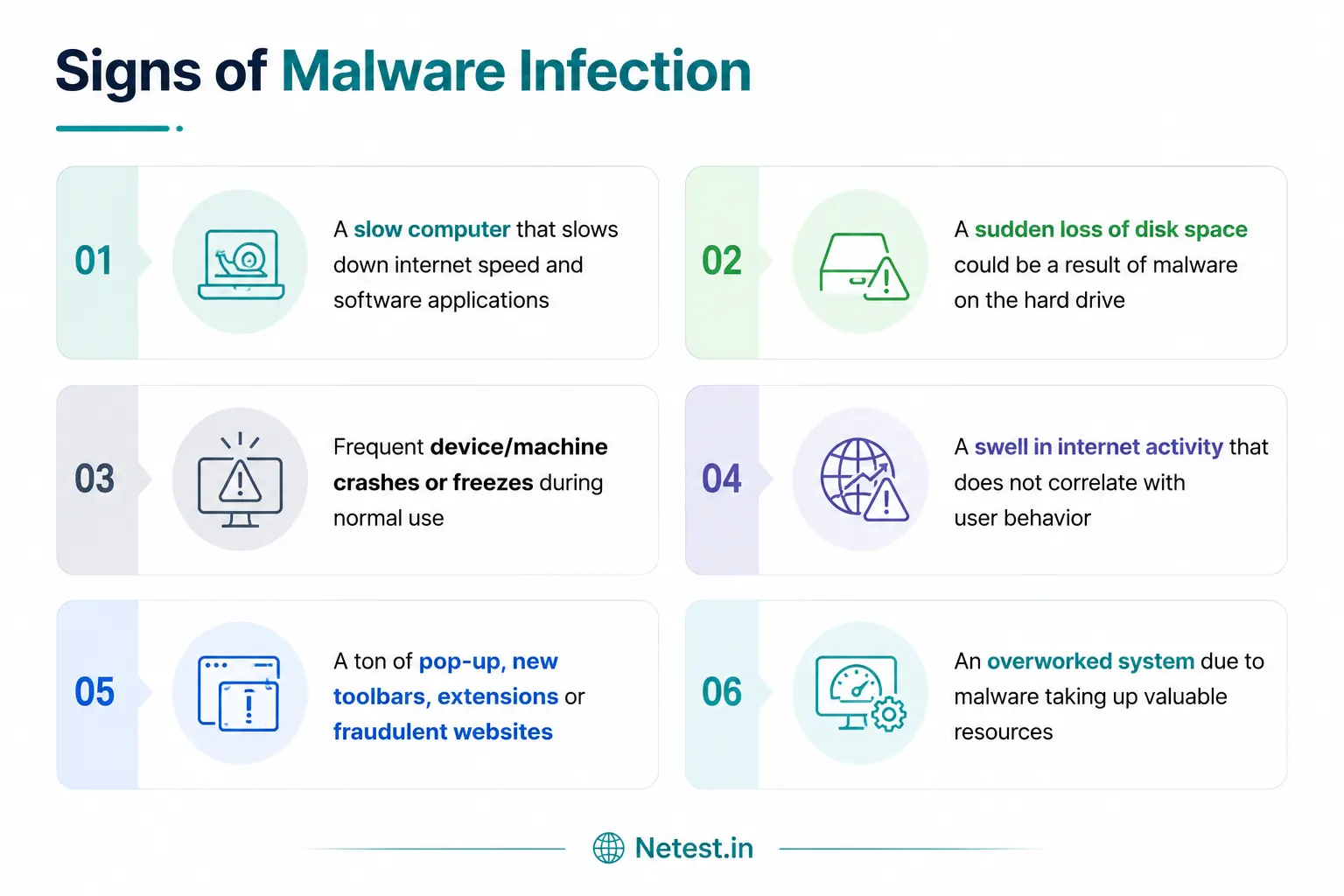
Applications, boot time, browsing, and network access become slower than normal.
The system becomes unstable during normal work or repeatedly stops responding.
Unexpected ads, toolbars, extensions, or homepage changes appear in the browser.
Storage disappears or CPU, memory, and fan activity stay high without a clear reason.
Short History of Malware
Malware has changed with technology. Early examples spread through physical media, while modern attacks use email, cloud accounts, browsers, collaboration tools, software supply chains, exposed remote access, and vulnerable internet-facing services.
| Period | What changed | Security lesson |
|---|---|---|
| 1980s | Early unwanted programs spread through floppy disks and local sharing. | Even simple software can become a trust and hygiene problem. |
| 1990s | Macro malware grew with common office documents and Windows desktops. | User files and productivity tools need security controls too. |
| 2000s | Worms, instant-message lures, adware, and social-network scams expanded. | Malware follows popular communication channels. |
| 2010s and later | Ransomware, cryptojacking, fileless malware, and credential-driven attacks became common. | Detection must combine endpoint, network, identity, and behavior signals. |
What Is the Intent of Malware?
Attackers use malware because it can create direct financial gain, long-term access, espionage value, disruption, or leverage. Criminal groups often use malware to steal money, demand ransom, sell data, rent botnets, or compromise accounts. Nation-state and advanced groups may use malware for intelligence collection, sabotage, or industrial espionage.
- Financial gain: steal banking data, payment details, crypto wallets, or ransom payments.
- Data theft: copy customer records, identity data, trade secrets, emails, or credentials.
- System disruption: damage systems, interrupt business services, or destroy data.
- Espionage: quietly monitor users, networks, documents, and communications.
- Sabotage: impact public services, manufacturing, utilities, or operational technology.
Different Types of Malware
Many attacks combine multiple malware types. For example, a phishing email may deliver a trojan, the trojan may install spyware, and the attacker may later deploy ransomware after stealing data.
| Malware type | How it works | Common impact |
|---|---|---|
| Virus | Attaches malicious code to a legitimate file or program and runs when the user executes it. | File corruption, system instability, spreading to other files or hosts. |
| Worm | Replicates across networks by exploiting reachable systems or weak configurations. | Rapid spread, bandwidth consumption, mass infection. |
| Trojan | Pretends to be legitimate software while creating hidden access for attackers. | Backdoors, remote control, payload delivery. |
| Spyware | Runs quietly and collects user activity, credentials, browser data, or sensitive information. | Privacy loss, credential theft, fraud. |
| Ransomware | Encrypts files or locks systems and demands payment for recovery. | Business outage, data loss, extortion, recovery cost. |
| Adware | Displays unwanted ads, redirects browsers, or installs unwanted extensions. | User disruption, unsafe clicks, privacy risk. |
| Rootkit | Hides malicious activity and gives attackers privileged access. | Deep persistence, stealth, difficult cleanup. |
| Keylogger | Records keystrokes and sends captured usernames, passwords, or payment data to attackers. | Account takeover, identity theft, financial fraud. |
| Cryptojacking | Uses a victim's CPU or GPU resources to mine cryptocurrency. | Performance loss, power cost, overheating, cloud bill spikes. |
| Rogue software and scareware | Pretends to detect a problem and pressures the user into installing or paying for unsafe software. | Financial loss, more malware, credential theft. |
Methods of Malware Attacks
Malware reaches systems through both technical weaknesses and human workflows. The most reliable defense is layered security, because no single control catches every path.
- Phishing and spear phishing: emails trick users into opening attachments, clicking links, or entering credentials.
- Smishing: text messages lure mobile users into unsafe links or fake login pages.
- Malicious attachments: documents, scripts, archives, and executables launch payloads after download or opening.
- Unpatched systems: attackers exploit old software, exposed services, or vulnerable appliances.
- File shares and removable media: infected files spread through shared folders, USB drives, or synced storage.
- P2P and unsafe downloads: cracked software, media files, and unofficial installers hide malware.
- Third-party access: compromised suppliers, partner networks, or unmanaged devices introduce malware into trusted paths.
- IoT and unmanaged devices: weak default passwords and outdated firmware create footholds inside networks.
Malware Detection
Malware detection combines signature checks, behavior analysis, network inspection, endpoint telemetry, sandboxing, and central correlation. Some malware reveals itself immediately, such as ransomware that begins encrypting files. Other malware is quieter and requires behavior-based monitoring to detect persistence, command-and-control traffic, suspicious scripts, or credential theft.
Detect known malware, suspicious processes, persistence, memory activity, and endpoint compromise indicators.
Inspect traffic, block malicious destinations, and prevent known exploit attempts from reaching targets.
Open suspicious files in an isolated environment to observe behavior before users or servers are exposed.
Combine endpoint, identity, firewall, DNS, proxy, and application logs to detect patterns across systems.
How to Protect Against Malware Attacks
Good malware prevention is proactive. It combines user education, secure configuration, strong identity controls, patching, backups, segmentation, endpoint protection, and response practice.
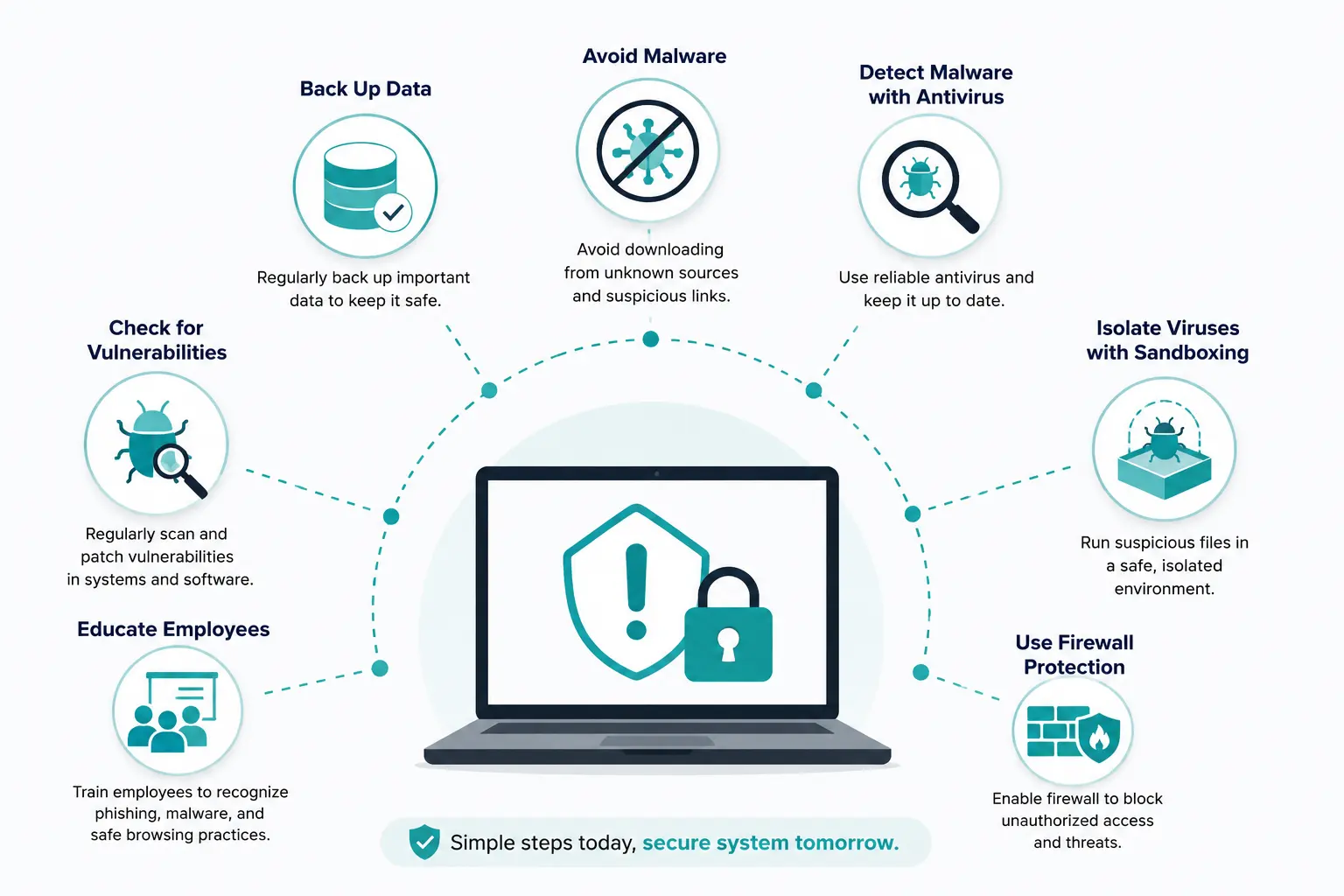
1. Avoid Malware Lures
Do not open unexpected attachments, random pop-ups, suspicious downloads, or links from unknown senders. Treat urgent login prompts, prizes, fake invoices, and password reset requests with caution.
2. Back Up Important Data
Keep reliable backups for endpoints, servers, and critical applications. Backups should be protected from the same malware that can reach production systems, especially for ransomware scenarios.
3. Educate Employees
Users should know the signs of phishing, unsafe browser prompts, suspicious attachments, and endpoint compromise. They should also know who to contact and what not to do if they suspect infection.
4. Find and Fix Vulnerabilities
Use vulnerability scanning, patch management, configuration review, and asset inventory to reduce the number of places malware can enter or spread.
5. Isolate Suspicious Files
Sandboxing gives security teams a safer way to inspect suspicious files and URLs before allowing them into production workflows.
6. Use Firewall and Network Protection
Firewalls, IPS, secure web gateways, DNS filtering, and segmentation can block delivery, command-and-control traffic, and lateral movement.
7. Detect Malware with Antivirus or EDR
Endpoint protection should be current, centrally monitored, and configured to quarantine or isolate threats. EDR adds deeper investigation and response options for business environments.
How to Get Rid of Malware
When malware is suspected, speed matters. The goal is to stop spread, preserve useful evidence, clean the device, and close the entry point so the same issue does not return.
- Disconnect or isolate the device: remove it from the network if active compromise is likely.
- Update security tools: confirm antivirus or EDR is enabled and has current signatures or cloud protection.
- Run a full scan: scan the entire system, not only recently downloaded files.
- Quarantine or remove findings: follow the security tool report and remove suspicious files or persistence entries.
- Reboot and rescan: verify the malware does not return after restart.
- Reset credentials: change passwords and enable MFA, especially if spyware or keylogging is possible.
- Restore or reimage if needed: for serious compromise, rebuild the device from trusted media and restore clean data from backup.
- Review logs and root cause: determine how the malware entered and update controls to prevent repeat infection.
Enterprise Malware Defense Checklist
Enterprise malware defense works best when security controls support each other. A blocked phishing email, a patched vulnerability, a quarantined endpoint, and a clean backup are all parts of the same resilience plan.
Use MFA, strong password policies, conditional access, and least privilege.
Limit lateral movement between users, servers, cloud workloads, and critical services.
Filter phishing, malicious attachments, spoofed senders, and unsafe URLs.
Practice ransomware, endpoint compromise, credential theft, and recovery workflows.
Malware FAQs
What are examples of malware?
Examples include viruses, worms, trojans, spyware, ransomware, adware, rootkits, keyloggers, cryptojacking malware, rogue software, and scareware.
What does malware do?
Malware can steal data, monitor users, encrypt files, damage systems, slow devices, show unwanted ads, open backdoors, hijack resources, or help attackers move through a network.
How do I get rid of malware?
Isolate the device, update antivirus or EDR, run a full scan, quarantine or remove findings, reboot and rescan, change passwords, and reimage the device if the infection cannot be trusted as fully removed.
How do you detect malware?
Use antivirus, EDR, firewalls, IPS, sandboxing, SIEM correlation, DNS and web filtering logs, network monitoring, and behavior analytics. Watch for abnormal process activity, unusual outbound connections, suspicious logins, and file encryption activity.
Where can malware be reported?
Organizations can report malware and cybercrime to appropriate national cybercrime or incident reporting agencies. In the United States, common reporting channels include IC3, FTC, and CISA.
Can malware infect mobile and IoT devices?
Yes. Phones, tablets, IoT devices, cameras, printers, routers, and other connected devices can be targeted, especially when they run outdated software or use weak credentials.
Malware: Definition, Types, Detection and Prevention: Tags and Keywords
Malware, malware definition, malware infection signs, malware detection, malware prevention, malware removal, viruses, worms, trojans, spyware, ransomware, adware, rootkit, keylogger, cryptojacking, scareware, rogue software, phishing, sandboxing, antivirus, EDR, IPS, firewall, SIEM, endpoint security.