Remote Desktops & VDI Explained
Remote desktops and VDI became important because users now work from offices, homes, branch sites, and mobile networks. Both technologies let users access business desktops and applications from anywhere, but the design, cost, performance, and security model are different. This guide explains VDI, Remote Desktop, RDS, DaaS, RDP, Citrix, VMware Horizon, Azure Virtual Desktop, FSLogix, SD-WAN, and VDI security in simple technical words.
In This Lesson
Compare VDI, Remote Desktop Services, and DaaS through architecture, user experience, operations, and security. The lesson connects platform choices to bandwidth, identity, and application delivery.
Quick Learning Map
Keep this three-step view in mind as you work through the detailed lesson.
Choose the delivery model
Match persistence, ownership, application needs, and geography to the platform.
Size the experience
Plan compute, storage, display protocol, latency, bandwidth, and profile handling.
Secure and operate
Use MFA, segmentation, endpoint controls, monitoring, patching, and resilient access.
Remote Desktops & VDI Explained at a Glance
Use this summary before moving into the detailed explanations, examples, commands, and checks.
Core focus
Compare VDI, Remote Desktop Services, and DaaS through architecture, user experience, operations, and security.
Key connection
Choose the delivery model → Size the experience → Secure and operate
Practical outcome
The lesson connects platform choices to bandwidth, identity, and application delivery.
Topic Coverage
1. What Is VDI?
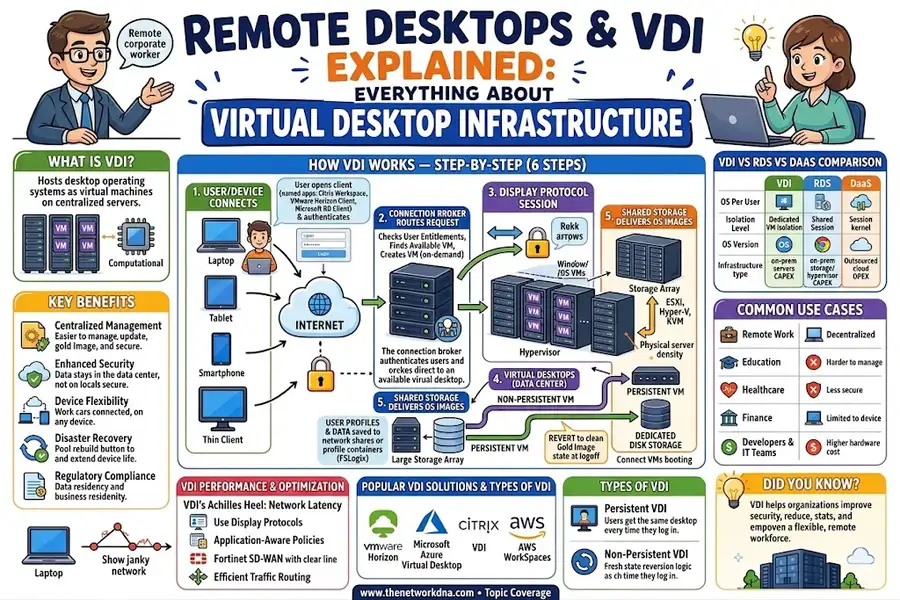
VDI stands for Virtual Desktop Infrastructure. In VDI, a desktop operating system such as Windows 11 runs as a virtual machine on servers in a data center or cloud. The user does not run the full desktop locally. The user only uses a client application on a laptop, thin client, tablet, or phone.
The endpoint sends keyboard and mouse input to the data center. The VDI platform sends the screen, audio, and application display back to the user. The real CPU, memory, application processing, and data access happen on the server side.
2. How VDI Works
- User connects from a device: The user opens Citrix Workspace, VMware Horizon Client, Microsoft Remote Desktop Client, or a browser-based client.
- User authenticates: The platform checks username, password, MFA, device posture, and user policy.
- Connection broker assigns a desktop: The broker checks which desktop pool the user can access and selects an available VM or session.
- Display protocol starts: RDP, Citrix HDX, VMware Blast Extreme, PCoIP, or another protocol carries screen updates and user input.
- Hypervisor runs the desktop VM: VMware ESXi, Microsoft Hyper-V, KVM, Nutanix AHV, or cloud infrastructure hosts the desktop.
- Profile and data are attached: User profiles are loaded from FSLogix, Citrix Profile Management, VMware DEM, Azure Files, or network shares.
- Session ends: Persistent desktops keep changes. Non-persistent desktops reset back to a clean image after logoff.
3. VDI vs Remote Desktop Services vs DaaS
These terms are often mixed together. They are related, but they are not the same thing.
| Attribute | VDI | RDS / RDSH | DaaS |
|---|---|---|---|
| Desktop model | One VM desktop per user | Many users share one Windows Server | Cloud-hosted desktop service |
| Isolation | Strong VM isolation | Shared server session isolation | Depends on provider and design |
| Best for | Power users, regulated teams, personalized desktops | Task workers, call centers, simple apps | Fast cloud rollout and flexible workforce |
| Examples | VMware Horizon, Citrix Virtual Desktops | Microsoft Remote Desktop Services, Citrix Virtual Apps | Azure Virtual Desktop, Citrix DaaS, Amazon WorkSpaces |
RDP is not the same as VDI. RDP is Microsoft Remote Desktop Protocol. It is a display protocol used to carry a remote session. VDI is an architecture. RDP is one possible protocol used inside that architecture.
4. Persistent vs Non-Persistent VDI
Persistent VDI
In persistent VDI, each user has a dedicated VM. Their installed apps, settings, files, and desktop changes remain after logout. It feels close to a normal physical PC, but it runs in the data center.
- Pros: Better personalization, easier for power users, supports custom applications.
- Cons: More storage, harder patching, more VM drift over time.
Non-Persistent VDI
In non-persistent VDI, desktops boot from a shared gold image. When the user logs off, the VM resets back to a clean state. User settings and data are stored separately in profile containers or network shares.
- Pros: Easier patching, cleaner environment, lower storage use, better for large desktop pools.
- Cons: Profile management is more important, some apps need extra packaging work.
5. Top VDI Platforms Compared in 2026
| Platform | Protocols | Deployment | Best Fit |
|---|---|---|---|
| Citrix DaaS / Virtual Apps and Desktops | ICA / HDX, RDP | On-prem, hybrid, cloud | Enterprise users, WAN-heavy sites, app publishing |
| VMware Horizon 8 | Blast Extreme, PCoIP, RDP | On-prem vSphere, Horizon Cloud | VMware environments, GPU workloads, mature VDI operations |
| Microsoft Azure Virtual Desktop | RDP, RDP Shortpath | Azure cloud | Microsoft 365 users, cloud desktop projects, Windows multi-session |
| Nutanix Frame | Browser-based H.264, RDP | Multi-cloud and AHV | BYOD, browser access, simple cloud desktop delivery |
| Amazon WorkSpaces | PCoIP, WSP | AWS cloud | AWS-first teams and simple per-user desktop subscription |
Many organizations are reviewing VDI strategy in 2026 because licensing, cloud adoption, and hybrid work have changed. The right platform depends on existing infrastructure, user type, security policy, application needs, and network quality.
6. VDI Architecture and Core Components
| Component | What It Does | Common Examples |
|---|---|---|
| Hypervisor | Runs the virtual desktop machines | ESXi, Hyper-V, KVM, Nutanix AHV |
| Connection Broker | Authenticates users and assigns desktops | Citrix Delivery Controller, VMware Connection Server, RDS Broker |
| Shared Storage | Stores desktop images, user disks, profiles, and application data | All-flash SAN, vSAN, Nutanix, Azure Files, NetApp |
| Gold Image | Base OS image used to create non-persistent desktops | Citrix MCS/PVS, Horizon Instant Clones, AVD images |
| Profile Management | Keeps user settings and data across sessions | FSLogix, Citrix Profile Management, VMware DEM |
| Gateway | Secures external access into the VDI environment | Citrix Gateway, VMware UAG, RD Gateway |
| Network / SD-WAN | Carries display protocol traffic between user and desktop | Fortinet SD-WAN, Cisco SD-WAN, Versa, Palo Alto Prisma SD-WAN |
7. VDI Performance and Bandwidth Requirements
VDI performance depends on bandwidth, latency, packet loss, jitter, display protocol, endpoint quality, and server capacity. A small amount of packet loss or high latency can make a desktop feel slow even when the server has enough CPU and memory.
| User Type | Typical Bandwidth/User | Good RTT Target | Priority |
|---|---|---|---|
| Task worker | 0.5 to 1.5 Mbps | Under 150 ms | Medium |
| Knowledge worker | 1.5 to 4 Mbps | Under 100 ms | High |
| Power user | 4 to 10 Mbps | Under 75 ms | Critical |
| GPU / 3D / video editing | 10 to 50 Mbps | Under 50 ms | Dedicated path preferred |
Modern VDI protocols often prefer UDP because screen updates can recover quickly from a dropped packet. If UDP is blocked and traffic falls back to TCP, the session may freeze during retransmission. This is common during video calls, scrolling, or screen animation.
8. VDI Security, MFA, ZTNA, and Encryption
VDI improves security because company data can stay inside the data center or cloud. But the gateway, broker, and identity system become very important. If those parts are weak, attackers can reach many desktops from one exposed access point.
- MFA: Require multi-factor authentication before a desktop session is created.
- ZTNA: Use Zero Trust Network Access so users reach only approved VDI resources, not the whole network.
- Encryption: Use TLS 1.2 or TLS 1.3 for remote desktop traffic and disable old protocols.
- Device posture: Check endpoint patch level, antivirus, disk encryption, and certificate trust.
- Clipboard and drive control: Restrict copy/paste, local drive mapping, printing, and USB redirection based on trust level.
- Segmentation: Place VDI desktops in controlled VLANs or security zones. Do not allow broad lateral access to production servers.
- Logging: Log gateway login, broker assignment, session start, admin actions, and abnormal file transfer behavior.
9. SD-WAN and Application Steering for VDI
VDI is sensitive to network quality. This is why SD-WAN is often used with VDI. SD-WAN can identify VDI traffic and send it over the best available path based on latency, jitter, packet loss, and bandwidth.
- Steer Citrix HDX, VMware Blast, PCoIP, RDP, and AVD traffic over the cleanest WAN path.
- Prefer low-latency links for keyboard, mouse, screen, and voice/video redirection traffic.
- Use SLA rules to move sessions away from links with packet loss or high jitter.
- Prioritize FSLogix SMB profile traffic during login so users do not wait too long at sign-in.
- Use QoS and DSCP marking for display protocol traffic and login/profile traffic.
- Monitor user experience metrics, not only link uptime.
10. Best Practices and Quick Summary
- Use VDI when users need secure, centralized desktops with strong control.
- Use RDS/RDSH when many users need the same simple applications at lower cost.
- Use DaaS when cloud speed, monthly cost model, and less on-prem infrastructure matter most.
- Use non-persistent VDI with FSLogix for large standard desktop pools.
- Use persistent VDI for power users and special application needs.
- Size storage for boot storms, login storms, and profile load times.
- Allow and optimize UDP where supported by the VDI protocol.
- Add MFA, ZTNA, segmentation, and endpoint posture checks before production rollout.
- Use SD-WAN application steering for remote and branch users.
- Measure real user experience: login time, session latency, packet loss, reconnects, and application response.
Search Tags
Remote Desktop, VDI, Virtual Desktop Infrastructure, RDP, Remote Desktop Protocol, RDS, RDSH, DaaS, Desktop as a Service, Azure Virtual Desktop, AVD, VMware Horizon, Citrix DaaS, Citrix HDX, VMware Blast Extreme, PCoIP, Amazon WorkSpaces, Nutanix Frame, FSLogix, persistent VDI, non-persistent VDI, VDI architecture, VDI performance, VDI bandwidth, VDI latency, SD-WAN for VDI, application steering, ZTNA, MFA, VDI security, hybrid work, remote work, thin client, profile management, connection broker, VDI gold image, cloud desktop, endpoint security, remote desktop services, desktop virtualization, VDI best practices 2026.