Linux Text Processing Commands: awk, sed, cut, sort, tail and More
Turn logs, configuration files, text exports, monitoring output, CLI results, and network diagnostics into useful administrative evidence with practical Linux pipelines.
Linux Fundamentals for IT & Network Engineers
Each part adds a practical administration skill used in NOC, network, cloud and server roles.
In This Lesson
Start with the processing model, learn each command through realistic administrator examples, then combine the tools for log analysis and safe production troubleshooting.
Quick Learning Map
Inspect and filter
Use tail, less, or a targeted filter to reduce the input to relevant records.
Extract and normalize
Use awk, cut, sed, or tr to select fields and standardize text.
Order and summarize
Use sort, uniq, and wc to turn repeated records into useful counts.
Linux Text Processing at a Glance
Read the visual from left to right: start with a log or command output, inspect it, select relevant lines, extract fields, sort and consolidate the values, then use the result for an operational decision.
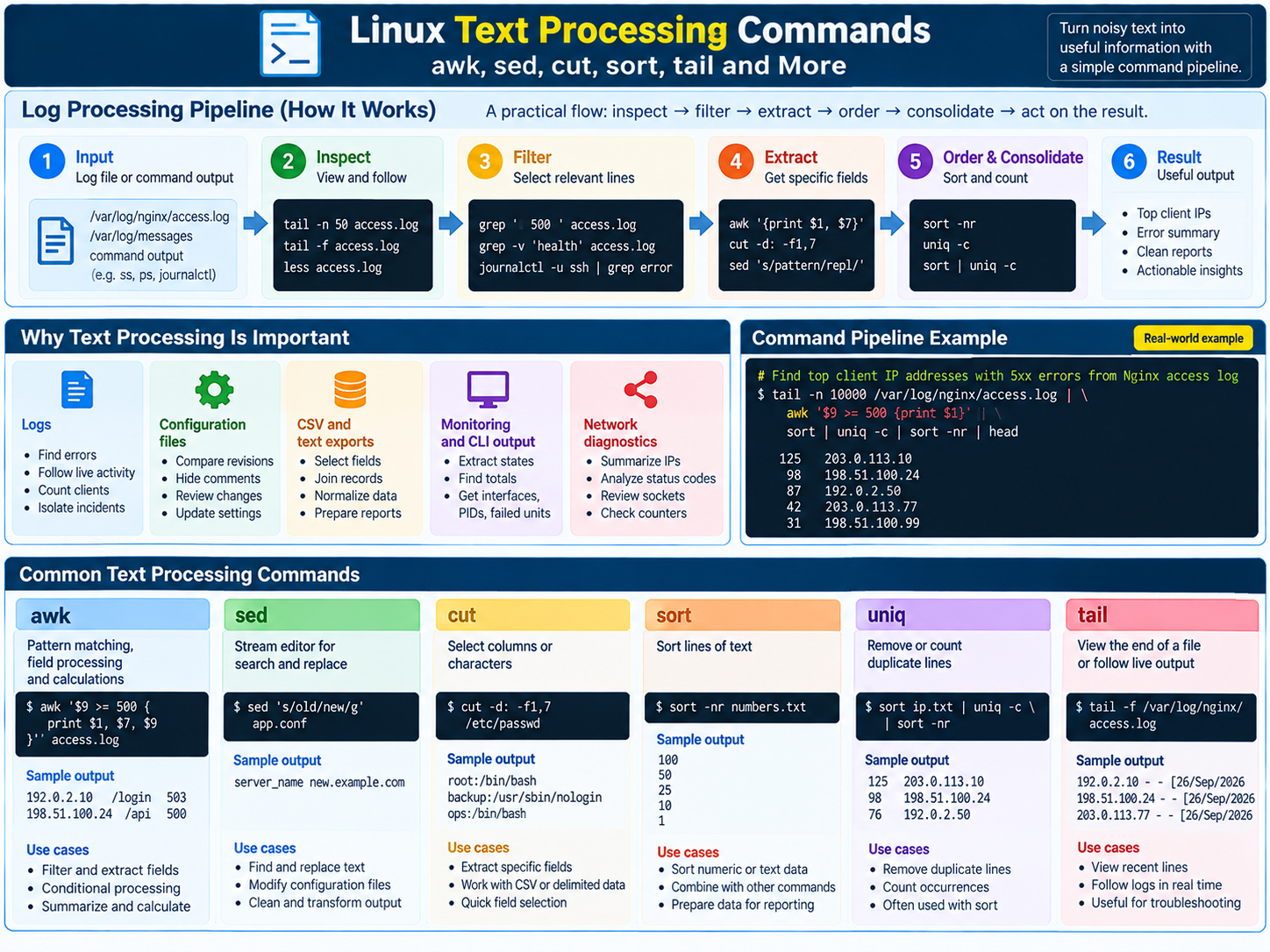
Why Text Processing Is Core Administration Work
Logs
Find errors, follow live activity, count clients, and isolate an incident window.
Configuration files
Compare revisions, hide comments for review, and change a controlled setting.
CSV and text exports
Select fields, join records, normalize delimiters, and prepare reports.
Monitoring and CLI output
Extract states, totals, interfaces, process IDs, or failed units.
Network diagnostics
Summarize source addresses, status codes, sockets, and packet counters.
Pipes and Command Chaining Come First
A pipe (|) connects the standard output on its left to the standard input on its right. Each stage should do one job: select lines, extract fields, sort records, count duplicates, or format the result.
journalctl -u ssh --since today | awk '{print $NF}' | sort | uniq -c | sort -nr | headThe shell builds the pipeline without intermediate files. > replaces an output file, >> appends, && continues only after success, and ; continues regardless of exit status.
cat is unnecessary: cat access.log | awk '{print $1}' works and illustrates standard input, but awk '{print $1}' access.log is shorter because awk can read the file directly. Use cat to concatenate files or when it genuinely clarifies a mixed input flow.Linux Text Processing Command Guide
Each command is presented as a full-width reference row. Read from purpose to syntax, option usage, practical examples, realistic output, and a pipeline you can adapt.
awk
What it does: splits records into fields, tests conditions, calculates values, and prints selected data.
- Basic syntax
awk [options] 'pattern { action }' [file...]- Options and usage
-Fseparator;-v name=valuevariable;-f script.awkprogram file.- Simple example
awk -F, '{print $1, $3}' servers.csv- Administration example
awk '$9 >= 500 {print $1, $7, $9}' access.logextracts IP, path, and server-error status in a common log layout.
192.0.2.10 /login 503
198.51.100.24 /api/health 500
Pipeline example: ss -lnt | awk 'NR>1 {print $4}' | sort -u lists unique listening addresses.
cut
What it does: selects character ranges or delimiter-separated fields.
- Basic syntax
cut OPTION... [file...]- Options and usage
-ddelimiter;-ffields;-ccharacters;--complementinverse selection.- Simple example
cut -d, -f1,3 servers.csv- Administration example
cut -d: -f1,7 /etc/passwdshows accounts and login shells.
root:/bin/bash
backup:/usr/sbin/nologin
ops:/bin/bash
Pipeline example: getent passwd | cut -d: -f7 | sort | uniq -c counts assigned shells.
diff
What it does: compares files or directories line by line.
- Basic syntax
diff [options] OLD NEW- Options and usage
-uunified;-rrecursive;-qbrief;-wignore whitespace.- Simple example
diff -u app.conf.old app.conf.new- Administration example
sudo diff -u /etc/ssh/sshd_config.prechange /etc/ssh/sshd_configreviews a controlled SSH change.
@@ -31,1 +31,1 @@
-PermitRootLogin yes
+PermitRootLogin prohibit-password
Pipeline example: diff -u old.conf new.conf | less. Exit 0 means identical, 1 different, and above 1 an error.
ex
What it does: provides the line-oriented command mode behind vi. It is historically important and scriptable, but less common for daily interactive editing.
- Basic syntax
ex [options] file- Options and usage
-ssilent/script mode;-c commandinitial command;+last line.- Simple example
ex notes.txt, then1,5pandq.- Administration example
printf '%s\n' '%s/^Timeout=.*/Timeout=30/' 'wq' | ex -s service.confapplies a reviewed scripted edit.
"service.conf" 42L, 811B
Timeout=30
Pipeline example: commands can feed ex -s, though sed is usually clearer for one substitution.
head
What it does: prints the beginning of files or input.
- Basic syntax
head [options] [file...]- Options and usage
-n Nlines;-c Nbytes;-qno file headings.- Simple example
head -n 5 inventory.csv- Administration example
journalctl -u nginx --since today | head -n 20samples the first selected service messages.
Sep 26 08:00:02 web01 systemd[1]: Starting nginx.service...
Sep 26 08:00:03 web01 systemd[1]: Started nginx.service.
Pipeline example: put head after ranking to keep only the top results.
iconv
What it does: converts text between character encodings when imports show broken characters or invalid bytes.
- Basic syntax
iconv -f FROM -t TO [file]- Options and usage
-fsource;-ttarget;-llist encodings;-comit invalid input carefully.- Simple example
iconv -f ISO-8859-1 -t UTF-8 legacy.csv > legacy-utf8.csv- Administration example
- Check with
file -bi vendor-export.csv, then normalize the known source encoding before import.
text/plain; charset=iso-8859-1
Converted file: legacy-utf8.csv
Pipeline example: iconv -f UTF-16LE -t UTF-8 events.txt | less converts for viewing without replacing the source.
join
What it does: combines lines from two files where a key field matches; both inputs normally must be sorted by that key.
- Basic syntax
join [options] FILE1 FILE2- Options and usage
-1 N/-2 Nkey fields;-t CHARdelimiter;-aunmatched lines;-efill value.- Simple example
join users.txt quotas.txt- Administration example
join -t, -1 1 -2 1 <(sort -t, -k1,1 hosts.csv) <(sort -t, -k1,1 status.csv)correlates host metadata and monitoring state in Bash.
web01,production,UP
web02,production,DEGRADED
Pipeline example: sort each stream by its join key before combining it.
less
What it does: pages through text with forward/backward movement and search without loading a whole large file.
- Basic syntax
less [options] [file]- Options and usage
-Nline numbers;-Sno wrap;+Ffollow;-RANSI colors.- Simple example
less -N /etc/services; search with/sshand quit withq.- Administration example
journalctl -u nginx --since yesterday | less -Sinspects long log lines.
Sep 26 10:14:31 web01 nginx[991]: 192.0.2.10 GET /health 200
/health
Pipeline example: end any verbose pipeline with less for safe inspection.
more
What it does: provides a simple, older pager intended mainly for forward movement.
- Basic syntax
more [options] [file]- Options and usage
-dprompts;-ssqueeze blanks;+Nstart line.- Simple example
more /etc/services- Administration example
dmesg | morepages kernel messages on a minimal system.
[    0.842113] systemd[1]: Detected architecture x86-64.
--More--(18%)
Pipeline example: dmesg | more pages kernel messages when only the basic pager is available. Less versus more: prefer less for search, backward navigation, and large files; use more for basic forward paging.
paste
What it does: merges corresponding lines side by side or serializes lines with a delimiter.
- Basic syntax
paste [options] [file...]- Options and usage
-d LISTdelimiters;-sserial mode;-standard input.- Simple example
paste -d, names.txt ips.txt- Administration example
paste -d' ' hosts.txt ping-results.txtpairs hostnames with collected status lines.
web01 12.4ms
web02 timeout
web03 18.1ms
Pipeline example: printf '%s\n' web01 web02 | paste -sd, - returns web01,web02.
sed
What it does: applies scripted substitutions, deletions, selections, and insertions to a text stream.
- Basic syntax
sed [options] 'script' [file...]- Options and usage
-nsuppress default output;-Eextended regex;-eexpressions;-i.bakedit with backup.- Simple example
sed 's/http:/https:/g' urls.txt- Administration example
sudo sed -i.bak 's/^Timeout=30$/Timeout=45/' /etc/example/service.confchanges one exact setting and saves a backup.
-Timeout=30
+Timeout=45
Pipeline example: ip addr show | sed -nE 's/.*inet ([0-9.]+).*/\1/p' prints IPv4 addresses. Anchor production replacements narrowly.
sort
What it does: orders lines and prepares duplicate values for uniq.
- Basic syntax
sort [options] [file...]- Options and usage
-nnumeric;-rreverse;-kkey;-tdelimiter;-uunique;-hhuman-size.- Simple example
sort -n response-times.txt- Administration example
du -h /var/log/* | sort -horders log usage.
12K /var/log/boot.log
4.8M /var/log/auth.log
1.2G /var/log/journal
Pipeline example: awk '{print $1}' access.log | sort | uniq -c | sort -nr ranks repeated IPs.
tail
What it does: prints the end of input and can continue showing lines as a file grows.
- Basic syntax
tail [options] [file...]- Options and usage
-n Nlines;-ffollow;-Ffollow across rotation;--pid=PIDstop after process.- Simple example
tail -n 20 /var/log/syslog- Administration example
sudo tail -F /var/log/nginx/access.logwatches live requests and survives common rotation.
192.0.2.10 - - [26/Sep/2026:11:01:04 +0530] "GET / HTTP/1.1" 200 4210
198.51.100.24 - - [26/Sep/2026:11:01:05 +0530] "GET /login HTTP/1.1" 401 612
Pipeline example: tail -F app.log | awk '/ERROR/ {print strftime(), $0; fflush()}' filters a live stream.
tr
What it does: translates or deletes characters from standard input.
- Basic syntax
tr [options] SET1 [SET2]- Options and usage
-ddelete;-ssqueeze repeats;-ccomplement.- Simple example
printf '%s\n' 'Web01' | tr '[:upper:]' '[:lower:]'- Administration example
tr -s '[:space:]' ' ' < monitoring.txtnormalizes whitespace before field processing.
web01 critical disk usage 94%Pipeline example: printf '%s' "$PATH" | tr ':' '\n' | sort -u lists unique PATH directories.
uniq
What it does: removes or counts adjacent duplicate lines; scattered duplicates must first be sorted.
- Basic syntax
uniq [options] [input [output]]- Options and usage
-ccount;-dduplicates only;-uunique only;-iignore case.- Simple example
sort hosts.txt | uniq- Administration example
awk '{print $9}' access.log | sort | uniq -c | sort -nrcounts HTTP status codes.
8412 200
 436 404
  27 500
Pipeline example: sort | uniq -c | sort -nr groups values, counts them, and ranks the counts.
wc
What it does: counts lines, words, bytes, or characters.
- Basic syntax
wc [options] [file...]- Options and usage
-llines;-wwords;-cbytes;-mcharacters;-Llongest line.- Simple example
wc -l inventory.csv- Administration example
journalctl -u ssh --since today --no-pager | wc -lcounts returned service log records.
284 inventory.csvPipeline example: ss -Htan state established | wc -l counts an established-socket snapshot.
xargs
What it does: builds command arguments from standard input so one command's results become another command's inputs.
- Basic syntax
producer | xargs [options] command- Options and usage
-0NUL input;-n Narguments/run;-P Nparallel jobs;-rskip empty;-I{}token.- Simple example
printf '%s\n' web01 web02 | xargs -n1 echo Checking- Administration example
find /var/log/myapp -type f -name '*.log' -print0 | xargs -0 -r grep -l 'ERROR'safely passes filenames, including spaces.
/var/log/myapp/api.log
/var/log/myapp/worker 2.log
Pipeline example: use -print0 | xargs -0 for filenames; preview modifying commands before execution.
Realistic Administrator Pipelines
| Goal | Pipeline | Why it works |
|---|---|---|
| Count failed SSH messages | journalctl -u ssh --since today --no-pager | grep -c 'Failed password' | Selects a unit and time range, then counts matches. |
| Top HTTP status codes | awk '{print $9}' access.log | sort | uniq -c | sort -nr | head | Extracts, groups, counts, and ranks. |
| Unique interactive shells | getent passwd | cut -d: -f7 | sort -u | Selects shell field 7 and removes repeats. |
| Largest log entries | du -h /var/log/* | sort -hr | head | Sorts human-size values largest first. |
| Active config lines | sed -E '/^[[:space:]]*(#|$)/d' service.conf | less | Hides blank and commented lines from the display. |
| Listening TCP port count | ss -Hlt | wc -l | Suppresses the header and counts socket lines. |
Teaching examples often start with cat access.log | awk .... That valid form highlights standard input. In scripts, prefer awk ... access.log because the processor already opens files. The same applies to sed, sort, head, tail, and wc.
Production Troubleshooting: A Few Source IPs Generate Too Many Requests
Scenario: a web server is receiving an unusually high number of requests from a few source IP addresses. The defensive goal is to summarize existing access logs and give responders evidence for rate limiting, application review, or upstream controls.
- Confirm field 1 is the source address with
headorless. - Select the relevant log and time window.
- Extract source addresses with
awk. - Sort so identical values become adjacent.
- Count them with
uniq -c. - Sort counts numerically in descending order.
awk '{print $1}' /var/log/nginx/access.log \
  | sort \
  | uniq -c \
  | sort -nr \
  | head
The key chain is awk → sort → uniq → sort: field extraction → grouping → counting → ranking.
Simplified report192.0.2.10 1843 requests
198.51.100.24 936 requests
203.0.113.77 412 requestsThe raw pipeline prints the count first, such as 1843 192.0.2.10; the display above is labeled for reporting. A high count alone does not prove abuse. Check reverse proxies, forwarding headers, health checks, NAT, request paths, status codes, and the observation window before changing production controls.
awk '{count[$1]++} END {for (ip in count) print ip, count[ip], "requests"}' access.log \
  | sort -k2,2nr \
| headA Safe Text-Processing Workflow
- Define the question. Example: which sources generated the most requests in the last hour?
- Inspect the source. Confirm delimiter, header, fields, encoding, rotation, and timestamps.
- Build one stage at a time. Check a small sample after every pipe.
- Use deterministic sorting. Set
LC_ALL=Cwhen locale order could alter scripted results. - Separate analysis from mutation. Redirect to a new file before an in-place edit.
- Validate totals. Compare counts with a known source total.
- Document assumptions. Record format, time zone, filters, and command.
Linux Text Processing Commands Frequently Asked Questions
Which command should I use for columns: awk or cut?
Use cut for a consistent delimiter and fixed fields. Use awk for conditions, calculations, flexible whitespace, or formatted output.
How do I watch a log file live?
Use tail -f file. Use tail -F file when log rotation may rename and recreate the file. Stop with Ctrl+C.
Why put sort before uniq?
uniq recognizes only adjacent duplicates. sort groups identical lines so uniq -c can count them.
What is the difference between less and more?
less searches, moves backward and forward, and handles large files efficiently. more is an older, simpler, forward-oriented pager.
When is cat unnecessary?
If the first command accepts filenames, pass the file directly: awk '{print $1}' access.log. Use cat to join files or standardize an intentionally mixed stream.
Does sed edit a file by default?
No. It writes transformed text to standard output. With -i, use a backup suffix, inspect the diff, validate the service, and retain rollback.
Why would an administrator use iconv?
Older systems and vendor exports may not use UTF-8. iconv converts a known source encoding to the encoding an importer, script, or terminal expects.
Is ex still useful?
Yes for historical understanding, recovery, or scripted line editing. For routine interactive work, vi/vim or another editor is more common; for one stream substitution, sed is often clearer.