Configure a Linux iSCSI Target with targetcli
Turn a dedicated Linux disk into a controlled iSCSI LUN using LIO, a dedicated portal, an initiator ACL and CHAP.
iSCSI Storage Learning Path
Move from the block-storage model to target setup, Linux and Windows initiators, then production troubleshooting and MPIO.
In This Lesson
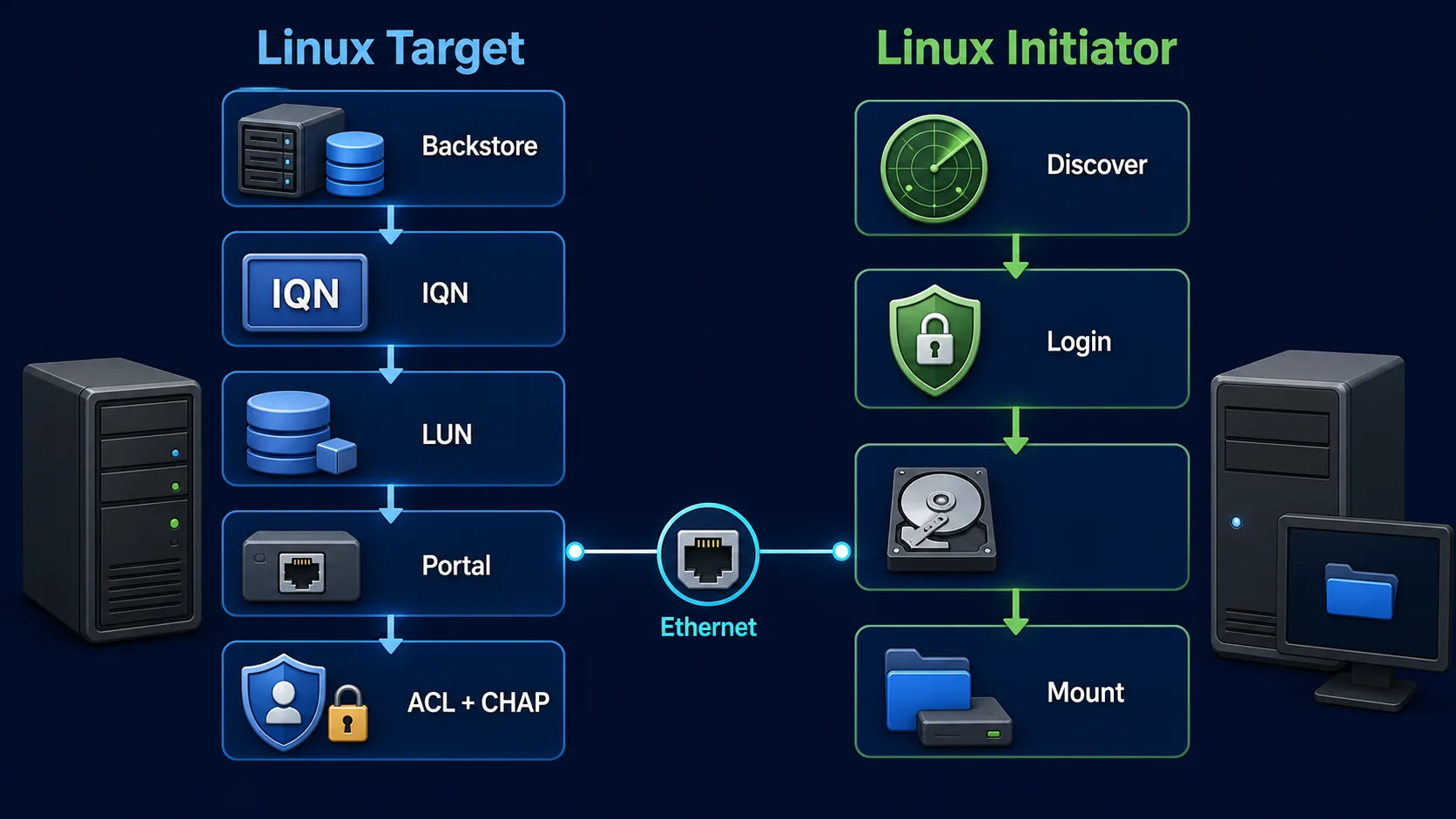
Publish a Linux block device as an iSCSI LUN with a controlled, verifiable configuration. The sequence protects the backing disk, limits initiators, and checks the portal before any client writes data.
Workflow: Protect the backing device → Restrict and verify
Keep this three-step view in mind as you work through the detailed lesson.
Protect the backing device
Identify the correct unused disk or file before creating a backstore.
Publish the LUN
Create the target IQN, LUN mapping, and network portal with targetcli.
Restrict and verify
Apply an initiator ACL and CHAP, save the configuration, and confirm reachability.
Configure a Linux iSCSI Target with targetcli Overview
Use this summary to establish the big picture before moving into the detailed explanations, commands, and checks.
Core focus
Publish a Linux block device as an iSCSI LUN with a controlled, verifiable configuration.
Key connection
Protect the backing device → Publish the LUN → Restrict and verify
Practical outcome
The sequence protects the backing disk, limits initiators, and checks the portal before any client writes data.
Before you configure the target
This lab uses target IP 192.168.50.10, empty disk /dev/sdb, target IQN iqn.2026-08.in.netest:storage.target01 and initiator IQN iqn.1994-05.com.redhat:client01.
Configuration path
1. Identify the storage disk
List block devices and confirm that the intended target disk is not mounted.
lsblk -o NAME,SIZE,TYPE,FSTYPE,MOUNTPOINTS,MODEL
findmnt /dev/sdb
wipefs -n /dev/sdb
wipefs -n reports existing signatures without modifying them. If the path is wrong, correct it before continuing.
2. Install and start the target software
RHEL, Rocky Linux or AlmaLinux
dnf install targetcli -y
systemctl enable --now target
Ubuntu or Debian
apt update
apt install targetcli-fb -y
systemctl enable --now rtslib-fb-targetctl
Package and service names can vary by release. The remaining commands run inside the targetcli shell.
3. Create the backstore, target, LUN and portal
Create a block backstore
targetcli
/> backstores/block create name=iscsi_disk01 dev=/dev/sdb
/> backstores/block ls
Create the target IQN
/> iscsi create iqn.2026-08.in.netest:storage.target01
/> iscsi ls
Map the backstore as LUN 0
/> iscsi/iqn.2026-08.in.netest:storage.target01/tpg1/luns create /backstores/block/iscsi_disk01Bind the storage portal
/> iscsi/iqn.2026-08.in.netest:storage.target01/tpg1/portals create 192.168.50.10192.168.50.10:3260 is easier to audit than exposing the target on every interface with 0.0.0.0.4. Restrict access with an ACL and CHAP
On the client, obtain the exact initiator IQN from /etc/iscsi/initiatorname.iscsi. Then create an ACL for that identity.
/> iscsi/iqn.2026-08.in.netest:storage.target01/tpg1/acls create iqn.1994-05.com.redhat:client01
/> iscsi/iqn.2026-08.in.netest:storage.target01/tpg1/acls ls
Enable authentication and set credentials on the ACL.
/> iscsi/iqn.2026-08.in.netest:storage.target01/tpg1 set attribute authentication=1
/> iscsi/iqn.2026-08.in.netest:storage.target01/tpg1/acls/iqn.1994-05.com.redhat:client01 set attribute authentication=1
/> iscsi/iqn.2026-08.in.netest:storage.target01/tpg1/acls/iqn.1994-05.com.redhat:client01 set auth userid=iscsiuser
/> iscsi/iqn.2026-08.in.netest:storage.target01/tpg1/acls/iqn.1994-05.com.redhat:client01 set auth password=Use-A-Strong-Secret5. Save and verify the target
/> saveconfig
/> exit

targetcli ls
ss -lntp | grep 3260
systemctl status target
The target tree should contain the target IQN, tpg1, one ACL, lun0 and portal 192.168.50.10:3260.
| Check | Expected result |
|---|---|
| Backstore | iscsi_disk01 points to the intended disk |
| LUN | lun0 maps to the block backstore |
| Portal | Dedicated IP listening on TCP 3260 |
| ACL | Exact initiator IQN is present |
| Authentication | CHAP enabled with a unique secret |
Firewall and reachability check
Permit TCP 3260 only from the authorised initiator subnet or addresses. From the initiator, test the path before discovery:
ping -c 4 192.168.50.10
nc -zv 192.168.50.10 3260
If the port is unreachable, fix routing, VLAN, host firewall and portal binding before changing CHAP.
Configure a Linux iSCSI Target with targetcli Frequently Asked Questions
What does targetcli configure?
It manages the Linux LIO target objects: backstores, target IQNs, portals, LUNs, ACLs and authentication.
Can I use an LVM volume instead of a physical disk?
Yes. LIO can export block devices such as LVM logical volumes, RAID devices and physical disks. Choose the correct backstore type and verify its lifecycle before mapping it.
Should the portal listen on 0.0.0.0?
A lab may listen on all addresses, but a dedicated storage IP is clearer and reduces accidental exposure.
How do I verify the target?
Use targetcli ls, confirm TCP 3260 with ss -lntp, and check the relevant target service.
Reference
See Red Hat's Configuring an iSCSI target documentation for supported backstores, portals, ACLs and authentication.