iSCSI Troubleshooting, Security and MPIO Checklist
Diagnose failures in a fixed order—from network reachability to filesystem mount—then build a production design without single points of failure.
iSCSI Storage Learning Path
Move from the block-storage model to target setup, Linux and Windows initiators, then production troubleshooting and MPIO.
In This Lesson
Diagnose iSCSI from network reachability through discovery, login, device detection, and filesystem state. Then strengthen the design with segmentation, authentication, redundant paths, and measured failover.
Workflow: Identify the failing layer → Harden and test
Keep this three-step view in mind as you work through the detailed lesson.
Identify the failing layer
Separate portal reachability, authentication, session, disk, and filesystem symptoms.
Use the right evidence
Check sessions, logs, device paths, counters, and target ACLs before changing settings.
Harden and test
Segment storage traffic, protect credentials, configure MPIO correctly, and test path loss.
iSCSI Troubleshooting, Security and MPIO Checklist Overview
Use this summary to establish the big picture before moving into the detailed explanations, commands, and checks.
Core focus
Diagnose iSCSI from network reachability through discovery, login, device detection, and filesystem state.
Key connection
Identify the failing layer → Use the right evidence → Harden and test
Practical outcome
Then strengthen the design with segmentation, authentication, redundant paths, and measured failover.
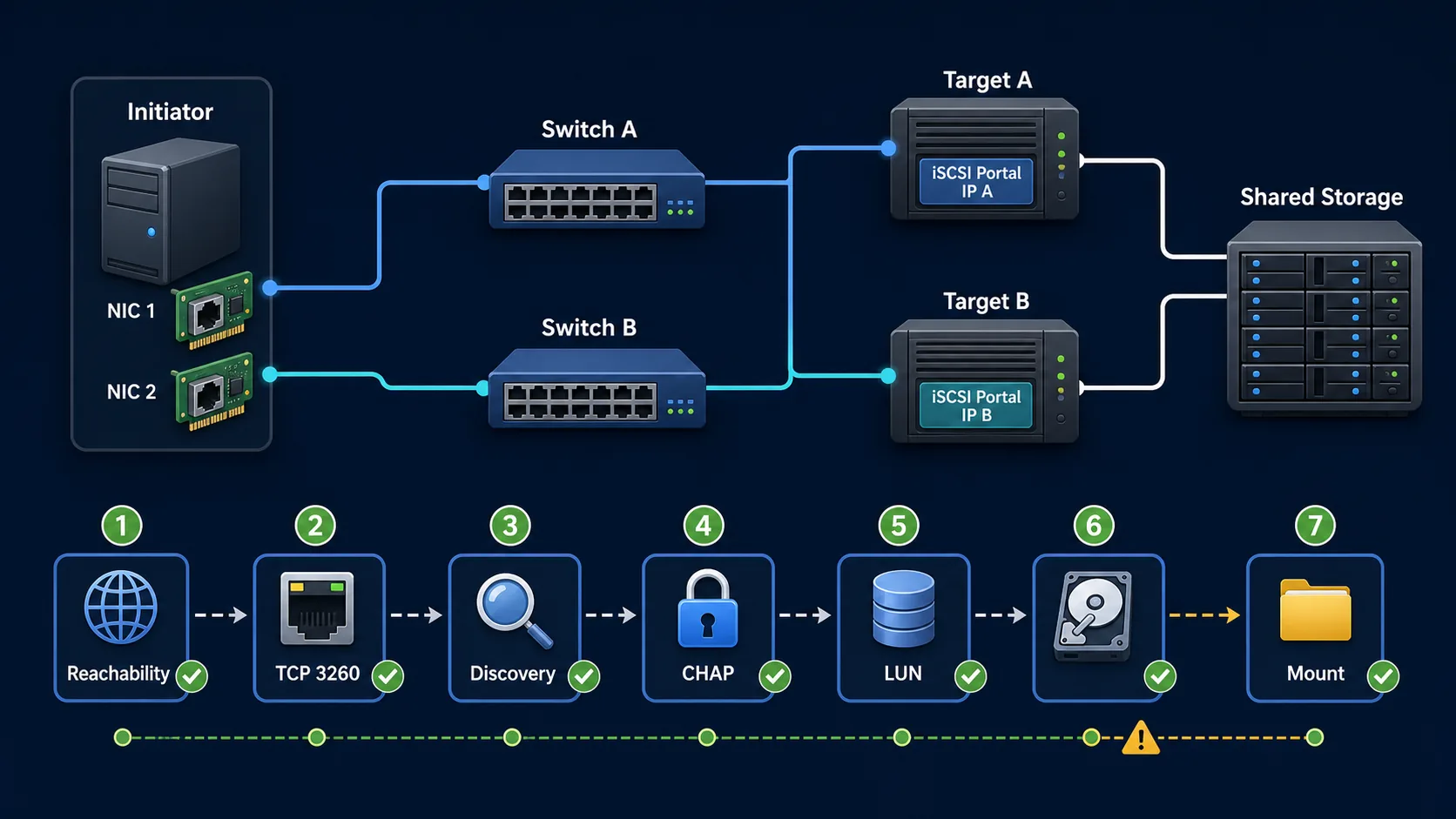
Troubleshoot in this order
- Can the initiator reach the target IP?
- Is TCP port 3260 open and listening?
- Does target discovery return the expected IQN?
- Does the ACL match the initiator IQN?
- Do CHAP credentials match?
- Is a LUN mapped to that ACL?
- Does the operating system detect the disk?
- Can the filesystem mount?
Target discovery returns no result
ping -c 4 192.168.50.10
nc -zv 192.168.50.10 3260

# On the Linux target
ss -lntp | grep 3260
systemctl status target
targetcli ls
Verify portal binding, target service state, host firewall, switch VLAN, subnet mask, routing and return path. Discovery cannot work until the initiator reaches the listening portal.
Login fails with an authentication error
- The initiator IQN exactly matches the target ACL.
- The CHAP username and secret are identical on both ends.
- No extra spaces or quoting mistakes were introduced.
- Target authentication is enabled where intended.
- The ACL has access to the exported LUN.
journalctl -u iscsid --since "10 minutes ago"
journalctl -u target --since "10 minutes ago"
Do not weaken access controls merely to make a login work. Compare identities and credentials methodically.
Login succeeds but no disk appears
Linux checks
iscsiadm -m session -P 3
lsblk
lsscsi
dmesg | tail -100
If required, rescan SCSI hosts:
for host in /sys/class/scsi_host/host*; do
    echo "- - -" > "$host/scan"
done
Windows checks
Get-IscsiSession
Get-Disk
Update-HostStorageCache
If the session is healthy but no device arrives, inspect the target-side LUN mapping for this initiator ACL.
Sessions disconnect frequently
Look for packet loss, NIC errors, switch-port drops, mismatched MTU, VLAN mismatch, duplicate IP addresses, firewall timeouts, unstable routing, target overload and faulty cables or transceivers.
ip -s link
ethtool -S eth1
journalctl -u iscsid

# Use only when every hop is configured for jumbo frames
ping -M do -s 8972 192.168.50.10The disk is visible but cannot be mounted
lsblk -f
blkid
file -s /dev/sdb1
findmnt /mnt/iscsi-data
Confirm the expected filesystem and check whether another server already owns the LUN. Do not run filesystem-repair tools on a production LUN until every other writer is stopped and the storage owner is confirmed.
iSCSI does not reconnect after reboot
systemctl is-enabled iscsid
systemctl is-enabled iscsi
iscsiadm -m node -o show | grep -E "Target:|node.startup"
The node should report node.startup = automatic. A persistent filesystem entry should use the correct UUID and include _netdev. Confirm that network-online ordering works on the host.
Recommended production architecture
A resilient design uses two initiator NICs, two independent switches, two target portals and a supported multipathing layer such as Linux device-mapper multipath or Windows MPIO.
Path resilience
- Two storage NICs
- Two separate switches
- Two target portals
- MPIO policy and failover tests
Operational resilience
- Target-side high availability
- Capacity and latency monitoring
- Alerting for path loss
- Regular restore testing
iSCSI security checklist
- Place iSCSI on dedicated storage VLANs or isolated fabrics.
- Restrict firewalls to approved source and target addresses.
- Create a specific ACL for each initiator IQN.
- Use CHAP or mutual CHAP with strong, unique secrets.
- Separate storage, management and user traffic.
- Use IPsec when encryption is required.
- Monitor logins, path state, latency, errors and capacity.
- Back up configuration and test data restores.
An IQN ACL is useful access control, but it is not strong identity verification by itself. Combine it with network restrictions and authentication.
iSCSI Troubleshooting, Security and MPIO Frequently Asked Questions
Why does target discovery return nothing?
Verify IP reachability, TCP 3260, the target service, portal binding, firewall rules and routing—in that order.
Why does login succeed but no disk appears?
The target may not map a LUN to this initiator ACL. Inspect the detailed session, target object tree and operating-system storage state.
Should iSCSI be exposed to the Internet?
No. Restrict it to dedicated storage networks and authorised addresses. Use IPsec if storage traffic needs encryption.
Does production iSCSI need MPIO?
Workloads that require storage-path resilience should use supported multipathing with redundant NICs, switches and target portals.
References
Use Microsoft's iSCSI connectivity troubleshooting guidance and the relevant Red Hat initiator documentation alongside your storage vendor's support matrix.