Spanning Tree Root Guard
Root Guard protects the planned STP root-bridge boundary. It allows ordinary BPDUs, but blocks a protected port if a downstream switch advertises superior root information.
Spanning Tree Protocol Series
Follow these lessons in order to move from Layer 2 loop prevention through edge-port protection to Rapid PVST+ configuration.
In This Lesson
Use Root Guard to enforce a deliberate STP boundary. You will see what a superior BPDU means, where the feature belongs, and how recovery occurs without guesswork.
Quick Learning Map
Keep these three decisions in view as you work through the detailed lesson.
Choose the boundary
Protect designated ports where a downstream switch must never become root.
Detect a superior BPDU
Root Guard places the port into root-inconsistent state instead of accepting it.
Correct and recover
Remove the superior BPDU source and verify automatic forwarding recovery.
Spanning Tree Root Guard at a Glance
Use this summary to establish the big picture before moving into commands, examples, and troubleshooting.
Protects
The intended root-bridge placement.
Triggered by
A superior BPDU arriving on a protected designated port.
Recovery
Automatic after superior BPDUs stop; no manual shut/no shut is normally required.
What is Spanning Tree Root Guard?
Unlike BPDU Guard, it does not treat every BPDU as a violation and it does not normally err-disable the physical interface. The goal is specific: keep the root bridge where the network design says it belongs.
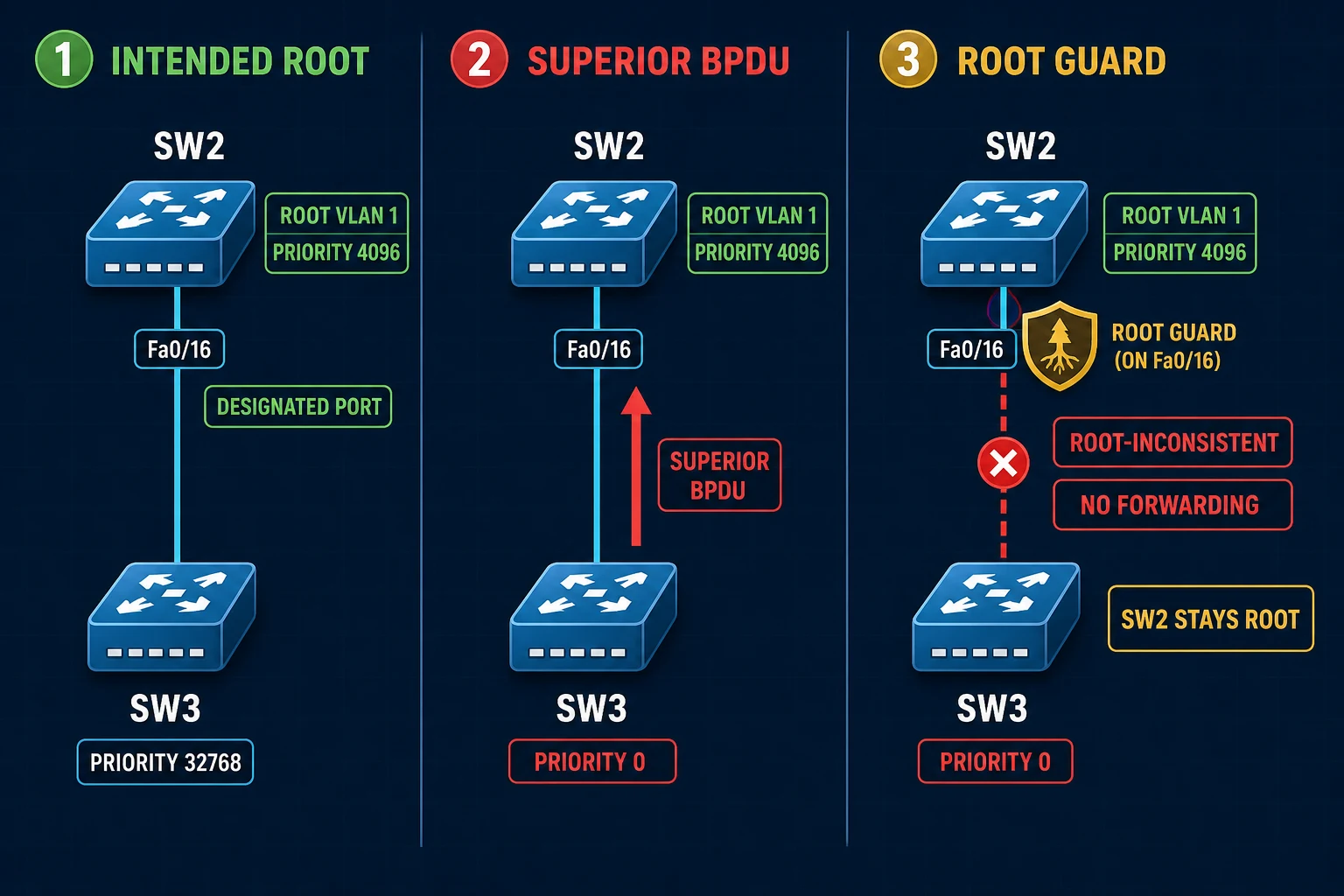
How Root Guard processes a superior BPDU
- SW2 is the intended root bridge for VLAN 1, so its downstream-facing port is designated.
- SW3 advertises a lower, superior bridge ID toward SW2.
- SW2 receives and compares the BPDU normally.
- Root Guard prevents Fa0/16 from becoming a root port and places it into root-inconsistent blocking for VLAN 1.
- When superior BPDUs stop and their information ages out, the port automatically returns through normal STP state transitions.
Root Guard lab topology
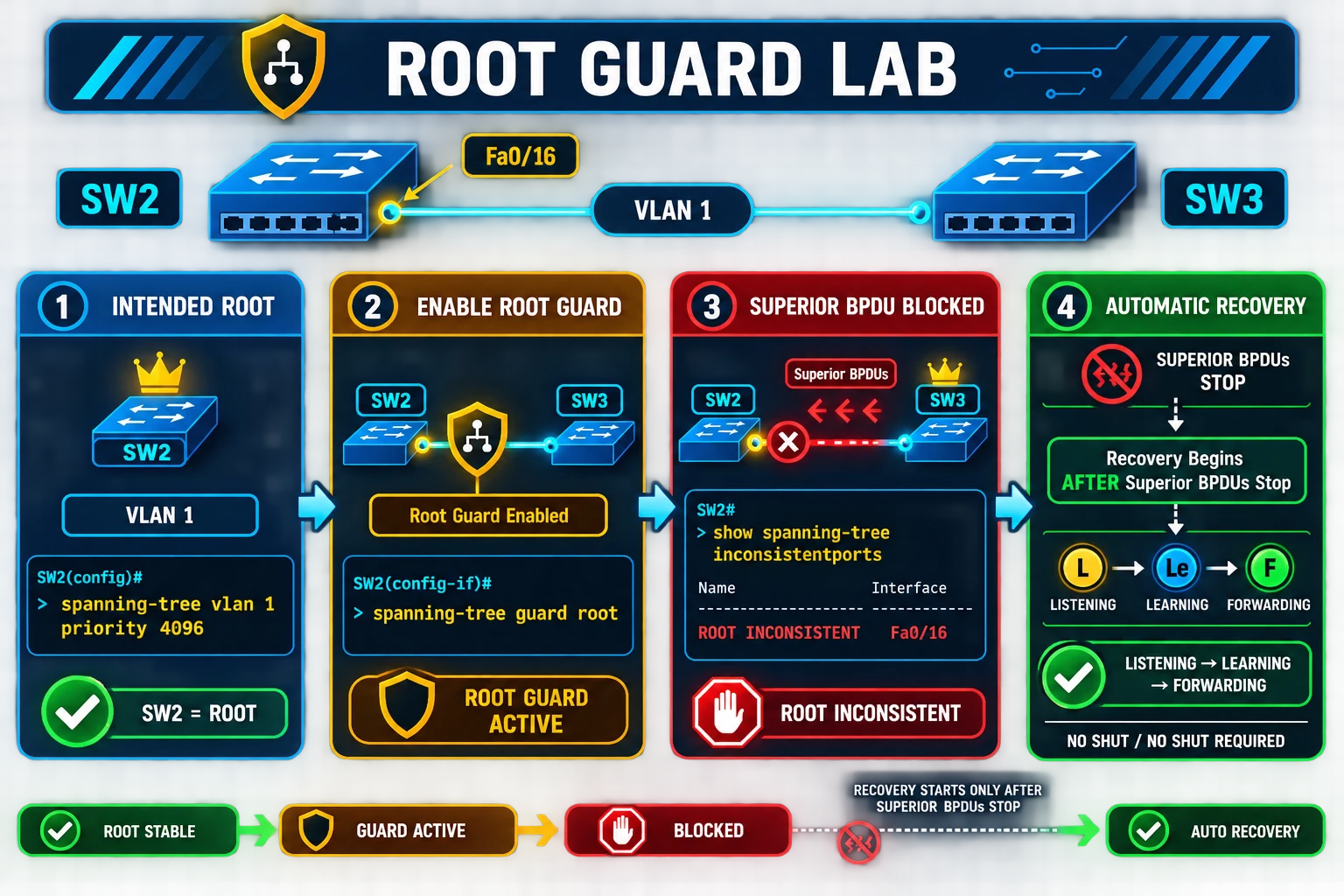
In this corrected lab, SW2 is the intended root for VLAN 1 and protects its Fa0/16 link facing SW3. SW3 initially has a worse bridge priority. We then lower SW3's priority to 0 to generate a superior BPDU and prove that SW2 enforces the boundary.
1. Configure the intended root bridge
Give SW2 a better VLAN 1 priority than the normal default. In production, plan the primary and secondary roots rather than selecting values ad hoc.
SW2# configure terminal
SW2(config)# spanning-tree vlan 1 priority 4096
SW2(config)# end
Verify the local bridge ID and the root information before applying a guard:
SW2# show spanning-tree vlan 1
2. Enable Root Guard on the downstream port
SW2# configure terminal
SW2(config)# interface FastEthernet0/16
SW2(config-if)# spanning-tree guard root
SW2(config-if)# end
A representative platform notification is:
%SPANTREE-2-ROOTGUARD_CONFIG_CHANGE: Root guard enabled on port FastEthernet0/16.
3. Test with a superior BPDU
In a maintenance lab, enable event debugging on SW2 and change SW3 to the lowest configurable bridge priority:
SW2# debug spanning-tree events

SW3# configure terminal
SW3(config)# spanning-tree vlan 1 priority 0
SW3(config)# end
SW3's bridge ID is now superior. SW2 should log that Root Guard blocked the protected port instead of accepting SW3 as the root direction:
STP: VLAN0001 heard root 1-000f.34ca.1000 on Fa0/16
     supersedes 4097-0019.569d.5700
%SPANTREE-2-ROOTGUARD_BLOCK: Root guard blocking port FastEthernet0/16 on VLAN0001.
Message format and bridge IDs vary by platform and lab. Disable debugging after the test:
SW2# undebug all
4. Verify the root-inconsistent port
SW2# show spanning-tree inconsistentports

Name                 Interface                Inconsistency
-------------------- ------------------------ ------------------
VLAN0001             FastEthernet0/16         Root Inconsistent

Number of inconsistent ports (segments) in the system : 1
Also inspect the VLAN and interface detail so you can confirm the root ID, port role, state, guard setting, and last topology change:
SW2# show spanning-tree vlan 1
SW2# show spanning-tree interface FastEthernet0/16 detail
SW2# show running-config interface FastEthernet0/16
5. Automatic Root Guard recovery
Restore SW3 to a bridge priority that no longer advertises a superior root:
SW3# configure terminal
SW3(config)# spanning-tree vlan 1 priority 32768
SW3(config)# end
After superior BPDUs stop and the stored information expires, SW2 removes the root inconsistency automatically. The port then follows normal STP convergence before forwarding.
shutdown and no shutdown.Where to deploy Root Guard
Core or distribution boundary
Use it on designated ports that point toward access-layer switches when the root must remain in the core or distribution layer.
Partner or unmanaged segment
Protect a boundary where connected bridging equipment must never influence your root election.
Not on a legitimate root path
Do not enable it on a port that is expected to become a root port; a valid superior BPDU would block that path.
Map every VLAN and instance
Root Guard can block the affected spanning-tree instance. Validate per-VLAN or MST behavior on the deployed platform.
Root Guard vs other STP protection features
| Feature | Trigger | Response | Typical placement |
|---|---|---|---|
| Root Guard | Superior BPDU | Root-inconsistent blocking; automatic recovery | Downstream-facing designated port |
| BPDU Guard | Any BPDU on a protected edge port | Err-disables the interface | PortFast endpoint-facing access port |
| BPDU Filter | Configuration-driven | Suppresses BPDUs; exact behavior differs globally and per interface | Specialized, tightly controlled use |
| Loop Guard | Expected BPDUs stop arriving | Loop-inconsistent blocking | Non-designated point-to-point links at risk of unidirectional failure |
Complete SW2 and SW3 example configurations
SW2 — intended root and protected boundary
hostname SW2
!
spanning-tree vlan 1 priority 4096
!
interface FastEthernet0/16
 spanning-tree guard root
!
end
SW3 — superior-BPDU test configuration
hostname SW3
!
spanning-tree vlan 1 priority 0
!
end
Spanning Tree Root Guard FAQs
What does Spanning Tree Root Guard do?
It enforces the expected root direction. A protected port receiving a superior BPDU enters root-inconsistent blocking instead of becoming the path to a new root.
Where should Root Guard be enabled?
Use it on designated ports facing downstream switches that must never become or lead toward the root bridge. Do not put it on a legitimate root-facing uplink.
What is the root-inconsistent state?
It is a blocking state for the affected STP instance. Data does not forward, but BPDUs continue to be received so the switch can detect when the inconsistency ends.
Does Root Guard err-disable the interface?
No. BPDU Guard normally err-disables a protected port; Root Guard places the affected instance into root-inconsistent state.
How does a Root Guard port recover?
Recovery is automatic after superior BPDUs stop and their information ages out. The port then converges normally, without a shutdown/no shutdown cycle.
What is the difference between Root Guard and BPDU Guard?
Root Guard permits ordinary BPDUs and reacts only to superior root information. BPDU Guard treats any received BPDU on a protected edge port as a fault.
Can Root Guard and Loop Guard be enabled on the same port?
Cisco documentation says they cannot be enabled on the same port simultaneously. Choose the protection that matches the port role and confirm the command behavior for your switch platform.
References and further study
This is an original article with original diagrams. The supplied NetworkLessons page defined the requested topic and lab scope; explanations and visuals were independently written, and operational behavior was checked against Cisco documentation.