BPDU Filter Configuration: Cisco IOS Behavior and Risks
BPDU Filter suppresses spanning-tree control messages, but its behavior depends entirely on where you configure it. The global PortFast default is conditional; the interface-level command is unconditional and can expose the network to Layer 2 loops.
What does BPDU Filter do?
BPDU Filter suppresses STP BPDUs, but its exact behavior depends on how it is enabled. Interface-level filtering can stop both sending and receiving BPDUs and may create a Layer 2 loop. The global PortFast form is conditional and should not be treated as equivalent to the interface command.
What is Spanning Tree BPDU Filter?
That difference is essential. BPDU Filter is not simply a quieter version of BPDU Guard. BPDU Guard treats an unexpected BPDU as a fault and err-disables the port. Interface BPDU Filter hides the control traffic that STP needs to detect and block redundant paths.
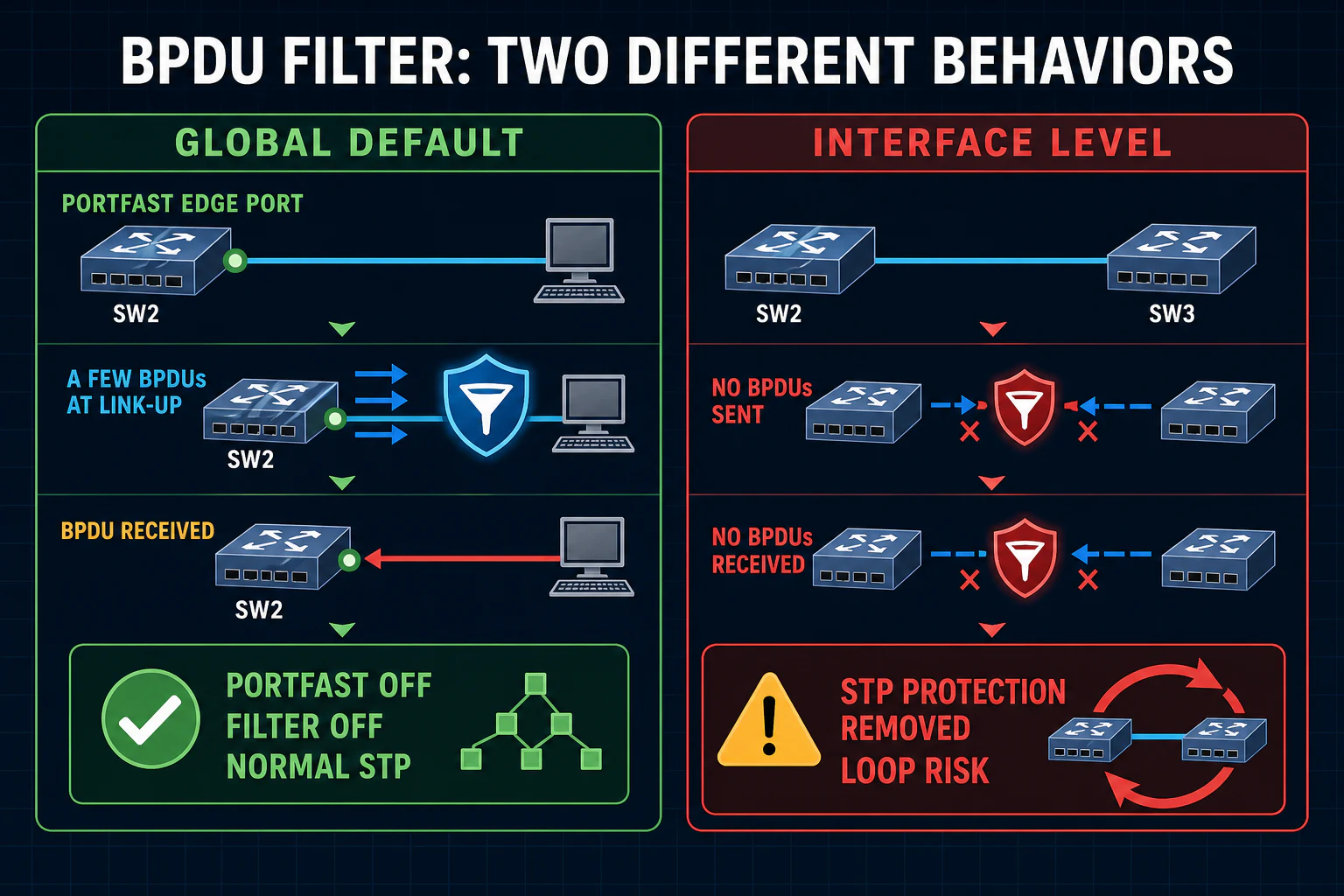
Global vs interface BPDU Filter behavior
Global PortFast default
Applies only while the interface is operationally PortFast. The port sends a few BPDUs after link-up before outbound filtering starts. If any BPDU arrives, the port loses operational PortFast status, BPDU Filter is disabled there, and normal STP processing resumes.
SW2(config)# spanning-tree portfast bpdufilter default
Interface-level command
Unconditionally prevents the interface from sending and processing BPDUs. It does not need PortFast. Cisco warns that this is similar to disabling spanning tree on that interface and can create a bridging loop.
SW2(config-if)# spanning-tree bpdufilter enable
How global BPDU Filter changes state
- The interface becomes operationally PortFast.
- The port sends several normal BPDUs at link-up.
- If no BPDU arrives, outbound BPDU filtering becomes effective.
- If a BPDU arrives at any time, the interface loses operational PortFast status.
- BPDU filtering is disabled for that port and it participates in STP normally.
This behavior allows the switch to recognize that the connection no longer looks like a simple endpoint link. It is still not the same as BPDU Guard: the port returns to normal STP rather than being err-disabled.
BPDU Filter lab topology
The supplied example uses Fa0/16 as a PortFast trunk between SW2 and SW3 so bidirectional filtering is easy to observe. Treat this as a controlled lab demonstration only. Direct BPDU filtering on a production switch-to-switch link can allow both sides to forward without STP detecting a redundant path.
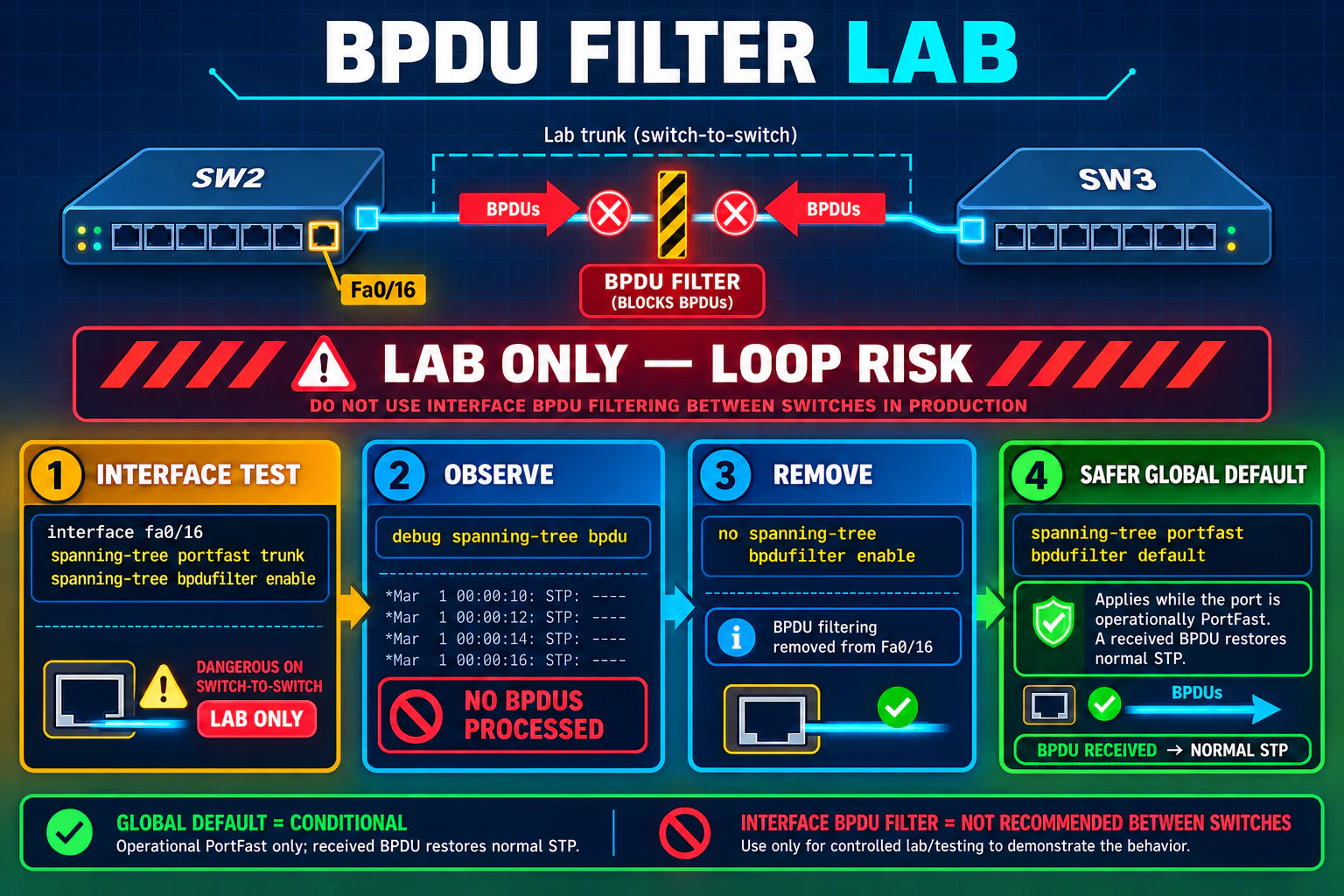
Configure interface-level BPDU Filter
Use an isolated lab with a single link and no alternate Layer 2 path:
SW2# configure terminal
SW2(config)# interface FastEthernet0/16
SW2(config-if)# spanning-tree portfast trunk
SW2(config-if)# spanning-tree bpdufilter enable
SW2(config-if)# end
After the interface command is active, SW2 does not transmit BPDUs on Fa0/16 and does not process BPDUs received there. Data traffic can continue forwarding, which is precisely why a physical loop can become dangerous.
Observe and verify BPDU filtering
SW2# debug spanning-tree bpdu
SW2# show running-config interface FastEthernet0/16
SW2# show spanning-tree interface FastEthernet0/16 detail
SW2# show spanning-tree summary totals
With the interface command enabled, BPDU debug output for that link can remain silent because the port neither sends nor processes BPDUs. Confirm from both switches in a lab. Disable debugging after the observation:
SW2# undebug all
Remove interface BPDU Filter safely
Confirm the topology has no accidental loop, then remove the unconditional interface command:
SW2# configure terminal
SW2(config)# interface FastEthernet0/16
SW2(config-if)# no spanning-tree bpdufilter enable
SW2(config-if)# end
Verify that expected BPDUs and normal spanning-tree participation return. The no form returns the interface to its inherited setting; if the global default exists and the port is operationally PortFast, conditional filtering may still apply.
Configure the global PortFast BPDU Filter default
SW2(config)# spanning-tree portfast default
SW2(config)# spanning-tree portfast bpdufilter default
On newer IOS or IOS XE releases, the equivalent syntax may include the edge keyword. Always check the command reference for the actual platform. The global default affects operational PortFast ports and automatically gives way to normal STP if a BPDU is received.
BPDU Filter vs BPDU Guard
| Behavior | BPDU Filter | BPDU Guard |
|---|---|---|
| Primary action | Suppresses BPDUs according to global or interface behavior | Err-disables a protected port after a BPDU arrives |
| Visibility | Can make BPDU activity invisible | Creates a clear logged failure |
| Global PortFast behavior | Filtering stops and normal STP resumes after a BPDU | The operational PortFast port is err-disabled after a BPDU |
| Interface behavior | No BPDUs sent or processed; loop risk | Any received BPDU err-disables the interface |
| Typical endpoint policy | Specialized requirement only | Usually preferred when BPDUs must never appear |
When should BPDU Filter be used?
Controlled endpoint requirement
A documented design may require hosts not to receive STP BPDUs, with global conditional filtering and careful port classification.
Isolated training lab
Interface filtering can demonstrate STP behavior only when the topology cannot form a loop.
Not for hiding faults
Do not silence BPDUs merely to remove log noise or make an unexpected neighbor disappear.
Prefer visible protection
Use BPDU Guard when an unexpected BPDU should stop the port and alert operations.
Spanning Tree BPDU Filter FAQs
What does BPDU Filter do?
It controls whether an interface sends or processes spanning-tree BPDUs. Global and interface configurations behave differently.
How does global BPDU Filter work?
It applies while a port is operationally PortFast. The port sends a few initial BPDUs, then filters. If a BPDU arrives, PortFast and filtering are disabled for that port and normal STP resumes.
How does interface-level BPDU Filter work?
It unconditionally prevents the interface from sending and processing BPDUs. This is similar to disabling STP protection on that link and can create bridging loops.
What is the difference between BPDU Filter and BPDU Guard?
BPDU Guard err-disables a protected port after receiving a BPDU. BPDU Filter suppresses BPDUs and does not provide the same fail-closed alert.
Should BPDU Filter be enabled between switches?
Not on ordinary production switch links. Hiding BPDUs can allow a physical Layer 2 loop to keep forwarding.
How do you remove interface BPDU Filter?
Use no spanning-tree bpdufilter enable in interface configuration mode, then verify that normal STP participation returns.
Is BPDU Guard usually safer for endpoint ports?
Yes. When BPDUs are unexpected, err-disabling the port provides a visible and fail-closed response instead of silently hiding control traffic.
References and further study
This is an original article with original diagrams. The supplied lesson defined the requested scope; operational claims were checked against Cisco documentation.