Spanning Tree BPDU Guard
BPDU Guard protects an endpoint-facing switch port from an unexpected bridge protocol data unit. If a protected port receives a BPDU, Cisco IOS places that interface into the err-disabled state before the attached device can influence the spanning-tree topology.
What is Spanning Tree BPDU Guard?
Endpoint ports commonly connect to workstations, phones, printers, servers, or access points. If someone connects a switch, enables bridging on a host, or runs software that transmits a superior BPDU, the endpoint port can unexpectedly participate in STP. Without protection, that BPDU may trigger a root election and change forwarding paths.
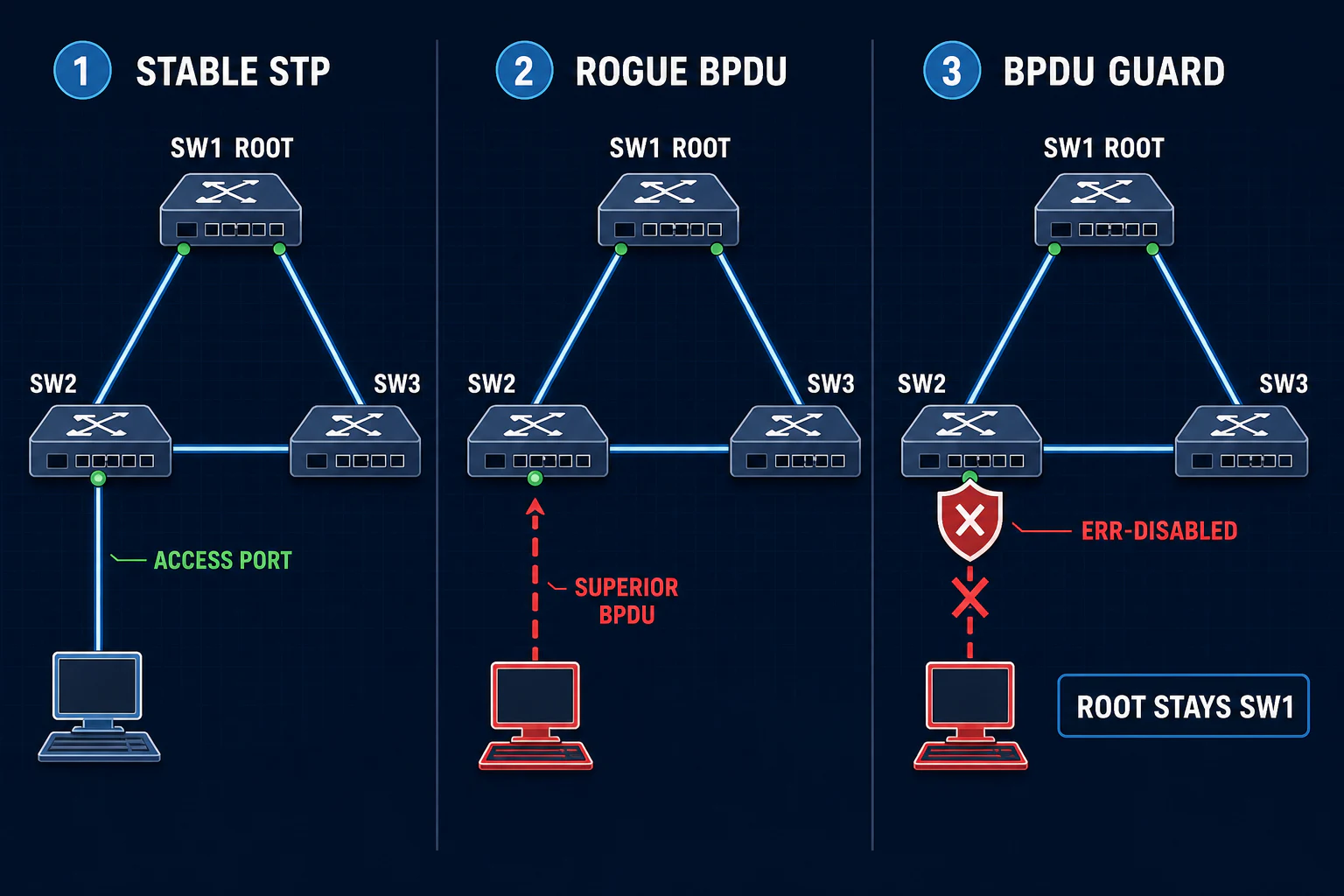
How a rogue BPDU can change the topology
- The network starts stable. A legitimate distribution or core switch is the intended root bridge.
- An endpoint-facing port receives a BPDU. This can come from an unauthorized switch, a software bridge, a hypervisor bridge, or a cabling mistake.
- The advertised bridge ID is superior. A lower bridge ID can win the STP election if no protection prevents the device from participating.
- STP reconverges. Root ports and blocked links may change, shifting traffic toward the unexpected device or a low-capacity access path.
- The result can be disruption or interception risk. A malicious device that is deliberately placed in-path may observe or relay traffic; simply becoming root does not by itself guarantee interception of every frame.
What happens when BPDU Guard triggers?
Without BPDU Guard
The interface can process the BPDU, and STP may recalculate the tree. The outcome depends on the received BPDU and the current topology.
With BPDU Guard
The switch detects a BPDU on the protected interface and moves that interface into err-disabled state. Traffic through the interface stops and the event is logged.
BPDU Guard lab topology
Use SW2 FastEthernet0/16 as a host-facing access port. A normal endpoint does not transmit STP BPDUs. For a safe lab test, connect a spare switch to Fa0/16 and observe the port enter err-disabled state when the first BPDU arrives.
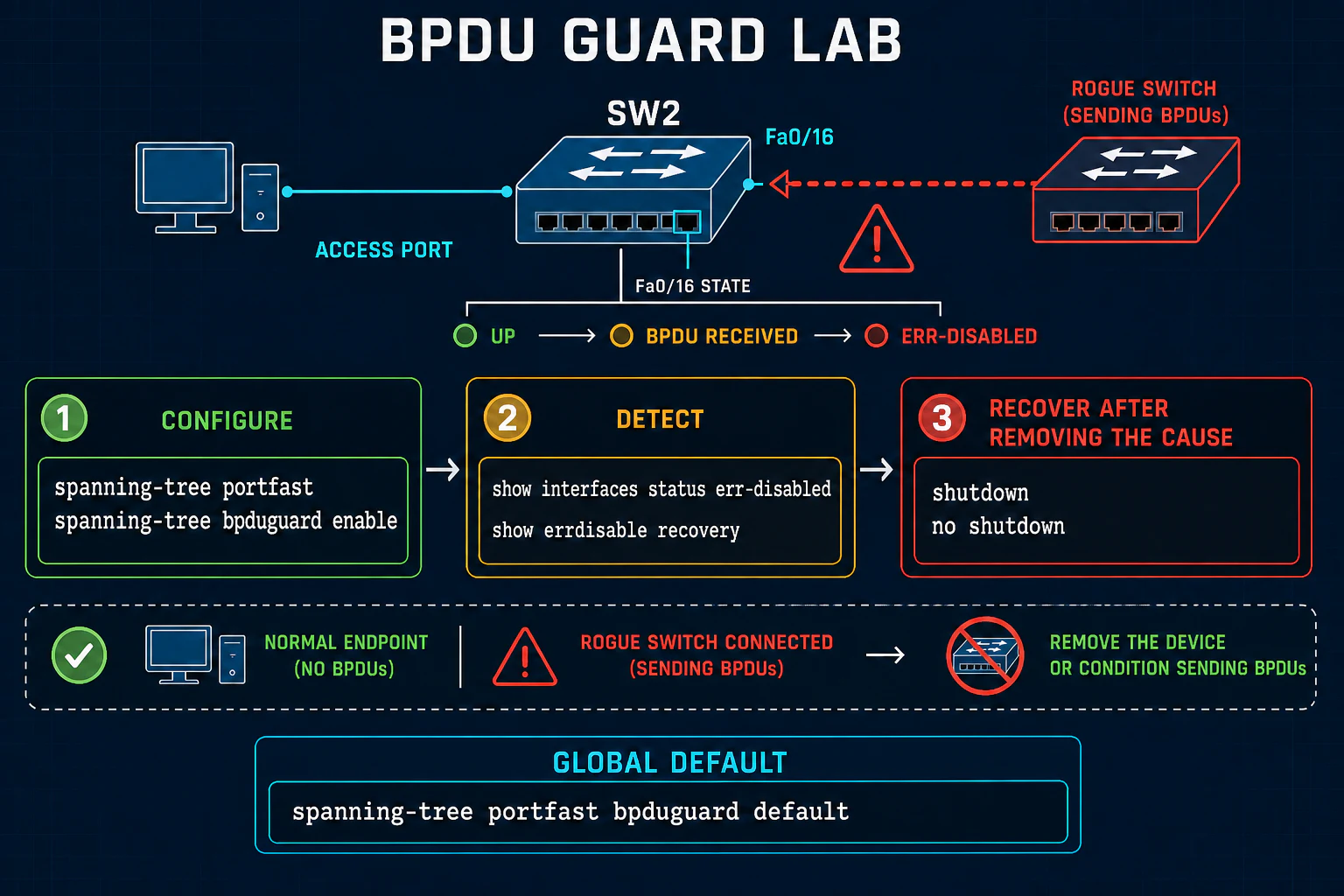
Configure BPDU Guard on one interface
The interface-level command enables BPDU Guard directly on Fa0/16. Because this is an endpoint-facing access port, enable PortFast as well:
SW2# configure terminal
SW2(config)# interface FastEthernet0/16
SW2(config-if)# switchport mode access
SW2(config-if)# spanning-tree portfast
SW2(config-if)# spanning-tree bpduguard enable
SW2(config-if)# end
Enable BPDU Guard globally for PortFast ports
The global default is usually easier to operate consistently across many verified edge ports:
SW2(config)# spanning-tree portfast default
SW2(config)# spanning-tree portfast bpduguard default
spanning-tree portfast default enables PortFast by default on qualifying nontrunking ports. spanning-tree portfast bpduguard default applies BPDU Guard to interfaces operating as PortFast ports. Command spelling can include the edge keyword on newer IOS and IOS XE releases, so confirm the syntax supported by the target platform.
Verify BPDU Guard and the err-disabled event
SW2# show spanning-tree summary totals
Switch is in pvst mode
Portfast Default             is enabled
PortFast BPDU Guard Default  is enabled

SW2# show running-config interface FastEthernet0/16
SW2# show spanning-tree interface FastEthernet0/16 detail
SW2# show interfaces status err-disabled
SW2# show errdisable recovery
When a BPDU arrives, platform and software versions may format messages differently. A representative event looks like this:
%SPANTREE-2-BLOCK_BPDUGUARD: Received BPDU on port Fa0/16 with BPDU Guard enabled. Disabling port.
%PM-4-ERR_DISABLE: bpduguard error detected on Fa0/16, putting Fa0/16 in err-disable state
Confirm both the reason and the physical device connected to the interface. Do not treat a down link alone as proof that the source of the BPDU has been removed.
Recover safely from a BPDU Guard shutdown
- Identify the interface and confirm
bpduguardas the err-disable reason. - Trace the cable or endpoint and remove the unauthorized switch, software bridge, loop, or misconfiguration.
- Verify that the interface is intended to be an endpoint-facing edge port.
- Keep BPDU Guard enabled and manually reset the interface.
- Monitor logs and STP state after the port returns.
SW2(config)# interface FastEthernet0/16
SW2(config-if)# shutdown
SW2(config-if)# no shutdown
Removing spanning-tree bpduguard enable is not the normal recovery step. That removes the safety control without correcting the reason it fired.
Optional automatic errdisable recovery
SW2(config)# errdisable recovery cause bpduguard
SW2(config)# errdisable recovery interval 400
Automatic recovery can be useful when policy allows it, but it can also create a repeated disable/re-enable cycle if the BPDU source remains connected. Use monitoring and an interval appropriate for the environment.
BPDU Guard vs BPDU Filter vs Root Guard
| Feature | Normal placement | Reaction | Primary goal |
|---|---|---|---|
| BPDU Guard | Endpoint-facing PortFast/edge port | Err-disables the port when a BPDU arrives | Stop an unexpected bridge from joining STP |
| BPDU Filter | Special, carefully designed edge cases | Suppresses BPDU transmission or processing depending on configuration | Filter BPDUs; misuse can hide a loop |
| Root Guard | Designated ports toward switches that must never become root | Places the port into a root-inconsistent state after superior BPDUs | Enforce the intended root-bridge location |
BPDU Guard best practices
Classify edge ports
Document which interfaces connect to single endpoints and which can lead to another Layer 2 bridge.
Pair with PortFast
Use the global PortFast BPDU Guard default to enforce the same policy across operational edge ports.
Alert on errdisable
Send syslog and monitoring alerts for BPDU Guard events so unexpected connections are investigated quickly.
Fix before recovery
Remove the BPDU source or cabling fault before returning the interface to service.
Audit exceptions
Record deliberate exceptions instead of disabling protection ad hoc during troubleshooting.
Test safely
Validate commands and recovery behavior in a lab that matches the production switch family and software train.
Spanning Tree BPDU Guard FAQs
What does BPDU Guard do?
It places a protected interface into err-disabled state when the port receives an STP BPDU, isolating the unexpected bridge or switch.
Where should BPDU Guard be enabled?
Normally on verified endpoint-facing PortFast access ports where no BPDU should arrive. Do not enable it blindly on normal switch links.
What is the difference between interface and global BPDU Guard?
The interface command enables the feature unconditionally on that interface. The global default applies it to interfaces operating as PortFast edge ports.
Does BPDU Guard block a BPDU and keep the port forwarding?
No. The protected port is placed into err-disabled state, which stops user traffic until the port is recovered.
How do you recover a port after a BPDU Guard event?
Remove or correct the device sending BPDUs first. Then reset the interface with shutdown and no shutdown, or use controlled errdisable recovery if policy permits.
Should BPDU Guard be removed to recover the port?
Usually no. Keep the safety control and fix the cause. Removing BPDU Guard can expose the topology to the same problem again.
Is BPDU Guard the same as BPDU Filter?
No. BPDU Guard shuts a protected port when a BPDU arrives. BPDU Filter suppresses BPDU handling and has different, more specialized use cases.
References and further study
This article and its diagrams are original. The scenario supplied by the reader was expanded and checked against Cisco documentation; the linked third-party lesson was used only to understand the requested teaching scope.