Proxmox VE Top 100 Questions, Part 1: Foundations
Questions 1–50 take you from installation and first login through virtual networking, storage design, snapshots, and recoverable backups.
Proxmox VE Top 100 Questions
Move from first installation and storage decisions to secure VM operations, clustering, automation, and homelab design.
In This Lesson
Build a reliable foundation first: understand the platform, connect guests correctly, and choose storage and backup controls that match the workload.
Quick Learning Map
Use three decisions to turn a first Proxmox installation into a manageable virtualization host.
Build the host
Verify hardware, install Proxmox VE, and understand the node, KVM, and LXC model.
Connect workloads
Use bridges, VLANs, routing, firewall policy, and remote access deliberately.
Protect data
Choose storage by workload, then combine snapshots with tested, retained backups.
Proxmox VE Questions at a Glance
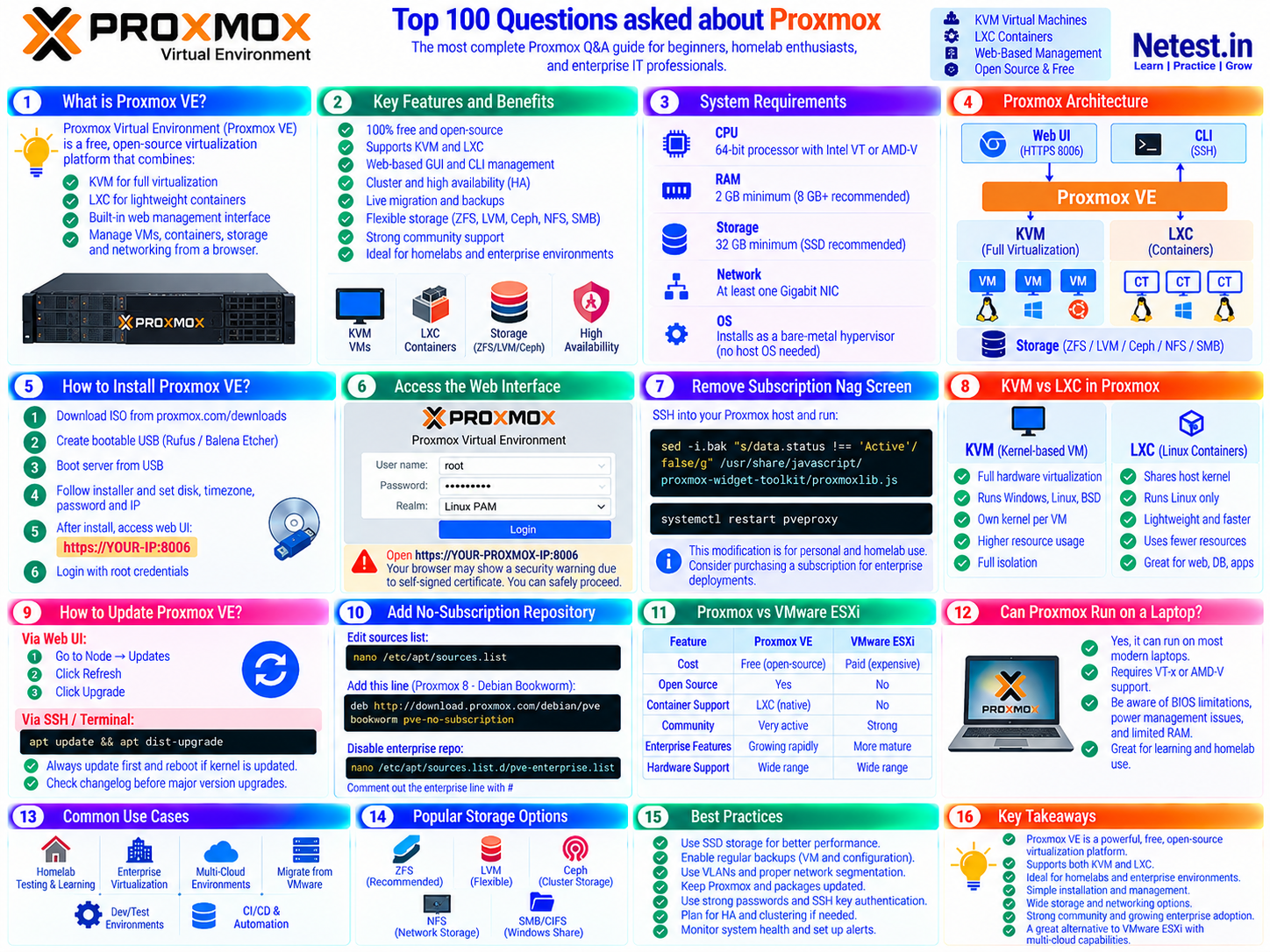
The supplied visual summarizes the platform, installation flow, architecture, KVM and LXC choices, storage options, and operational best practices.
Proxmox Basics and Installation (Q1–Q20)
Understand Proxmox VE, install it, access the interface, and choose KVM or LXC.
Q1: What is Proxmox VE?
Proxmox Virtual Environment (Proxmox VE) is a free, open-source server virtualization management platform. It integrates two virtualization technologies: KVM (Kernel-based Virtual Machine) for full virtualization and LXC (Linux Containers) for lightweight container-based virtualization. It includes a built-in web management interface, making it easy to manage VMs, containers, storage, and networking from a browser.
Q2: Is Proxmox free to use?
Yes. Proxmox VE is open-source software under the GNU AGPL v3 license and can be downloaded and used without a license fee. Paid subscriptions provide support and access to the enterprise repository. Proxmox documents the no-subscription repository for testing and non-production use; choose the repository and support level that match the system's importance.
Q3: What are the minimum system requirements for Proxmox VE?
Minimum requirements for Proxmox VE include:
- CPU: 64-bit processor with Intel VT or AMD-V virtualization support
- RAM: 2 GB minimum, 8 GB or more recommended for running multiple VMs
- Storage: 32 GB minimum, SSD strongly recommended
- Network: At least one Gigabit NIC
- OS: Proxmox installs as a bare-metal hypervisor, no host OS needed
Q4: How do I install Proxmox VE?
- Download the ISO from proxmox.com/downloads
- Flash it to a USB drive using Rufus or Balena Etcher
- Boot your server from the USB
- Follow the graphical installer and set disk, timezone, password, and IP
- After install, access the web UI at https://YOUR-IP:8006
- Login with root credentials you set during installation
Q5: What is the difference between Proxmox and VMware ESXi?
- Licensing: Proxmox VE is open source, with optional paid subscriptions; VMware vSphere uses commercial licensing.
- Guests: Proxmox manages KVM virtual machines and LXC containers from one interface; ESXi focuses on virtual machines.
- Operations: Both support clustering, live migration, high availability, software-defined networking, and enterprise storage integrations, but their workflows and ecosystems differ.
- Decision: Compare required vendor support, existing skills, hardware certification, backup tools, migration effort, and total operating cost.
Q6: How do I access the Proxmox web interface?
Open any web browser and navigate to https://YOUR-PROXMOX-IP:8006. Login with username root and the password you set during installation. The realm should be set to Linux PAM. Your browser may show a security warning because Proxmox uses a self-signed certificate. You can safely proceed past this warning.
Q7: How do I remove the Proxmox subscription nag screen?
Do not patch Proxmox JavaScript files to hide the subscription dialog. That unsupported workaround is overwritten by updates and can leave the interface in an inconsistent state.
For a homelab, acknowledge the reminder and configure the official no-subscription repository. For production, use the enterprise repository with a valid subscription. This keeps upgrades on a supported path.
Q8: What is the difference between KVM and LXC in Proxmox?
KVM (Kernel-based Virtual Machine): Full hardware virtualization. Runs any OS including Windows, Linux, and BSD. Has its own kernel. Heavier resource usage but full isolation.
LXC (Linux Containers): Shares the host kernel. Only runs Linux. Much lighter, faster to start, and uses fewer resources. Great for Linux-only workloads like web servers, databases, and applications.
Q9: How do I update Proxmox VE?
Via the web UI: Go to your Node, then Updates, then Refresh, then Upgrade.
Via SSH or terminal run: apt update && apt dist-upgrade
Always update first and reboot if the kernel is updated. Check the Proxmox changelog before upgrading major versions.
Q10: How do I add the no-subscription repository in Proxmox?
For Proxmox VE 9 on Debian 13 “Trixie,” disable the enterprise source only when you do not have a subscription, then configure the official no-subscription channel:
deb http://download.proxmox.com/debian/pve trixie pve-no-subscriptionRepository definitions may use Debian’s newer .sources format. Confirm the exact file and suite in the current Proxmox administration guide before changing a host.
Q11: Can Proxmox run on a laptop?
Yes! Proxmox can run on most modern laptops with VT-x or AMD-V support. However, be aware that laptops may have BIOS limitations, power management issues, and limited RAM. It is great for testing but not recommended for production use. Mini PCs like Intel NUC or Beelink are better options for homelab use.
Q12: What Linux distro is Proxmox based on?
Current Proxmox VE 9.x releases are based on Debian 13 “Trixie” and use a Proxmox-customized Linux kernel. Older Proxmox VE 8.x systems are based on Debian 12 “Bookworm.” Always match repository suites and upgrade instructions to the installed major version.
Q13: How do I create a VM in Proxmox?
- Upload an ISO to Proxmox storage via local, then ISO Images, then Upload
- Click Create VM in the top-right corner
- Set VM ID, name, OS type, ISO, disk size, CPU cores, and RAM
- Configure network using the default virtio bridge vmbr0
- Click Finish, then start the VM
- Open the console to begin OS installation
Q14: How do I create an LXC container in Proxmox?
- Download a template via local storage, then CT Templates, then Templates, then Download
- Click Create CT
- Set ID, hostname, password, template, storage, CPU, RAM, and network
- Click Finish and start the container
LXC containers start in seconds and use far less RAM than full virtual machines.
Q15: How do I enable IOMMU for GPU passthrough in Proxmox?
Edit GRUB configuration using: nano /etc/default/grub
For Intel processors add to GRUB_CMDLINE_LINUX_DEFAULT: intel_iommu=on iommu=pt For AMD processors add: amd_iommu=on iommu=pt
Then run: update-grub and reboot the server. Also load vfio modules in /etc/modules
Q16: What is a Proxmox node?
A Proxmox node is a single physical server running Proxmox VE. Multiple nodes can be joined into a cluster for centralized management, live migration, and high availability. Each node appears in the left panel of the Proxmox web UI.
Q17: How do I install Proxmox on a Raspberry Pi?
Proxmox now publishes an official ARM64 installer alongside the x86-64 release. ARM64 hardware support is newer and device compatibility can vary, so check the current release notes and validate networking, storage, and boot support before choosing a Raspberry Pi or another ARM system for an important workload.
Q18: What is Proxmox Backup Server (PBS)?
Proxmox Backup Server (PBS) is a dedicated backup solution that integrates seamlessly with Proxmox VE. It provides incremental and deduplication-based backups, fast restore capabilities, encryption support, tape backup support in PBS 2.x and later, and it is a separate free product you can install on a different machine or VM.
Q19: Can I install Proxmox inside VirtualBox or VMware?
Yes, for testing purposes only. You can install Proxmox as a nested VM inside VirtualBox or VMware Workstation. Enable nested virtualization in the hypervisor settings first. Performance will be limited and GPU passthrough will not work. This is useful for learning Proxmox without dedicated hardware.
Q20: What is Proxmox Mail Gateway?
Proxmox Mail Gateway (PMG) is a free enterprise-grade email security platform that filters spam, viruses, and malware before emails reach your mail server. It can be deployed as a VM or bare-metal installation and integrates with Postfix, SpamAssassin, ClamAV, and more.
Proxmox Networking (Q21–Q35)
Build bridges, VLANs, firewall policy, remote access, and a repeatable troubleshooting path.
Q21: What is vmbr0 in Proxmox?
vmbr0 is the default Linux Bridge created during Proxmox installation. It acts as a virtual switch that connects VMs and containers to your physical network. Your physical NIC such as eth0 or eno1 is bridged into vmbr0, allowing VMs to get IP addresses on your local area network.
Q22: How do I set a static IP address on Proxmox?
Edit the interfaces file using: nano /etc/network/interfaces
Set your bridge vmbr0 with a static IP by adding these lines: address 192.168.1.100/24 gateway 192.168.1.1 dns-nameservers 8.8.8.8
Then apply the changes using: ifreload -a
Q23: How do I create a NAT network in Proxmox?
Create a second bridge such as vmbr1 without a physical interface, then add NAT rules via iptables in the /etc/network/interfaces file:
post-up echo 1 > /proc/sys/net/ipv4/ip_forward
post-up iptables -t nat -A POSTROUTING -s '10.10.10.0/24' -o vmbr0 -j MASQUERADE
Then assign VMs to vmbr1 and give them IP addresses in the 10.10.10.x range.
Q24: What is SDN in Proxmox?
Proxmox SDN or Software Defined Networking is a built-in feature available from Proxmox VE 7.0 and later. It allows you to create complex virtual networks from the web interface. It supports VLANs, VXLANs, EVPN, and more. SDN is excellent for multi-node clusters where you want isolated networks for different VMs or tenants without touching individual node configurations.
Q25: How do I configure VLANs in Proxmox?
Enable VLAN-aware mode on your bridge vmbr0 from the web UI by going to Node, then Network, then selecting vmbr0, then Edit, and then enabling VLAN aware mode.
When creating or editing a VM network device, set the VLAN Tag such as 10, 20, or 100. The bridge will automatically tag and untag traffic accordingly.
Q26: How do I set up a firewall in Proxmox?
Proxmox has a built-in firewall at three levels.
- Datacenter level: Applies to all nodes
- Node level: Applies to the host itself
- VM or CT level: Applies per virtual machine or container
Navigate to Datacenter then Firewall, or VM then Firewall in the web UI. Enable the firewall and create rules to allow or deny specific ports and IP addresses.
Q27: How do I add a second NIC to Proxmox?
After physically installing a second NIC, go to Node then Network then Create then Linux Bridge. Set the bridge port to the new NIC interface such as enp2s0. Apply and reboot if needed. You can then assign VMs to this new bridge for a completely separate network segment.
Q28: What is Open vSwitch in Proxmox?
Open vSwitch or OVS is an advanced virtual switch alternative to the standard Linux Bridge in Proxmox. It supports VLANs, bonding, and more advanced networking features. Install it with: apt install openvswitch-switch and then create OVS Bridge or Bond types in the Network section of the web UI.
Q29: How do I enable network bonding in Proxmox?
In the web UI go to Node then Network then Create then Linux Bond. Select your NICs such as eno1 and eno2 and choose a bonding mode like active-backup or 802.3ad LACP. Then create a bridge using the bond as the port. This provides redundancy and or increased bandwidth for your network connections.
Q30: How do I access a Proxmox VM via SSH?
If the VM is on the same network as your computer, SSH using the VM's IP address with this command: ssh username@VM_IP_ADDRESS
Alternatively, you can SSH into the Proxmox host first and then SSH into the VM using its internal IP address. Always ensure the SSH server is installed and running inside the VM.
Q31: How do I port forward on Proxmox?
Use iptables on the Proxmox host. For example, to forward port 8080 on the host to port 80 on a VM at 192.168.2.100 use this command:
iptables -t nat -A PREROUTING -p tcp --dport 8080 -j DNAT --to-destination 192.168.2.100:80Make this permanent by adding it to the post-up section of /etc/network/interfaces or by using the iptables-persistent package.
Q32: How do I change the Proxmox management IP address?
Edit the file /etc/network/interfaces to change the IP on vmbr0. Also update /etc/hosts to reflect the new IP address. If the node is in a cluster, you will also need to update corosync configurations. Apply the changes with ifreload -a or reboot the server.
Q33: How do I use Tailscale or WireGuard with Proxmox?
For Tailscale, install it directly on the Proxmox host using: curl -fsSL https://tailscale.com/install.sh | sh then run tailscale up
For WireGuard, install it in a Proxmox VM or LXC container and configure it as a VPN gateway. Many homelab users run WireGuard in an LXC container with network host access for full network visibility.
Q34: What is corosync in Proxmox?
Corosync is the cluster communication framework used by Proxmox. It handles node heartbeats, quorum, and messaging between cluster nodes. The corosync configuration is stored in /etc/pve/corosync.conf. Proper corosync network configuration is critical for cluster reliability and should use a dedicated low-latency network link.
Q35: Why can't my Proxmox VM access the internet?
Common causes and fixes include:
- Wrong bridge: Make sure VM network is set to vmbr0 or whichever bridge has internet access
- No IP address: Ensure VM has a valid IP either static or via DHCP
- Wrong gateway: Check the gateway IP is set correctly inside the VM
- Firewall blocking: Check both the Proxmox firewall and the VM's own firewall
- DNS issues: Test with ping 8.8.8.8. If this works but domain names do not resolve, it is a DNS configuration issue
Storage and Backup in Proxmox (Q36–Q50)
Compare storage backends, protect guests, and move or restore data safely.
Q36: What storage types does Proxmox support?
Proxmox supports a wide variety of storage backends including Directory for local filesystem, LVM and LVM-Thin, ZFS both local and over iSCSI, NFS and CIFS or SMB, iSCSI, Ceph RBD, GlusterFS, and Proxmox Backup Server as a storage target.
Q37: What is ZFS in Proxmox and should I use it?
ZFS combines a filesystem and volume manager with checksums, snapshots, compression, RAID-Z, mirrors, and self-healing when redundancy is available. It is a strong fit when data integrity and snapshots matter.
There is no universal “1 GB of RAM per 1 TB” requirement. Memory needs depend on workload, cache goals, drive count, and whether deduplication is enabled. Size the host from measured demand, use adequate RAM, and avoid deduplication unless you understand its cost.
Q38: How do I add NFS storage to Proxmox?
Navigate to Datacenter then Storage then Add then NFS. Enter the ID which is a name for the storage, the server NFS IP address, the export path, and the content types such as disk images, ISOs, or backups.
Proxmox will automatically mount the NFS share. Ensure the NFS server allows access from the Proxmox host IP address.
Q39: How do I take a VM snapshot in Proxmox?
In the web UI go to the VM, then Snapshots, then Take Snapshot. Enter a name and optionally include the RAM state. Click Take Snapshot to confirm.
To revert, select the snapshot and click Rollback.
Note: Snapshots require the disk to be on snapshot-capable storage such as LVM-Thin, ZFS, or Ceph RBD. Standard LVM does NOT support snapshots for VM disks.
Q40: How do I backup a VM in Proxmox?
Manual backup: Select VM then Backup then Backup Now. Choose storage, mode, and compression type.
Scheduled backup: Go to Datacenter then Backup and create a backup job with a schedule, VMs to include, and retention policy.
Backup modes available: Stop mode is the most consistent as the VM shuts down during backup. Suspend mode pauses the VM during backup. Snapshot mode keeps the VM running and requires snapshot-capable storage.
Q41: How do I resize a VM disk in Proxmox?
Via web UI: Select VM then Hardware then select the Disk then Resize Disk and add the size in GB. Note that you can only increase disk size, not decrease it.
After resizing in Proxmox, you must also resize the partition inside the VM. For Linux use growpart and resize2fs or lvextend commands. For Windows use Disk Management and then Extend Volume.
Q42: What is thin provisioning in Proxmox?
Thin provisioning means disks only use actual space as data is written rather than pre-allocating the full disk size upfront. A VM with a 100GB thin-provisioned disk might only use 5GB of actual storage if only 5GB of data has been written. Proxmox supports thin provisioning via LVM-Thin and ZFS storage backends.
Q43: How do I add an external USB hard drive to Proxmox for backups?
- Plug in the USB drive and identify it using the command: lsblk
- Format it if needed using: mkfs.ext4 /dev/sdb1
- Mount it using: mkdir /mnt/usb and then mount /dev/sdb1 /mnt/usb
- Add to Proxmox storage via Datacenter then Storage then Add then Directory, and point to /mnt/usb
- For persistent mounting add the drive to /etc/fstab
Q44: What is Ceph storage and how does it work with Proxmox?
Ceph is a distributed storage system that can be installed directly on Proxmox nodes. It provides shared storage across cluster nodes without needing a central NAS, live migration support without external shared storage, high availability, and scales by adding additional nodes.
The minimum recommendation is 3 Proxmox nodes each with dedicated Ceph drives. Set it up from Node then Ceph in the web UI.
Q45: How do I migrate a VM from one storage to another in Proxmox?
Via web UI: Right-click the VM and select Migrate for live migration between nodes, or use VM then Hardware then select Disk then Move Disk to move a disk to different storage on the same node.
Via command line use: qm move_disk VMID disk storage-name
Q46: How do I restore a VM backup in Proxmox?
Via web UI: Go to the storage containing the backup then Backups, select the backup file, and click Restore. Choose the target storage, VM ID, and whether to start the VM automatically.
Via command line use: qmrestore /path/to/backup.vma.gz VMID
Q47: How do I set up backup retention policies in Proxmox?
In Datacenter then Backup, when creating or editing a backup job, scroll down to the Retention section. You can configure keeping the last N backups or configure hourly, daily, weekly, monthly, and yearly retention settings.
With Proxmox Backup Server, retention policies are even more granular and efficient because of built-in deduplication support.
Q48: How do I clone a VM in Proxmox?
Right-click the VM and select Clone. You have two options:
- Full Clone: Creates an independent copy of the entire disk. Uses more storage but is fully independent from the source.
- Linked Clone: Shares the base disk with the parent VM. Uses less storage but depends on the template remaining intact.
Linked clones require the source VM to be converted to a template first. Right-click the VM and choose Convert to Template.
Q49: How do I pass through a physical disk to a Proxmox VM?
Use this command replacing VMID and DISK-ID with your values: qm set VMID -scsi1 /dev/disk/by-id/DISK-ID
Using disk-by-id paths is important for persistent identification across reboots. Find disk IDs with the command: ls /dev/disk/by-id/
This is commonly used for TrueNAS or Unraid VM passthrough to maintain ZFS pool integrity.
Q50: How do I upload an ISO to Proxmox?
Via web UI: Go to Local Storage then ISO Images then Upload. Browse your computer and upload the file.
Via URL: Click Download from URL and paste a direct ISO download link. Proxmox downloads it directly which is much faster.
Via SCP command: Use scp file.iso root@proxmox-ip:/var/lib/vz/template/iso/
Official Sources and Version Scope
Use these primary sources to confirm release-specific steps before changing a host:
Proxmox VE Foundations Frequently Asked Questions
Is Proxmox VE free to use?
Yes. Proxmox VE is open-source software. Paid subscriptions provide access to the enterprise repository and support; the no-subscription repository is intended for testing and non-production use.
Should I choose a KVM virtual machine or an LXC container?
Choose KVM when you need a separate kernel, another operating system, or stronger isolation. Choose LXC for lightweight Linux services that can share the host kernel.
Are snapshots a replacement for backups?
No. Snapshots are short-term rollback points tied to the source storage. Keep independent, tested backups with a retention policy for recovery from host or storage failure.
Which Proxmox VE version does this guide cover?
This edition was reviewed for Proxmox VE 9.2. Check the official documentation for the exact major version installed on your host.