Cisco Express Forwarding (CEF) Explained
Cisco Express Forwarding helps a router or multilayer switch forward Layer 3 traffic efficiently. It prepares optimized forwarding information before packets arrive, so ordinary traffic does not require a fresh routing-table decision from the CPU for every packet.
What Is Cisco Express Forwarding?
Learns the network
Routing protocols, connected networks and static routes build the Routing Information Base (RIB).
Forwards the traffic
CEF performs destination lookup, selects an adjacency, rewrites the packet and sends it out.
Operates the device
Administrators and automation systems configure, monitor and collect information from the device.
Data Plane vs Control Plane vs Management Plane
A Cisco device separates learning, forwarding and administration into logical planes. This separation explains how a router can keep forwarding large amounts of traffic while routing protocols and management sessions perform different jobs.
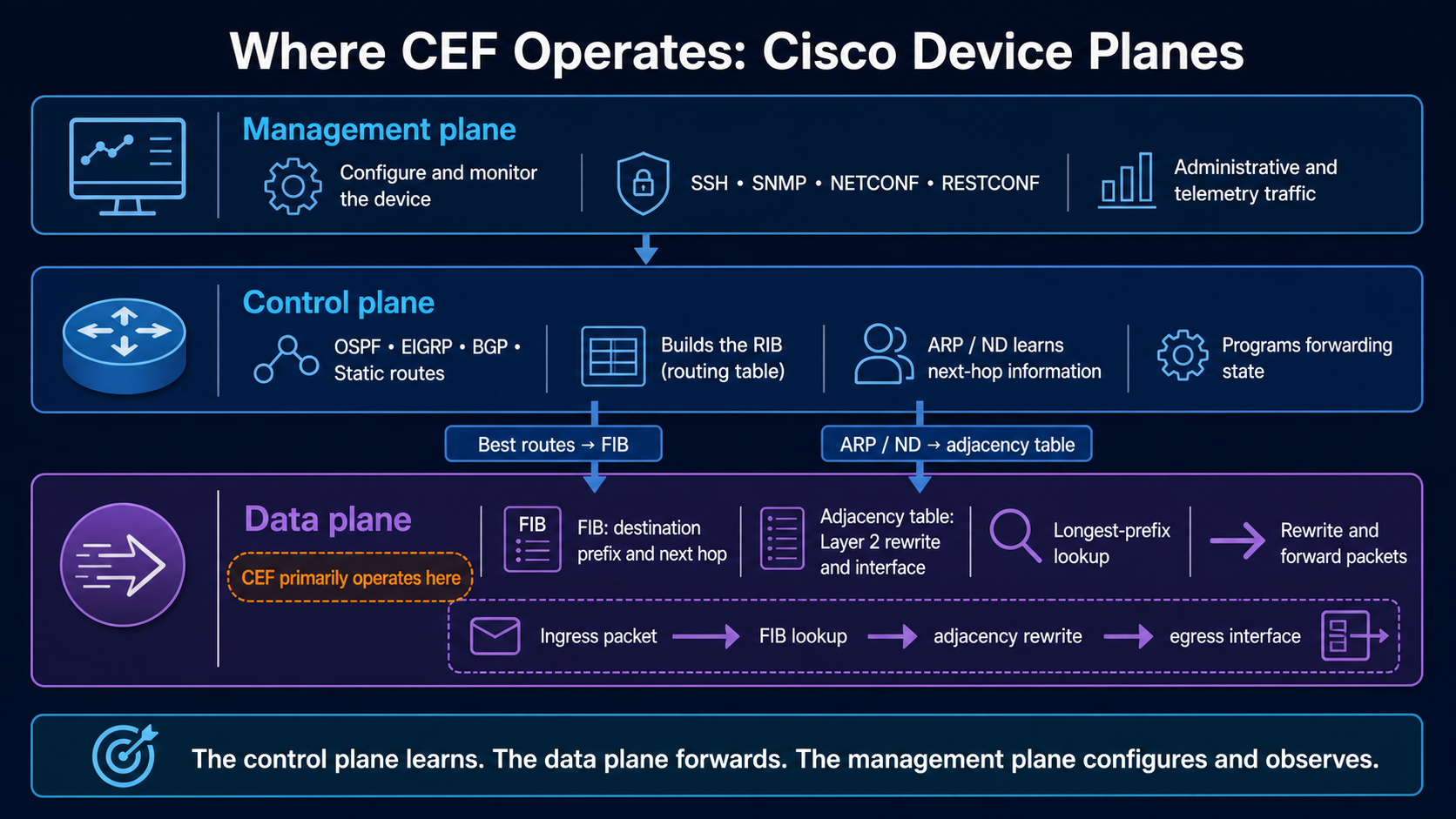
| Plane | Main responsibility | Examples | CEF relationship |
|---|---|---|---|
| Management plane | Configure, monitor and administer the device. | SSH, SNMP, NETCONF, RESTCONF and telemetry. | Can display, configure or monitor forwarding state, but does not forward ordinary transit traffic. |
| Control plane | Learn reachability and create network state. | Connected routes, static routes, OSPF, EIGRP, BGP, ARP and Neighbor Discovery. | Selects routes in the RIB and supplies information used to program the FIB and adjacencies. |
| Data plane | Forward, filter or drop packets. | FIB lookups, adjacency rewrites, ACL and QoS actions, hardware or optimized software forwarding. | CEF performs its normal per-packet forwarding work here. |
How Cisco Express Forwarding Works
CEF prepares forwarding information from the device's current topology. When the control plane selects a best route, that information is reflected in the FIB. Neighbor information learned through ARP for IPv4 or Neighbor Discovery for IPv6 helps form adjacency entries.
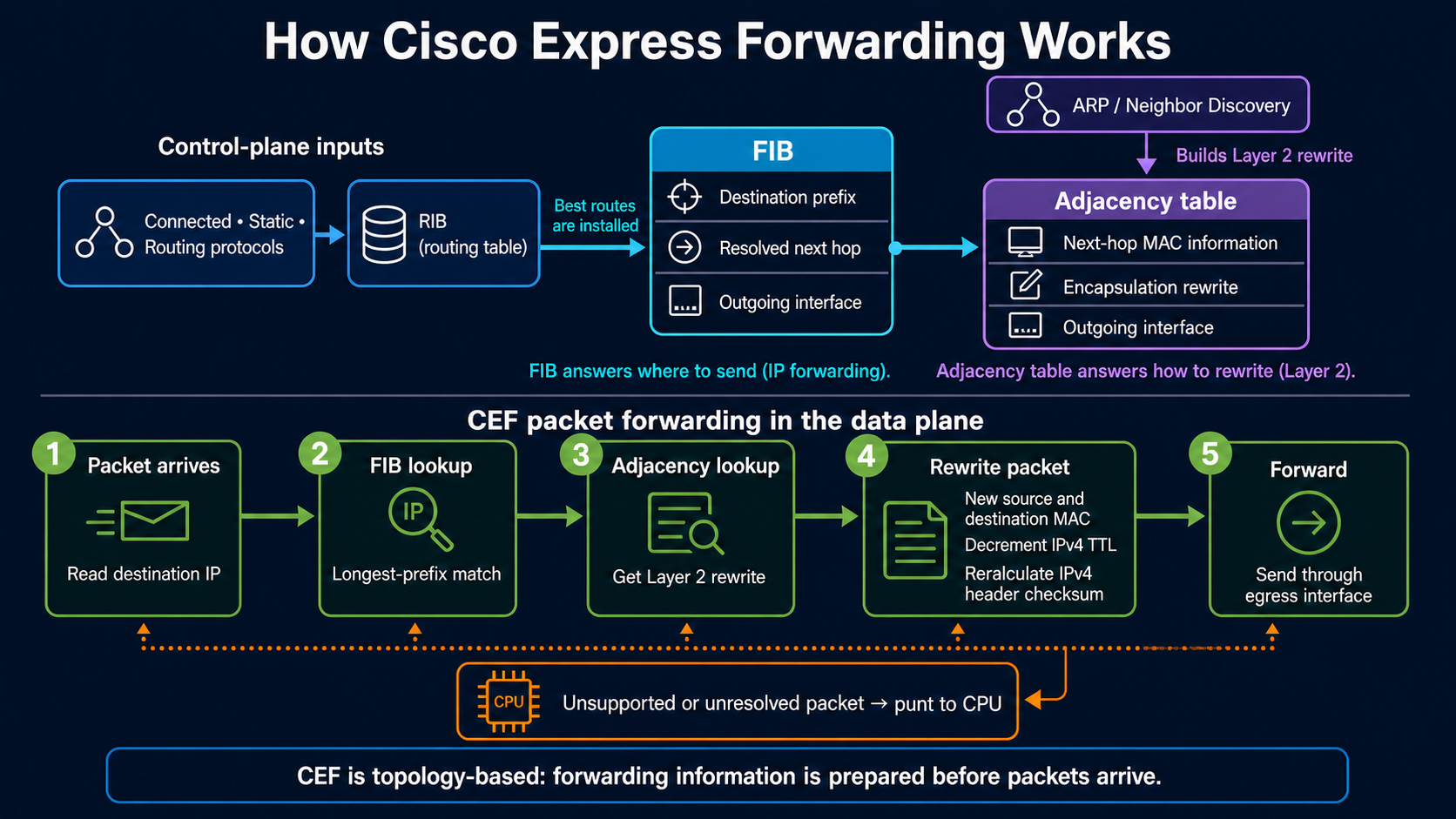
- A packet arrives. The device reads the destination IP address.
- CEF searches the FIB. A longest-prefix match selects the most specific destination entry.
- The FIB points to an adjacency. This resolves the next hop, outgoing interface and required encapsulation information.
- The device rewrites the packet for the next link. For IPv4 forwarding, it changes the Layer 2 addresses, decreases TTL and updates the IPv4 header checksum.
- The packet leaves through the selected interface. Many switching platforms perform these operations in forwarding hardware; other platforms use optimized software.
Forwarding Information Base (FIB) Explained
The RIB and FIB are related, but they are designed for different work. The RIB is the control-plane routing table. It contains routes learned from connected interfaces, static configuration and routing protocols. The FIB is organized for fast destination-prefix lookup in the forwarding path.
| Table | Plane | Purpose | Typical command |
|---|---|---|---|
| RIB | Control plane | Stores learned routes and the selected best route for each destination. | show ip route |
| FIB | Data-plane forwarding state | Provides optimized prefix, resolved next-hop and outgoing-interface information. | show ip cef |
Recursive next hops can require several logical routing lookups. CEF resolves that recursion while building forwarding state. As a result, the FIB can point toward the usable next hop and interface instead of repeating the full recursive route search for every packet.
192.168.0.0/16, 192.168.20.0/24 and 192.168.20.44/32, the most specific matching prefix wins.Cisco Adjacency Table Explained
The adjacency table stores the forwarding details for nodes reachable across the next Layer 2 link. A normal adjacency can include the outgoing interface and the information needed to build the new Layer 2 header. The FIB entry points to the appropriate adjacency.
Complete adjacency
The next-hop rewrite is known, so CEF can forward the packet normally.
Glean adjacency
A directly connected prefix needs a neighbor resolution for the specific destination, such as an ARP request.
Punt or receive
The packet needs CPU attention because it is destined to the device or cannot follow the ordinary CEF path.
Other special entries can represent drop, discard or Null-interface handling. Names and displayed details vary across Cisco operating systems and platforms, so interpret the output in the context of the device you are using.
CEF vs Process Switching vs Fast Switching
| Method | How the decision is made | CPU impact | Key idea |
|---|---|---|---|
| Process switching | The CPU handles packet forwarding and performs the required lookup for packets on that path. | Highest | Per-packet software processing. |
| Fast switching | The first packet creates a destination-based route-cache entry that later packets can reuse. | Lower after the cache is built | Demand-built route cache. |
| CEF | The FIB and adjacency information are prepared from topology and neighbor state before ordinary packets arrive. | Low for supported transit forwarding | Topology-based forwarding. |
Packets That Need Control-Plane Attention
Most supported transit traffic follows the CEF path, but not every packet can be handled as an ordinary forwarding lookup. Examples can include:
- Packets addressed to one of the router's own interfaces.
- Routing protocol and other control traffic intended for the device.
- Packets that require unresolved neighbor information.
- Packets with unsupported options or special processing requirements.
- Packets whose TTL expires at the device.
These packets may be received, dropped or punted to the CPU. A small number is normal. A sustained high punt rate can consume CPU resources and should be investigated.
Useful Cisco CEF Verification Commands
show ip route
show ip cef
show ip cef 192.168.20.0
show adjacency
show adjacency detail
show cef not-cef-switched
show arp| Command | What to check |
|---|---|
show ip route | Control-plane routes and selected next hops. |
show ip cef | IPv4 FIB prefixes, resolved next hops and interfaces. |
show ip cef <prefix> | Detailed forwarding information for a destination prefix. |
show adjacency detail | Adjacency state and available rewrite information. |
show cef not-cef-switched | Reasons packets left the normal CEF switching path, where supported. |
Command syntax and output differ among IOS, IOS XE, NX-OS and IOS XR. Use context-sensitive help and the command reference for the exact platform.
Cisco Express Forwarding FAQs
What is Cisco Express Forwarding?
CEF is a topology-based Layer 3 forwarding architecture that uses a FIB for destination lookups and an adjacency table for Layer 2 rewrite information.
Does CEF operate in the data plane or control plane?
CEF primarily operates in the data plane. The control plane creates the route and neighbor state used to program CEF forwarding information.
What is the difference between the RIB and FIB?
The RIB is the control-plane routing table. The FIB is derived from selected routes and organized for efficient forwarding lookups.
What does the adjacency table contain?
It contains information needed to reach a next hop across Layer 2, including the outgoing interface and encapsulation rewrite information.
How is CEF different from fast switching?
Fast switching builds a route cache after handling the first packet. CEF prepares forwarding information from network topology before ordinary packets arrive.
Does CEF always run in hardware?
No. Many multilayer switches program hardware tables, while other platforms perform optimized software forwarding. CEF is the architecture, not a guarantee about one hardware implementation.
Why would a packet be punted?
A packet may require CPU attention because it is addressed to the device, needs unresolved neighbor information, uses an unsupported feature or requires special handling.
How can I verify CEF?
Start with show ip cef, compare it with show ip route, and inspect show adjacency detail. Exact commands vary by platform.
References and Further Study
This article is an original explanation based on the supplied study notes, cross-checked against Cisco documentation, and informed by the referenced NetworkLessons lesson. Its wording, structure and diagrams were created specifically for Networking Essentials.