Step-by-Step Troubleshooting IPSec Tunnels on Palo Alto Networks Firewalls
Diagnose a failed or unstable site-to-site VPN in the right order: prove IKE Phase 1, prove IPSec Phase 2, then trace routing, security policy, NAT and the return path.
In This Lesson
Use the tunnel's dependency chain to find the first broken layer, collect useful evidence and apply a targeted fix without hiding the root cause.
- Read the complete troubleshooting cheat sheet
- Understand IKE Phase 1 and IPSec Phase 2
- Check tunnel status in the PAN-OS web interface
- Verify IKE, IPSec and tunnel counters in the CLI
- Validate the IKE gateway and Phase 1 crypto
- Validate Phase 2 crypto and proxy IDs
- Trace the tunnel interface, routes, policy and NAT
- Use logs, debug output and packet captures
- Clear and re-initiate security associations safely
- Map common symptoms to likely fixes
Quick Learning Map
Stop at the first stage that fails; later layers depend on the earlier ones.
Prove Negotiation
Confirm reachability, IKE identity and Phase 1 proposals before investigating the child SA.
Prove Encryption
Confirm Phase 2 proposals, PFS and mirrored proxy IDs or traffic selectors.
Prove Forwarding
Trace routes, zones, security rules, NAT, counters and the remote return path.
Palo Alto IPSec Troubleshooting at a Glance
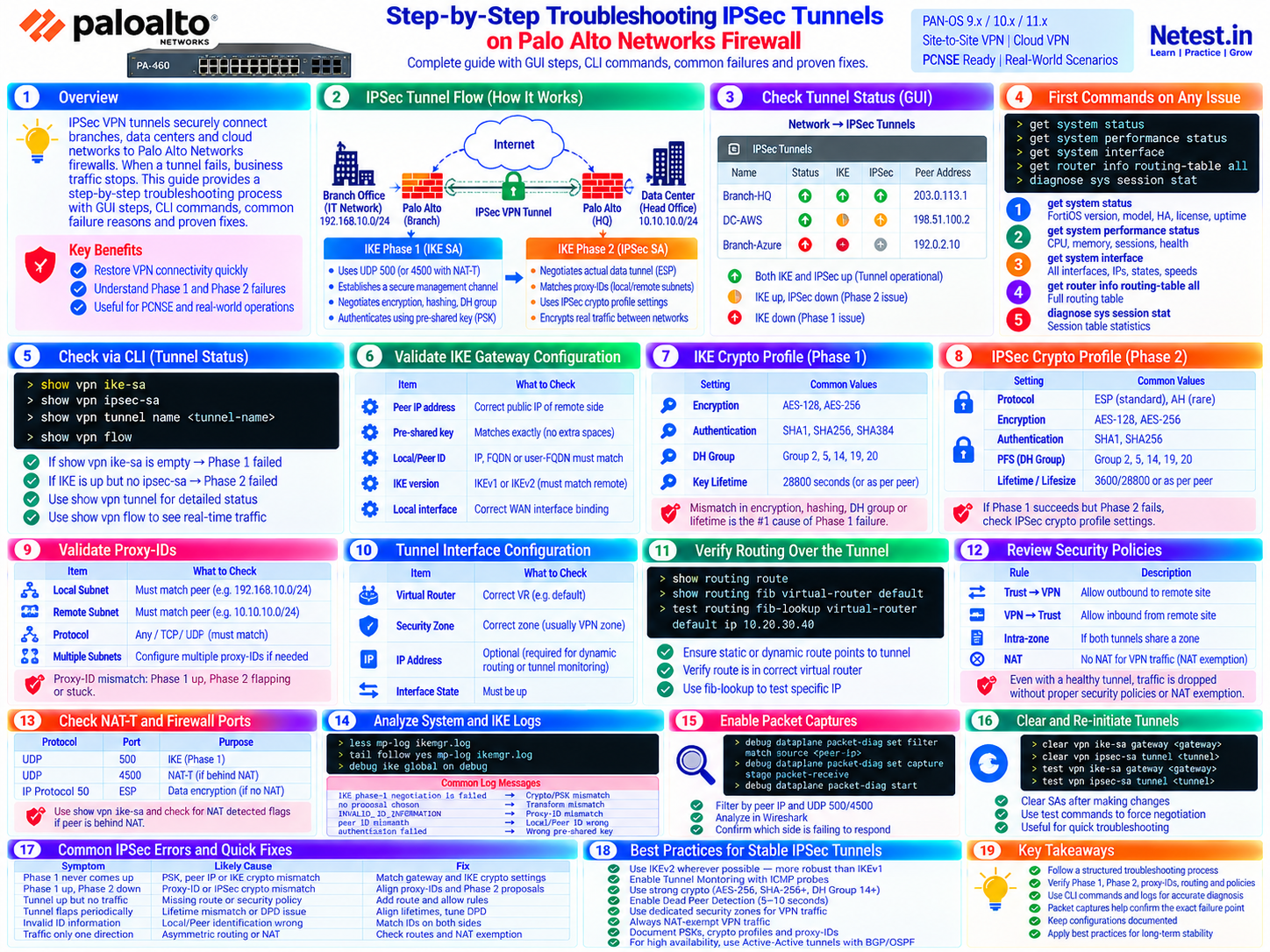
The visual below summarizes tunnel flow, GUI and CLI checks, configuration dependencies, log messages, packet capture filters and the fastest fixes for common failure patterns.
Understand the IPSec Tunnel Dependency Chain
An IPSec VPN can be green at the control plane and still fail to carry application traffic. Troubleshooting is faster when you separate negotiation from forwarding instead of changing several settings at once.
IKE Phase 1
Peers authenticate and create the IKE security association. Verify peer reachability, IKE version, identity, pre-shared key or certificate, encryption, authentication, DH group and lifetime.
IPSec Phase 2
The peers negotiate the child SA that protects data. Verify ESP parameters, PFS, lifetime and compatible proxy IDs or IKEv2 traffic selectors.
Encrypted Forwarding
The firewall routes interesting traffic to the tunnel, evaluates zone policy and NAT, encrypts it and expects a valid return route and matching policy at the peer.
Step 1: Check Tunnel Status in the PAN-OS Web Interface
Open Network → IPSec Tunnels. Treat the indicators as a starting point, then confirm the result with CLI state and counters.
| Observed state | What it usually means | Next check |
|---|---|---|
| IKE and IPSec active | Both negotiation stages completed. | Generate known traffic and trace routing, security policy, NAT and encrypt/decrypt counters. |
| IKE inactive | Phase 1 did not form or has expired without being re-triggered. | Check peer reachability, UDP 500/4500, identities, authentication and IKE crypto proposals. |
| IKE active, IPSec inactive | Phase 1 succeeded but the child SA did not. | Compare Phase 2 proposals, PFS, lifetimes and proxy IDs or traffic selectors. |
| State flaps during rekey | A lifetime, DPD, reachability or simultaneous-rekey issue may exist. | Correlate both peers' logs and timestamps before clearing either side. |
Step 2: Verify Tunnel State and Counters with PAN-OS CLI Commands
Palo Alto Networks documents these commands for site-to-site VPN diagnosis. Run read-only checks first and save the output before changing or clearing state.
show vpn ike-sa — verify IKE Phase 1
Syntax: show vpn ike-sa, show vpn ike-sa gateway <gateway-name> or show vpn ike-sa tunnel <tunnel-name>. Confirm that the expected peer has an IKE SA and note its state, version and timers.
> show vpn ike-sa
> show vpn ike-sa gateway branch-hq-gw
Troubleshooting: no matching SA means Phase 1 is not established. Confirm that interesting traffic or a controlled test initiated negotiation before treating an idle, on-demand tunnel as failed.
show vpn ipsec-sa — verify IPSec Phase 2
Syntax: show vpn ipsec-sa or show vpn ipsec-sa tunnel <tunnel-name>. Confirm the child SA, peer, proxy ID, algorithms, SPIs and remaining lifetime.
> show vpn ipsec-sa
> show vpn ipsec-sa tunnel branch-hq
Troubleshooting: an IKE SA with no IPSec SA narrows the problem to the Phase 2 proposal, PFS, selectors or traffic that should trigger negotiation.
show vpn flow — inspect tunnel state and counters
Syntax: show vpn flow, then use show vpn flow tunnel-id <id> for a specific tunnel. Watch encrypt/encap and decrypt/decap counters while generating approved test traffic.
> show vpn flow
> show vpn flow tunnel-id 7
Troubleshooting: increasing encapsulation without decapsulation often points to the remote peer, remote return route, selector mismatch or filtering in the reverse direction. Rising authentication, decryption or replay counters require closer crypto and packet analysis.
show vpn tunnel and running flow information
Syntax: use show vpn tunnel to list auto-key configurations and show running tunnel flow info for basic tunnel statistics.
> show vpn tunnel
> show running tunnel flow info
Troubleshooting: confirm that the CLI object names match the intended IKE gateway and IPSec tunnel before narrowing later commands.
See the official PAN-OS site-to-site VPN CLI troubleshooting reference for current command syntax.
Steps 3–4: Validate the IKE Gateway and Phase 1 Crypto
Open Network → Network Profiles → IKE Gateways, then compare both peers line by line. A correct local configuration can still fail when the remote peer expects a different identity or proposal.
Peer and Path
Verify the remote public IP, local egress interface, source IP, default or specific route, and upstream allowance for UDP 500 and UDP 4500 when NAT-T is used.
Identity and Authentication
Confirm the IKE version, local ID, peer ID and pre-shared key or certificate. An IP, FQDN and user-FQDN are different identity types.
Crypto Proposal
Confirm at least one common encryption algorithm, authentication or integrity algorithm, DH group and lifetime. Prefer approved modern cryptography rather than weakening both peers to make a test pass.
- Ask the remote administrator for the exact committed configuration or sanitized screenshots—not a remembered value.
- Check for PSK whitespace and the correct secret on the correct gateway.
- Confirm that NAT detection and the observed source address match the design.
- Use synchronized time on both peers so log comparison and certificate validation are reliable.
Steps 5–6: Validate IPSec Crypto, PFS and Proxy IDs
Open Network → Network Profiles → IPSec Crypto and the tunnel's Proxy IDs tab. Phase 2 succeeds only when both peers exchange compatible IPSec parameters.
| Setting | What must agree | Typical failure clue |
|---|---|---|
| Protocol and algorithms | Usually ESP with compatible encryption and integrity settings; AEAD modes handle integrity within the cipher. | no proposal chosen or no child SA |
| PFS | Both peers use compatible PFS behavior and DH group. | Phase 1 active, Phase 2 negotiation rejected |
| Lifetime/lifesize | Values should be operationally compatible and rekey behavior tested. | Periodic flap or rekey instability |
| Proxy IDs/selectors | Local and remote networks are exact mirrors across peers; protocol and ports agree when constrained. | INVALID_ID_INFORMATION or traffic-selector rejection |
PAN-OS uses a route-based tunnel interface, but explicit proxy IDs are often required when the peer is policy-based or needs defined traffic selectors. Palo Alto Networks explains that the two peers' local and remote values should be mirrors: local subnet A to remote subnet B on one side becomes local subnet B to remote subnet A on the other. Review the official Proxy ID guidance.
Steps 7–10: Trace the Tunnel Interface, Route, Policy and NAT Path
Once both SAs exist, troubleshoot the packet as normal forwarded traffic. A tunnel interface must participate in the correct virtual router and security zone. Palo Alto Networks notes that it needs an IP address for tunnel monitoring or dynamic routing, but not for a basic static route-based tunnel.
Verify the tunnel interface and virtual router
Open Network → Interfaces → Tunnel. Confirm the interface is up, assigned to the intended virtual router and placed in the planned VPN zone. Use a tunnel IP where monitoring or dynamic routing requires it.
Interface: tunnel.10
Virtual router: default
Security zone: vpn
Management profile: none unless explicitly required
Troubleshooting: an interface in the wrong virtual router can make the route invisible; an incorrect zone changes which security rule must match.
test routing fib-lookup — prove the forwarding decision
Syntax: inspect the route table and FIB, then test a real remote address. The selected route should use the intended tunnel interface or dynamic next hop.
> show routing route
> show routing fib virtual-router default
> test routing fib-lookup virtual-router default ip 10.20.30.40
Troubleshooting: check for a more-specific competing route, an inactive static route, unresolved next hop or a dynamic route learned through the wrong path.
Validate bidirectional security policy
Create or verify least-privilege rules from the initiating zone to the VPN zone and for the required return direction. Confirm source, destination, application, service, schedule, user and security profiles.
trust → vpn : allow required branch applications
vpn → trust : allow required return or remotely initiated applications
log at session end : enabled
Troubleshooting: use Traffic logs to identify the actual rule, action, zones and session end reason. Do not add a broad allow rule when the existing packet attributes can reveal the mismatch.
Check NAT exemption and upstream encapsulation
VPN traffic should normally retain the source and destination addresses expected by the selectors and remote routing. Review NAT rules in evaluation order and confirm whether the path uses native ESP or NAT-T.
UDP 500  : IKE
UDP 4500 : IKE/IPSec with NAT-T
IP 50    : native ESP when NAT-T is not used
Troubleshooting: an unexpected source translation can break selector matching or the remote return route. If NAT exists between peers, verify UDP 4500 end to end; native ESP is not a TCP or UDP port.
For the interface requirements and policy-based interoperability details, see Palo Alto Networks' tunnel interface documentation.
Steps 11–12: Analyze IKE Logs and Capture the Failing Exchange
Use Monitor → Logs → System with VPN/IKE filters to build a timeline. Compare the same attempt on both peers because the responder may record the clearest reason.
less mp-log ikemgr.log — inspect historical IKE events
Syntax: read the management-plane IKE manager log and search around the exact test time and peer address.
> less mp-log ikemgr.logTroubleshooting: no proposal chosen points toward incompatible proposals; identity or authentication messages point toward IDs, PSK or certificates; timeouts point toward reachability, filtering or a silent peer. Interpret the complete sequence rather than one isolated line.
tail follow yes mp-log ikemgr.log — watch a controlled negotiation
Syntax: start the live log view immediately before generating approved test traffic or using the test commands.
> tail follow yes mp-log ikemgr.logTroubleshooting: stop the follow session after collecting the attempt. Record timestamps, gateway/tunnel names and the remote peer's simultaneous evidence.
IKE debug and packet capture — escalate with care
Use temporary IKE debugging or a packet capture only in an approved window. Filter tightly to the peer and UDP 500/4500; use the PAN-OS debug procedure that matches your release.
> debug ike global on debug
> debug ike stat
> debug ike global off
Troubleshooting: debug output can be verbose and packet captures may contain sensitive metadata. Protect the files, stop debugging promptly and follow your organization's evidence-retention rules.
Step 13: Clear and Re-initiate the Tunnel Safely
Clear SAs after correcting the suspected problem—not as the first diagnostic step. These commands interrupt matching VPN traffic, so use an approved change window and coordinate with the remote peer.
clear vpn ike-sa gateway — remove the existing IKE SA
Syntax: target the exact gateway and capture state first. Clearing Phase 1 can remove dependent child SAs and disrupt active sessions.
> clear vpn ike-sa gateway branch-hq-gwPrecaution: confirm the gateway name and business impact. Palo Alto Networks' CLI reference labels some clear operations specifically for IKEv1, so verify release and IKE-version behavior before use.
clear vpn ipsec-sa tunnel — remove the existing child SA
Syntax: target the affected IPSec tunnel when a fresh Phase 2 negotiation is needed.
> clear vpn ipsec-sa tunnel branch-hqPrecaution: retain pre-clear counters and logs. If the tunnel recovers only until the next rekey, investigate lifetimes, DPD and simultaneous rekey behavior instead of scheduling repeated clears.
test vpn ... — initiate Phase 1 and Phase 2
Syntax: initiate IKE first, verify it, then initiate IPSec and verify it. These commands create a clean test sequence without waiting for application traffic.
> test vpn ike-sa gateway branch-hq-gw
> show vpn ike-sa gateway branch-hq-gw
> test vpn ipsec-sa tunnel branch-hq
> show vpn ipsec-sa tunnel branch-hq
Troubleshooting: note the exact time, capture both peers' logs and validate data-plane traffic after both SAs form. A successful negotiation does not prove routing or policy.
Common Palo Alto IPSec Errors and Quick Fixes
| Symptom | Likely causes | Focused fix |
|---|---|---|
| Phase 1 never appears | Peer IP, route, UDP 500/4500, IKE version, identity, PSK/certificate or Phase 1 proposal | Prove reachability, then compare the IKE gateway and crypto profile line by line. |
| Phase 1 up, Phase 2 down | IPSec proposal, PFS, lifetime or proxy-ID/selector mismatch | Compare mirrored selectors and every Phase 2 proposal parameter. |
| Tunnel up, no traffic | Missing or competing route, wrong VR/zone, security policy, NAT, selector or remote return route | Run a FIB lookup, inspect Traffic logs and watch encrypt/decrypt counters during a controlled flow. |
| Traffic works one way | Asymmetric routing, missing reverse policy, remote route, NAT or one-sided selector | Trace the return packet at both peers and compare decap/encap counters. |
| Tunnel flaps at intervals | Lifetime or rekey behavior, DPD, unstable path or duplicate peers | Correlate timestamps, align supported settings and verify stability across a complete rekey cycle. |
INVALID_ID_INFORMATION | Identity or selector mismatch, depending on the negotiation context | Inspect the full log sequence and compare IKE IDs plus mirrored proxy IDs. |
no proposal chosen | No mutually acceptable cryptographic proposal | Identify whether the rejection occurs in Phase 1 or Phase 2, then configure an approved common proposal. |
Best Practices for Stable IPSec Tunnels
- Use IKEv2 where both peers and the design support it.
- Use organization-approved modern cryptography and remove obsolete proposals after migration.
- Enable tunnel monitoring to a stable, meaningful target when automated path detection is required.
- Choose DPD and monitoring timers that detect real failures without creating avoidable churn.
- Keep VPN traffic in a dedicated security zone when that improves policy clarity and visibility.
- Document peer addresses, identities, crypto profiles, selectors, routes, owners and change history in a protected system.
- Alert on negotiation failures, flaps, error counters and unexpected changes in tunnel traffic.
- For high availability, test failover and rekey behavior with the remote peer—not only initial establishment.
For the underlying protocol model, continue with IPsec Explained: IKE, ESP, AH and VPN Modes.
Official References and Defensive-Use Scope
- Palo Alto Networks: Troubleshoot Site-to-Site VPN Issues Using CLI — current show, clear, test and debug command reference.
- Palo Alto Networks: Troubleshoot Your IPSec VPN Tunnel Connection — negotiation tests and common log messages.
- Palo Alto Networks: Set Up an IPSec Tunnel — tunnel-mode configuration and interoperability requirements.
- PAN-OS CLI Cheat Sheet: Networking — supported VPN show commands.
Palo Alto IPSec Tunnel Troubleshooting Frequently Asked Questions
Why is IKE up but the IPSec tunnel down?
Phase 1 succeeded but Phase 2 did not. Compare the IPSec crypto profile, PFS settings, lifetimes and mirrored proxy IDs or IKEv2 traffic selectors on both peers.
Why is the Palo Alto IPSec tunnel up but traffic not passing?
Check the route lookup, tunnel interface and virtual router, security policies in both directions, NAT exemption, proxy IDs and return path. Then confirm that encrypt and decrypt counters increase.
Which PAN-OS commands show Phase 1 and Phase 2 status?
Use show vpn ike-sa for IKE Phase 1 and show vpn ipsec-sa for IPSec Phase 2. Add a gateway or tunnel name to narrow the output, and use show vpn flow for tunnel counters.
Do Palo Alto route-based VPNs always need proxy IDs?
No. Proxy IDs are commonly required for interoperability with policy-based peers or when traffic selectors must be explicit. When used, each peer's local and remote networks must be exact mirrors of the other side.
Should I clear the VPN security associations first?
No. Capture the current state, logs and counters first. Clear and re-initiate the IKE and IPSec security associations only after correcting the suspected mismatch or when an approved test requires a fresh negotiation.
Which ports and protocols must be allowed for a site-to-site IPSec VPN?
Allow UDP 500 for IKE, UDP 4500 when NAT Traversal is used and IP protocol 50 for native ESP when the path does not use NAT-T. Verify intermediate firewalls and upstream devices in both directions.