5 Firewall Management Mistakes That Can Expose Your Entire Network
A powerful firewall can still fail when its policies, management plane and telemetry are neglected. Learn the five operational mistakes that create the widest exposure—and the controls that close each gap.
In This Lesson
Follow the attack path from a small policy shortcut to broad network exposure, then turn each failure into a concrete engineering and governance control.
- Read the firewall management visual guide
- Understand why management errors become breaches
- Compare the five management failures
- Fix permissive rules and policy bloat
- Control lateral movement with segmentation
- Protect the firewall management plane
- Reduce encrypted-traffic blind spots
- Make logs and change governance actionable
- Run a repeatable firewall hardening audit
- Review the security references and scope
Quick Learning Map
Good firewall management is a lifecycle: define the minimum access, enforce it at the right boundary, and prove that the control still works.
Minimize
Allow only the identities, applications, destinations and time windows required for a documented business purpose.
Segment
Place controls between important zones so one compromised endpoint cannot freely reach every internal system.
Verify
Monitor traffic and administrative changes, test alerts, remove stale access and correct drift on a routine schedule.
Firewall Management Mistakes at a Glance
The visual connects five common operational failures with the attack paths they enable, their likely impact, and the corrective control for each one.
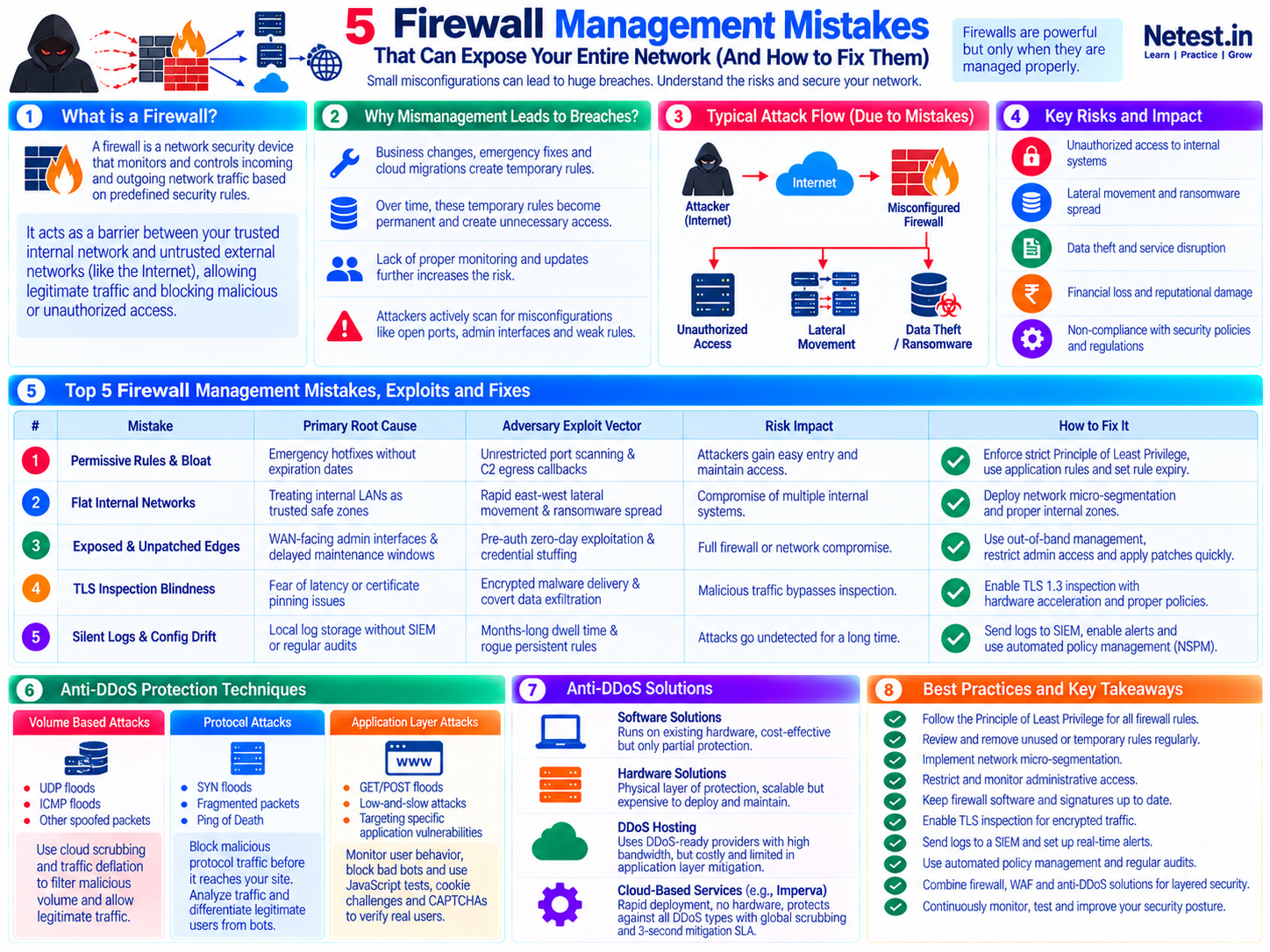
Why Firewall Management Mistakes Cause Network Breaches
A firewall monitors and controls traffic between security zones according to policy. It can block unauthorized access, limit lateral movement and generate high-value security telemetry—but only when its deployed rules still match the intended design. NIST SP 800-41 Rev. 1 provides the foundational guidance for establishing, configuring, testing and managing firewall policy.
Most dangerous errors are not dramatic. An emergency rule loses its expiry date. A new cloud subnet inherits a broad trust relationship. A management interface remains reachable after a migration. A log collector silently stops receiving events. Individually, each looks small; together, they create a path from reconnaissance to initial access, lateral movement and data loss.
Configuration Creates Reachability
Broad source, destination or service objects create more paths than the application actually needs.
Trust Expands Blast Radius
Flat internal routing lets an attacker turn one compromised device into access across servers, users and backups.
Weak Telemetry Delays Response
Missing logs and unreviewed changes allow unsafe rules or active attacks to persist without an accountable signal.
Executive Risk Matrix: Five Firewall Management Failures
Use this matrix to connect a technical defect with the attacker behavior it enables and the architectural control that reduces the risk.
| Management failure | Typical root cause | Likely attacker advantage | Primary corrective control |
|---|---|---|---|
| 1. Permissive rules and bloat | Emergency access, weak ownership and no expiry | Broader entry paths and unrestricted command-and-control egress | Least privilege, application-aware policy and lifecycle controls |
| 2. Flat internal networks | Internal subnets treated as equally trusted | Fast east-west discovery and ransomware spread | Security zones and workload or network micro-segmentation |
| 3. Exposed, unpatched edges | Internet-reachable administration and delayed maintenance | Credential attacks or exploitation of the security appliance itself | Dedicated management access, MFA, rapid patching and tested HA |
| 4. TLS inspection blind spots | Performance, privacy or compatibility concerns left unresolved | Malware delivery and data transfer hidden inside approved encryption | Risk-based inspection with documented, narrow exceptions |
| 5. Silent logs and configuration drift | Local-only logs, noisy alerts and unmanaged changes | Longer dwell time and persistent unauthorized policy | Central telemetry, actionable alerts and peer-reviewed automation |
Mistake 1: Permissive Rules, Rule Bloat and Shadowed Policies
Rule bloat often begins with a real outage. A temporary any-source, any-service rule restores an application, but nobody returns to identify the exact flow. Over time, broad rules accumulate above more specific controls, and old objects survive long after their applications or owners disappear.
In a top-down policy, an early broad match can prevent a later restrictive rule from ever being evaluated. That later rule is shadowed. The result is especially dangerous because the configuration appears to contain the intended restriction even though live traffic never reaches it.
How to fix permissive firewall policy
- Define source identities or subnets, destination applications, required services, action, logging and business owner for every allow rule.
- Apply an automatic expiry to temporary access and require reapproval before extending it.
- Review hit counts and flow logs before disabling a rule; observe through a safe change window before deleting it.
- Control outbound traffic as carefully as inbound traffic, especially for servers that should contact only known repositories or APIs.
- Detect duplicates, conflicts and shadowed rules before a change reaches production.
Mistake 2: Flat Internal Networks with No East-West Segmentation
A strong internet edge does not protect internal assets from a compromised laptop, contractor account, vulnerable printer or malicious workload. When internal VLANs route freely through the core, the perimeter becomes a hard shell around a large trusted interior.
Attackers can use ordinary administrative protocols and valid credentials to discover systems and move laterally. If user devices, management interfaces, databases and backup repositories share broad reachability, one initial foothold can become an organization-wide incident.
How to build useful segmentation
Classify Zones
Separate users, servers, management, guest, IoT, OT, development and backup systems according to trust and business impact.
Define Allowed Flows
Document the applications and identities that genuinely require cross-zone access; deny and log unexpected paths.
Enforce Near the Resource
Use internal segmentation firewalls, distributed workload policy or cloud controls so traffic cannot bypass inspection.
Segmentation supports a broader Zero Trust architecture: access is based on verified need and context, not merely on being inside the corporate network. This aligns with NIST SP 800-207, which removes implicit trust based only on network location.
Mistake 3: Exposed Management Planes and Unpatched Edges
The firewall can become the initial attack target when administrative HTTPS, SSH or SNMP services are reachable from untrusted networks. Internet exposure invites constant discovery, credential stuffing and attempts to exploit vulnerabilities in the operating system, VPN gateway or management service. CISA guidance on internet-exposed management interfaces recommends removing that exposure or protecting access through a separate Zero Trust policy-enforcement point.
Edge appliances also require deliberate patch planning. Because they sit on critical traffic paths, teams may delay maintenance to avoid downtime. That operational caution becomes a security liability when a known weakness remains exposed.
How to protect firewall administration
- Disable administrative services on untrusted data-plane interfaces unless there is a documented, tightly restricted requirement.
- Use a dedicated management network reached through hardened jump hosts or a controlled administrative access service.
- Require phishing-resistant MFA where supported, named administrator accounts and role-based privileges.
- Restrict management sources, rotate credentials and alert on failed or unusual administrative logins.
- Maintain an asset inventory, subscribe to vendor advisories and define risk-based patch targets.
- Use tested high availability, configuration backups and rollback procedures to make maintenance safer.
Mistake 4: Ignoring Encrypted-Traffic Blind Spots
Encryption protects confidentiality in transit, but it can also hide malware downloads, command-and-control traffic and data transfers from controls that inspect only cleartext payloads. A firewall may permit a TLS session based on address, port and certificate signals while having limited visibility into the application content.
Full decryption is not appropriate for every flow. Privacy obligations, certificate pinning, unmanaged endpoints and latency-sensitive applications require a measured design. The mistake is not creating an exception; it is allowing broad, permanent exceptions without a risk decision, owner or compensating control.
How to use risk-based TLS inspection
- Measure inspection throughput and session capacity using the features that will be enabled in production.
- Deploy the required trust chain to managed endpoints and protect private keys used by the inspection service.
- Prioritize unknown, newly registered and high-risk destinations, downloads and application categories.
- Create narrow bypass categories for legally sensitive or technically incompatible traffic and review them regularly.
- Use DNS, endpoint, proxy, identity and flow telemetry as compensating signals when payload inspection is not possible.
Encrypted inspection should support policy intent without silently breaking applications. Test representative users and services, monitor failures and document who can approve an exception.
Mistake 5: Silent Logs, Alert Fatigue and Configuration Drift
A firewall is both an enforcement point and a security sensor. Denied connections from a sensitive server, unexpected geographic destinations, internal scans and after-hours administrator activity can reveal an incident early—if the events reach a system that retains, correlates and acts on them. The multi-agency CISA visibility and hardening guidance recommends centralized logging, configuration monitoring, management-path restriction and strong segmentation for network devices.
Logging everything without a detection plan is not the same as monitoring. High-volume noise can bury important events, while local storage may roll over before an investigation begins. At the same time, direct device edits create configuration drift between the approved design, backup and live policy.
How to make telemetry and change control useful
- Forward traffic, threat, authentication, system and configuration-audit logs to centralized, access-controlled storage.
- Alert on management logins, policy changes, disabled security services, internal scanning and unusual denied or allowed flows.
- Assign each alert an owner, response action and severity; tune repeated noise without removing the underlying visibility.
- Require a ticket, documented intent, peer review, pre-change validation and rollback plan for production policy changes.
- Compare live configurations with approved templates and test that backups can actually restore the device.
For the detection layer around firewall telemetry, see SIEM for threat detection and security management.
Where DDoS Protection Fits in Firewall Management
The infographic also highlights availability attacks. Firewall policy can block known unwanted protocols, limit connections and protect applications, but an on-premises firewall cannot recover bandwidth after a large flood has already saturated the internet circuit.
Volume Attacks
Use upstream filtering, provider controls or cloud scrubbing capacity before traffic fills the origin link.
Protocol Attacks
Apply protocol validation, connection controls and capacity sized for stateful inspection under load.
Application Attacks
Combine WAF, bot management, caching and endpoint-specific rate controls with network defenses.
Read What Is a DDoS Attack? for the full attack taxonomy and mitigation plan, and WAF vs Firewall for the difference between network and web-application enforcement.
Quarterly Firewall Hardening and Audit Checklist
Use this six-step review as a repeatable operating routine. High-risk and frequently changing environments should continuously monitor the same controls between formal audits.
1. Validate Policy Ownership and Scope
Confirm that every allow rule has a current business owner, documented purpose, correct source and destination, required service, logging decision and review date.
Evidence: an exported rule review with owner approval and a list of exceptions requiring remediation.
2. Retire Stale and Overly Broad Access
Investigate zero-hit, duplicate, disabled, expired and shadowed rules. Narrow broad objects and services, including outbound access, after validating real traffic needs.
Evidence: approved change records, observation results and a rollback path for each removal.
3. Verify Segmentation
Test that users, servers, management, guest, IoT, OT and backup zones can reach only approved destinations. Include negative tests that should be denied.
Evidence: flow results mapped to the zone policy and tracked remediation for unexpected paths.
4. Harden and Patch the Management Plane
Confirm that administration is not exposed to untrusted networks, MFA and role assignments are correct, firmware is within policy, HA synchronizes and backups restore successfully.
Evidence: reachability tests, administrator review, version inventory, failover record and restore test.
5. Review Inspection and Exceptions
Check IPS, application control, URL filtering and TLS inspection status. Revalidate every bypass against current privacy, compatibility and business needs.
Evidence: enabled-profile inventory, exception owners, expiry dates and performance measurements.
6. Test Logs, Alerts and Change Detection
Generate an approved test login, configuration change and blocked connection. Verify timestamps, forwarding, correlation, notification and analyst response.
Evidence: the received events, alert ticket, response timing and fixes for any missing signal.
Security References and Defensive-Use Scope
The recommendations in this lesson are grounded in primary guidance. Apply them according to your network design, vendor documentation, risk assessment and change-control process.
- NIST SP 800-41 Rev. 1: firewall policy, selection, configuration, testing, deployment and management.
- NIST SP 800-207: Zero Trust principles, resource-focused protection and removal of implicit network-location trust.
- CISA enhanced visibility and hardening guidance: management isolation, default-deny policy, logging, configuration monitoring and segmentation.
- CISA BOD 23-02 overview: reducing risk from internet-exposed administrative interfaces. The directive applies to U.S. federal civilian agencies; CISA recommends the underlying guidance more broadly.
Firewall Management Frequently Asked Questions
How often should firewall rules be reviewed?
Review critical and internet-facing policies continuously through alerts and change controls, and perform a documented full ruleset review at least quarterly. Increase the frequency for high-change environments or when a regulation, contract or internal standard requires it.
What is a shadowed firewall rule?
A shadowed rule can never match because an earlier, broader rule already accepts or denies the same traffic. Shadowed rules create policy confusion and can make administrators believe a restriction is active when it is not.
Should a firewall allow any-any rules?
An unrestricted any-any allow rule should not be a normal production policy. If an emergency exception is unavoidable, narrowly define it, obtain approval, log the traffic, attach an owner and expiry time, and replace it with the minimum required rule as soon as possible.
Does Zero Trust make firewalls obsolete?
No. Zero Trust changes the basis of access from network location to verified identity, device state and resource context. Firewalls still provide enforcement and segmentation, but they work with identity, endpoint and workload controls instead of treating the internal network as automatically trusted.
Why is outbound firewall filtering important?
Outbound filtering restricts command-and-control callbacks, unauthorized data transfers and unexpected service access from compromised internal systems. It also produces useful telemetry when a host attempts a connection that its business role should not need.