IPsec Explained: IKE, ESP, AH, Transport and Tunnel Mode
IPsec protects IP traffic as it crosses an untrusted network. It can encrypt packets, confirm who sent them, detect changes, and reject replayed traffic. This guide follows a tunnel from negotiation to protected data transfer in simple steps.
In This Lesson
Follow IPsec as a sequence of trust, negotiation, and protected forwarding. The terminology becomes easier when every protocol and mode is tied to its job.
Quick Learning Map
Keep these three decisions in view as you work through the detailed lesson.
Establish trust
IKE authenticates peers and agrees on cryptographic parameters.
Protect packets
ESP commonly provides confidentiality, integrity, and authentication.
Verify the SAs
Confirm negotiation state, counters, selectors, and the real data path.
IPsec Explained: IKE, ESP, AH, Transport and Tunnel Mode at a Glance
Use this summary to establish the big picture before moving into commands, examples, and troubleshooting.
IKE
Builds and maintains the security associations used by peers.
ESP and AH
ESP is common; AH authenticates but does not encrypt payloads.
Modes
Tunnel mode protects a new routed packet; transport mode protects the original payload.
What Does IPsec Do?
IPsec is a framework that secures IP packets. It does not depend on one encryption method. Instead, the peers agree on algorithms, authenticate each other, build Security Associations (SAs), and then protect matching traffic.
1. Where IPsec Is Used
IPsec can protect traffic between gateways, between a user and a gateway, or directly between hosts. A common design is a site-to-site VPN between two routers or firewalls.
2. The IPsec Building Blocks
| Part | Job | Practical note |
|---|---|---|
| IKE | Authenticates peers and negotiates SAs and keys. | Use IKEv2 for new deployments where supported. |
| ESP | Encrypts data and can also provide integrity and authentication. | The normal choice for modern VPNs. |
| AH | Provides integrity and authentication, but no encryption. | Rare today and does not work well through NAT. |
| Algorithms | Define encryption, integrity, key exchange and authentication. | Prefer current algorithms such as AES-GCM, AES with SHA-2, and strong DH/ECDH groups. |
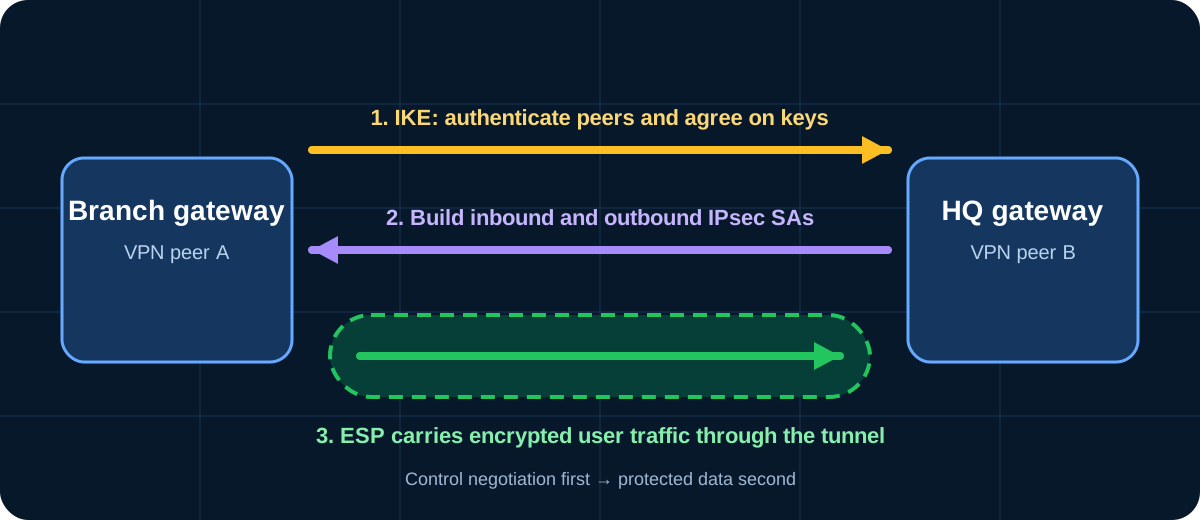
3. How an IPsec Tunnel Is Built
An SA is a one-way agreement. Bidirectional traffic therefore needs an inbound SA and an outbound SA. Each SA includes its algorithms, keys, lifetime and a Security Parameters Index (SPI).
4. IKEv1 and IKEv2
IKEv1 describes negotiation as Phase 1 and Phase 2. Phase 1 creates a protected management channel. Phase 2, called Quick Mode, creates the IPsec SAs used for data. IKEv2 simplifies the exchange, handles failures better, and is the preferred choice for a new design.
IKEv1 Main Mode: six messages
IKEv1 Aggressive Mode: three messages
Aggressive Mode sends more information in fewer messages, but it exposes peer identity information before a protected channel exists. Use Main Mode when maintaining IKEv1; prefer IKEv2 when possible.
IKEv1 Quick Mode: three messages
After Phase 1, Quick Mode negotiates the protocols and keys for protected data. Perfect Forward Secrecy (PFS), when enabled, performs a fresh Diffie-Hellman exchange so a later key compromise does not expose earlier session keys.
5. AH Compared with ESP
| Feature | AH | ESP |
|---|---|---|
| Encryption | No | Yes |
| Integrity/authentication | Yes | Optional, commonly used |
| Protects original IP header fields | Most immutable fields | No |
| NAT compatibility | Poor | Works with NAT Traversal |
| Typical use | Rare | Most IPsec VPNs |
Why AH and NAT conflict: NAT changes an IP address in the header. AH detects that change as an integrity failure. ESP with NAT-T avoids this problem by carrying ESP inside UDP.
6. Transport Mode and Tunnel Mode
Transport mode
Protects the payload while keeping the original IP header. Common for host-to-host protection.
Tunnel mode
Wraps and protects the complete original packet. Common for site-to-site and remote-access VPNs.
What the packet protection covers
AH
*Mutable header fields are excluded from the integrity calculation.
ESP
ESP encryption starts after the outer IP header.
7. Protocol Numbers, Ports and NAT-T
| Traffic | Identifier | Purpose |
|---|---|---|
| IKE | UDP 500 | Peer negotiation and key management. |
| ESP | IP protocol 50 | Protected user traffic. |
| AH | IP protocol 51 | Authenticated user traffic without encryption. |
| NAT Traversal | UDP 4500 | Encapsulates ESP in UDP when NAT is detected. |
Protocol 50 and port 50 are not the same thing. ESP is an IP protocol; it is not TCP or UDP unless NAT-T wraps it in UDP 4500.
8. Safe Choices for a Modern Deployment
- Prefer IKEv2 and ESP.
- Use AES-GCM, or AES with SHA-2 integrity, according to platform support and policy.
- Use strong DH/ECDH groups, PFS, certificates or carefully managed high-entropy pre-shared keys.
- Treat DES, 3DES, MD5 and weak DH groups as legacy examples, not recommendations.
- Match proposals, identities, protected subnets, lifetimes and routing on both peers.
9. Verification and Troubleshooting
Command availability varies by Cisco platform and software release, but these are common starting points:
show crypto ikev2 sa
show crypto isakmp sa
show crypto ipsec sa
- Confirm reachability between the peer public addresses.
- Check that IKE proposals, authentication and identities match.
- Confirm protected source and destination networks match on both sides.
- Verify UDP 500 and 4500, plus ESP when NAT-T is not used, are allowed.
- Check the encapsulation and decapsulation counters while sending matching traffic.
IPsec Explained: IKE, ESP, AH, Transport and Tunnel Mode Frequently Asked Questions
Is IPsec a single protocol?
No. IPsec is a framework that combines IKE, ESP or AH, Security Associations and cryptographic algorithms.
What is the difference between IKE and ESP?
IKE negotiates and manages security. ESP protects the actual user packets after negotiation completes.
Why is ESP used more often than AH?
ESP can encrypt traffic and works through NAT with NAT-T. AH does not encrypt and its IP-header protection conflicts with NAT changes.
Does tunnel mode hide the original IP addresses?
Yes. The original packet, including its IP header, is protected inside a new packet with gateway or peer addresses in the outer header.
Should a new VPN use IKEv1 or IKEv2?
Use IKEv2 when all peers support it. Keep IKEv1 only where legacy interoperability requires it.