LACP EtherChannel Configuration on Cisco Switches
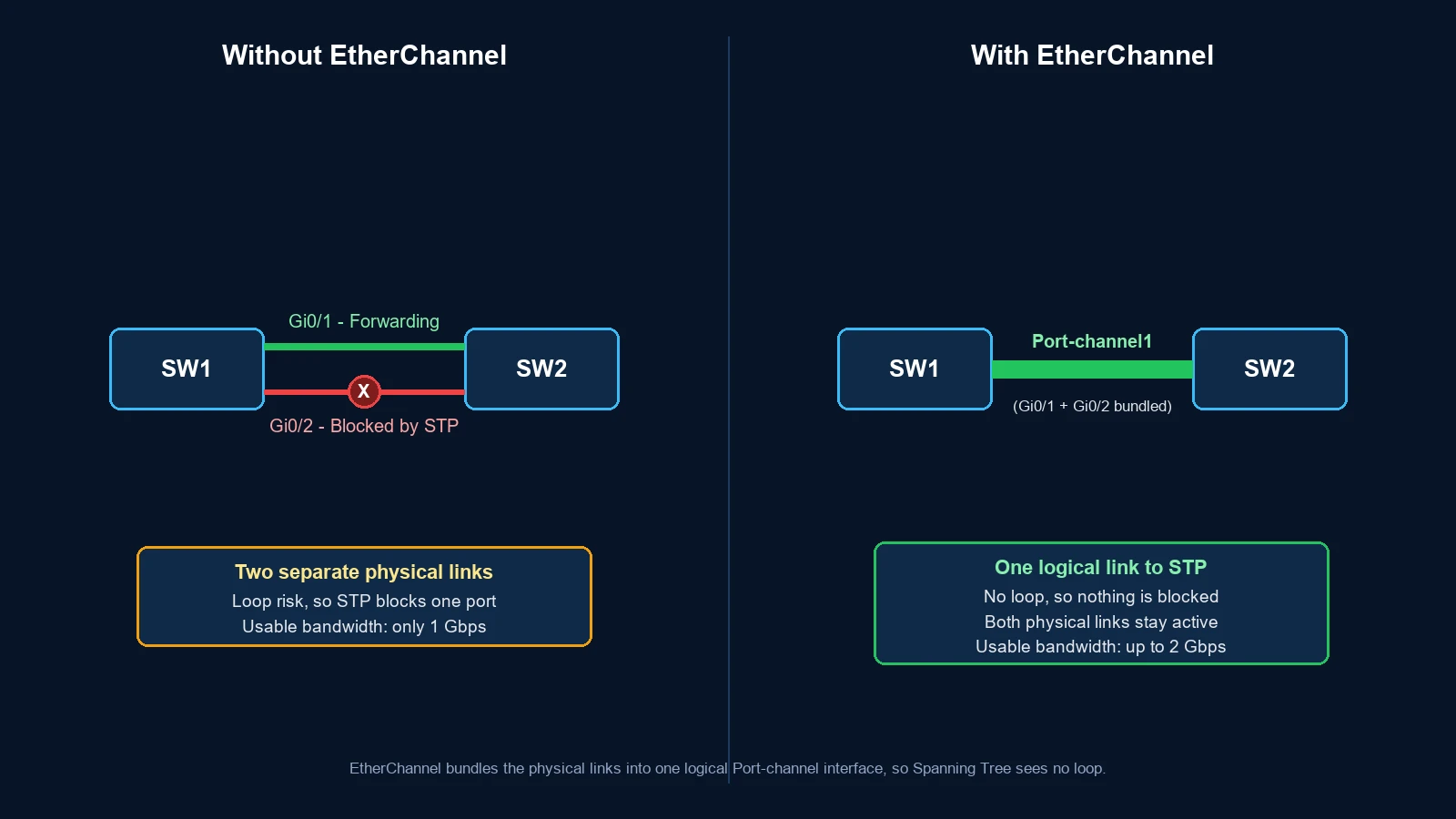
LACP combines multiple compatible Ethernet links into one logical Port-channel. The bundle adds total bandwidth, keeps the logical connection available when a member fails, and lets Spanning Tree treat the group as one link. This guide builds a two-link Layer 2 trunk and explains exactly how to verify it.
In This Lesson
Build an EtherChannel only after the member links agree on the essentials. Then use LACP state and port-channel verification to prove the bundle behaves as one logical link.
Quick Learning Map
Keep these three decisions in view as you work through the detailed lesson.
Align member links
Match speed, trunking, VLANs, and other interface settings first.
Negotiate the bundle
Use compatible LACP active and passive modes on both ends.
Verify resilience
Confirm members are bundled, traffic uses the port-channel, and one-link failure is safe.
Quick Answer
Use channel-group 1 mode active on at least one side. The other side can be active or passive. After negotiation, verify Po1(SU) and (P) member flags with show etherchannel summary.
| Question | Answer |
|---|---|
| What is the logical interface? | Port-channel1 for channel group 1 |
| Which pairs form? | active-active and active-passive |
| Which pair fails? | passive-passive, because neither side starts negotiation |
| Does one flow use every link? | No. A hash normally keeps one flow on one member to preserve packet order. |
- Match members: use compatible speed, trunk and VLAN settings.
- Negotiate LACP: active starts negotiation and passive can respond.
- Create the Port-channel: the members operate as one logical interface.
- Hash traffic flows: different flows can use different member links.
1. How LACP EtherChannel Works
EtherChannel is the bundled link. LACP is the standards-based protocol that negotiates which physical interfaces may join that bundle. Cisco configuration represents the result as a Port-channel interface.
LACP exchanges control messages with the directly connected partner. It checks link identity and compatibility, selects usable members, and removes a failed or unsuitable member from forwarding. User traffic then crosses the logical Port-channel.
- Physical view: Gi0/1 and Gi0/2 are separate cables.
- Logical view: both members belong to Port-channel1.
- STP view: Port-channel1 is one logical STP port.
- Forwarding view: a platform-specific hash selects a member for each flow.
2. Requirements Before You Configure LACP
Members must be compatible. Exact restrictions vary by Catalyst platform and release, but these settings should match across the intended bundle:
| Area | What must be consistent |
|---|---|
| Physical link | Speed, duplex and supported interface type |
| Switchport role | All access ports, all trunk ports, or all routed ports |
| Access bundle | Same access VLAN |
| Trunk bundle | Same trunk mode, native VLAN and allowed VLAN list |
| Protocol | LACP on both ends; do not mix LACP with PAgP or static on |
Check the configuration on both ends before troubleshooting LACP itself. Many suspended-member problems are configuration mismatches, not failed negotiation.
3. LACP Active and Passive Modes
Active sends LACP messages and starts negotiation. Passive listens and responds. At least one side must be active.
| SW1 | SW2 | Result | Reason |
|---|---|---|---|
| active | active | Forms | Both sides negotiate |
| active | passive | Forms | SW1 starts; SW2 responds |
| passive | active | Forms | SW2 starts; SW1 responds |
| passive | passive | Does not form | Neither side starts |
Practical default: use active-active when you control both switches. It is easy to understand and both sides actively detect the partner.
4. Configure a Two-Link LACP Trunk
This example bundles Gi0/1 and Gi0/2 between SW1 and SW2. VLANs 10, 20 and 30 cross Port-channel1, with VLAN 99 as the native VLAN.
SW1
SW1(config)#interface range GigabitEthernet 0/1 - 2
SW1(config-if-range)#switchport mode trunk
SW1(config-if-range)#switchport trunk native vlan 99
SW1(config-if-range)#switchport trunk allowed vlan 10,20,30,99
SW1(config-if-range)#channel-group 1 mode active
SW1(config-if-range)#exit
SW1(config)#interface Port-channel 1
SW1(config-if)#switchport mode trunk
SW1(config-if)#switchport trunk native vlan 99
SW1(config-if)#switchport trunk allowed vlan 10,20,30,99
SW2
SW2(config)#interface range GigabitEthernet 0/1 - 2
SW2(config-if-range)#switchport mode trunk
SW2(config-if-range)#switchport trunk native vlan 99
SW2(config-if-range)#switchport trunk allowed vlan 10,20,30,99
SW2(config-if-range)#channel-group 1 mode active
SW2(config-if-range)#exit
SW2(config)#interface Port-channel 1
SW2(config-if)#switchport mode trunk
SW2(config-if)#switchport trunk native vlan 99
SW2(config-if)#switchport trunk allowed vlan 10,20,30,99
The channel-group 1 command associates the members with Port-channel1. Keep the member and logical-interface settings aligned according to the behavior of your platform.
5. Verify the LACP Bundle
Start with the summary
SW1#show etherchannel summary
Group  Port-channel  Protocol    Ports
------+-------------+-----------+---------------------------
1      Po1(SU)       LACP        Gi0/1(P)  Gi0/2(P)
| Flag | Meaning | What you want |
|---|---|---|
S | Layer 2 Port-channel | Expected for this trunk example |
U | Port-channel is in use | Yes |
P | Physical port is bundled | Every intended member should show P |
I | Stand-alone member | Investigate negotiation or compatibility |
s | Suspended member | Investigate mismatched settings or partner state |
D | Down | Check the physical link |
Then confirm the partner, trunk and interface
show lacp neighbor
show interfaces port-channel 1
show interfaces trunk
show running-config interface port-channel 1
show running-config interface gigabitEthernet 0/1
Do not stop after seeing Po1. Confirm that every expected member is (P) and that the allowed VLANs and native VLAN are correct on the logical trunk.
6. What Happens When a Member Link Fails?
LACP removes the failed member. If the Port-channel still has enough usable members for the platform and configured minimum-link policy, the logical interface remains up and new traffic is hashed across the surviving links.
Existing flows that used the failed member must be reassigned, so a brief traffic interruption is possible. EtherChannel improves availability, but it does not guarantee that every application session is completely interruption-free.
7. How EtherChannel Load Balancing Works
The switch uses a deterministic hash based on fields supported by the platform—for example source and destination MAC addresses, IP addresses, or Layer 4 ports. The same flow normally stays on the same member to prevent out-of-order packets.

SW1#show etherchannel load-balance
Choose a hash input that varies in your traffic. Changing the algorithm can improve distribution, but it does not split one flow across every member and does not promise perfectly equal utilization.
8. LACP Troubleshooting Checklist
- Check the cable and interface state: confirm every intended member is physically up.
- Check the modes: passive-passive will not form; use active-active or active-passive.
- Check the protocol: LACP cannot negotiate with PAgP or static
on. - Compare switchport settings: access or trunk mode, native VLAN, allowed VLANs, speed and duplex must be compatible.
- Read the flags:
(I),(s)and(D)narrow the fault quickly. - Inspect the neighbor: if
show lacp neighboris empty, verify the far-side configuration and link path. - Verify the logical interface: check Port-channel1 rather than testing only the physical members.
9. LACP vs PAgP vs Static EtherChannel
| Method | Modes | Negotiation | Recommendation |
|---|---|---|---|
| LACP | active / passive | Standards-based | Preferred for most new deployments |
| PAgP | desirable / auto | Cisco proprietary | Use when an existing Cisco design requires it |
| Static | on / on | None | Use only for a validated requirement |
Never combine negotiation families. An LACP active port does not form a bundle with PAgP desirable, and static on should be paired only with static on.
LACP EtherChannel Configuration on Cisco Switches Frequently Asked Questions
What is the difference between LACP and EtherChannel?
EtherChannel is the logical link bundle. LACP is a standards-based protocol used to negotiate and maintain the members of that bundle.
Should both sides use LACP active?
Active-active is a clear default when you control both devices. Active-passive also forms. Passive-passive does not.
Why is my LACP port suspended?
Common causes include incompatible trunk or VLAN settings, a protocol mismatch, or an unsuitable partner link. Compare both ends and inspect the summary and LACP neighbor output.
Does two 1-Gbps links make one flow run at 2 Gbps?
No. One flow normally remains on one member, so it is limited to that member's speed. Multiple flows can use the bundle's combined capacity.
Does Spanning Tree run on every LACP member?
STP treats a successfully formed Layer 2 Port-channel as one logical port. It does not independently block one correctly bundled member as a separate redundant path.