Mastering Terraform for Multi-Cloud: Real-World Workflows, Automation, and Best Practices
Move beyond isolated examples and learn how to organize, review, automate and protect production Terraform across AWS and Azure without hiding each cloud's operational differences.
In This Lesson
Build a production mental model for multi-cloud Terraform, from provider configuration and reusable modules to remote state, environment separation, delivery automation and day-two operations.
- Why Terraform for Multi-Cloud Infrastructure?
- Providers and the Terraform Architecture
- A Practical AWS and Azure Configuration
- The Production Terraform Workflow
- CI/CD Automation for Multi-Cloud
- Reusable Module Design
- Remote State and Environment Separation
- Security and Day-Two Operations
- Real-World Multi-Cloud Use Cases
- Production Readiness Checklist
Quick Learning Map
Reliable multi-cloud Terraform comes from one consistent workflow with deliberate boundaries between providers, state and deployment authority.
Model each cloud
Use explicit providers and cloud-specific modules while standardizing names, tags, inputs and outputs.
Separate failure domains
Divide state, credentials and approvals by environment, account, subscription and operational ownership.
Automate reviewed change
Validate, scan and plan in CI; deploy only from protected code with short-lived cloud identities.
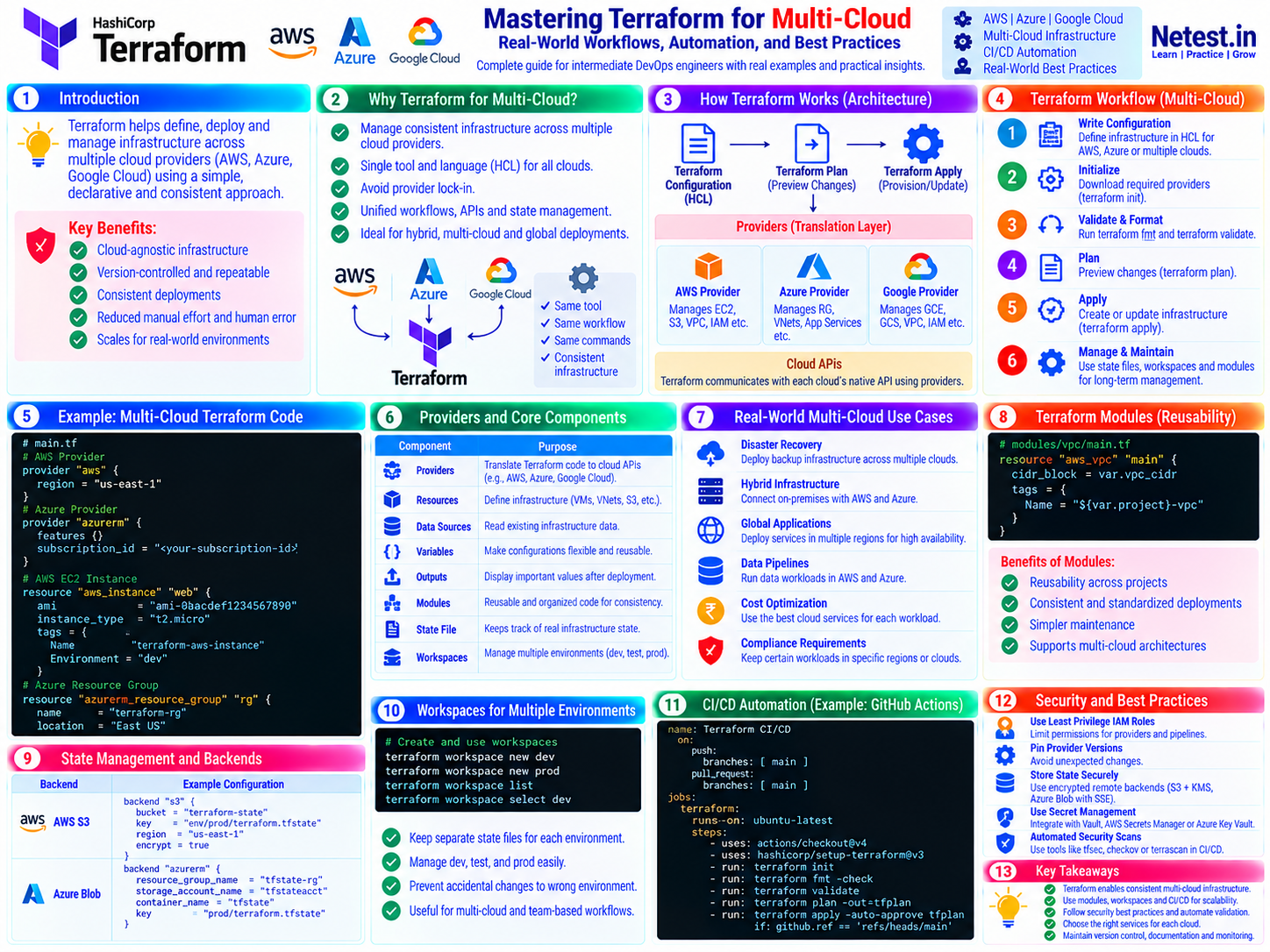
Terraform Multi-Cloud Mastery at a Glance
Terraform gives AWS, Azure and other API-driven platforms a shared configuration language and lifecycle, while providers preserve the cloud-specific resource models underneath.
Why Terraform for Multi-Cloud Infrastructure?
Infrastructure management has moved far beyond manually creating servers and networks. A modern platform may run application workloads in AWS, analytics or regulated services in Azure, and shared services across both for resilience. Without a common delivery model, every cloud becomes its own island of APIs, identity rules, command-line tools and deployment habits.
Terraform solves the workflow problem without pretending the clouds are identical. Teams use the same declarative language, review process and lifecycle commands while still selecting the AWS or Azure resources that fit each workload.
One delivery language
HCL, variables, outputs and modules give engineers a common way to express infrastructure intent across providers.
Reviewable change
A plan exposes creates, updates, replacements and deletions before a provider sends changes to either cloud API.
Versioned blueprints
Git history records the configuration, review and rationale behind repeatable infrastructure deployments.
Providers and the Terraform Architecture
A provider is the translation layer between Terraform configuration and a platform API. The AWS provider understands resources such as VPCs, EC2 instances and S3 buckets. AzureRM understands resource groups, VNets and platform services. The same architecture also supports Google Cloud, network controllers, SaaS systems and well-maintained internal providers.
Configuration
HCL files describe the desired resources, relationships, constraints and reusable inputs.
Core lifecycle
Terraform reads configuration and state, builds a dependency graph, then proposes the actions needed to converge.
Provider plugins
Each provider reads the remote API, maps resource schemas and performs the approved create, read, update or delete calls.
A Practical AWS and Azure Configuration
This compact root configuration declares both providers and creates one foundational resource in each cloud. Authentication should come from the local credential chain or short-lived CI identity, never from hard-coded secrets.
main.tf — declare two providers explicitly
terraform {
  required_version = ">= 1.8, < 2.0"

  required_providers {
    aws = {
      source  = "hashicorp/aws"
      version = "~> 6.0"
    }
    azurerm = {
      source  = "hashicorp/azurerm"
      version = "~> 4.0"
    }
  }
}

provider "aws" {
  region = var.aws_region
}

provider "azurerm" {
  features {}
  subscription_id = var.azure_subscription_id
}

resource "aws_vpc" "primary" {
  cidr_block = "10.10.0.0/16"
  tags = {
    Name        = "${var.project}-aws-vpc"
    Environment = var.environment
  }
}

resource "azurerm_resource_group" "primary" {
  name     = "${var.project}-${var.environment}-rg"
  location = var.azure_location
  tags = {
    Environment = var.environment
  }
}
Production note: keep version constraints compatible with the modules you have tested and commit .terraform.lock.hcl. Provider versions shown here are illustrative baselines, not an instruction to upgrade an existing platform without testing.
For real platforms, keep cloud resources in focused modules rather than a growing root file. The root module should compose provider configurations, environment inputs and module outputs so reviewers can understand which platform changes together.
The Production Terraform Workflow
The same lifecycle works across providers. Run it from a clean, predictable working directory and treat the plan as a change record rather than routine terminal output.
terraform init — initialize providers and state
Initialize the selected backend and download provider plugins recorded in the dependency lock file.
terraform init -input=false -lockfile=readonlyCheck: confirm the backend and workspace before continuing; initializing against the wrong state is an operational incident waiting to happen.
terraform fmt and terraform validate — normalize and check configuration
Formatting keeps reviews readable, while validation catches schema and reference errors before cloud access is required.
terraform fmt -check -recursive
terraform validate -no-color
Limit: validation does not prove permissions, quotas or runtime behavior in AWS or Azure.
terraform plan — review the predicted impact
Create a saved plan from protected code and current state. Read replacements, deletions, address changes and unknown values carefully.
terraform plan -input=false -out=tfplan
terraform show -no-color tfplan
Protect it: plan files can contain configuration and sensitive data. Encrypt them, restrict access and keep retention short.
terraform apply — deploy the approved plan
Apply the exact reviewed artifact from a protected environment instead of calculating an unreviewed plan at deployment time.
terraform apply -input=false tfplanVerify: confirm application reachability, routes, policies, monitoring and cloud-native health after Terraform exits successfully.
CI/CD Automation for Multi-Cloud Terraform
This simplified GitHub Actions workflow validates every pull request and creates a fresh saved plan after merge. The apply job uses a protected production environment and an identity helper that must authenticate AWS and Azure separately with short-lived credentials.
.github/workflows/terraform.yml — validate, plan and apply
name: Terraform CI/CD

on:
  pull_request:
    paths: ['**/*.tf', '.terraform.lock.hcl']
  push:
    branches: [main]
    paths: ['**/*.tf', '.terraform.lock.hcl']

env:
  TF_IN_AUTOMATION: 'true'
  TF_INPUT: 'false'

jobs:
  validate:
    runs-on: ubuntu-latest
    permissions:
      contents: read
    steps:
      - uses: actions/checkout@v7
      - uses: hashicorp/setup-terraform@v4
        with:
          terraform_wrapper: false
      - run: terraform fmt -check -recursive
      - run: terraform init -backend=false -lockfile=readonly
      - run: terraform validate -no-color

  plan:
    if: github.event_name == 'push'
    needs: validate
    runs-on: ubuntu-latest
    permissions:
      contents: read
      id-token: write
    concurrency:
      group: terraform-production
      cancel-in-progress: false
    steps:
      - uses: actions/checkout@v7
      - uses: hashicorp/setup-terraform@v4
      - name: Authenticate to the cloud with OIDC
        run: ./scripts/configure-cloud-identity.sh
      - run: terraform init -lockfile=readonly
      - run: terraform plan -out=tfplan
      - run: terraform show -no-color tfplan > tfplan.txt
      - uses: actions/upload-artifact@v7
        with:
          name: terraform-production-plan
          path: |
            tfplan
            tfplan.txt
          retention-days: 1

  apply:
    if: github.event_name == 'push'
    needs: plan
    runs-on: ubuntu-latest
    environment: production
    permissions:
      contents: read
      id-token: write
    steps:
      - uses: actions/checkout@v7
      - uses: hashicorp/setup-terraform@v4
      - uses: actions/download-artifact@v8
        with:
          name: terraform-production-plan
      - name: Authenticate to the cloud with OIDC
        run: ./scripts/configure-cloud-identity.sh
      - run: terraform init -lockfile=readonly
      - run: terraform apply tfplan
Adapt before use: replace the identity helper with your cloud's official OIDC action or CLI flow, set the Terraform working directory, and ensure plan and apply use the same operating system, architecture, absolute checkout path, Terraform version and locked provider versions.
Reusable Module Design Without Hiding the Clouds
Modules turn reviewed patterns into building blocks. A good module has a narrow responsibility, predictable inputs, useful outputs and safe defaults. In multi-cloud platforms, separate AWS and Azure implementations but give them consistent organizational conventions.
infrastructure/
├── modules/
│   ├── aws-vpc/
│   └── azure-vnet/
└── environments/
    ├── dev/
└── prod/| Standardize across clouds | Keep cloud-specific |
|---|---|
| Project, environment, owner and cost tags | VPC, VNet, subnet and routing resource behavior |
| Input validation and CIDR allocation policy | Identity models, security controls and service endpoints |
| Output names for IDs and address ranges | Availability-zone and region architecture |
| Documentation, tests and release process | Provider-specific lifecycle and import limitations |
Remote State, Backends and Environment Separation
State maps resource addresses in configuration to real objects. Because it can contain infrastructure details and sensitive values, it needs the same deliberate ownership as a production database.
Remote backend
Centralize state, control access, encrypt stored data, retain recoverable versions and enable supported locking.
Small blast radius
Split state by lifecycle and ownership so an application plan does not refresh or risk an entire multi-cloud estate.
Explicit data sharing
Publish stable outputs through approved interfaces instead of coupling every stack to broad remote-state access.
Use workspaces only for intentionally similar environments
CLI workspaces select separate state instances for the same configuration. They are convenient for repeatable dev or test copies, but they do not create a security boundary.
terraform workspace new dev
terraform workspace new prod
terraform workspace list
terraform workspace select dev
Choose separate roots and backends instead when environments use different credentials, approval paths, ownership, compliance controls or architecture.
- Keep production state separate from development and test.
- Separate independently operated AWS accounts and Azure subscriptions when teams or release cycles differ.
- Enable encryption, versioning, least-privilege access, audit logs and supported state locking.
- Never commit state, plan files, credential files or secret variable values to Git.
- Document recovery, import, moved-resource and force-unlock procedures before an emergency.
Security, Compliance and Day-Two Operations
Infrastructure as Code can amplify both good standards and dangerous mistakes. Make the safe path the normal path with identity, policy, drift and recovery controls built into delivery.
Use separate least-privilege cloud identities
Give AWS and Azure distinct workload identities with only the actions and resource scope required by their stacks. Prefer OIDC or workload identity federation over stored long-lived secrets, and bind trust to protected code and deployment environments.
Control dependencies and supply chain
Constrain Terraform and provider versions, commit .terraform.lock.hcl, and promote module or provider upgrades through testing and review. Treat provider binaries as privileged code.
Scan configuration and enforce policy
Use maintained IaC scanners and organizational policy checks to detect public exposure, weak encryption, wildcard permissions, missing logs and unapproved regions before deployment.
Detect drift without blindly reconciling it
Run scheduled plans and investigate unexpected differences. An out-of-band change may be an incident response or emergency repair, so identify ownership and impact before deciding whether code or infrastructure is authoritative.
- Retain the commit, plan summary, approver, runner identity, apply log and verification result.
- Verify application reachability, routes, security controls, monitoring and backups after deployment.
- Test provider failure, partial apply, state restoration, import and rollback procedures.
- Record policy exceptions with an owner, justification and expiry date.
Real-World Multi-Cloud Use Cases
| Use case | Terraform pattern | Operational focus |
|---|---|---|
| Disaster recovery | Separate modules deploy recovery foundations in a second cloud or region. | Test data recovery, DNS, identity dependencies and realistic recovery objectives. |
| Hybrid connectivity | Independent AWS and Azure network stacks publish approved gateway and CIDR outputs. | Coordinate routing, address management, encryption and change windows. |
| Global applications | Environment roots compose cloud-native load balancing, compute and observability. | Avoid assuming that equal resource counts create equal resilience. |
| Data platforms | Cloud-specific modules provision storage, private endpoints and processing services. | Apply data residency, encryption, retention and egress controls. |
| Compliance placement | Policy-approved modules constrain region, service tier, tags and diagnostic settings. | Keep evidence and verify that deployed behavior matches policy intent. |
| Cost optimization | Common tagging and outputs support allocation while each cloud uses appropriate services. | Include transfer, support, licensing and operating complexity—not only compute price. |
Production Readiness Checklist
- Define ownership and lifecycle boundaries before choosing the state layout.
- Use cloud-specific modules with consistent names, tags, validation and outputs.
- Commit configuration and
.terraform.lock.hcl; exclude state, plans, credentials and secret values. - Use encrypted remote state with access controls, versioning, logging and supported locking.
- Separate development and production credentials, backends and approval paths.
- Run formatting, validation, security scans, policy checks and a reviewed plan in CI/CD.
- Use short-lived AWS and Azure identities rather than long-lived repository secrets.
- Apply only from protected code and verify the actual service after deployment.
- Document drift, import, moved-resource, force-unlock, recovery and provider-upgrade procedures.
- Measure outcomes: deployment lead time, failed changes, drift, recovery time and policy exceptions.
Terraform Multi-Cloud Frequently Asked Questions
Can one Terraform configuration manage both AWS and Azure?
Yes. A root configuration can declare both AWS and AzureRM providers and call cloud-specific modules. Keep provider settings, credentials and state boundaries explicit so a change for one platform cannot accidentally affect another.
Should AWS and Azure resources share one Terraform state file?
Usually not for large or independently operated platforms. Smaller state boundaries reduce blast radius, speed up plans and allow separate access controls. Share stable outputs through approved interfaces instead of giving every stack access to every state file.
Are Terraform workspaces enough to separate production from development?
Workspaces are useful when environments intentionally share the same configuration and operating model, but they are not a strong security boundary. Separate backends, accounts or subscriptions are safer when credentials, approvals, ownership or compliance requirements differ.
How should Terraform authenticate to multiple clouds in CI/CD?
Use separate least-privilege workload identities and short-lived credentials for each provider. Bind each identity to the repository, protected branch and deployment environment, and avoid storing long-lived AWS or Azure secrets in the repository.
How do modules help a multi-cloud Terraform platform?
Modules package repeatable patterns such as an AWS VPC or Azure VNet behind consistent inputs, outputs, tags and policy defaults. They improve reuse without pretending that different cloud services are identical.