How Terraform Helps Deploying Network Infrastructure in Azure Cloud
From VNets and network security groups to Azure Firewall and hub-and-spoke topology, Terraform gives network engineers a repeatable way to build and change Azure infrastructure through code.
In This Lesson
Apply Terraform to Azure networking through a reviewed infrastructure-as-code workflow. Examples connect providers, VNets, subnets, NSGs, routes, firewalls, peering, and gateways.
- Terraform as the Network Engineer's Azure Control Plane
- Why Terraform for Azure Network Infrastructure?
- The AzureRM Provider: Connecting Terraform to Azure
- Deploying VNets, Subnets, and NSGs
- Route Tables, User-Defined Routes, and Azure Firewall
- Hub-and-Spoke Topology with VNet Peering
- VPN Gateway and BGP with Terraform
- A Safe Terraform Network Deployment Workflow
Quick Learning Map
Keep this three-step view in mind as you work through the detailed lesson.
Describe Azure networking
Model the desired resources, relationships, variables, and outputs in code.
Review the plan
Inspect additions, replacements, dependencies, and destructive changes.
Apply and verify
Deploy through scoped credentials, then confirm Azure state and connectivity.
How Terraform Helps Deploying Network Infrastructure in Azure Cloud at a Glance
Use this summary before moving into the detailed explanations, examples, commands, and checks.
Core focus
Apply Terraform to Azure networking through a reviewed infrastructure-as-code workflow.
Key connection
Describe Azure networking → Review the plan → Apply and verify
Practical outcome
Examples connect providers, VNets, subnets, NSGs, routes, firewalls, peering, and gateways.
Terraform as the Network Engineer's Azure Control Plane
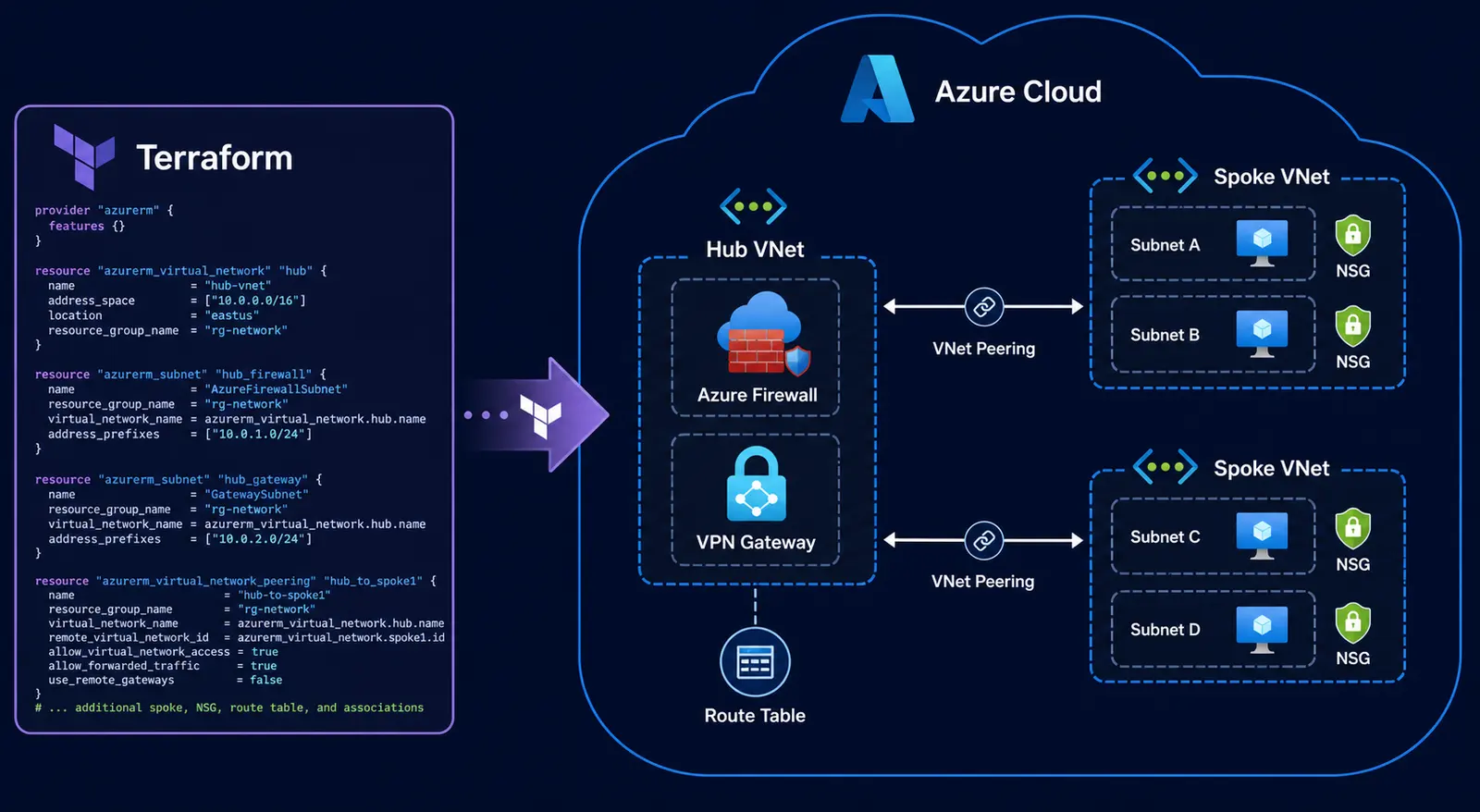
Anyone who has manually deployed a virtual network, created subnets, configured NSG rules, and connected a VPN gateway through the Azure portal knows the repeatability problem. The first environment may work, but rebuilding the same design for another region, customer, or disaster-recovery site can introduce inconsistent names, address ranges, rules, and routing choices.
Terraform addresses that problem with declarative Infrastructure as Code. The desired Azure network is described in HashiCorp Configuration Language, or HCL. Terraform then builds a dependency graph, compares the configuration with the managed Azure resources, and proposes the required actions before making a change.
1. Why Terraform for Azure Network Infrastructure?
Azure also supports ARM templates and Bicep. Terraform is useful when a team wants a consistent declarative workflow across Azure and other platforms, along with a state model that maps configuration to managed resources.
| Capability | Manual Portal Workflow | Terraform Workflow |
|---|---|---|
| Repeatability | Actions must be repeated for every environment | One reviewed configuration can deploy multiple environments |
| Change visibility | Impact depends on manual review | terraform plan previews proposed actions |
| Dependencies | Engineers sequence resources manually | References create an automatic dependency graph |
| Code review | Portal clicks are difficult to peer review | HCL changes can use pull requests and approvals |
| Standardization | Names, tags, and security settings can vary | Modules and variables enforce common patterns |
Terraform state is not a general monitoring database. It records the relationship between Terraform resource addresses and remote infrastructure. During planning, Terraform refreshes managed resource information and reports differences that may require an update, replacement, import, or configuration change.
2. The AzureRM Provider: Connecting Terraform to Azure
The HashiCorp AzureRM provider translates Terraform resource declarations into Azure Resource Manager API operations. Provider versions can introduce new resources, change defaults, and remove deprecated arguments, so production configurations should use a reviewed version constraint and commit the generated dependency lock file.
Provider and Remote-State Configuration
terraform {
  required_version = ">= 1.5.0"

  required_providers {
    azurerm = {
      source  = "hashicorp/azurerm"
      version = "~> 4.0"
    }
  }

  backend "azurerm" {
    resource_group_name  = "rg-terraform-state"
    storage_account_name = "sttfstateproduction"
    container_name       = "tfstate"
    key                  = "network/hub/terraform.tfstate"
    use_azuread_auth     = true
  }
}

provider "azurerm" {
  features {}
  subscription_id = var.subscription_id
}
The AzureRM backend stores state as a blob and supports native state locking. Use Microsoft Entra ID, workload identity federation, or a managed identity where possible. Avoid placing client secrets in HCL, command history, backend configuration files, or source control.
3. Deploying VNets, Subnets, and NSGs
A virtual network, its subnets, network security groups, and subnet associations are separate resources. Direct resource references allow Terraform to infer creation order without hard-coded resource IDs.
VNet and Reserved Azure Subnets
resource "azurerm_virtual_network" "hub" {
  name                = "vnet-hub-uks-prod"
  address_space       = ["10.0.0.0/16"]
  location            = var.location
  resource_group_name = azurerm_resource_group.network.name
  tags                = local.common_tags
}

resource "azurerm_subnet" "gateway" {
  name                 = "GatewaySubnet"
  resource_group_name  = azurerm_resource_group.network.name
  virtual_network_name = azurerm_virtual_network.hub.name
  address_prefixes     = ["10.0.1.0/27"]
}

resource "azurerm_subnet" "firewall" {
  name                 = "AzureFirewallSubnet"
  resource_group_name  = azurerm_resource_group.network.name
  virtual_network_name = azurerm_virtual_network.hub.name
  address_prefixes     = ["10.0.2.0/26"]
}

resource "azurerm_subnet" "workload" {
  name                 = "snet-workload-prod"
  resource_group_name  = azurerm_resource_group.network.name
  virtual_network_name = azurerm_virtual_network.hub.name
  address_prefixes     = ["10.0.10.0/24"]
}
Important: Azure requires the exact names GatewaySubnet and AzureFirewallSubnet for those managed services. A /27 or larger is recommended for VPN Gateway, while Azure Firewall requires a dedicated /26 subnet. Do not attach a subnet-level NSG to either reserved subnet.
Workload NSG and Association
resource "azurerm_network_security_group" "workload" {
  name                = "nsg-workload-prod"
  location            = var.location
  resource_group_name = azurerm_resource_group.network.name

  security_rule {
    name                       = "allow-https-from-private"
    priority                   = 100
    direction                  = "Inbound"
    access                     = "Allow"
    protocol                   = "Tcp"
    source_port_range          = "*"
    destination_port_range     = "443"
    source_address_prefix      = "10.0.0.0/8"
    destination_address_prefix = "*"
  }
}

resource "azurerm_subnet_network_security_group_association" "workload" {
  subnet_id                 = azurerm_subnet.workload.id
  network_security_group_id = azurerm_network_security_group.workload.id
}
Use inline NSG rules or standalone azurerm_network_security_rule resources consistently. Mixing both management approaches for the same NSG can create conflicts and unexpected diffs.
4. Route Tables, User-Defined Routes, and Azure Firewall
To send spoke-subnet traffic through Azure Firewall, create the firewall, create a route table with a virtual-appliance next hop, and associate the route table with each workload subnet that must use that path.
Azure Firewall
resource "azurerm_public_ip" "firewall" {
  name                = "pip-fw-hub-prod"
  location            = var.location
  resource_group_name = azurerm_resource_group.network.name
  allocation_method   = "Static"
  sku                 = "Standard"
  zones               = ["1", "2", "3"]
}

resource "azurerm_firewall" "hub" {
  name                = "fw-hub-uks-prod"
  location            = var.location
  resource_group_name = azurerm_resource_group.network.name
  sku_name            = "AZFW_VNet"
  sku_tier            = "Premium"
  zones               = ["1", "2", "3"]

  ip_configuration {
    name                 = "fw-ipconfig"
    subnet_id            = azurerm_subnet.firewall.id
    public_ip_address_id = azurerm_public_ip.firewall.id
  }
}
Default Route to the Firewall
resource "azurerm_route_table" "spoke" {
  name                          = "rt-spoke-to-firewall"
  location                      = var.location
  resource_group_name           = azurerm_resource_group.network.name
  bgp_route_propagation_enabled = false
}

resource "azurerm_route" "default_to_firewall" {
  name                   = "default-to-firewall"
  resource_group_name    = azurerm_resource_group.network.name
  route_table_name       = azurerm_route_table.spoke.name
  address_prefix         = "0.0.0.0/0"
  next_hop_type          = "VirtualAppliance"
  next_hop_in_ip_address = azurerm_firewall.hub.ip_configuration[0].private_ip_address
}

resource "azurerm_subnet_route_table_association" "spoke_workload" {
  subnet_id      = azurerm_subnet.spoke_workload.id
  route_table_id = azurerm_route_table.spoke.id
}
Disabling BGP route propagation is a design decision, not a universal requirement. It may be appropriate when a route table must ignore routes learned from a gateway, but it can also remove required hybrid routes. Validate effective routes and failure paths before applying the change.
5. Hub-and-Spoke Topology with VNet Peering
In a hub-and-spoke design, shared connectivity and security services live in the hub while application networks use separate spokes. Standard VNet peering is not automatically bidirectional: Terraform must create both hub-to-spoke and spoke-to-hub peering resources.
resource "azurerm_virtual_network_peering" "hub_to_spoke" {
  name                         = "peer-hub-to-spoke-app"
  resource_group_name          = azurerm_resource_group.network.name
  virtual_network_name         = azurerm_virtual_network.hub.name
  remote_virtual_network_id    = azurerm_virtual_network.spoke_app.id
  allow_gateway_transit        = true
  allow_forwarded_traffic      = true
  allow_virtual_network_access = true
}

resource "azurerm_virtual_network_peering" "spoke_to_hub" {
  name                         = "peer-spoke-app-to-hub"
  resource_group_name          = azurerm_resource_group.network.name
  virtual_network_name         = azurerm_virtual_network.spoke_app.name
  remote_virtual_network_id    = azurerm_virtual_network.hub.id
  use_remote_gateways          = true
  allow_forwarded_traffic      = true
  allow_virtual_network_access = true
}
allow_gateway_transit on the hub side and use_remote_gateways on the spoke side allow a spoke to use a compatible gateway in the hub. Confirm that the topology, gateway type, peering state, and route tables support the intended transit path.
For repeatable deployments, place the spoke VNet, peering pair, NSG, and route-table association in a tested module. Adding another spoke then becomes a reviewed module call with a unique CIDR and environment-specific variables.
6. VPN Gateway and BGP with Terraform
Terraform can manage the gateway subnet, public IP, virtual network gateway, local network gateway, and connection resources. The example below creates a route-based, zone-redundant gateway with BGP enabled.
resource "azurerm_public_ip" "vpn_gateway" {
  name                = "pip-vgw-hub-prod"
  location            = var.location
  resource_group_name = azurerm_resource_group.network.name
  allocation_method   = "Static"
  sku                 = "Standard"
  zones               = ["1", "2", "3"]
}

resource "azurerm_virtual_network_gateway" "hub_vpn" {
  name                = "vgw-hub-uks-prod"
  location            = var.location
  resource_group_name = azurerm_resource_group.network.name
  type                = "Vpn"
  vpn_type            = "RouteBased"
  sku                 = "VpnGw2AZ"
  generation          = "Generation2"
  enable_bgp          = true
  active_active       = false

  bgp_settings {
    asn = 65001
  }

  ip_configuration {
    name                          = "vgw-ipconfig"
    public_ip_address_id          = azurerm_public_ip.vpn_gateway.id
    private_ip_address_allocation = "Dynamic"
    subnet_id                     = azurerm_subnet.gateway.id
  }
}
VPN Gateway provisioning is a long-running Azure operation. Terraform waits for Azure to finish before creating dependent resources, but deployment duration and success still depend on regional capacity, SKU availability, policy, quotas, and the surrounding configuration.
7. A Safe Terraform Network Deployment Workflow
terraform fmt -check: checks that HCL follows the standard format.terraform init: initializes the backend, installs providers, and updates the dependency lock file when required.terraform validate: checks configuration syntax and internal references without proposing infrastructure changes.terraform plan -out=tfplan: creates a reviewable execution plan for the current configuration and state.- Peer and policy review: checks CIDRs, routes, security rules, replacements, costs, and outage risk.
terraform apply tfplan: applies the saved plan that was reviewed.
Pay special attention to a plan that marks a VNet, subnet, gateway, peering, public IP, or firewall for replacement. A destroy-and-recreate action on a core network resource can interrupt every workload that depends on it. Treat unexpected replacement as a stop condition until the reason and recovery plan are understood.
8. Production Best Practices
- Protect remote state: restrict access, enable suitable recovery controls, and separate state by environment or trust boundary.
- Use identity-based authentication: prefer managed identities or federated workload identities over stored client secrets.
- Pin and review providers: use a version constraint, commit
.terraform.lock.hcl, and test upgrades before production. - Validate address planning: prevent overlapping VNet, on-premises, partner, and service CIDRs before deployment.
- Use modules carefully: standardize patterns without hiding critical routing and replacement behavior from reviewers.
- Separate plan and apply: require approval for the exact saved plan used in a production deployment.
- Control portal changes: use policy and operating procedures to avoid unmanaged drift.
- Test recovery: document state recovery, import, rollback, and emergency access procedures before they are needed.
Azure Networking Resource Quick Reference
| Terraform Resource | Network Function |
|---|---|
azurerm_virtual_network | Creates a VNet with address space and optional DNS settings |
azurerm_subnet | Creates a subnet inside a VNet |
azurerm_network_security_group | Defines stateful Layer 3 and Layer 4 filtering rules |
azurerm_route_table | Creates a route table and controls BGP route propagation |
azurerm_route | Creates an individual user-defined route |
azurerm_firewall | Deploys Azure Firewall in a VNet or supported secured topology |
azurerm_virtual_network_peering | Creates one direction of VNet peering |
azurerm_virtual_network_gateway | Deploys a VPN or ExpressRoute virtual network gateway |
azurerm_virtual_hub | Creates an Azure Virtual WAN hub |
How Terraform Helps Deploying Network: Frequently Asked Questions
Why use Terraform for Azure networking?
Terraform makes the network configuration repeatable, version controlled, peer reviewable, and easier to reproduce across development, testing, production, and disaster-recovery environments.
What Azure networking resources can Terraform deploy?
The AzureRM provider supports VNets, subnets, NSGs, routes, firewalls, peerings, gateways, private connectivity resources, load-balancing components, DNS resources, and many related Azure services.
Where should a team store Terraform state?
Use a protected remote backend. For Azure deployments, the AzureRM backend can store state in Azure Blob Storage and provide native locking. Apply least-privilege access and suitable recovery controls.
Does Terraform automatically fix configuration drift?
No. Terraform can show detected differences during planning, but it does not change the environment until an authorized apply occurs. Review whether the correct response is to update Azure, update HCL, or import an existing resource.
Can Terraform build a complete hub-and-spoke network?
Yes. It can manage the hub and spoke VNets, peering in both directions, route tables, NSGs, Azure Firewall, VPN Gateway, and supporting associations. Complex deployments should be split into tested modules and state boundaries.
How Terraform Helps Deploying Network: Conclusion
Terraform transforms Azure networking from a collection of manual portal actions into a repeatable engineering workflow. Its resource model maps directly to familiar network constructs such as VNets, subnets, NSGs, route tables, firewalls, peerings, and gateways.
Start with a small VNet and workload NSG, then add routing, centralized inspection, peering, and hybrid connectivity as the design matures. The main advantage is not simply faster deployment: it is a documented, reviewable, and reproducible control process for network change.
How Terraform Helps Deploying Network: Tags and Keywords
Terraform, Microsoft Azure, AzureRM provider, Infrastructure as Code, cloud networking, Azure VNet, subnet, NSG, route table, Azure Firewall, hub and spoke, VNet peering, VPN Gateway, BGP, network automation.