CI/CD Automation for Terraform
Turn Terraform from a manual workstation command into a reviewable, repeatable delivery workflow with validation, saved plans, approval gates, short-lived credentials and auditable applies.
In This Lesson
Follow the complete path from a pull request to an approved Terraform deployment, then harden the pipeline, troubleshoot common failures and understand where custom providers fit.
Quick Learning Map
A dependable Terraform pipeline separates proposed code, reviewed infrastructure impact and authorized deployment.
Validate the change
Format and validate the configuration, honor the lock file, and run IaC security checks.
Review the plan
Create a readable plan, expose it to reviewers and protect the saved binary plan as sensitive data.
Approve and apply
Use a protected environment, short-lived cloud identity and the exact approved plan to deploy.
Terraform CI/CD Automation at a Glance
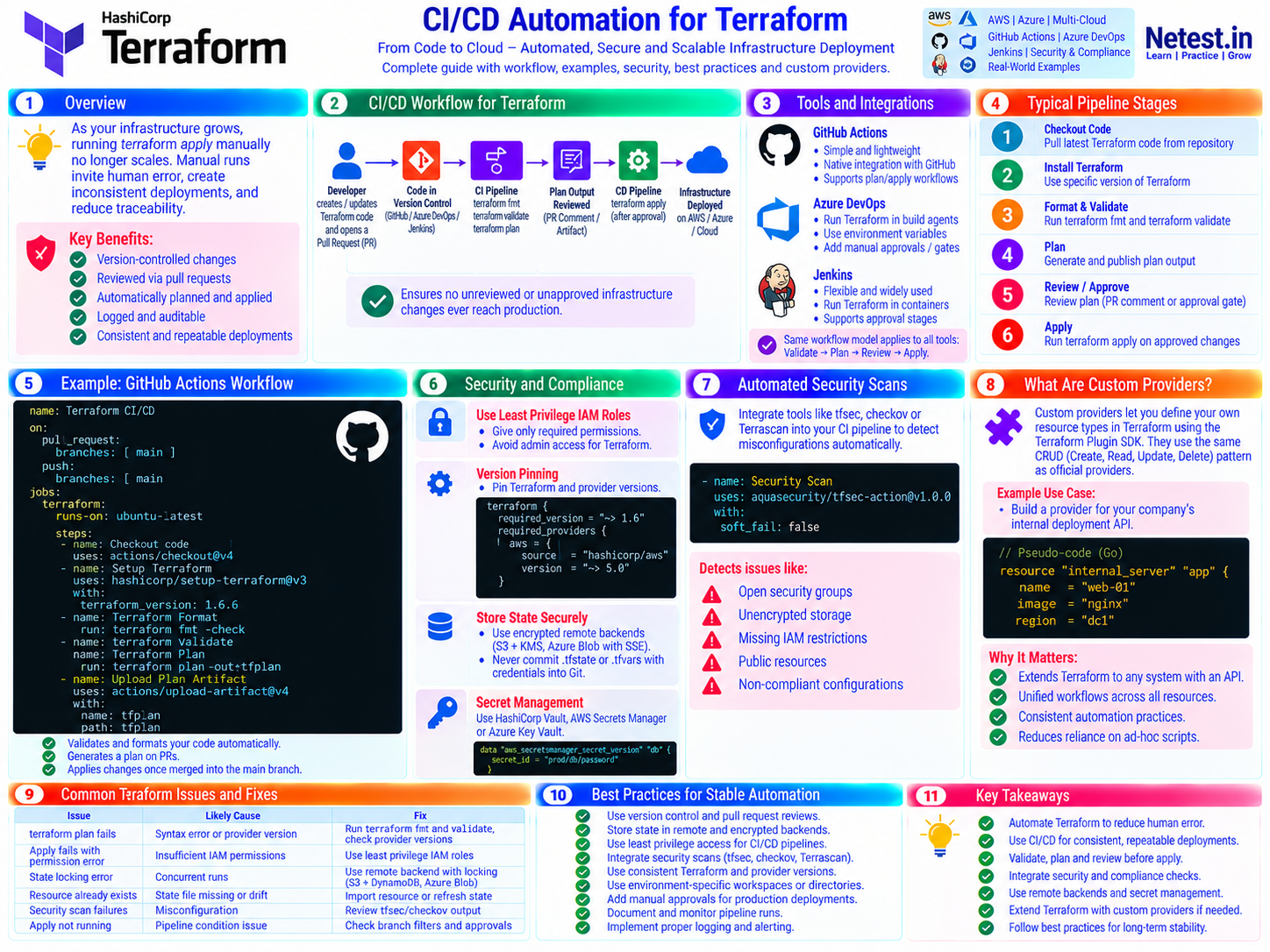
The core model is simple: version-controlled code enters CI, an immutable plan is reviewed, and a protected CD stage applies only an authorized change to remote state.
Why Automate Terraform?
As infrastructure grows, running terraform apply manually no longer scales. Local runs invite inconsistent tooling, missed reviews, unmanaged credentials and weak traceability. CI/CD makes the delivery process repeatable without removing human judgment from production changes.
Version-controlled
Infrastructure intent, module changes and provider constraints travel through the same pull-request history as application code.
Reviewed before impact
Reviewers see both the code diff and Terraform's predicted create, update, replace or destroy actions.
Consistent and auditable
Known runner images, locked dependencies, protected environments and retained logs make every deployment easier to explain.
A Safe Terraform Automation Workflow
The workflow should make a clear distinction between a speculative pull-request plan and the final saved plan that is eligible for deployment.
1. Open a pull request
The developer proposes Terraform changes in a short-lived branch. Branch protection requires review and passing checks before merge.
2. Format, initialize and validate
CI runs formatting and static validation with non-interactive flags. Use -lockfile=readonly so a pipeline cannot silently choose different provider versions.
terraform fmt -check -recursive
terraform init -backend=false -input=false -lockfile=readonly
terraform validate -no-color
3. Generate a review plan
A trusted runner initializes the real backend and creates a plan. For untrusted forked pull requests, do not expose cloud credentials; restrict the job to offline validation or use an isolated speculative-plan service.
terraform init -input=false -lockfile=readonly
terraform plan -input=false -no-color
4. Re-plan protected main
After merge, generate a new saved plan from the protected commit and current remote state. The pull-request preview may be stale and should not normally be applied directly.
terraform plan -input=false -out=tfplan
terraform show -no-color tfplan > tfplan.txt
5. Approve and apply the saved plan
A protected environment or pipeline gate pauses the apply job. After approval, Terraform applies the exact saved plan instead of calculating an unreviewed one.
terraform apply -input=false tfplanImportant: a saved plan can contain configuration, state and sensitive values. Encrypt it, restrict access, keep retention short and never publish it in a public PR comment.
HashiCorp's automation guidance recommends the initialize, plan, review and apply sequence, remote state with locking, and non-interactive execution. Its terraform plan reference explains why saved plans are designed for this two-step automation workflow.
Example: Terraform with GitHub Actions
This simplified workflow validates every pull request and creates a fresh saved plan after merge. The apply job uses a protected production environment, so reviewers can inspect tfplan.txt before approving deployment.
.github/workflows/terraform.yml — validate, plan and apply
name: Terraform CI/CD

on:
  pull_request:
    paths: ['**/*.tf', '.terraform.lock.hcl']
  push:
    branches: [main]
    paths: ['**/*.tf', '.terraform.lock.hcl']

env:
  TF_IN_AUTOMATION: 'true'
  TF_INPUT: 'false'

jobs:
  validate:
    runs-on: ubuntu-latest
    permissions:
      contents: read
    steps:
      - uses: actions/checkout@v7
      - uses: hashicorp/setup-terraform@v4
        with:
          terraform_wrapper: false
      - run: terraform fmt -check -recursive
      - run: terraform init -backend=false -lockfile=readonly
      - run: terraform validate -no-color

  plan:
    if: github.event_name == 'push'
    needs: validate
    runs-on: ubuntu-latest
    permissions:
      contents: read
      id-token: write
    concurrency:
      group: terraform-production
      cancel-in-progress: false
    steps:
      - uses: actions/checkout@v7
      - uses: hashicorp/setup-terraform@v4
      - name: Authenticate to the cloud with OIDC
        run: ./scripts/configure-cloud-identity.sh
      - run: terraform init -lockfile=readonly
      - run: terraform plan -out=tfplan
      - run: terraform show -no-color tfplan > tfplan.txt
      - uses: actions/upload-artifact@v7
        with:
          name: terraform-production-plan
          path: |
            tfplan
            tfplan.txt
          retention-days: 1

  apply:
    if: github.event_name == 'push'
    needs: plan
    runs-on: ubuntu-latest
    environment: production
    permissions:
      contents: read
      id-token: write
    steps:
      - uses: actions/checkout@v7
      - uses: hashicorp/setup-terraform@v4
      - uses: actions/download-artifact@v8
        with:
          name: terraform-production-plan
      - name: Authenticate to the cloud with OIDC
        run: ./scripts/configure-cloud-identity.sh
      - run: terraform init -lockfile=readonly
      - run: terraform apply tfplan
Adapt before use: replace the identity helper with your cloud's official OIDC action or CLI flow, set the Terraform working directory, and ensure plan and apply use the same operating system, architecture, absolute checkout path, Terraform version and locked provider versions.
Integrating Terraform with Azure DevOps and Jenkins
The YAML or job syntax changes, but the control model remains checkout → validate → scan → plan → review → approve → apply.
Azure DevOps
Use hosted or self-hosted agents, publish the human-readable plan, protect stages with environment checks and use an Azure Resource Manager service connection with workload identity federation instead of a stored client secret.
Jenkins
Run Terraform in a pinned container image, bind short-lived credentials at runtime, archive protected plan evidence and require an input or external approval gate before the apply stage.
Any CI/CD platform
Serialize changes per state, keep environments isolated, use the same reviewed lock file and retain logs that identify the commit, actor, plan and deployment result.
Microsoft recommends workload identity federation for Azure Resource Manager service connections, eliminating a long-lived secret from the pipeline. The same short-lived identity principle applies to AWS and other clouds.
Security and Compliance Controls
Infrastructure as Code can create a large blast radius quickly. Put identity, state protection, dependency integrity and policy checks into the normal pipeline path.
Use least-privilege, short-lived identities
Grant plan and apply only the cloud actions and resource scope they require. Prefer OIDC or workload identity federation; bind trust to the repository, protected branch and environment. AWS explains how OIDC exchanges identity tokens for temporary role credentials.
Pin Terraform and provider dependencies
Constrain supported versions, run upgrades deliberately, and commit .terraform.lock.hcl. HashiCorp recommends checking the lock file into version control so provider selections and checksum changes are reviewed.
terraform {
  required_version = ">= 1.10, < 2.0"

  required_providers {
    aws = {
      source  = "hashicorp/aws"
      version = "~> 6.0"
    }
  }
}
Choose constraints that match your tested platform baseline; do not copy these example ranges without confirming module and provider compatibility. See the official dependency lock file guidance.
Protect remote state and saved plans
Use a remote backend with encryption, access controls, versioning, audit logs and state locking where supported. Never commit *.tfstate, *.tfvars containing secrets, .terraform/ or saved plans. HashiCorp's sensitive-data guidance explains that state may contain secrets even when CLI output masks them.
Scan code and policy before deployment
Run one or more maintained scanners such as Checkov, Trivy, tfsec or Terrascan, then enforce organization-specific policy. Pin scanner versions or container digests and fail on agreed severity levels.
checkov -d . --framework terraform --quiet --compact
trivy config --exit-code 1 --severity HIGH,CRITICAL .
Typical findings include public security groups, unencrypted storage, wildcard IAM permissions, exposed resources and missing logging.
Keep secrets out of Terraform configuration
Deliver provider credentials through the CI identity and use a secrets manager for application secrets. Be careful with secret data sources: values read by Terraform can still enter a plan or state unless a provider supports ephemeral or write-only handling.
What Are Custom Terraform Providers?
A provider is the bridge between Terraform and an external API. A custom provider lets an organization define data sources and resource types for an internal platform, appliance or service that is not covered by an existing provider.
Create
Translate a Terraform resource definition into an API request that provisions the remote object.
Read and update
Refresh state from the API, detect drift and change only the attributes that need reconciliation.
Delete and import
Remove managed objects safely and bring existing resources under Terraform control when supported.
Consume an internal provider like any other provider
terraform {
  required_providers {
    internal = {
      source  = "registry.example.com/acme/internal"
      version = "~> 1.2"
    }
  }
}

resource "internal_server" "app" {
  name   = "web-01"
  image  = "nginx"
  region = "dc1"
}
Engineering note: publish signed builds through a controlled registry, define stable schemas and import behavior, test upgrades, and treat provider binaries as privileged pipeline dependencies. The modern starting point is HashiCorp's Terraform Plugin Framework.
Custom providers matter because they extend the same declarative review and lifecycle model to private APIs. For hybrid or bespoke infrastructure, that can replace fragile one-off scripts with one consistent workflow—but only when the provider has strong tests, documentation and ownership.
Common Terraform Pipeline Issues and Fixes
| Issue | Likely cause | Practical fix |
|---|---|---|
terraform plan fails | Syntax error, provider mismatch or backend initialization failure | Run fmt, init -lockfile=readonly and validate; inspect the first error, not only the final exit code. |
| Apply gets permission denied | OIDC trust or cloud role lacks the required scope | Verify token claims, role trust, environment restrictions and least-privilege permissions against the exact failing API action. |
| State lock cannot be acquired | Another run is active or a previous run ended unexpectedly | Serialize runs per state and confirm the owner before using force-unlock; never disable locking as a routine workaround. |
| Plan differs during apply | Apply generated a new plan, infrastructure drifted or dependencies changed | Apply the reviewed saved plan with the same Terraform version, provider lock file, platform and checkout path. |
| Security scan fails | A real misconfiguration, unsupported rule or documented exception | Fix the resource first; if an exception is justified, scope it narrowly, record the owner and expiry, and preserve audit evidence. |
| Pipeline does not run | Branch, path or event filters do not match | Check trigger filters, protected-branch names, workflow permissions and whether the changed files satisfy the configured paths. |
Best Practices for Stable Terraform Automation
- Use pull requests, required reviews and protected branches for infrastructure code.
- Separate state and credentials by environment, account, subscription or trust boundary.
- Commit
.terraform.lock.hcland upgrade Terraform, providers, modules and actions through reviewed pull requests. - Use encrypted remote state with locking, backups, access controls and audit logs.
- Use OIDC or workload identity federation instead of long-lived cloud secrets.
- Create the deployable plan from protected main, review it and apply that exact plan.
- Serialize runs that share state; do not cancel an in-progress production apply casually.
- Integrate formatting, validation, IaC scanning, policy checks and post-deployment verification.
- Retain the commit SHA, plan evidence, approver, deployment logs and outcome for audits.
- Test failure, rollback and recovery paths before a pipeline manages critical production systems.
Terraform CI/CD Automation Frequently Asked Questions
Should a Terraform pipeline apply the plan created for a pull request?
Usually no. Treat the pull-request plan as a review preview, then create and approve a fresh saved plan from the protected main branch so it reflects the final code and current infrastructure state.
How should a CI/CD pipeline authenticate Terraform to AWS or Azure?
Prefer workload identity federation or OIDC so the pipeline receives short-lived credentials. Scope the cloud role to the repository, branch or protected environment and grant only the permissions required by that deployment.
Where should Terraform state be stored in CI/CD?
Use an encrypted remote backend with access control, versioning, audit logs and state locking where supported. Never commit state files to Git because state can contain sensitive values.
Which checks should run before terraform apply?
Run terraform fmt, initialize with the reviewed lock file, validate, create a speculative or saved plan, run infrastructure-as-code security scans and apply policy checks. Require human approval for production and apply the exact approved saved plan.
Can the same Terraform workflow run in GitHub Actions, Azure DevOps and Jenkins?
Yes. Each platform can implement the same control flow: checkout, initialize, format, validate, scan, plan, review, approve and apply. The syntax differs, but the security and state-management principles remain the same.