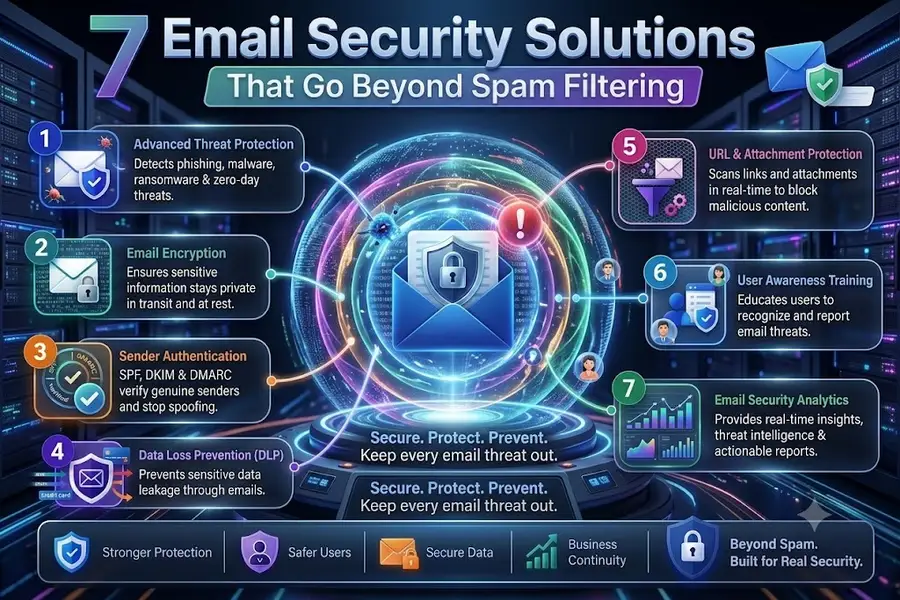
7 Email Security Solutions Beyond Basic Spam Filtering
Inbox security used to be simple: turn on a spam filter, block obvious junk, and move on. That no longer matches how attackers work. Modern email attacks use trusted-looking senders, clean links that turn malicious later, fake invoices, brand impersonation, and account takeover signals that a basic filter can miss.
In This Lesson
Compare seven email-security platforms by the threats and operating model they must support. The lesson keeps product features secondary to requirements, integration, testing, and response workflow.
Quick Learning Map
Keep this three-step view in mind as you work through the detailed lesson.
Define the threat model
Include phishing, BEC, account takeover, malicious links, attachments, and data loss.
Compare operational fit
Evaluate identity, API integration, mail flow, telemetry, administration, and cost.
Pilot with evidence
Measure detection, false positives, response speed, and user impact before rollout.
7 Email Security Solutions Beyond Basic Spam Filtering at a Glance
Use this summary before moving into the detailed explanations, examples, commands, and checks.
Core focus
Compare seven email-security platforms by the threats and operating model they must support.
Key connection
Define the threat model → Compare operational fit → Pilot with evidence
Practical outcome
The lesson keeps product features secondary to requirements, integration, testing, and response workflow.
What Good Inbox Security Must Catch
A useful email security stack protects the mailbox before delivery, at click time, and after a suspicious message has already landed. The strongest tools combine identity signals, message reputation, URL analysis, attachment detonation, and fast remediation.
Quick Comparison
| Solution | Strongest Fit | What It Adds Beyond Spam Filtering |
|---|---|---|
| Check Point Harmony Email & Collaboration | Microsoft 365 and Google Workspace protection | API-based inspection, URL rewriting, attachment sandboxing, sender behavior checks, and account takeover detection. |
| Proofpoint Email Protection | Advanced phishing and BEC defense | Impersonation analysis, lookalike-domain detection, time-of-click URL scanning, and targeted threat intelligence. |
| Mimecast Email Security | Email security plus continuity and archiving | Attachment sandboxing, URL protection, impersonation controls, policy enforcement, retention, and continuity workflows. |
| Microsoft Defender for Office 365 | Microsoft 365-native environments | Safe Links, Safe Attachments, anti-phishing policies, identity signals, and Defender portal investigation. |
| Cisco Secure Email | Cisco security stack integration | Talos intelligence, malware defense, URL reputation, attachment analysis, and broader Cisco telemetry correlation. |
| Barracuda Email Protection | Mid-sized teams needing practical controls | Phishing protection, account takeover detection, backup, archiving, and simpler operational management. |
| Google Workspace Security | Google-native inbox protection | Machine-learning phishing detection, attachment scanning, external sender warnings, 2FA, and context-aware access. |
1. Check Point Harmony Email & Collaboration
Check Point Harmony Email & Collaboration is designed for cloud mailboxes such as Microsoft 365 and Google Workspace. It sits close to the inbox and inspects sender behavior, URLs, attachments, and unusual account activity.
- Useful for: Stopping phishing, malicious attachments, credential theft, and risky collaboration-file sharing.
- Key value: API-based protection can review mail and collaboration content without forcing every organization into a traditional gateway-only design.
- Watch for: Tune policies carefully so VIP impersonation alerts and quarantine actions match business risk.
2. Proofpoint Email Protection
Proofpoint is strong when the main concern is targeted phishing, business email compromise, supplier fraud, and messages that look normal at first glance. It focuses heavily on who is being attacked, who is sending, and whether the message relationship makes sense.
- Useful for: Executive impersonation, lookalike domains, credential phishing, and suspicious external conversations.
- Key value: Time-of-click URL analysis helps catch links that become dangerous after delivery.
- Watch for: User reporting and automated removal should be configured early; detection alone is not enough.
3. Mimecast Email Security
Mimecast combines email filtering, targeted threat protection, continuity, and archiving. That makes it useful for organizations that want mailbox defense and email resilience in one operational platform.
- Useful for: Malware, phishing, impersonation, continuity planning, retention, and compliance workflows.
- Key value: URL protection and attachment sandboxing reduce risk from links and files that normal filters cannot confidently classify.
- Watch for: Align retention and archiving rules with legal and compliance requirements before rollout.
4. Microsoft Defender for Office 365
Microsoft Defender for Office 365 is a natural choice for organizations already using Exchange Online. It brings Safe Links, Safe Attachments, anti-phishing policies, domain and user impersonation controls, and investigation workflows into the Microsoft security ecosystem.
- Enable Safe Links for time-of-click URL scanning.
- Enable Safe Attachments for detonation before users open files.
- Protect VIPs, finance teams, administrators, and common supplier domains with anti-phishing policies.
5. Cisco Secure Email
Cisco Secure Email is built for organizations that want email defense connected with Cisco Talos intelligence and broader Cisco security telemetry. It can help with malware defense, ransomware delivered by email, URL reputation, and suspicious attachment behavior.
- Useful for: Hybrid environments, gateway-based controls, malware-heavy threat models, and Cisco-centered security operations.
- Key value: Talos intelligence and integration with other Cisco security products can improve investigation context.
- Watch for: Review mail flow design carefully when combining cloud mail, gateways, and API controls.
6. Barracuda Email Protection
Barracuda is a practical option for teams that want strong email protection without building a complicated security operations workflow. It covers spam, malware, phishing, spear-phishing, account takeover detection, backup, and archiving.
- Useful for: Small and mid-sized organizations that need quick deployment and understandable controls.
- Key value: Combines inbox protection with backup and recovery features that matter during account compromise or accidental deletion.
- Watch for: Test impersonation policies with real business workflows so legitimate vendors are not blocked unnecessarily.
7. Google Workspace Security
Google Workspace includes built-in protections for spam, phishing, malware, suspicious attachments, external sender warnings, two-step verification, and context-aware access. For many teams, that is a strong baseline.
Organizations with higher risk may still add a third-party API or gateway security layer for deeper BEC detection, advanced sandboxing, brand impersonation controls, or centralized incident response across multiple platforms.
Implementation Checklist
- Lock the domain: Publish SPF, DKIM, and DMARC, then move DMARC toward quarantine or reject after monitoring.
- Protect identity: Enforce MFA, conditional access, risky sign-in alerts, and admin account separation.
- Inspect risky content: Use URL rewriting, time-of-click checks, and attachment sandboxing.
- Detect impersonation: Monitor display-name spoofing, lookalike domains, supplier fraud, and VIP targeting.
- Close the response loop: Give users a report button and automate search-and-remove for confirmed malicious mail.
7 Email Security Solutions Beyond Basic Spam: FAQ
Is spam filtering still useful?
Yes. Spam filtering is still the first layer, but it should be paired with phishing detection, URL protection, sandboxing, DMARC enforcement, and account takeover monitoring.
What is the biggest email security mistake?
Treating email security as a single switch. A strong program combines technology, identity controls, user reporting, logging, and response playbooks.
Should every company buy a third-party tool?
Not always. Start by hardening the native platform you already use. Add a third-party layer when your threat level, compliance needs, or investigation workload requires more control.