What Is DNS Tunneling?
DNS tunneling uses DNS queries and responses as a covert channel for data that DNS was not designed to carry. Attackers may use it for data exfiltration or command-and-control (C2) communication because DNS traffic is widely permitted.
DNS Tunneling Explained for Beginners
Normal DNS asks questions such as “What IP address belongs to this domain?” In a DNS tunneling attack, labels such as mfrggzdf.chunk7.tunnel.example can carry encoded chunks. The recursive DNS resolver forwards the lookup according to normal domain delegation, eventually reaching the attacker's authoritative DNS server.
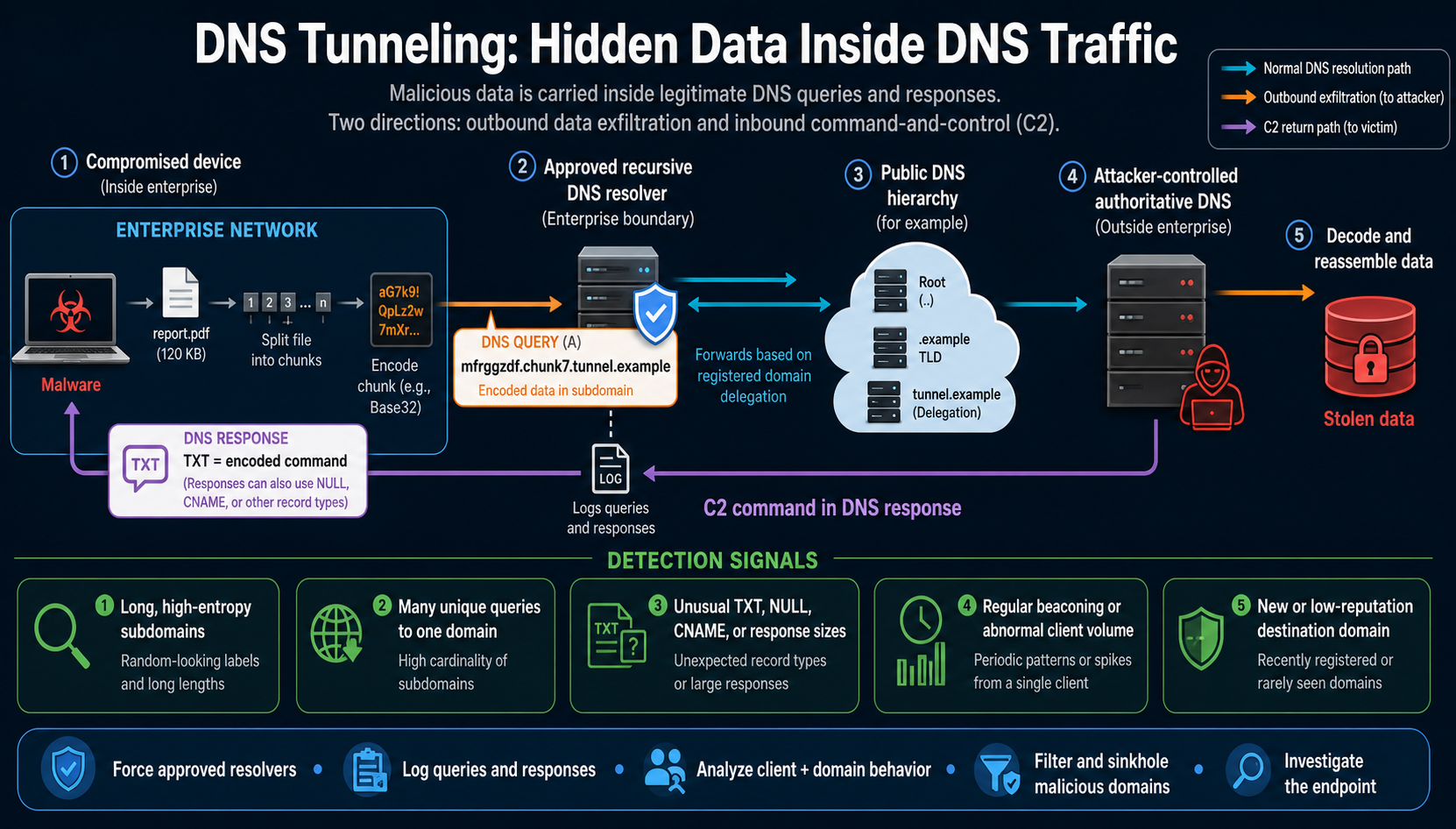
What Is DNS Tunneling and How Does It Work?
- An endpoint is compromised or an unauthorized tunneling application is installed.
- Data or a device identifier is split into small pieces and encoded.
- Each piece is placed in a DNS query, often in a unique subdomain.
- The enterprise resolver processes and forwards the query through the DNS hierarchy.
- An attacker-controlled authoritative server receives the query and decodes the hidden data.
- The server may return encoded commands or content in TXT, CNAME, A, AAAA, or other responses.
- The process repeats, forming a slow covert channel that can blend with ordinary DNS traffic.
DNS Tunneling Attack Examples and Uses
DNS tunneling data exfiltration
Malware encodes sensitive information into many DNS queries. The attacker's authoritative server collects and reassembles the chunks.
DNS tunneling malware communication
A compromised host beacons over DNS and receives C2 commands in responses, helping traffic blend into normal name resolution.
Network discovery
An attacker can return instructions and receive encoded results about hosts, services, or the compromised environment.
Payload staging
Small encoded content or instructions may be delivered in DNS responses. DNS has limited capacity, so large transfers are inefficient.
Documented families and campaigns have used DNS for C2. MITRE ATT&CK lists DNS as sub-technique T1071.004 and records examples across Windows, Linux, macOS, ESXi and network devices.
How to Detect DNS Tunneling
Long or high-entropy labels
Encoded DNS queries may contain random-looking, numeric-heavy, or unusually long subdomains.
High subdomain cardinality
One client may request many unique names beneath the same registered domain.
Volume and timing anomalies
Look for spikes, steady beaconing, or DNS rates that do not fit the device's normal role.
Record and response anomalies
Unexpected TXT, NULL, CNAME, A or AAAA usage and unusually large responses deserve context-aware review.
Domain risk
New, rarely seen, low-reputation or threat-intelligence-linked destinations strengthen other signals.
Endpoint correlation
Identify the process generating DNS. Script interpreters or an unknown binary can make network signals more meaningful.
DNS Tunneling Prevention Best Practices
- Force approved resolvers: block direct outbound DNS from endpoints and govern unauthorized DoH, DoT and DoQ.
- Log queries and responses: retain the client, full name, record type, result, size, timing and policy action where appropriate.
- Use DNS filtering: block or sinkhole known malicious and high-risk domains using current threat intelligence.
- Analyze behavior: baseline by device type and alert on combined entropy, length, frequency, novelty and response indicators.
- Harden endpoints: prevent the malware or unapproved VPN that creates the tunnel through EDR, patching, application control and least privilege.
- Restrict unnecessary record types carefully: apply context-aware policy and allowlists instead of blindly blocking legitimate TXT traffic.
- Integrate DNS with NDR, IDS and SIEM: correlate DNS monitoring with identity, endpoint and network events.
- Prepare containment: isolate affected endpoints, block or sinkhole infrastructure, preserve evidence and hunt for fallback channels.
NIST recommends detecting and blocking unauthorized applications that tunnel data in DNS, including attention to query volume, changing patterns, unusual QNAME entropy and known malicious domains.
DNS Tunneling vs DNS Spoofing
| Feature | DNS tunneling | DNS spoofing/cache poisoning |
|---|---|---|
| Goal | Carry hidden data or commands. | Return false DNS information and redirect traffic. |
| Method | Encode content in queries or responses. | Forge or alter DNS answers. |
| Typical outcome | Exfiltration, C2, persistence or policy bypass. | Phishing, interception, malware delivery or outage. |
| Key defenses | Behavior analytics, approved resolvers, filtering and endpoint investigation. | DNSSEC validation, resolver hardening and secure administration. |
Read the detailed DNS cache poisoning and spoofing guide for the response-race attack.
Important Security Limitations
DNSSEC is not a general DNS tunneling control. It authenticates signed DNS data; an attacker who legitimately controls and signs a domain can still encode tunnel data in its names and responses.
Encrypted DNS is not automatically prevention. DoH, DoT and DoQ protect transport privacy. Unmanaged encrypted resolvers can reduce enterprise visibility, so organizations should permit approved services and enforce a clear resolver policy.
Blocking all DNS is not practical. DNS is foundational. Layered monitoring, filtering, egress control and endpoint security are safer than simplistic blocking.
Response Checklist
- Identify the clients, processes, domains, resolvers, record types and timeframe.
- Isolate suspicious endpoints and preserve volatile and DNS evidence.
- Block or sinkhole confirmed malicious domains and restrict fallback resolvers.
- Find the initial compromise, persistence mechanism and any stolen data.
- Reset exposed credentials, remove malware and patch the affected systems.
- Hunt for alternate C2 channels and monitor for recurrence.
DNS Tunneling FAQs
What is DNS tunneling?
It is the use of DNS queries and responses to carry hidden data or commands instead of only resolving names.
How does DNS tunneling work?
Software encodes data into DNS names or records, sends it through resolvers to an attacker-controlled authoritative server, and may receive encoded commands back.
What are signs of a DNS tunneling attack?
Long high-entropy labels, many unique subdomains, abnormal client volume, beaconing, unusual responses and risky domains are useful combined signs.
How is DNS tunneling detected?
Use query and response logging, behavioral baselines, domain intelligence, statistical analysis and endpoint correlation.
How can DNS tunneling attacks be prevented?
Force approved resolvers, restrict unauthorized DNS, filter malicious domains, monitor behavior and harden endpoints.
Is every long DNS query malicious?
No. Legitimate services can create unusual names, so detection needs context and multiple signals.
Does DNSSEC stop DNS tunneling?
Not generally. DNSSEC validates signed DNS data but does not judge whether a domain owner is carrying covert data.
What is DNS tunneling vs DNS spoofing?
Tunneling hides data inside DNS; spoofing forges DNS information to misdirect users or resolvers.