PHP2Shell on Plesk: Patching and Verification Runbook
Identify vulnerable PHP handlers and Plesk sw-engine builds, apply the fixed packages, verify the running versions, and monitor for signs of compromise.
PHP2Shell Response Series
Move from understanding the vulnerability to patching and verifying PHP shipped with Plesk.
In This Lesson
Translate the PHP2Shell advisory into a controlled Plesk change: establish scope, compare exact builds, update PHP and the Plesk UI engine, and retain evidence that the running environment is fixed.
Quick Learning Map
A Plesk server can run multiple PHP handlers plus the separate PHP engine behind the control panel, so verify both layers.
Map
Record the Plesk update, active PHP handlers, assigned subscriptions, operating system, and package/build source.
Update
Install the latest Plesk update so fixed PHP packages and the corrected sw-engine build are available.
Prove
Verify every active binary, recycle workers, test applications, and retain logs and screenshots as change evidence.
Plesk PHP2Shell Response at a Glance
Patching only a site's selected PHP handler is incomplete. A Plesk server may host several side-by-side PHP versions and also uses sw-engine for the Plesk interface.
Why Plesk Servers Are in Scope
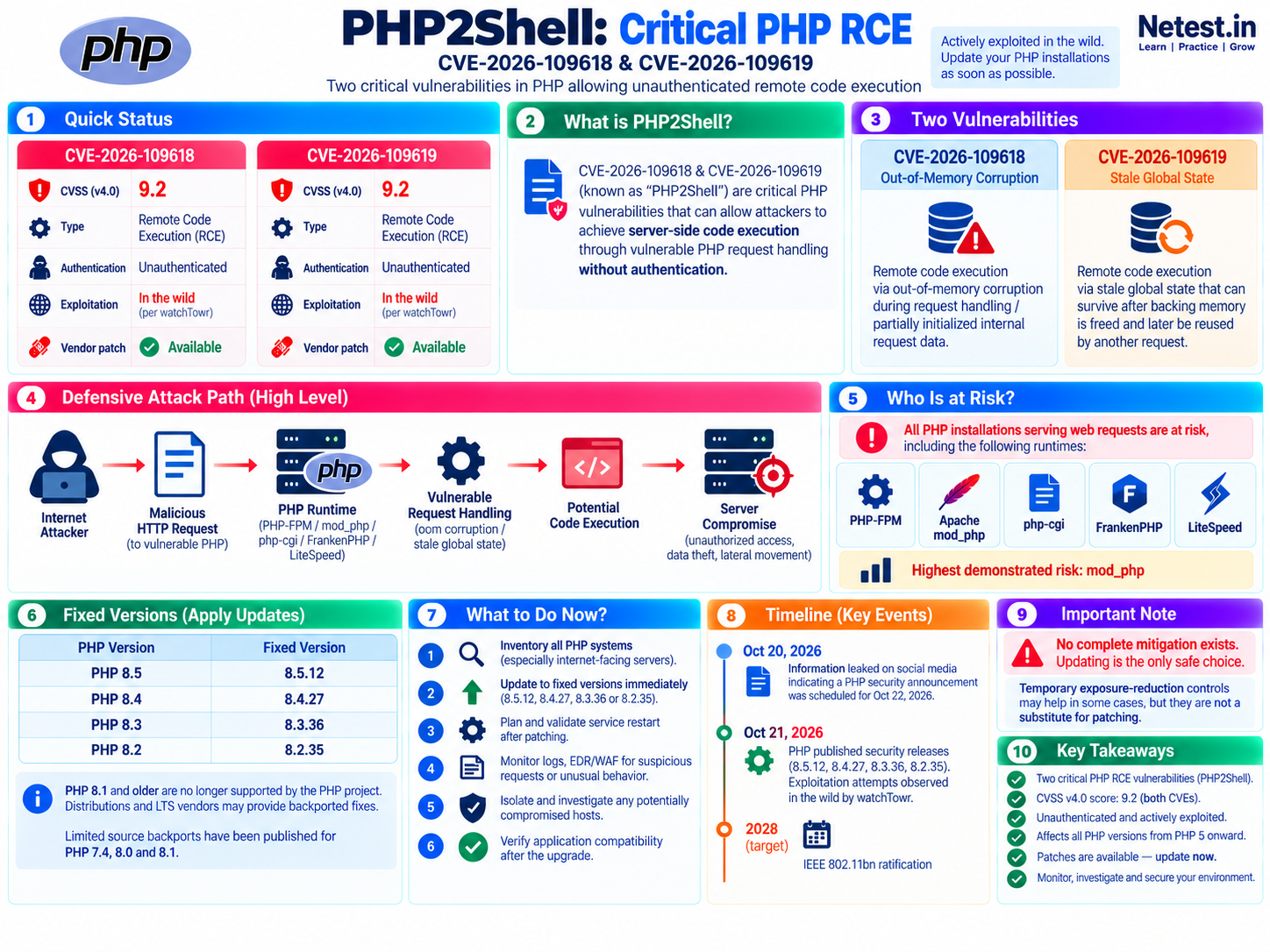
Plesk ships and manages PHP runtimes used by hosted applications. Because CVE-2026-109618 and CVE-2026-109619 affect PHP request handling, those Plesk-provided handlers inherit the vulnerability until the fixed packages are installed.
Hosted websites
Subscriptions can use different PHP versions and handlers. One default handler check does not prove that every hosted application is safe.
Plesk interface
Plesk's own UI uses the sw-engine PHP component. It has a separate fixed Plesk update level that must also be checked.
EOL branches
Some Plesk for Linux backports keep the same PHP version string. The October 21, 2026 build date is therefore part of the security decision.
Plesk for Linux: Affected and Patched PHP Builds
| Product | Affected versions/builds | Patched version/build |
|---|---|---|
| PHP 8.5 | 8.5.11 and below | 8.5.12 |
| PHP 8.4 | 8.4.26 and below | 8.4.27 |
| PHP 8.3 | 8.3.35 and below | 8.3.36 |
| PHP 8.2 | 8.2.34 and below | 8.2.35 |
| PHP 8.1 (EOL) | 8.1.34 built before October 21, 2026 | 8.1.34 built on October 21, 2026 |
| PHP 8.0 (EOL) | 8.0.30 built before October 21, 2026 | 8.0.30 built on October 21, 2026 |
| PHP 7.4 (EOL) | 7.4.33 built before October 21, 2026 | 7.4.33 built on October 21, 2026 |
Plesk recommends paid TuxCare Extended Lifecycle Support for PHP for older PHP 5.6, 7.2, and 7.3 deployments. The safer strategic outcome is still to remove unsupported application dependencies and move to a supported PHP branch.
Plesk for Windows: Affected and Patched PHP Builds
| Product | Affected versions | Patched version |
|---|---|---|
| PHP 8.5 | 8.5.11 and below | 8.5.12 |
| PHP 8.4 | 8.4.26 and below | 8.4.27 |
| PHP 8.3 | 8.3.35 and below | 8.3.36 |
| PHP 8.2 | 8.2.34 and below | 8.2.35 |
Use Tools & Settings > PHP Settings to confirm installed handlers and their names, then verify that every handler assigned to a subscription is on a fixed version.
Plesk sw-engine Affected and Fixed Updates
The sw-engine component is the PHP engine used by Plesk itself. The same fixed update levels apply to Plesk for Linux and Plesk for Windows.
| Plesk branch | Affected | Patched |
|---|---|---|
| Plesk Obsidian 18.0.80 | Update 10 and below | Update 11 |
| Plesk Obsidian 18.0.81 | Base release through Update 3 | Update 4 |
Pre-Update Inventory and Safety Checks
- Record the current Plesk buildCapture the exact branch, update number, operating system, and build date before changing anything.
- List installed and assigned PHP handlersMap each handler to subscriptions and note the SAPI in use, including PHP-FPM, FastCGI, or Apache module deployments.
- Prioritize internet-facing applicationsStart with public services, especially Apache
mod_php, administrative applications, upload endpoints, and high-value data stores. - Prepare recoveryConfirm current backups, snapshots where appropriate, application owners, maintenance window, rollback criteria, and console access.
- Collect a health baselineRecord HTTP checks, background jobs, PHP extensions, database connectivity, and representative application transactions.
- Use the supported updaterFollow Plesk's official update process and install the latest available Plesk version rather than downloading PHP packages from an untrusted source.
Official procedure: How to install Plesk updates.
Version Verification Commands
Run read-only checks from an authorized administrative session. Replace the example PHP branch with every installed version in active use.
plesk version — verify the control-panel build
Use: print the exact Plesk product version, operating system, build date, and revision.
# plesk version
Product version: Plesk Obsidian 18.0.81.4
OS version: your installed operating system
Build date: 2026/10/21 ...
Pass condition: the result is 18.0.81 Update 4 or later, or 18.0.80 Update 11 or later. Prefer the newest supported release offered to the server.
plesk bin php_handler --list — enumerate handlers
Use: list registered PHP handlers so no side-by-side runtime is missed during verification.
# plesk bin php_handler --list
                 id:  plesk-php83-fpm
        display name:  8.3.36
             version:  8.3.36
                type:  fpm
Pass condition: every active 8.x handler is at or above its fixed release. Investigate disabled but installed vulnerable handlers before deciding whether to update or remove them.
/opt/plesk/php/8.3/bin/php -v — verify one Linux runtime
Use: call the version-specific Plesk PHP binary directly. Repeat for 8.2, 8.4, 8.5, and any approved EOL branch present.
# /opt/plesk/php/8.3/bin/php -v
PHP 8.3.36 (cli) (built: Oct 21 2026 08:04:57) (NTS)
Copyright (c) The PHP Group
Zend Engine v4.3.36, Copyright (c) Zend Technologies
    with Zend OPcache v8.3.36, Copyright (c), by Zend Technologies
Pass condition: PHP 8.3 reports 8.3.36 or later. For Plesk's PHP 7.4.33, 8.0.30, and 8.1.34 backports, the build must be dated October 21, 2026 or later.
php -v — check the system default separately
Use: identify what the shell's default php command resolves to.
$ php -v
PHP x.y.z (cli) (built: ...)
Caution: this result does not prove that Plesk-managed websites use the same binary. Verify each Plesk handler directly and confirm each subscription's assignment in the UI.
Verify PHP Versions in the Plesk Interface
- Log in through the authorized administration pathUse the server hostname over HTTPS and your approved Plesk administrator account.
- Open Tools & Settings > PHP SettingsReview every installed handler. Versions should be reflected in the handler names and details.
- Check subscription assignmentsConfirm which websites use each handler so an older runtime is not overlooked simply because it is not the server default.
- Confirm the Plesk buildOpen Tools & Settings > About Plesk and record the full version/update level.
- Retain evidenceSave the change record, version output, package/build details, restart time, and application validation results.
For official navigation and login options, use Plesk's login guide and version-check guide.
Post-Update Validation and Monitoring
- Recycle runtime processes: follow Plesk's updater and service guidance so web-server and PHP workers load patched binaries.
- Verify each handler again: compare actual output with the fixed-version table and retain build dates for EOL backports.
- Test representative applications: validate login, uploads, scheduled tasks, APIs, payment or form flows, and PHP extensions.
- Check Plesk UI health: confirm administrative pages, subscriptions, extensions, and background tasks operate normally after the
sw-engineupdate. - Review telemetry: inspect web access/error logs, PHP logs, WAF and EDR alerts, new processes, unusual child processes, outbound connections, and unexpected file changes.
- Treat anomalies as an incident: isolate affected systems, preserve evidence, rotate exposed credentials and secrets, and follow the organization's incident-response plan.
sw-engine component are fixed, services have loaded the new code, applications pass health checks, and security monitoring shows no unresolved signs of compromise.Official Sources and Next Checks
- Plesk vulnerability advisory — the source of the Plesk PHP and
sw-engineversion tables. - PHP security advisory — upstream fixed releases and the statement that updating is the only complete solution.
- Plesk update procedure — supported installation paths for Plesk updates.
- Plesk version verification — UI and CLI methods for checking the installed build.
If you need the threat model before using this runbook, return to Part 1: PHP2Shell explained.
Plesk PHP2Shell Patching Frequently Asked Questions
Which Plesk PHP versions fix PHP2Shell?
For Plesk PHP 8.x, the fixed versions are 8.5.12, 8.4.27, 8.3.36, and 8.2.35. On Plesk for Linux, vendor builds dated October 21, 2026 patch the listed PHP 7.4, 8.0, and 8.1 EOL packages without changing their version numbers.
Which Plesk Obsidian updates fix sw-engine?
Plesk states that sw-engine is fixed in Plesk Obsidian 18.0.80 Update 11 and 18.0.81 Update 4 for both Linux and Windows.
How do I check a Plesk PHP handler on Linux?
Run the version-specific binary, such as /opt/plesk/php/8.3/bin/php -v, and confirm PHP 8.3.36 or later. For EOL Plesk builds, also confirm the October 21, 2026 build date.
Is updating the website application enough?
No. These vulnerabilities are in PHP itself. Update the PHP handlers used by hosted sites and update Plesk so its sw-engine component is also fixed.
Should I restart services after the Plesk update?
Follow the Plesk updater's instructions and planned maintenance process. Ensure long-lived PHP and web-server workers are restarted or recycled so they load the patched binary, then verify every active handler and application.