Step-by-Step Troubleshooting for IS-IS on Cisco Routers
Follow a safe, layered workflow to isolate Cisco IS-IS failures from the physical link and adjacency through the link-state database, SPF calculation, and final route installation.
In This Lesson
Move from the lowest failure domain to the highest so each command answers one question and you avoid clearing a healthy process before finding the real fault.
Quick Learning Map
Use three checkpoints to keep the investigation ordered and evidence based.
Prove the local link
Confirm the interface is up, the intended Layer 2 service works, and IS-IS is enabled on the correct circuit.
Prove protocol agreement
Validate hellos, NET identity, levels, MTU, timers, network type, and authentication on both peers.
Prove topology and routes
Inspect LSPs, overload state, SPF results, metric style, filters, and the routing table before resetting anything.
IS-IS Troubleshooting at a Glance
Integrated IS-IS is a scalable link-state protocol used in service-provider backbones, MPLS cores, data-center underlays, and large enterprise networks. It carries its control traffic directly over Layer 2 with CLNS, so troubleshooting begins below IP reachability and moves upward.
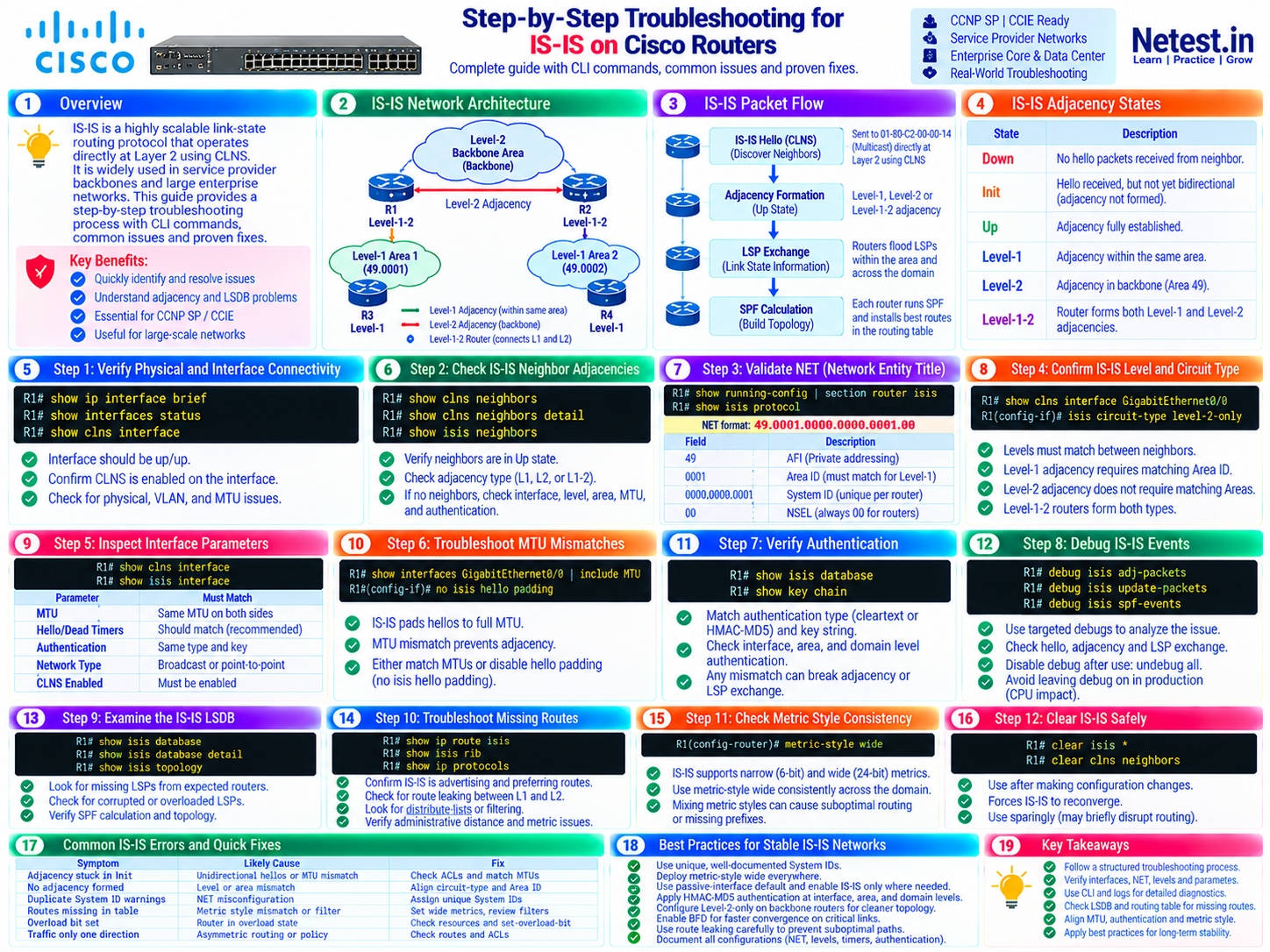
Understand the IS-IS Failure Domains First
An IS-IS routing failure usually belongs to one of four layers: the physical or Layer 2 path, adjacency formation, link-state flooding and SPF, or route installation. Starting at the bottom prevents misleading conclusions higher in the stack.
1. Link and circuit
The interface, VLAN, or transport must carry CLNS frames. An IP ping is useful context, but it does not by itself prove that IS-IS PDUs can cross the link.
2. Adjacency
Compatible hellos must agree on circuit level, area requirements, authentication, and other interface parameters before the neighbor reaches Up.
3. LSDB and SPF
Up neighbors exchange LSPs. Each router builds a level-specific link-state database and runs SPF to derive paths.
4. Routing table
A path can exist in the IS-IS topology yet remain absent from the IP routing table because of filtering, metric style, leaking, overload, or route preference.
Adjacency states and types
| State or type | Meaning | Primary checks |
|---|---|---|
| Down | No usable hello has been received from the neighbor. | Interface state, VLAN or transport, CLNS enablement, ACLs, circuit type. |
| Init | A hello was received, but bidirectional adjacency formation is incomplete. | Reverse path, MTU and padding, authentication, hello compatibility. |
| Up | The adjacency is established. | Move to LSDB, topology, SPF, and route checks if reachability is still wrong. |
| Level-1 | Area adjacency between routers that share an area address. | Matching area portion of the NET and Level-1 circuit support. |
| Level-2 | Backbone adjacency; matching area addresses are not required. | Both sides must support Level 2 on that circuit. |
| Level-1-2 | The router can participate at both levels. | Confirm the intended topology and avoid accidental dual-level operation. |
Steps 1–4: Verify Interfaces, Neighbors, NETs, and Levels
These checks establish whether the local circuit works, whether hellos form a neighbor relationship, and whether both routers agree on identity and topology level.
show ip interface brief — confirm operational state
Use: Find the expected link and verify that both interface and line protocol are up.
R1# show ip interface briefTroubleshooting: An administratively down or line-protocol-down interface is a lower-layer fault. Resolve shutdown, optics, cabling, VLAN, encapsulation, or remote-port issues before blaming IS-IS.
show interfaces status — inspect Layer 2 port state
Use: On platforms that support it, confirm port status, VLAN placement, duplex, speed, and interface identity.
R1# show interfaces statusTroubleshooting: Verify that the connected switchport, subinterface, or transport service matches the design on both ends.
show clns interface — prove IS-IS is active on the circuit
Use: Display CLNS and IS-IS interface state, circuit type, metrics, hello timers, adjacency count, and padding behavior.
R1# show clns interface GigabitEthernet0/0Troubleshooting: Confirm the routing protocol is IS-IS, the circuit type is intended, CLNS is enabled, and active Level-1 or Level-2 adjacency counts match expectations.
show clns neighbors — inspect CLNS neighbors
Use: Display IS and ES neighbors known through CLNS and identify their state, interface, hold time, type, and protocol.
R1# show clns neighbors
R1# show clns neighbors detail
Troubleshooting: If no expected neighbor appears, return to link transport, IS-IS enablement, level compatibility, area requirements, MTU, and authentication.
show isis neighbors — verify adjacency state and level
Use: Check the IS-IS-specific neighbor table and identify the System ID, interface, state, hold time, and Level-1 or Level-2 type.
R1# show isis neighbors
R1# show isis neighbors detail
Troubleshooting: The expected state is Up. A flapping hold time or repeated loss points toward packet loss, timers, BFD interaction, authentication, or an unstable underlying link.
show running-config | section router isis — validate the NET
Use: Read the IS-IS process configuration and confirm the Network Entity Title.
R1# show running-config | section router isis
router isis CORE
 net 49.0001.0000.0000.0001.00
Interpretation: 49 is the AFI commonly used for private addressing, 0001 is the area portion in this example, 0000.0000.0001 is the unique six-byte System ID, and 00 is the router NSEL.
isis circuit-type — align Level-1 and Level-2 behavior
Use: Inspect the current circuit with show clns interface, then configure the intended level only after confirming the design.
R1# show clns interface GigabitEthernet0/0
R1(config)# interface GigabitEthernet0/0
R1(config-if)# isis circuit-type level-2-only
Troubleshooting: Level-1 peers require a compatible area address. Level-2 peers do not need matching areas. A Level-1-only side cannot form with a Level-2-only side.
Steps 5–7: Check Interface Parameters, MTU, and Authentication
When the link is up but the adjacency is absent or unstable, compare both ends side by side. Do not compare a saved template with a live interface; collect live output from both peers.
| Parameter | What to compare | Why it matters |
|---|---|---|
| MTU | Configured and effective Layer 2 MTU end to end | Padded hellos expose a path that cannot carry full-size frames; later LSP flooding can also fail on a broken transport. |
| Hello/hold timers | Expected values and stable hold-time refresh | Incompatible or overly aggressive detection can create neighbor flaps. |
| Authentication | Scope, algorithm, key chain, key ID, lifetime, and secret | Hello authentication affects adjacency; LSP authentication affects database exchange. |
| Network type | Broadcast or point-to-point on both sides | Changes hello behavior, DIS operation, and circuit expectations. |
| CLNS/IS-IS enablement | Correct process attached to the intended interface | A healthy IP interface does not automatically participate in IS-IS. |
show isis interface — compare live IS-IS settings
Use: Display IS-IS-specific interface state and metrics, then compare the same circuit on its peer.
R1# show isis interface GigabitEthernet0/0
R2# show isis interface GigabitEthernet0/0
Troubleshooting: Confirm level, metric, network type, hello values, authentication, and adjacency count. Platform output differs, so use the field names shown by the deployed IOS or IOS XE release.
show interfaces ... | include MTU — detect MTU mismatch
Use: Check the interface MTU on each peer and validate any intermediate Ethernet, QinQ, pseudowire, or MPLS transport.
R1# show interfaces GigabitEthernet0/0 | include MTU
R2# show interfaces GigabitEthernet0/0 | include MTU
Troubleshooting: Match the real end-to-end MTU whenever possible. IS-IS hello padding is designed to reveal large-frame transport or MTU problems early.
no isis hello padding — use only as a controlled workaround
Use: Cisco IOS can suppress interface hello padding when an exceptional transport cannot be repaired immediately.
R1(config)# interface GigabitEthernet0/0
R1(config-if)# no isis hello padding
Precaution: This can hide a path-MTU defect rather than fix it. Full-size LSPs or application traffic may still fail, so document the exception and restore padding after the transport is corrected.
show key chain — verify active authentication keys
Use: Confirm the referenced key chain, key IDs, algorithms, and send/accept lifetimes.
R1# show key chainTroubleshooting: Compare time, time zone, key lifetime, algorithm, and key string on both peers. Redact secrets from tickets and shared outputs.
show isis database — detect LSP authentication trouble
Use: Confirm that expected LSPs arrive at the relevant level after the adjacency becomes Up.
R1# show isis databaseTroubleshooting: An interface hello can authenticate successfully while area- or domain-level LSP authentication still prevents a complete database. Verify interface, Level-1, and Level-2 authentication scopes separately.
Step 8: Debug IS-IS Events Safely
Use debugging only after show commands narrow the fault. Capture for a short window, filter or limit the session where the platform allows it, and watch CPU and console impact.
debug isis adj-packets — inspect adjacency packets
Use: Observe IS-IS hello and adjacency behavior when a neighbor will not form or keeps flapping.
R1# debug isis adj-packetsTroubleshooting: Correlate messages with interface counters and the peer. Repeated one-way activity suggests reverse-path filtering, authentication, or transport problems.
debug isis update-packets — inspect LSP and SNP exchange
Use: Observe link-state update traffic after adjacency formation.
R1# debug isis update-packetsTroubleshooting: Use this when neighbors are Up but LSDB contents diverge. Look for authentication rejection, sequence behavior, checksum issues, and missing acknowledgments.
debug isis spf-events — correlate topology changes with SPF
Use: Identify why SPF runs and whether repeated topology changes cause churn.
R1# debug isis spf-eventsTroubleshooting: Repeated SPF events are evidence, not a root cause. Trace the triggering adjacency, LSP, or interface event.
undebug all — stop debugging immediately
Use: Disable every active IOS debug as soon as the evidence window ends.
R1# undebug allPrecaution: Leaving verbose debugs enabled on a production router can consume CPU, flood logging, and make an incident worse.
Steps 9–11: Validate the LSDB, Routes, and Metric Style
If adjacencies are Up, stop treating the issue as a neighbor problem. Prove whether the expected LSP exists, whether SPF derives a path, and whether that path wins installation in the IP routing table.
show isis database — inventory received LSPs
Use: Confirm that LSPs from the expected System IDs exist at Level 1 or Level 2.
R1# show isis databaseTroubleshooting: Missing LSPs point toward flooding scope, authentication, adjacency, or filtering. Also note the overload bit, purge state, sequence number, and remaining lifetime.
show isis database detail — inspect advertised reachability
Use: Read the TLVs carried by an LSP and verify that the router actually advertises the expected prefix, neighbor, and metric.
R1# show isis database detailTroubleshooting: If a prefix is absent at the origin, check interface enablement, redistribution, address-family configuration, passive settings, and policy. If it is present locally but missing remotely, investigate flooding.
show isis topology — verify the SPF view
Use: Display the IS-IS topology, metrics, next hops, and outgoing interfaces calculated from the LSDB.
R1# show isis topologyTroubleshooting: A database can contain an LSP while the computed path is unusable. Look for excessive metrics, disconnected branches, overload state, and an unexpected level.
show ip route isis — confirm route installation
Use: Display IPv4 routes installed in the routing table from IS-IS.
R1# show ip route isisTroubleshooting: If the topology contains a path but the route table does not, compare administrative distance, address family, route filtering, route leaking, and a more-preferred protocol.
show isis rib — inspect the IS-IS RIB
Use: On supported platforms, inspect the routes selected within IS-IS before global routing-table installation.
R1# show isis ribTroubleshooting: Command availability and fields vary by IOS release. If unavailable, use show isis topology, detailed LSDB output, and the IP routing table to follow the same decision chain.
show ip protocols — review process policy and distance
Use: Confirm the active routing process, sources, administrative distance, and applicable policy information.
R1# show ip protocolsTroubleshooting: Check for distribute lists, route maps, redistribution behavior, and unexpected preference versus connected, static, OSPF, EIGRP, or BGP routes.
metric-style wide — keep TLV metric capability consistent
Use: Configure wide metrics throughout a modern IS-IS domain after planning any transition from narrow metrics.
R1(config)# router isis CORE
R1(config-router)# metric-style wide
Precaution: Do not change one router blindly. Mixed generation and acceptance behavior can hide prefixes or create inconsistent path selection. Use a documented transition strategy when migrating an existing domain.
Common causes of missing IS-IS routes
- The interface is not enabled for the intended IS-IS process or address family.
- Wide and narrow metric/TLV behavior is inconsistent during migration.
- Level-1 and Level-2 route leaking or attached-bit behavior does not match the design.
- A distribute list or route policy filters the prefix.
- Another route source wins because of administrative distance or a more specific prefix.
- The advertising router sets the overload bit or omits the prefix from its LSP.
Step 12: Clear IS-IS Safely
Clear state only after collecting evidence and correcting the configuration or transport fault. A reset can temporarily hide the root cause and briefly disrupt forwarding.
clear isis * — restart IS-IS state on supported IOS releases
Use: Force the IS-IS process to rebuild after an approved change when the deployed platform supports this syntax.
R1# clear isis *Precaution: This is disruptive. Verify the exact syntax with context-sensitive help for the deployed IOS or IOS XE release and avoid using a process-wide clear when a narrower recovery is available.
clear clns is-neighbors — reset selected adjacency state
Use: Remove IS-IS neighbor information from the adjacency database when the platform supports the required scope.
R1# clear clns is-neighbors *Precaution: Adjacencies must reform and routes may reconverge. Confirm the exact keyword and optional interface or process scope with clear clns ? before execution.
Common IS-IS errors and quick fixes
| Symptom | Likely cause | Focused response |
|---|---|---|
| Adjacency stuck in Init | One-way hellos, authentication, or padded-hello transport problem | Check both directions, ACLs, counters, live authentication, and end-to-end MTU. |
| No adjacency forms | Interface not enabled, circuit-level mismatch, or Level-1 area mismatch | Confirm CLNS state, process attachment, circuit type, and NET area portion. |
| Duplicate System ID warnings | NET misconfiguration | Assign a unique six-byte System ID and verify LSP ownership after convergence. |
| Routes missing from the table | Prefix absent from LSP, policy, leaking, metric style, overload, or route preference | Trace origin LSP → remote LSDB → topology → IS-IS RIB → global RIB. |
| Overload bit set | Manual configuration, startup behavior, or resource pressure | Check configuration, logs, memory/CPU, and the operational reason before removing it. |
| Traffic works only one way | Asymmetric routing, filter, missing return prefix, or data-plane policy | Trace the route and forwarding path independently in both directions. |
Best Practices for Stable IS-IS Networks
- Assign unique, documented System IDs and keep a single source of truth for NET ownership.
- Use wide metrics consistently and plan a controlled transition for an existing narrow-metric domain.
- Enable IS-IS only on intended links; use passive interfaces where adjacency is not required.
- Use strong, supported authentication with managed key chains and tested rollover procedures.
- Keep backbone circuit types intentional, such as Level-2-only where the topology design calls for it.
- Use BFD only with timer values and failure behavior validated for the platform and transport.
- Design and test Level-1/Level-2 route leaking so default and specific paths remain predictable.
- Alert on adjacency changes, overload state, repeated SPF runs, duplicate System IDs, and LSP exhaustion risk.
- Document NETs, levels, metrics, authentication, timers, and exceptions so comparisons are fast during an incident.
A repeatable order—interface, neighbor, identity, parameters, LSDB, topology, and routes—resolves most IS-IS incidents faster than starting with broad debugs or process resets.
Official Cisco References
Command syntax and supported authentication or clear operations vary across IOS, IOS XE, IOS XR, NX-OS, platform families, and software releases. Confirm behavior against the documentation for the deployed image.
IS-IS Troubleshooting Frequently Asked Questions
What should I check first when an IS-IS adjacency is down?
Start with the physical interface and Layer 2 path. Confirm both ends are up, CLNS and IS-IS are enabled on the intended interface, and VLAN, encapsulation, ACL, and MTU settings are compatible.
Why is an IS-IS adjacency stuck in Init?
Init normally indicates that a hello was received but bidirectional communication has not completed. Check the reverse path, ACLs, authentication, circuit type, and whether padded hellos expose an MTU or transport problem.
Do IS-IS Level-1 neighbors need the same area ID?
Yes. Level-1 neighbors must share an area address. Level-2 neighbors can form across different areas when both interfaces and routers support Level 2.
How do I verify the IS-IS NET on Cisco IOS?
Use show running-config | section router isis and inspect the configured net statement. The area portion must support the intended Level-1 design, the six-byte System ID must be unique, and the NSEL for a router NET is 00.
Can I disable IS-IS hello padding to work around an MTU mismatch?
Cisco IOS supports no isis hello padding, but matching the actual MTU and repairing the Layer 2 transport is the preferred fix. Padding is valuable because it detects paths that cannot carry full-size IS-IS packets.
What should I check when IS-IS neighbors are up but routes are missing?
Inspect the IS-IS database and topology first, then verify route advertisement, metric style, Level-1 and Level-2 route leaking, distribute lists, overload state, and whether another source wins by administrative distance.