PHP2Shell: Critical Vulnerabilities and Mitigations You Must Know
Understand the PHP-CGI argument-injection chain behind CVE-2024-4577, identify exposed systems, detect suspicious activity, and apply a safe patching and hardening plan.
In This Lesson
Build an accurate mental model of the PHP-CGI risk, verify historical and current patch status, hunt for signs of exploitation, and prioritize controls that reduce both immediate and long-term exposure.
Quick Learning Map
Use a three-step response: verify the runtime, remove the vulnerable path, then investigate and make the safer state durable.
Identify
Find Windows PHP-CGI deployments, direct CGI exposure, XAMPP/WAMP stacks, and stale vendor packages.
Patch and Isolate
Install the latest supported package, remove direct CGI exposure, restart services, and verify the running workers.
Investigate and Harden
Hunt across host and network telemetry, reduce privileges, improve monitoring, and test recovery.
PHP2Shell at a Glance
The core risk is unauthenticated command injection through vulnerable Windows PHP-CGI request handling. Patching is primary; WAF rules and configuration controls provide defense in depth.
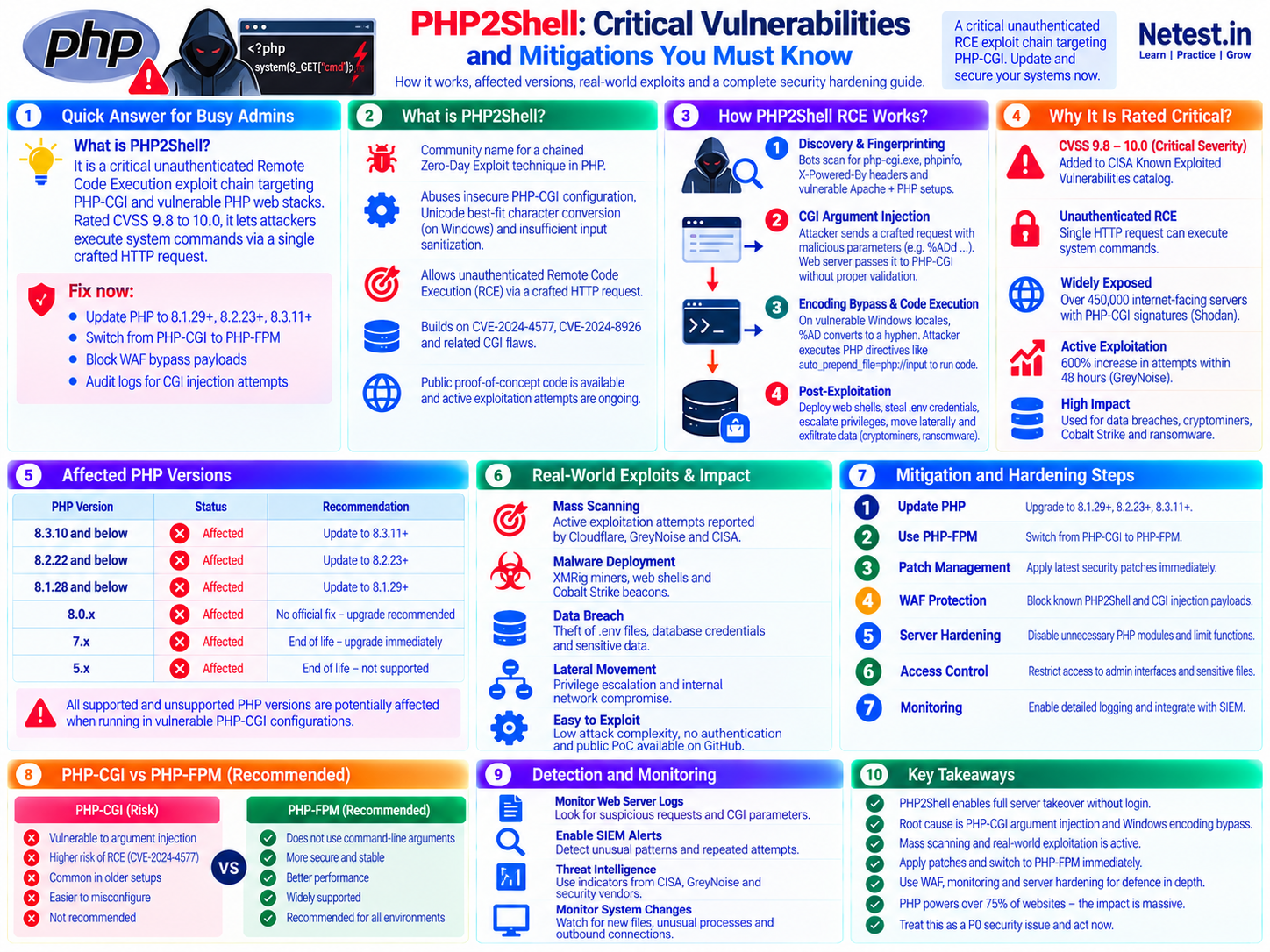
Quick Answer for Busy Admins
php-cgi.exe or uses a vulnerable PHP-CGI deployment, remove public access, install the latest supported vendor build, restart the service, and begin a compromise review.PHP2Shell is an informal name used for PHP remote-code-execution attack chains. This guide focuses on CVE-2024-4577, a critical Windows PHP-CGI argument-injection flaw, and the later CVE-2024-8926 bypass affecting unusual Windows code-page configurations.
- Patch beyond the historical minimum: install the newest supported PHP or trusted vendor package available for the operating system and hosting stack.
- Remove direct CGI exposure: block public access to CGI binaries and retire obsolete XAMPP, WAMP, control-panel, container, and appliance builds.
- Use layered controls: apply current WAF rules, least privilege, safe upload handling, egress controls, and centralized logging.
- Assume patching and incident response are separate: an update closes the flaw but does not remove a foothold created before the update.
What PHP2Shell Means in This Guide
PHP2Shell is not the official name of one CVE. Security reporting has used the phrase for more than one PHP RCE event, so defenders should always pair it with a CVE number and date. Here, the term describes the Windows PHP-CGI chain associated with CVE-2024-4577.
PHP-CGI accepts command-line switches when a web server launches the CGI executable. On affected Windows systems, “best fit” character conversion could transform alternate byte values into characters PHP treated as option prefixes. A crafted query string could therefore become an unexpected PHP configuration argument before the application handled the request.
How the PHP-CGI RCE Chain Works
This defender-focused sequence explains the risk without providing a weaponized exploit recipe.
- Discovery and fingerprintingAutomated scanners look for Windows web stacks, PHP-CGI handlers, exposed diagnostic files, default XAMPP paths, and headers that reveal PHP.
- Argument injectionA crafted request reaches a vulnerable PHP-CGI integration and is interpreted as command-line configuration data instead of harmless query content.
- Encoding conversionWindows character conversion changes attacker-controlled bytes into option-like characters, bypassing the earlier protection that rejected ordinary command-line prefixes.
- Code executionIf the deployment permits dangerous configuration overrides or direct CGI access, PHP can execute attacker-supplied server-side code with the web process's privileges.
- Post-exploitationAn intruder may deploy a web shell or miner, steal application secrets, create users, alter content, move laterally, or exfiltrate databases.
The issue is especially serious because it can be reached before a CMS, framework, or application login can protect the request. Application updates alone do not fix a vulnerable runtime or web-server integration.
Why CVE-2024-4577 Is Critical
Unauthenticated path
The vulnerable request path does not require an application account or prior access.
Remote code execution
Successful exploitation can run code as the web-server or PHP process and expose application secrets and data.
Common bundled stacks
Development and small-business Windows stacks may expose PHP-CGI through defaults, copied examples, or long-lived legacy configurations.
Known exploitation
CISA added CVE-2024-4577 to its Known Exploited Vulnerabilities catalog, making remediation a practical incident-response priority.
NVD records CVE-2024-4577 with a CVSS v3.1 base score of 9.8 (Critical). Treat any reachable vulnerable deployment as urgent, but avoid unsupported claims that a particular organization or data set was compromised unless you have evidence.
Affected Versions and Verified Patch Baselines
The June 2024 fixes addressed CVE-2024-4577. A later bypass, CVE-2024-8926, led to updated September 2024 baselines for uncommon Windows code-page configurations. These are historical minimums, not recommended target versions in 2026.
| PHP branch | Initial CVE-2024-4577 fix | Follow-up CVE-2024-8926 fix | Recommended action now |
|---|---|---|---|
| PHP 8.1 | 8.1.29 | 8.1.30 | Branch is upstream EOL; migrate or use an accountable lifecycle vendor |
| PHP 8.2 | 8.2.20 | 8.2.24 | Install the latest vendor-supported security release and plan branch migration |
| PHP 8.3 | 8.3.8 | 8.3.12 | Install the latest vendor-supported security release |
| PHP 8.0, 7.x, and older | Not supported upstream | Not supported upstream | Migrate immediately or obtain documented vendor backports |
Configurations that deserve immediate review
- Windows Apache deployments using PHP in CGI mode, particularly systems with locale-sensitive code pages.
- Directly reachable
php-cgi.exepaths, default XAMPP/WAMP routes, or copied sample aliases. - Internet-facing development servers, abandoned test hosts, and old virtual-machine or container images.
- Hosting panels and appliances that bundle their own PHP builds outside the operating system package manager.
- Side-by-side PHP installations where the web server still points to an older handler after an update.
How to Detect Exposure or Compromise
Start with authenticated administrative checks. Do not “test” production by sending an exploit payload.
Confirm the CLI version
Use the local administrative shell, then separately confirm that the web handler loads the same patched build.
php -vOperational note: a CLI result does not prove Apache, IIS, a control panel, or a PHP-FPM pool uses the same binary.
Identify running PHP-CGI processes on Windows
Review process paths and launch arguments from an elevated PowerShell session.
Get-CimInstance Win32_Process -Filter "Name = 'php-cgi.exe'" |
  Select-Object ProcessId, ExecutablePath, CommandLine
Operational note: no current process does not prove the handler is absent; inspect web-server mappings and configuration too.
Search copied access logs for suspicious indicators
Work on a preserved log copy and begin with case-insensitive searches for encoded option prefixes, CGI binary paths, unexpected configuration directives, and unusual POST activity.
grep -RniE 'php-cgi|auto_prepend_file|allow_url_include|%ad' /path/to/preserved/logsOperational note: a match is a triage lead, not proof of compromise. Correlate it with response codes, request bodies, child processes, file changes, and outbound connections.
High-value investigation signals
- Unexpected requests to CGI binaries, diagnostic scripts, or rarely used PHP endpoints.
- New or modified PHP files in upload, cache, temporary, theme, plugin, and web-root directories.
- Web-server child processes launching command shells, scripting tools, download utilities, or archive programs.
- New administrators, scheduled tasks, services, startup entries, SSH keys, or modified authentication configuration.
- Unexpected CPU spikes, connections to mining infrastructure, outbound transfers, or access to credential and configuration files.
Immediate Mitigation and Server Hardening
1. Patch from a trusted source
Install the newest supported PHP, operating-system, hosting-panel, or appliance package. Restart affected web services and long-lived workers, then verify the binary and package revision actually in use.
2. Remove direct PHP-CGI access
Delete obsolete aliases and deny public routes to CGI binaries. On Linux, PHP-FPM behind a properly configured web server is generally preferred to direct CGI. On Windows, follow current vendor guidance or migrate to a supported architecture; do not assume changing a label from CGI to FastCGI fixes an unpatched binary.
3. Apply WAF virtual patching
Enable current managed rules for PHP-CGI argument injection and monitor blocked requests. Use rate limiting where operationally appropriate. Treat WAF protection as temporary risk reduction and defense in depth, not as proof that a vulnerable server is safe.
4. Reduce runtime privileges
Run each site or pool under a dedicated low-privilege identity. Restrict write access, secrets, network reachability, and administrative interfaces. Prevent script execution in upload directories using web-server and platform controls.
5. Harden PHP deliberately
Disable unnecessary modules and risky features only after compatibility testing. Keep allow_url_include disabled, avoid public diagnostic files, protect error output, and manage settings centrally so applications cannot weaken them.
6. Improve visibility and recovery
Centralize web, PHP, WAF, EDR, identity, and egress logs; alert on anomalous process chains and file changes; retain evidence long enough for investigation; and maintain tested, immutable backups.
disable_functions lists and open_basedir can limit some post-exploitation actions, but they are not security boundaries and can break applications. Patch first, test hardening in staging, and use operating-system isolation and least privilege.What to Do If You Suspect a Breach
- ContainRemove the host from public service or isolate it using approved network controls. Do not destroy volatile evidence before the response team can capture it.
- PreserveSecure web, PHP, WAF, EDR, operating-system, authentication, DNS, proxy, and cloud logs. Record time sources and affected asset identifiers.
- ScopeIdentify exposed applications, neighboring sites, reused credentials, databases, cloud keys, service accounts, and reachable internal systems.
- EradicateRebuild from trusted media or restore a known-good image, patch before reconnecting, remove persistence, and validate integrity. Do not rely only on deleting one suspicious file.
- RecoverRotate potentially exposed secrets, monitor closely, test application behavior and backups, and complete legal, contractual, privacy, or regulatory notifications when required.
Long-Term PHP Security Checklist
- Maintain a complete inventory of PHP versions, handlers, packages, containers, panels, sites, and owners.
- Automate supported security updates with staged testing and time-bound emergency patch procedures.
- Remove
phpinfo, test scripts, backup archives, sample applications, and unused CGI mappings from public roots. - Use separate identities and pools for different sites to reduce cross-site impact on shared servers.
- Require MFA for hosting panels and administration; store secrets outside the web root and rotate them after incidents.
- Monitor file integrity, child processes, unusual egress, and high-risk web requests in a centralized SIEM or detection platform.
- Keep offline or immutable backups and test full restoration regularly, including credentials and infrastructure configuration.
- Subscribe to PHP, operating-system, hosting-provider, CISA, and vendor security advisories.
Authoritative Security References
- PHP security advisory for CVE-2024-4577 — affected PHP-CGI behavior, original fixed branches, and technical scope.
- PHP advisory for CVE-2024-8926 — follow-up bypass scope and historical patched versions.
- PHP 8 change log — release-level confirmation for the CGI security fixes.
- NVD record for CVE-2024-4577 — severity, references, and affected-product data.
- CISA Known Exploited Vulnerabilities Catalog — current exploitation status and remediation deadlines for covered agencies.
Security conditions change. Recheck the live vendor advisory and your package provider before making a production change.
Security and Legal Disclaimer
PHP2Shell and CVE-2024-4577 Frequently Asked Questions
Is PHP2Shell the same as CVE-2024-4577?
PHP2Shell is an informal label. In this guide it describes the unauthenticated PHP-CGI RCE chain centered on CVE-2024-4577 and its later CVE-2024-8926 bypass. Use CVE identifiers when checking advisories and patches.
Which versions fix the PHP-CGI argument-injection chain?
The initial CVE-2024-4577 fixes shipped in PHP 8.1.29, 8.2.20, and 8.3.8. The later CVE-2024-8926 bypass is fixed in 8.1.30, 8.2.24, and 8.3.12. Those are historical baselines; install the latest supported vendor release rather than stopping at an old minimum.
Are Linux PHP servers affected by CVE-2024-4577?
The Windows best-fit character conversion at the center of CVE-2024-4577 is Windows-specific. Linux servers still need supported PHP releases and secure CGI or FastCGI configuration, but they are not affected by that exact Windows conversion flaw.
Will a web application firewall stop PHP2Shell?
A current WAF can reduce exposure and block known probes, but it is not a replacement for patching. Encoding variations and new bypasses can evade signature-only controls.
How can I check the installed PHP version safely?
Run php -v from an authenticated administrative shell and verify the package build with the operating-system or hosting vendor. Avoid leaving a public phpinfo page online because it exposes useful configuration details.
What should I do if exploitation is suspected?
Isolate the host, preserve volatile data and logs, engage incident response, rotate exposed credentials, rebuild or restore from a known-good source, and complete any required legal or regulatory notifications. Patching alone does not remove an existing foothold.