How to Set Up VLAN Routing on a Netgear Managed Switch Using CLI Commands
Build working inter-VLAN routing from the CLI: plan the subnets, create routed VLANs and SVIs, assign access and trunk ports, add an upstream route, save the configuration, and verify every hop.
In This Lesson
Follow a complete four-VLAN example from design through validation, while accounting for the command differences between Netgear switch families and firmware releases.
- Understand VLAN routing and SVIs
- Confirm platform and design prerequisites
- Review the addressing and port plan
- Access the CLI safely
- Enable global IP routing
- Create the routing VLANs
- Configure VLAN interfaces and gateways
- Assign access, trunk and voice ports
- Add the upstream default route
- Save and verify the configuration
- Troubleshoot common failures
Quick Learning Map
Inter-VLAN routing works when the Layer 2 membership, Layer 3 gateways and upstream path agree.
Build VLANs
Create each VLAN, make it a routing VLAN where required, and place the intended switch ports in it.
Build Gateways
Assign one SVI address per subnet and configure every endpoint to use its own VLAN's SVI as the gateway.
Prove the Path
Verify interfaces, connected routes, the default route, VLAN membership, pings and return routing before production use.
Netgear VLAN Routing at a Glance
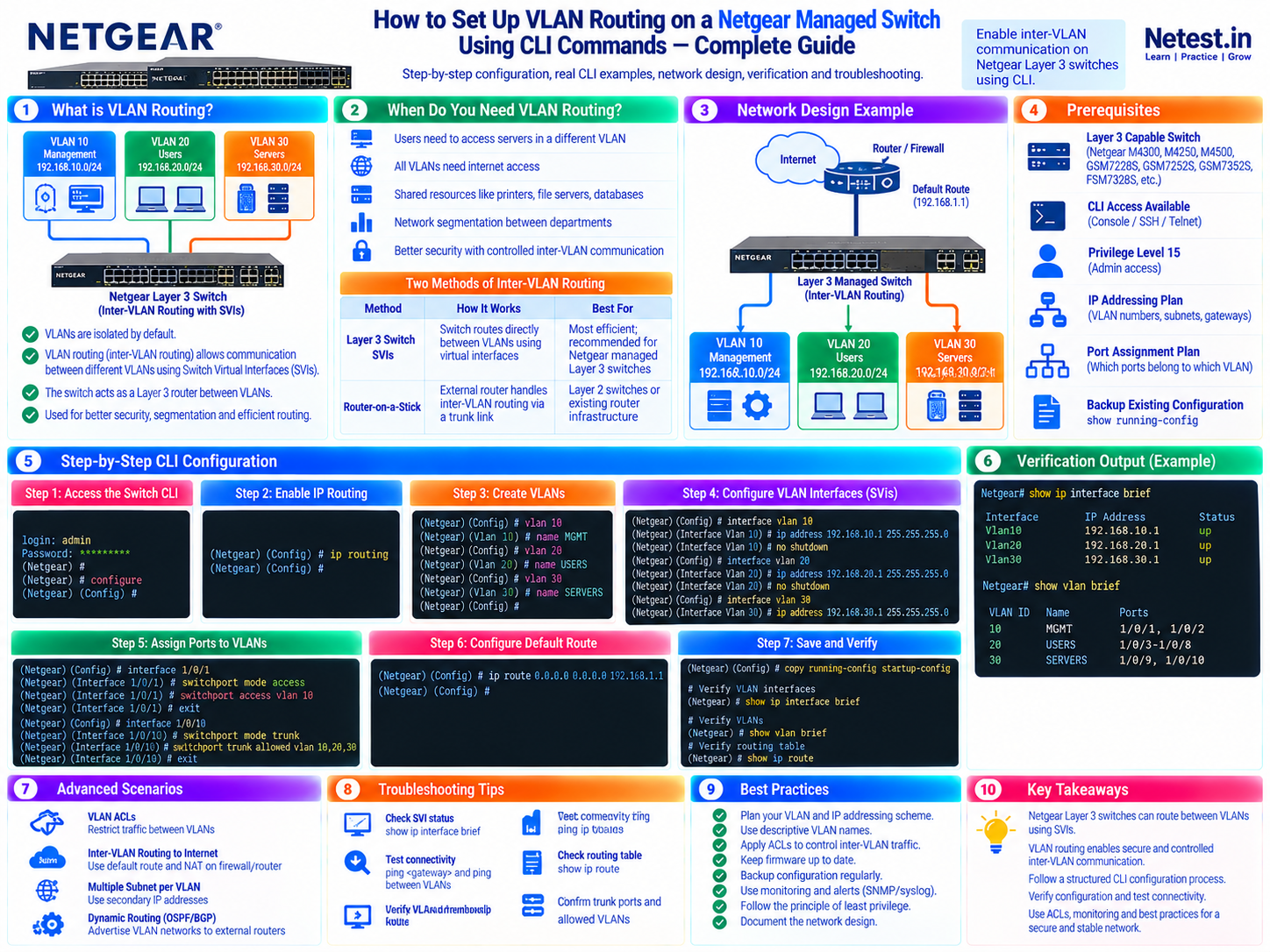
This visual condenses the concepts, prerequisites, three-VLAN topology, configuration sequence, sample output, troubleshooting checks and best practices into one study reference.
What VLAN Routing Does
A VLAN is a separate Layer 2 broadcast domain. That isolation is useful for management, users, servers and voice devices, but it also means a host in VLAN 20 cannot directly reach a server in VLAN 30. Inter-VLAN routing gives the switch a Layer 3 interface in each subnet and lets its routing table forward packets between them.
VLAN
Groups ports into an isolated Layer 2 segment. Broadcasts stay inside the VLAN unless a Layer 3 device routes the traffic.
SVI
A Switched Virtual Interface is the logical Layer 3 interface for a VLAN. Its IP address normally becomes the hosts' default gateway.
Routing Table
Contains one connected route for every active SVI subnet plus static or dynamic routes for destinations beyond the switch.
192.168.20.100 sends server-bound traffic to gateway 192.168.20.1. The switch looks up 192.168.30.0/24, forwards the packet through the VLAN 30 SVI, and delivers it to the server's access port.| Method | How it works | Best fit |
|---|---|---|
| Layer 3 switch SVIs | The switch routes directly between local VLANs in hardware. | Capable managed switches and high-throughput campus or SMB networks. |
| Router-on-a-stick | An external router or firewall routes VLANs over an 802.1Q trunk with subinterfaces. | Layer 2 switches, policy-heavy designs or existing router infrastructure. |
Prerequisites and Platform Compatibility
Confirm the switch can perform Layer 3 routing before changing production traffic. Models, licenses and firmware trains differ, even when their prompts look similar.
- Use a Netgear model and license that support IPv4 routing and routed VLAN interfaces.
- Confirm the exact model, firmware release and documented CLI syntax with
show version. - Have console or SSH access and an administrator account that can reach Privileged EXEC and configuration modes.
- Prepare VLAN IDs, non-overlapping subnets, SVI gateway addresses, DHCP scopes and physical port assignments.
- Back up the running configuration and keep console access available in case the management path changes.
- Plan security policy: routing enables reachability, so use ACLs or a firewall when VLANs must not communicate freely.
switchport commands, while Smart Switch models may be primarily web-managed. Match commands to the CLI manual for the exact product and firmware; do not infer support from the brand name alone.Netgear documents the routing-VLAN sequence in its official VLAN routing CLI support article. For M4300 systems, use the matching CLI command reference to verify commands and modes.
Network Design Used in This Guide
The example separates infrastructure, staff, servers and voice devices. The upstream router is reachable at 192.168.10.254 through VLAN 10, so it can serve as the next hop for the switch's default route. Replace every sample address and interface with values from your own design.
| VLAN | Name | Subnet | SVI / gateway | Ports | Purpose |
|---|---|---|---|---|---|
| 10 | Management | 192.168.10.0/24 | 192.168.10.1 | 1/0/1-1/0/4 | Switches, access points and administrators |
| 20 | Users | 192.168.20.0/24 | 192.168.20.1 | 1/0/5-1/0/16 | Staff computers and laptops |
| 30 | Servers | 192.168.30.0/24 | 192.168.30.1 | 1/0/17-1/0/20 | File, print and application servers |
| 40 | Voice | 192.168.40.0/24 | 192.168.40.1 | 1/0/21-1/0/23 | IP phones and unified communications |
| Trunk | Uplink | VLANs 10, 20, 30, 40 | Native / untagged VLAN 10 | 1/0/24 | Router, firewall or upstream switch |
192.168.10.254 needs routes back to 192.168.20.0/24, 192.168.30.0/24 and 192.168.40.0/24 through 192.168.10.1, or traffic may leave the switch but never return.Step 1 — Access the Switch CLI
Use the console for initial setup or recovery and SSH for encrypted remote administration. Avoid Telnet on production networks because it does not protect credentials or commands in transit.
ssh — Open an Encrypted Remote Session
Use: connect from a trusted management host after SSH and a management address are configured on the switch.
ssh [email protected]Precaution: verify the host key, restrict SSH to the management network, and keep console access available before changing the management VLAN.
enable and configure — Enter Configuration Mode
Use: move from User EXEC to Privileged EXEC and then Global Configuration mode.
User: admin
Password: ********

(Netgear Switch) > enable
(Netgear Switch) # configure
(Netgear Switch) (Config) #
Troubleshooting: if access is denied, confirm the account's privilege level and authentication configuration instead of bypassing access controls.
Step 2 — Enable IP Routing Globally
The switch must forward IPv4 packets at Layer 3. VLANs and SVI addresses alone do not guarantee global routing is enabled.
ip routing — Enable Layer 3 Forwarding
Syntax: run ip routing in Global Configuration mode.
(Netgear Switch) # configure
(Netgear Switch) (Config) # ip routing
(Netgear Switch) (Config) # exit
Verify: inspect the running configuration and routing table. If connected routes do not appear later, check both global routing and the routed-VLAN/SVI configuration.
Step 3 — Create VLANs and Routing VLAN Interfaces
On Netgear FASTPATH-based switches, vlan routing <id> is an important platform-specific step. It creates a logical routed interface for the VLAN and can return an internal interface identifier on some releases.
vlan and vlan routing — Build the Four VLANs
Use: create, name and enable routing for each VLAN in VLAN database mode.
(Netgear Switch) # vlan database
(Netgear Switch) (Vlan) # vlan 10
(Netgear Switch) (Vlan) # vlan name 10 Management
(Netgear Switch) (Vlan) # vlan routing 10
(Netgear Switch) (Vlan) # vlan 20
(Netgear Switch) (Vlan) # vlan name 20 Users
(Netgear Switch) (Vlan) # vlan routing 20
(Netgear Switch) (Vlan) # vlan 30
(Netgear Switch) (Vlan) # vlan name 30 Servers
(Netgear Switch) (Vlan) # vlan routing 30
(Netgear Switch) (Vlan) # vlan 40
(Netgear Switch) (Vlan) # vlan name 40 Voice
(Netgear Switch) (Vlan) # vlan routing 40
(Netgear Switch) (Vlan) # exit
Compatibility: some releases use a slightly different VLAN naming command or automatically create the logical interface. Use context-sensitive help (?) and the exact firmware manual before applying the block.
show vlan brief — Confirm the VLAN Database
Use: verify that VLAN IDs and names exist before assigning ports or addresses.
(Netgear Switch) # show vlan brief

VLAN ID   Name          Status
1         Default       Active
10        Management    Active
20        Users         Active
30        Servers       Active
40        Voice         Active
Troubleshooting: do not continue if a VLAN is missing or its ID conflicts with the production design.
Step 4 — Configure VLAN Interfaces (SVIs)
Each SVI gives the switch an IP address inside that VLAN. Hosts use that address as their default gateway. The routing command inside the interface is required on Netgear releases that default VLAN interface routing to disabled.
interface vlan 10 — Management Gateway
Address: 192.168.10.1/24 for management devices and the reachable upstream next hop.
(Netgear Switch) (Config) # interface vlan 10
(Netgear Switch) (Interface-vlan 10) # routing
(Netgear Switch) (Interface-vlan 10) # ip address 192.168.10.1 255.255.255.0
(Netgear Switch) (Interface-vlan 10) # no shutdown
(Netgear Switch) (Interface-vlan 10) # exit
Precaution: changing a management SVI can terminate the current SSH session. Use console access or a staged migration plan.
interface vlan 20 — User Gateway
Address: 192.168.20.1/24. Configure the user DHCP scope to distribute this address as the default router.
(Netgear Switch) (Config) # interface vlan 20
(Netgear Switch) (Interface-vlan 20) # routing
(Netgear Switch) (Interface-vlan 20) # ip address 192.168.20.1 255.255.255.0
(Netgear Switch) (Interface-vlan 20) # no shutdown
(Netgear Switch) (Interface-vlan 20) # exit
Verification: the connected route 192.168.20.0/24 should appear when the interface is operational.
interface vlan 30 — Server Gateway
Address: 192.168.30.1/24. Apply an ACL or route through a firewall if users should reach only approved server services.
(Netgear Switch) (Config) # interface vlan 30
(Netgear Switch) (Interface-vlan 30) # routing
(Netgear Switch) (Interface-vlan 30) # ip address 192.168.30.1 255.255.255.0
(Netgear Switch) (Interface-vlan 30) # no shutdown
(Netgear Switch) (Interface-vlan 30) # exit
Security: successful routing does not imply appropriate authorization; validate the allowed source, destination and service matrix.
interface vlan 40 — Voice Gateway
Address: 192.168.40.1/24. Coordinate DHCP options, call-control reachability and QoS with the voice design.
(Netgear Switch) (Config) # interface vlan 40
(Netgear Switch) (Interface-vlan 40) # routing
(Netgear Switch) (Interface-vlan 40) # ip address 192.168.40.1 255.255.255.0
(Netgear Switch) (Interface-vlan 40) # no shutdown
(Netgear Switch) (Interface-vlan 40) # exit
Troubleshooting: an SVI can stay down when the VLAN has no active member port. Check physical links and VLAN participation.
Step 5 — Assign Access and Trunk Ports
Access ports carry one untagged client VLAN. A trunk carries several VLANs, normally leaving one native VLAN untagged and tagging the rest. The following examples use Netgear FASTPATH vlan pvid, vlan participation and vlan tagging syntax.
vlan pvid — Configure Management Access Ports
Use: make ports 1/0/1-1/0/4 untagged members of VLAN 10 and assign incoming untagged frames to VLAN 10.
(Netgear Switch) (Config) # interface range 1/0/1-1/0/4
(Netgear Switch) (Interface 1/0/1-1/0/4) # vlan pvid 10
(Netgear Switch) (Interface 1/0/1-1/0/4) # vlan participation include 10
(Netgear Switch) (Interface 1/0/1-1/0/4) # vlan participation exclude 1
(Netgear Switch) (Interface 1/0/1-1/0/4) # exit
Precaution: remove VLAN 1 only after confirming that management and any connected devices no longer depend on it.
vlan participation — Configure User and Server Access Ports
Use: place staff and server port ranges in their intended untagged VLANs.
(Netgear Switch) (Config) # interface range 1/0/5-1/0/16
(Netgear Switch) (Interface 1/0/5-1/0/16) # vlan pvid 20
(Netgear Switch) (Interface 1/0/5-1/0/16) # vlan participation include 20
(Netgear Switch) (Interface 1/0/5-1/0/16) # vlan participation exclude 1
(Netgear Switch) (Interface 1/0/5-1/0/16) # exit

(Netgear Switch) (Config) # interface range 1/0/17-1/0/20
(Netgear Switch) (Interface 1/0/17-1/0/20) # vlan pvid 30
(Netgear Switch) (Interface 1/0/17-1/0/20) # vlan participation include 30
(Netgear Switch) (Interface 1/0/17-1/0/20) # vlan participation exclude 1
(Netgear Switch) (Interface 1/0/17-1/0/20) # exit
Verification: check both membership and PVID. Correct membership with the wrong PVID can place untagged traffic in the wrong VLAN.
vlan tagging — Configure the Uplink Trunk
Use: carry VLANs 10, 20, 30 and 40 on port 1/0/24, with VLAN 10 untagged/native and the other VLANs tagged.
(Netgear Switch) (Config) # interface 1/0/24
(Netgear Switch) (Interface 1/0/24) # vlan pvid 10
(Netgear Switch) (Interface 1/0/24) # vlan participation include 10,20,30,40
(Netgear Switch) (Interface 1/0/24) # vlan tagging 20,30,40
(Netgear Switch) (Interface 1/0/24) # description "Uplink-to-Router-or-Switch"
(Netgear Switch) (Interface 1/0/24) # exit
Troubleshooting: the peer must use the same allowed VLANs and native/untagged VLAN. A mismatch can cause selective loss, DHCP failure or a spanning-tree problem.
Voice and Data on One Port — Verify the Phone Profile First
Use: a phone can tag voice in VLAN 40 while the attached PC sends untagged data in VLAN 20. Exact commands vary significantly by Netgear family.
(Netgear Switch) (Config) # interface 1/0/22
(Netgear Switch) (Interface 1/0/22) # vlan pvid 20
(Netgear Switch) (Interface 1/0/22) # vlan participation include 20,40
(Netgear Switch) (Interface 1/0/22) # vlan tagging 40
(Netgear Switch) (Interface 1/0/22) # exit
Precaution: confirm LLDP-MED, the phone vendor's tagging behavior and the switch's Auto-VoIP or AV profile before using a generic port block.
switchport mode access, switchport access vlan, switchport mode trunk and switchport trunk allowed vlan. Use only the dialect shown in your switch's context-sensitive help and official manual.Step 6 — Configure the Default Route
Connected SVI routes are enough for communication between the four local subnets. A default route tells the switch where to send every other destination, including internet-bound traffic. Its next hop must be directly reachable through one of the switch's connected networks.
ip route 0.0.0.0 0.0.0.0 — Add the Upstream Gateway
Syntax: ip route 0.0.0.0 0.0.0.0 <reachable-next-hop>. In this design, the router is 192.168.10.254.
(Netgear Switch) # configure
(Netgear Switch) (Config) # ip route 0.0.0.0 0.0.0.0 192.168.10.254
(Netgear Switch) (Config) # exit
Troubleshooting: first ping the next hop from the switch. Then verify that the router has return routes to VLANs 20, 30 and 40 and that its security policy and NAT configuration allow the intended traffic.
ip route — Add an Optional Specific Route
Use: prefer a more specific next hop for a remote private network when the design requires it.
(Netgear Switch) (Config) # ip route 172.16.0.0 255.240.0.0 192.168.10.253Precaution: document static routes and verify bidirectional reachability. Overlapping or stale routes make troubleshooting difficult.
Step 7 — Save and Verify the Configuration
Prove each layer separately before testing an application. Save only after reviewing the running configuration and confirming that management access remains stable.
copy system:running-config nvram:startup-config — Save Changes
Use: persist the current configuration across a reboot on M4300-style CLI releases.
(Netgear Switch) # copy system:running-config nvram:startup-config
Are you sure you want to save? (y/n) y
Compatibility: some platforms also support write memory. Use the command documented for your model; do not assume copy running-config startup-config is accepted.
show ip interface brief — Check SVI State
Use: confirm that every VLAN interface has the expected address and is operational.
(Netgear Switch) # show ip interface brief

Interface   IP Address       Status
Vlan10      192.168.10.1     up
Vlan20      192.168.20.1     up
Vlan30      192.168.30.1     up
Vlan40      192.168.40.1     up
Interpretation: a down SVI usually points to missing VLAN routing, administrative state, membership or active-link problems.
show ip route — Confirm Connected and Default Routes
Use: verify four connected networks and the upstream default route.
(Netgear Switch) # show ip route

C   192.168.10.0/24    directly connected, Vlan10
C   192.168.20.0/24    directly connected, Vlan20
C   192.168.30.0/24    directly connected, Vlan30
C   192.168.40.0/24    directly connected, Vlan40
S*  0.0.0.0/0          via 192.168.10.254
Troubleshooting: a missing connected route means the corresponding SVI is not operational; a missing default route prevents unknown destinations from using the upstream router.
ping — Test One Hop at a Time
Use: test the local SVI, another VLAN, the upstream gateway and an external IP in that order.
# From a VLAN 20 client
ping 192.168.20.1
ping 192.168.30.1
ping 192.168.30.50
ping 192.168.10.254

# On the switch
(Netgear Switch) # ping 192.168.10.254
Interpretation: if SVI pings work but a server does not, inspect the server gateway and host firewall. If local VLAN routing works but internet access fails, inspect the default route, return routes, firewall policy, NAT and DNS.
- Run
show vlan briefand confirm the expected VLANs and port memberships. - Inspect the switchport or VLAN membership view for one port in every access range and for the trunk.
- Confirm DHCP gives clients the correct subnet mask, gateway and DNS values.
- Test both directions between permitted VLAN pairs; do not validate only one source VLAN.
- Reload only during an approved window, then confirm the startup configuration restores the intended state.
Troubleshooting Netgear VLAN Routing
Start with the lowest failing layer and move upward. Random configuration changes often hide the original fault and create a second one.
| Symptom | Likely cause | What to verify |
|---|---|---|
| VLAN interface is down | No active VLAN member, missing routing VLAN, or disabled interface | show vlan brief, port link state and show ip interface brief |
| Client cannot ping its SVI | Wrong access VLAN/PVID, mask, gateway or local firewall | Port membership, client addressing, ARP and same-subnet reachability |
| SVIs are up but VLANs cannot communicate | Global ip routing disabled, ACL denial or missing connected route | Running configuration, routing table and VLAN ACL bindings |
| Some VLANs fail over a trunk | Allowed-VLAN or tagging mismatch | Both ends of the trunk, native VLAN and tagged membership |
| Inter-VLAN works but internet fails | Missing default/return route, firewall policy or NAT | Next-hop ping, switch default route, upstream routes, firewall logs and NAT |
| Works until reboot | Running configuration was not saved | Startup configuration and the platform's documented save command |
| One direction works | Asymmetric routing, host gateway or stateful policy | Forward and return routes, ACL counters and endpoint firewalls |
Core Read-Only Checks — Capture State Before Changing It
Use: collect VLAN, interface, route, ARP and running-configuration evidence.
show version
show vlan brief
show ip interface brief
show ip route
show arp
show running-config
Method: compare the outputs with the design table, check recent changes, and fix the first incorrect layer rather than pasting the full configuration again.
Advanced Scenarios and Best Practices
VLAN ACLs
Apply policy between routed VLANs so users can reach required server ports without granting unrestricted east-west access.
Internet Edge
Use a firewall or router for NAT and internet security. The Layer 3 switch normally routes internal subnets and points a default route upstream.
Dynamic Routing
Use OSPF only when the topology and operations justify it; define passive interfaces, authentication, summarization and route filters deliberately.
DHCP Relay
When the DHCP server is in another VLAN, configure the platform's relay/helper feature and allow the exchange through ACLs.
Redundant Gateways
Use a supported first-hop redundancy design on paired switches rather than assigning the same SVI address to two independent devices.
Monitoring
Track SVI state, route changes, trunk errors, ACL drops, CPU and configuration backups through SNMP, syslog and change control.
- Use descriptive VLAN names and keep the addressing, port and security plans in source-controlled documentation.
- Do not use VLAN 1 for routine user or management traffic when the platform design supports a dedicated VLAN.
- Permit only required VLANs on trunks and keep the native VLAN consistent on both ends.
- Back up the startup configuration after every approved change and test the restore procedure.
- Apply least privilege to administrator accounts and prefer SSH from a protected management network.
- Validate model-specific syntax in a lab or maintenance window before deploying to production.
VLAN Routing in the Web Interface
If the switch supports both CLI and web management, the underlying design remains the same: enable global routing, create VLANs, make each VLAN routable, assign an IP address and mask, configure port membership, and add upstream routes. Menu names vary by platform. Netgear's traditional Smart Switch UI guide and Smart UI guide show the supported GUI workflow for their listed models.
Netgear VLAN Routing Frequently Asked Questions
What command enables inter-VLAN routing on a Netgear managed switch?
Use ip routing in global configuration mode to enable Layer 3 forwarding. On FASTPATH-based models, also create each routing VLAN with vlan routing followed by the VLAN ID, and enable routing on the VLAN interface when that firmware requires it.
Why is vlan routing required as well as interface vlan?
On many Netgear FASTPATH releases, vlan routing creates the logical routed VLAN interface, while interface vlan enters that interface so you can enable routing and assign its IP address. The exact sequence varies by model and firmware, so verify it in the matching CLI manual.
What should each host use as its default gateway?
A host should use the IP address of its own VLAN SVI. For example, hosts in VLAN 20 on 192.168.20.0/24 use 192.168.20.1 when that address is configured on the VLAN 20 interface.
Why is a Netgear VLAN interface down after configuration?
The VLAN might have no active member port, the physical link might be down, the routing VLAN might not have been created, or the VLAN interface might be administratively disabled. Check VLAN membership, port state and the IP interface summary.
Can a Layer 2 Netgear switch route between VLANs?
No. A Layer 2-only switch can carry multiple VLANs but needs an external router or firewall, commonly through a trunk, to route between them. The SVI method in this guide requires a model and license that support Layer 3 routing.
How do I save the Netgear switch configuration?
On M4300-style CLI releases, run copy system:running-config nvram:startup-config in Privileged EXEC mode. Some current platforms also support write memory. Confirm the save command in the CLI manual for your switch and firmware.