Azure ExpressRoute + VPN Gateway Outage: What Happened Across Multiple Regions and How to Build Resilience
An engineer-focused analysis of Azure incident 7Q30-010, including Microsoft's confirmed cause and response timeline, a practical recovery runbook, and resilient hybrid connectivity patterns.
In This Lesson
Start with Microsoft's final incident record and the observed failure modes, isolate the fault with Azure and on-premises evidence, then move from immediate recovery to a resilient hybrid network design.
- Read the outage resilience visual guide
- Review the confirmed incident facts and timeline
- Understand why both connectivity paths can fail
- Identify affected users, applications and resources
- Follow the immediate response runbook
- Run read-only Azure CLI diagnostics
- Compare resilience architecture patterns
- Build monitoring and alerting coverage
- Complete the post-incident review
Quick Learning Map
Treat hybrid connectivity recovery as three connected decisions: establish scope, restore a genuinely independent path, and remove shared failure domains.
Confirm
Correlate Service Health, Resource Health, Azure metrics and edge-device logs before changing the network.
Restore
Shift traffic only to a tested path whose gateway, region, provider or peering location does not share the failed dependency.
Redesign
Add the diversity, alerting and rehearsed failover procedures required by the workload's recovery objective.
Azure Hybrid Connectivity Outage at a Glance
The visual summarizes the failure symptoms, affected architecture, investigation points, immediate runbook, diagnostic commands and resilience patterns in one operational reference.
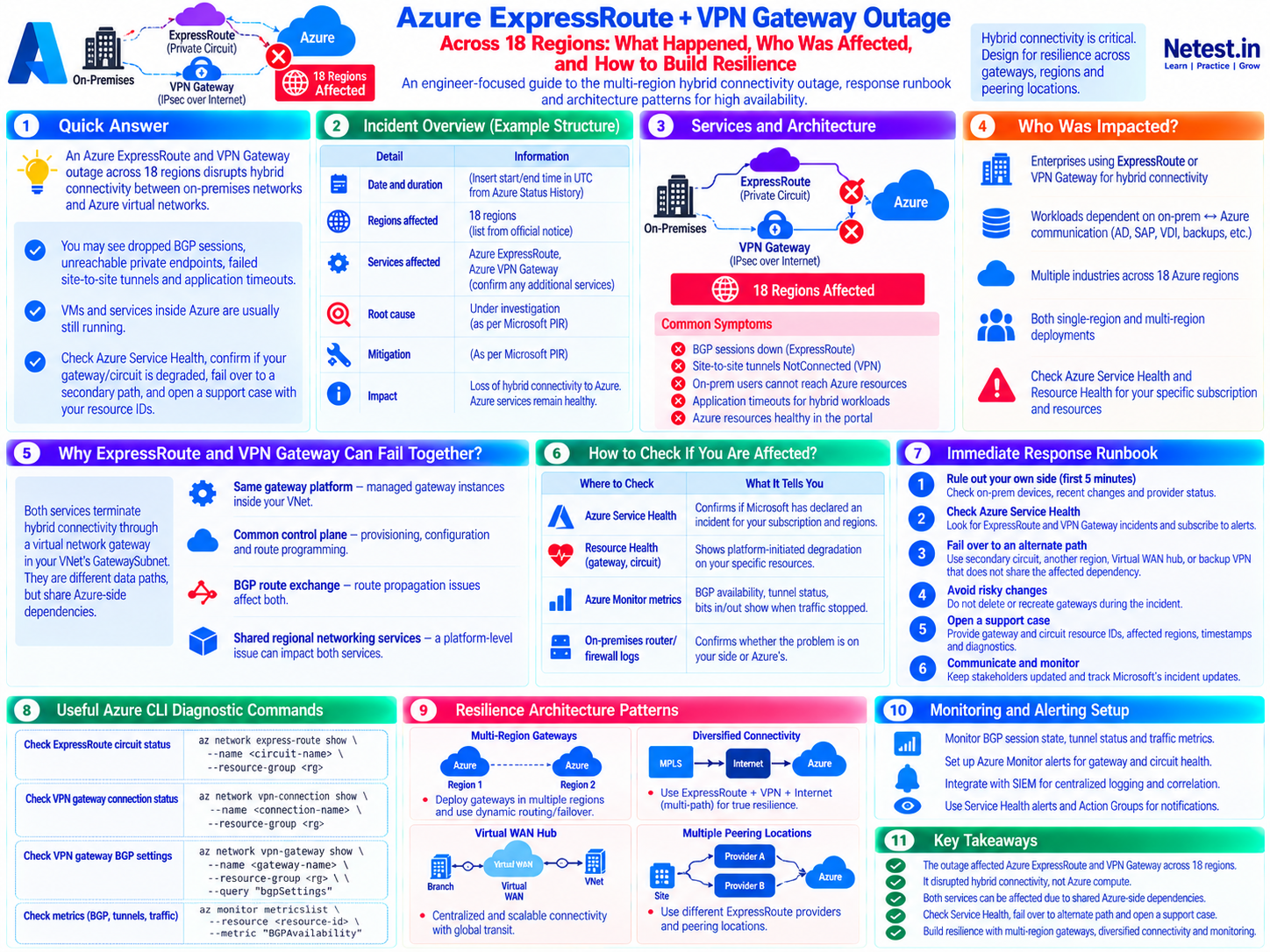
Confirmed Incident Overview and Timeline
Microsoft's final Post Incident Review for tracking ID 7Q30-010 records a multi-region gateway service degradation from 20:30 UTC on September 30, 2026, through 02:15 UTC on October 1, 2026. Several Azure networking services experienced intermittent management-operation failures. A subset of upgraded ExpressRoute gateways also lost connectivity temporarily because they could not retrieve the routing configuration they required.
| Incident field | What this guide can state | Authoritative record to capture |
|---|---|---|
| Tracking ID | 7Q30-010 | Microsoft Azure Status History and subscription-specific Service Health |
| Overall window | 20:30 UTC September 30 to 02:15 UTC October 1, 2026 | Individual impact varied by service, region, customer and resource |
| Final regional scope | 33 regions named in the final PIR | Early communications and the supplied visual referenced 18 regions |
| Services named | ExpressRoute Gateway, Application Gateway, Firewall, Bastion, Virtual WAN and VPN Gateway | Azure VMware Solution customers could also lose SDDC connectivity temporarily |
| Confirmed connectivity loss | A subset of upgraded ExpressRoute gateways temporarily lost on-premises connectivity | The broader incident caused intermittent management-operation failures |
| Primary cause | Gateway updates resumed at scale while a prior change increased control-plane processing time | The resulting request surge overwhelmed a shared regional networking control-plane service |
| Final mitigation | Microsoft paused updates and rolled back the processing-time regression | The rollback completed across affected regions by 02:15 UTC |
Regions named in the final PIR
Australia Central 2, Australia Southeast, Austria East, Belgium Central, Canada East, Central US, Chile Central, Denmark East, East Asia, France Central, Germany North, Germany West Central, India South Central, Indonesia Central, Japan West, Jio India Central, Korea Central, Malaysia West, North Europe, Norway West, South Africa North, South Central US, South India, Southeast Asia, Sweden South, Switzerland North, Taiwan North, UAE North, UK South, West Europe, West US, West US 2 and West US 3.
Detection: 20:30–20:58 UTC
Customer impact began at 20:30. ExpressRoute connectivity monitoring detected degradation at 20:43, followed by broader control-plane health failures at 20:58.
Operational lesson: component and end-to-end connectivity monitoring must complement control-plane health signals.
Stabilization: 21:45–22:36 UTC
Microsoft paused further gateway operating-system updates at 21:45. Traffic shifting and added resources provided incomplete relief. By 22:36, affected ExpressRoute gateways had restored connectivity using locally stored last-known-good configurations.
Operational lesson: preserve evidence and avoid destructive gateway recreation while a provider mitigation is in progress.
Recovery: 23:55–02:15 UTC
Microsoft associated increased configuration-processing time with a previously deployed change at 23:55. The rollback began at 01:15 and completed across affected regions at 02:15.
Operational lesson: end the incident only after routing and application transactions remain stable through an agreed observation window.
Quick answer: this was broader than an ExpressRoute-plus-VPN event. The final PIR confirms intermittent management failures across several gateway-based services and temporary connectivity loss for a subset of upgraded ExpressRoute gateways. During similar symptoms, check Service Health, confirm the gateway and circuit state, verify your own edge, and fail over only to a path that does not share the suspected dependency.
Who Was Impacted and How to Tell
The highest-risk organizations are those whose identity, data, administration or application flows depend on continuous on-premises-to-Azure connectivity. This includes Active Directory integrations, SAP, VDI, backup, replication, private endpoints, management systems and any application split across the hybrid boundary.
Common symptoms
- ExpressRoute private-peering BGP sessions flap or remain down.
- Site-to-site VPN connections show
NotConnectedor reconnect repeatedly. - On-premises clients cannot reach Azure virtual machines, databases or private endpoints.
- Hybrid applications time out even though Azure compute resources appear healthy.
- Multiple regions or otherwise independent applications lose hybrid reachability at similar times.
| Where to check | What it tells you | Evidence to preserve |
|---|---|---|
| Azure Service Health | Whether Microsoft declared an incident for your subscriptions, services and regions | Tracking ID, UTC updates, impacted services, regions and resources |
| Resource Health | Whether a specific gateway or circuit has an Azure-reported degradation | Health state and transition timestamps |
| Azure Monitor | BGP/ARP availability, tunnel state, route counts, throughput and packet drops | Time-series export covering before, during and after the incident |
| On-premises router and firewall logs | Whether local interfaces, BGP peers, IKE sessions or provider handoffs also failed | Timestamped logs, configuration changes and provider ticket references |
| Application telemetry | Which business transactions failed and whether Azure-internal traffic continued | Error rates, latency, dependency failures and user impact |
Immediate Response Runbook
Use the runbook in order. Assign an incident commander, record decisions in UTC, and avoid changes that destroy evidence or add a second failure while the service is unstable.
1. Rule Out Your Own Side in the First Five Minutes
Check edge-interface state, BGP and IKE/IPsec sessions, recent firewall or routing changes, and connectivity-provider status. Compare more than one Azure region or path where available.
Decision: if a local fault or change explains the symptoms, follow the owned-device rollback or provider escalation path while continuing to watch Azure health.
2. Confirm Scope in Azure Service Health
Open Service Health, filter Service Issues by the affected subscriptions, services and regions, and inspect the Impacted Resources tab. Capture the tracking ID and subscribe the incident team to updates.
Decision: align your internal severity with confirmed business impact, not only the provider's incident label.
3. Fail Over to an Independent Path
Use a secondary circuit, another regional gateway, a separate Virtual WAN hub or a backup VPN only after confirming that its gateway, provider, region and routes do not share the active failure.
Validation: test route convergence, security policy, DNS, application transactions and return-path symmetry before declaring recovery.
4. Avoid Risky Gateway Changes
Do not delete or recreate a gateway during a suspected platform incident. Re-creation can be slow and can invalidate allowed public IP addresses or other dependencies.
Precaution: a gateway reset is disruptive and will not fix an Azure-side service fault. Use it only through an approved change after the platform is healthy.
5. Open a Support Case
Provide subscription, circuit, gateway and connection resource IDs; affected regions; the earliest UTC symptom; BGP/tunnel evidence; and the business impact. Ask Microsoft to associate the case with the relevant tracking ID.
Evidence: preserve portal exports, metrics, edge logs, screenshots, change records and provider case numbers.
6. Communicate and Monitor
Publish a fixed update cadence, state what is confirmed versus suspected, list the next decision point, and track primary and alternate paths throughout recovery.
Exit criteria: require stable routing and successful application tests for an agreed observation window before ending the incident.
Azure CLI Diagnostic Commands
Replace the placeholder resource names and run these read-only checks in the correct subscription. The final reset command is intentionally separated and marked disruptive.
az network vnet-gateway show — Inspect Gateway State
Use: confirm the gateway provisioning state, SKU and BGP setting before interpreting tunnel or routing symptoms.
az network vnet-gateway show \
  --resource-group MyRG \
  --name MyGateway \
  --query "{state:provisioningState,sku:sku.name,bgp:enableBgp}" \
  --output table
Interpretation: preserve the output, but do not assume a successful provisioning state proves that the data path is healthy.
az network vpn-connection show — Check VPN Connection Status
Use: view the connection state and transferred byte counters for a site-to-site connection.
az network vpn-connection show \
  --resource-group MyRG \
  --name MyVpnConnection \
  --query "{status:connectionStatus,ingress:ingressBytesTransferred,egress:egressBytesTransferred}" \
  --output table
Interpretation: correlate NotConnected and stalled counters with IKE, tunnel and on-premises firewall logs.
az network vnet-gateway list-bgp-peer-status — Verify BGP Peers
Use: retrieve the current state of BGP peers on the virtual network gateway.
az network vnet-gateway list-bgp-peer-status \
  --resource-group MyRG \
  --name MyGateway \
  --output table
Interpretation: compare peer state, connected duration and route counts with the on-premises router. A disconnected IPsec tunnel prevents BGP over that VPN path.
az network express-route show — Inspect Circuit Provisioning
Use: compare Azure and service-provider provisioning states for the ExpressRoute circuit.
az network express-route show \
  --resource-group MyRG \
  --name MyCircuit \
  --query "{circuit:circuitProvisioningState,provider:serviceProviderProvisioningState}" \
  --output table
Interpretation: provisioning state is one input; also inspect ARP availability, BGP availability, traffic and provider evidence.
az network express-route list-route-tables — Inspect Learned Routes
Use: view private-peering routes through the primary ExpressRoute path.
az network express-route list-route-tables \
  --resource-group MyRG \
  --name MyCircuit \
  --peering-name AzurePrivatePeering \
  --path primary \
  --output table
Interpretation: compare primary and secondary paths and confirm that the prefixes needed by the application exist in both directions.
az network vnet-gateway reset — Disruptive Recovery Action
Use only after review: reset a VPN gateway when Azure is healthy but tunnels still do not re-establish and your change authority approves the interruption.
az network vnet-gateway reset \
  --resource-group MyRG \
  --name MyGateway
Warning: this action interrupts connectivity. Capture state first, notify stakeholders, define rollback and never use reset as a reflex during an active platform incident.
See the official Azure CLI virtual network gateway reference for current options and command behavior.
Resilience Architecture Patterns
No single control removes every failure mode. Select a combination based on the recovery time, data consistency and operational complexity your business can support.
| Pattern | Protects against | Important limitation or trade-off |
|---|---|---|
| Zone-redundant gateway SKUs | A single availability-zone failure inside a region | Does not protect against a region-wide or shared control-plane event |
| Two ExpressRoute circuits in different peering locations | Circuit, provider edge or peering-location failure | Higher cost; route advertisement and failover still require testing |
| Site-to-site VPN backup | Private circuit or provider failure | Lower or less predictable performance and possible Azure-side shared dependencies |
| Multi-region hub-and-spoke or Virtual WAN | A gateway or networking failure confined to one region | More routing, security, DNS and cost complexity |
| Workload recovery in another region | Regional network and application-service degradation | Requires data replication, dependency mapping and tested application failover |
| Independent administrative access | Operator lockout when the private path is unavailable | Needs strict identity controls, approval, monitoring and an explicit break-glass design |
Diversify Transport
Use private and encrypted internet paths where appropriate, but map every shared gateway, hub, DNS and route dependency.
Diversify Location
Place critical circuits in different peering locations and provide another regional termination point for region-level recovery.
Prove Failover
Verify route advertisement, security policy, return paths, DNS and application transactions during scheduled game days.
Monitoring and Alerting Setup
Build one view that compares the primary and alternate paths. Microsoft documents ARP and BGP availability for ExpressRoute, and BGP peer state, learned/advertised routes, tunnel bandwidth and packet drops for VPN Gateway.
- Create Service Health alerts for ExpressRoute and VPN Gateway in every used subscription and region; route them to the on-call system.
- Create Resource Health alerts for every circuit, gateway and critical connection.
- Alert on ExpressRoute ARP/BGP availability, traffic collapse, packet drops and relevant gateway performance metrics.
- Alert on VPN tunnel state, BGP peer state, learned-route deviations, packet drops and throughput anomalies.
- Run end-to-end synthetic tests between on-premises probes and private Azure endpoints rather than relying only on component health.
- Forward diagnostic logs and alerts to centralized retention and correlate them with provider and on-premises telemetry.
- Test the notification path, escalation owner and backup contact during scheduled exercises.
Use the official monitoring references for ExpressRoute and VPN Gateway to select supported metrics and dimensions.
Post-Incident Review Checklist
- Record Microsoft's tracking ID, confirmed root cause, mitigation and prevention work from the final PIR.
- Build a UTC timeline from the first symptom through route stability and application recovery.
- Document affected systems, users, transactions, operational effort and financial impact.
- Compare the expected failover with what actually happened, including detection and route-convergence time.
- Map shared dependencies between primary and backup paths, including gateways, regions, providers, DNS and security controls.
- Confirm whether alerts fired, reached the right people and led to an actionable diagnosis.
- Update runbooks, inventories, contact lists and escalation paths, then assign owners and due dates.
- Schedule a controlled failover game day within the next quarter and track the resulting improvements.
- Preserve the evidence needed for support follow-up and any SLA service-credit review.
Azure ExpressRoute and VPN Gateway Outage Frequently Asked Questions
What is Azure ExpressRoute?
Azure ExpressRoute provides private connectivity between on-premises networks and Microsoft cloud services through a connectivity provider. Unlike a site-to-site VPN, its traffic does not depend on the public internet path.
What is the difference between ExpressRoute and VPN Gateway?
ExpressRoute uses a private circuit and is designed for predictable enterprise connectivity. VPN Gateway carries encrypted IPsec traffic, typically over the internet. Organizations often use ExpressRoute as the primary path and VPN as an alternate path.
Will a VPN backup always keep workloads reachable when ExpressRoute fails?
No. A VPN backup helps with circuit, provider or peering-location failures when it does not share the failed dependency. It may not protect against an Azure regional, gateway-platform or route-control issue that affects both paths. Stronger designs add gateway, region, provider and peering-location diversity.
How do I check whether Azure has an active networking incident?
Use Azure Service Health for subscription-specific incidents, affected services, regions and resources. Use Resource Health for individual gateways and circuits, Azure Monitor for metrics, and the public Azure Status page for broad events.
Should I reset my VPN gateway during an Azure outage?
Usually not while a platform incident is active. A reset briefly disrupts connections and does not repair an Azure-side service fault. Consider it only after confirming the platform is healthy and the tunnels still fail to re-establish, and follow your approved change process.
Can an organization receive Azure SLA service credits for an outage?
It may qualify if the measured downtime and service SKU meet the applicable SLA terms and the claim is submitted within the required window. Preserve incident records and review the current Microsoft licensing and support terms for the affected service.