GRE Tunneling: Connect Two LANs Across a Routed Underlay
Build the point-to-point GRE foundation used by later overlay designs. Prove underlay reachability, configure reciprocal tunnel endpoints, exchange LAN routes, tune MTU and MSS, and isolate a controlled failure.
GRE at-a-Glance
GRE wraps the original packet in a new IP and GRE header. The outer source and destination cross the transport network; the inner source and destination remain the private endpoints carried through the overlay.
In This Lesson
1. Plan the Practical Topology
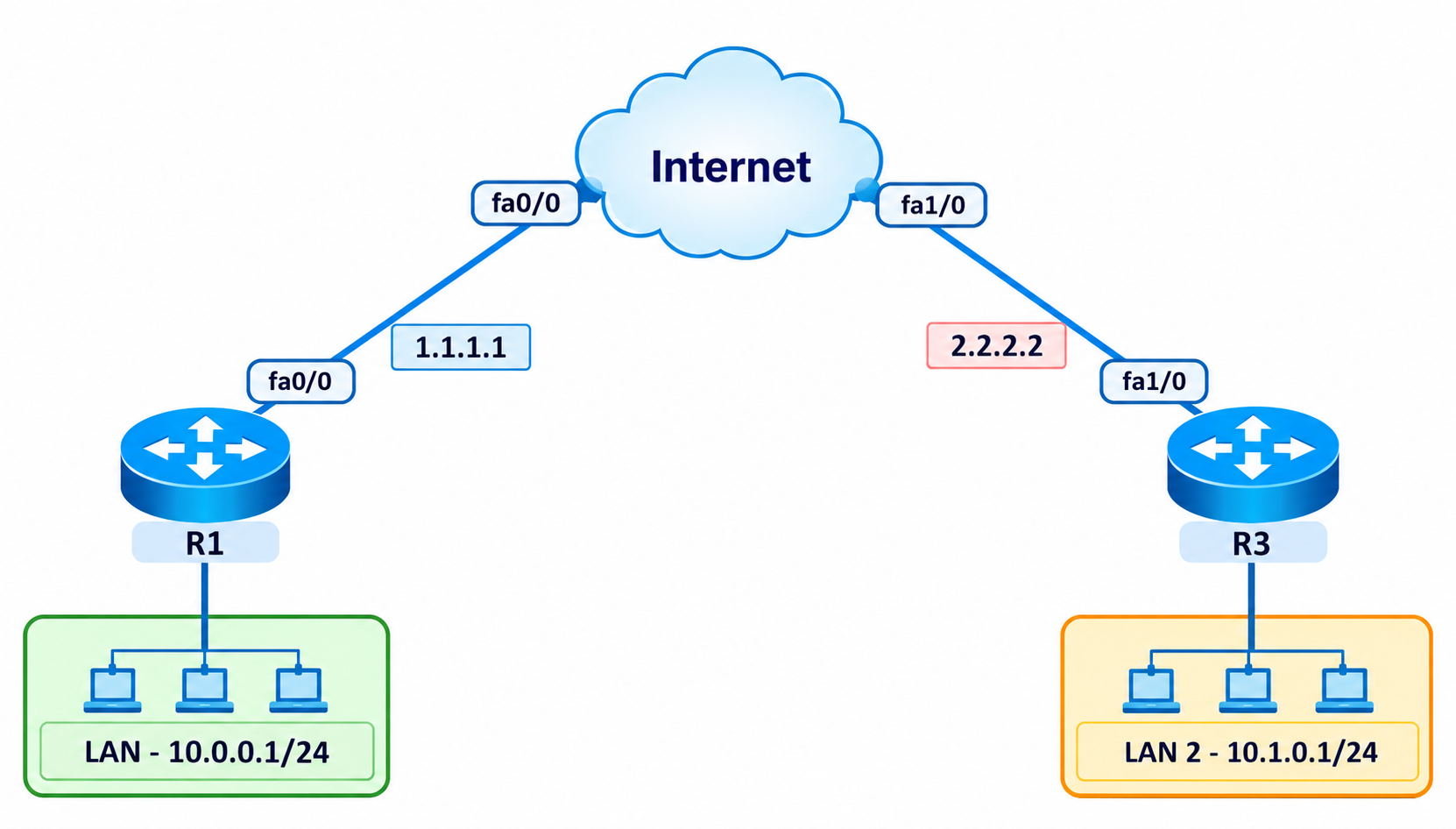
| Device | Underlay | Tunnel0 | LAN / loopback |
|---|---|---|---|
| R1 | 1.1.1.1/30 | 192.168.1.1/30 | 10.0.0.1/24 |
| Internet | 1.1.1.2/30, 2.2.2.1/30 | — | Transit only |
| R3 | 2.2.2.2/30 | 192.168.1.2/30 | 10.1.0.1/24 |
2. Configure and Prove the Underlay
Do not troubleshoot GRE until each router can reach the remote tunnel destination through the physical transport. Keep that route out of the tunnel to prevent recursive routing.
R1
interface FastEthernet0/0
 ip address 1.1.1.1 255.255.255.252
 no shutdown
interface Loopback0
 ip address 10.0.0.1 255.255.255.0
ip route 0.0.0.0 0.0.0.0 1.1.1.2
Internet router
interface FastEthernet0/0
 ip address 1.1.1.2 255.255.255.252
 no shutdown
interface FastEthernet1/0
 ip address 2.2.2.1 255.255.255.252
 no shutdown
R3
interface FastEthernet1/0
 ip address 2.2.2.2 255.255.255.252
 no shutdown
interface Loopback0
 ip address 10.1.0.1 255.255.255.0
ip route 0.0.0.0 0.0.0.0 2.2.2.1
Underlay gate
R1# ping 2.2.2.2 source 1.1.1.1
R1# show ip route 2.2.2.2
R3# ping 1.1.1.1 source 2.2.2.2
R3# show ip route 1.1.1.1
3. Build the Point-to-Point GRE Tunnel
The tunnel source is local and the destination is remote. Both ends must mirror one another; a tunnel key is an optional identifier, not a password or encryption control.
R1 Tunnel0
interface Tunnel0
 description GRE TO R3
 ip address 192.168.1.1 255.255.255.252
 tunnel source FastEthernet0/0
 tunnel destination 2.2.2.2
 tunnel mode gre ip
 tunnel key 100
 no shutdown
R3 Tunnel0
interface Tunnel0
 description GRE TO R1
 ip address 192.168.1.2 255.255.255.252
 tunnel source FastEthernet1/0
 tunnel destination 1.1.1.1
 tunnel mode gre ip
 tunnel key 100
no shutdown4. Route the Private LANs
Use static routes for the smallest reproducible lab, or run a routing protocol over Tunnel0. Do not use both options for the same prefixes during the baseline test.
Static route option
! R1
ip route 10.1.0.0 255.255.255.0 192.168.1.2

! R3
ip route 10.0.0.0 255.255.255.0 192.168.1.1
OSPF option
router ospf 10
 passive-interface default
 no passive-interface Tunnel0
 network 192.168.1.0 0.0.0.3 area 0
 network 10.0.0.0 0.0.0.255 area 0

! On R3, advertise 10.1.0.0/24 instead.
5. Tune MTU, TCP MSS, and Failure Detection
IPv4-over-GRE normally adds 24 bytes: 20 bytes for the new IPv4 header and 4 bytes for GRE. With a 1500-byte underlay, a 1476-byte tunnel IP MTU avoids outer fragmentation. A 1436-byte TCP MSS leaves space for the inner IPv4 and TCP headers.
Apply on both tunnel interfaces
interface Tunnel0
 ip mtu 1476
 ip tcp adjust-mss 1436
 keepalive 10 3
Validate the packet size
show interface Tunnel0
show ip interface Tunnel0
ping 10.1.0.1 source 10.0.0.1 size 1448 df-bit

! 1448-byte payload + 28-byte inner ICMP/IPv4 headers = 1476.Encryption adds variable overhead based on the transform, mode, padding, and authentication method. Measure the actual path and lower the tunnel MTU/MSS when GRE is protected by IPsec.
6. Verify the Tunnel and Reproduce a Failure
Healthy-state proof
show interface Tunnel0
show tunnel interface Tunnel0
show ip route 10.1.0.0
show ip ospf neighbor
ping 192.168.1.2 source 192.168.1.1
ping 10.1.0.1 source 10.0.0.1
traceroute 10.1.0.1 source 10.0.0.1
Expected relationships
R1 outer destination: 2.2.2.2
R3 outer destination: 1.1.1.1
Tunnel line protocol: up
Remote LAN next hop: remote Tunnel0 IP
Sourced LAN ping: successful
Controlled destination mismatch
On R1, record the baseline, change the destination to 2.2.2.3, and wait for the configured keepalive threshold. Capture the failed tunnel ping and interface state. Restore tunnel destination 2.2.2.2, then prove route and end-to-end recovery.
| Symptom | Likely cause | First evidence |
|---|---|---|
| Tunnel down/down | Source interface unavailable | show ip interface brief |
| Up/down with keepalives | Destination, return path, ACL, or key mismatch | Underlay route and reciprocal config |
| Up/up but no LAN traffic | Missing overlay route | show ip route |
| Small ping works, large flow fails | MTU, PMTUD, or MSS issue | DF-bit size sweep and interface counters |
| Destination route points to Tunnel0 | Recursive routing | show ip route 2.2.2.2 |
7. Capture Genuine First-Hand Evidence
This page supplies the procedure and expected relationships; it does not present invented device output as an execution record.
- Capture the topology and clock before configuration.
- Capture remote underlay reachability before Tunnel0 exists.
- Capture the remote LAN route and sourced end-to-end ping.
- Capture DF-bit success at the selected tunnel MTU.
- Capture the wrong-destination failure and the restored state.
8. Frequently Asked Questions
Does GRE encrypt traffic?
No. GRE carries packets across an IP transport but does not provide confidentiality, integrity, or authentication. Use IPsec when those protections are required.
Why can Tunnel0 appear up even when end-to-end traffic fails?
Without keepalives, the tunnel line protocol can depend mainly on the local source interface and the presence of a route to the destination. It does not prove the remote router is correctly configured or that LAN routes exist.
What causes recursive GRE routing?
It occurs when the route used to reach the outer tunnel destination resolves through the tunnel itself. Pin the destination to the physical underlay with a static or underlay-learned route.