DMVPN over IPsec Practical Lab
Build an encrypted hub-and-spoke overlay with mGRE, NHRP, EIGRP, and IPsec tunnel protection. Then progress through DMVPN Phases 1, 2, and 3 to verify how routing and encrypted forwarding change.
DMVPN over IPsec Practical at-a-Glance
The practical builds GRE/NHRP first and protects every tunnel with a shared IPsec transport profile. One three-router topology then makes the Phase 1, Phase 2, and Phase 3 routing and forwarding differences visible.
In This Lesson
1. Cable and Address the Topology
Use the supplied topology exactly as shown. R1 is the NHRP Next Hop Server (NHS); R2 and R3 are Next Hop Clients (NHCs). Loopback0 represents each site LAN so the traffic source remains stable while the tunnel changes.
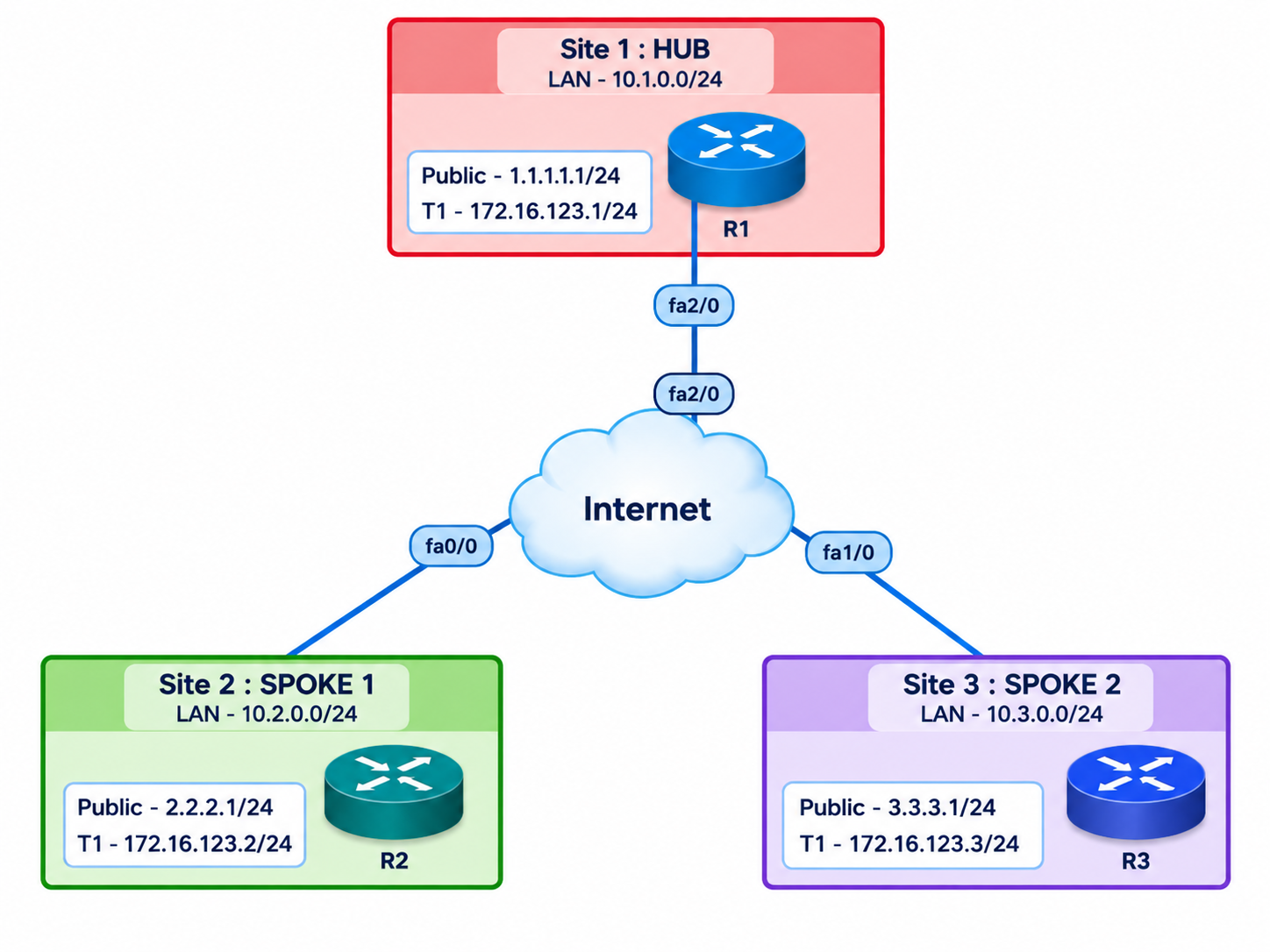
| Router / role | WAN interface | NBMA address | Tunnel1 | Loopback0 / LAN |
|---|---|---|---|---|
| R1 / Hub | FastEthernet2/0 | 1.1.1.1/24 | 172.16.123.1/24 | 10.1.0.1/24 |
| R2 / Spoke 1 | FastEthernet0/0 | 2.2.2.1/24 | 172.16.123.2/24 | 10.2.0.1/24 |
| R3 / Spoke 2 | FastEthernet1/0 | 3.3.3.1/24 | 172.16.123.3/24 | 10.3.0.1/24 |
2. Prepare the Underlay and Site LANs
Configure each WAN and Loopback0 interface first. The Internet cloud or service-provider routers must route between all three NBMA subnets. Replace the placeholder default gateway with the next hop in your emulator.
R1 hub baseline
hostname R1
!
interface FastEthernet2/0
 description DMVPN_UNDERLAY
 ip address 1.1.1.1 255.255.255.0
 no shutdown
!
interface Loopback0
 description SITE_1_LAN
 ip address 10.1.0.1 255.255.255.0
!
ip route 0.0.0.0 0.0.0.0 <ISP_NEXT_HOP>
R2 spoke baseline
hostname R2
!
interface FastEthernet0/0
 description DMVPN_UNDERLAY
 ip address 2.2.2.1 255.255.255.0
 no shutdown
!
interface Loopback0
 description SITE_2_LAN
 ip address 10.2.0.1 255.255.255.0
!
ip route 0.0.0.0 0.0.0.0 <ISP_NEXT_HOP>
R3 spoke baseline
hostname R3
!
interface FastEthernet1/0
 description DMVPN_UNDERLAY
 ip address 3.3.3.1 255.255.255.0
 no shutdown
!
interface Loopback0
 description SITE_3_LAN
 ip address 10.3.0.1 255.255.255.0
!
ip route 0.0.0.0 0.0.0.0 <ISP_NEXT_HOP>Before creating Tunnel1, R2 must ping 1.1.1.1 and 3.3.3.1 from 2.2.2.1. Repeat in both directions. If this fails, stop and repair the provider routing; NHRP cannot compensate for a broken underlay.
3. Build the Common IPsec Transport Profile
Apply the same lab profile on R1, R2, and R3. Transport mode protects the GRE packet without adding a second tunnel-mode IP header. The pre-shared key is intentionally a lab value.
R1, R2, and R3
crypto isakmp policy 10
 encr aes 256
 hash sha256
 authentication pre-share
 group 14
 lifetime 86400
!
crypto isakmp key DMVPN-LAB-ONLY address 0.0.0.0 0.0.0.0
!
crypto ipsec transform-set DMVPN-TS esp-aes 256 esp-sha256-hmac
 mode transport
!
crypto ipsec profile DMVPN-PROFILE
set transform-set DMVPN-TS4. Configure DMVPN Phase 1
R1 uses mGRE so one hub interface can accept both spokes. R2 and R3 remain point-to-point GRE clients with a fixed destination of 1.1.1.1. All spoke-to-spoke traffic must traverse R1.
R1 hub - Phase 1
interface Tunnel1
 description DMVPN_PHASE_1_HUB
 ip address 172.16.123.1 255.255.255.0
 no ip redirects
 ip nhrp authentication DMVPN
 ip nhrp map multicast dynamic
 ip nhrp network-id 1
 tunnel source FastEthernet2/0
 tunnel mode gre multipoint
 tunnel protection ipsec profile DMVPN-PROFILE
 no shutdown
!
interface Tunnel1
 no ip split-horizon eigrp 1
!
router eigrp 1
 eigrp router-id 1.1.1.1
 network 10.1.0.0 0.0.0.255
 network 172.16.123.0 0.0.0.255
 passive-interface Loopback0
 no auto-summary
R2 spoke - Phase 1
interface Tunnel1
 description DMVPN_PHASE_1_SPOKE_1
 ip address 172.16.123.2 255.255.255.0
 no ip redirects
 ip nhrp authentication DMVPN
 ip nhrp map 172.16.123.1 1.1.1.1
 ip nhrp map multicast 1.1.1.1
 ip nhrp network-id 1
 ip nhrp nhs 172.16.123.1
 tunnel source FastEthernet0/0
 tunnel destination 1.1.1.1
 tunnel protection ipsec profile DMVPN-PROFILE
 no shutdown
!
router eigrp 1
 eigrp router-id 2.2.2.2
 network 10.2.0.0 0.0.0.255
 network 172.16.123.0 0.0.0.255
 passive-interface Loopback0
 no auto-summary
R3 spoke - Phase 1
interface Tunnel1
 description DMVPN_PHASE_1_SPOKE_2
 ip address 172.16.123.3 255.255.255.0
 no ip redirects
 ip nhrp authentication DMVPN
 ip nhrp map 172.16.123.1 1.1.1.1
 ip nhrp map multicast 1.1.1.1
 ip nhrp network-id 1
 ip nhrp nhs 172.16.123.1
 tunnel source FastEthernet1/0
 tunnel destination 1.1.1.1
 tunnel protection ipsec profile DMVPN-PROFILE
 no shutdown
!
router eigrp 1
 eigrp router-id 3.3.3.3
 network 10.3.0.0 0.0.0.255
 network 172.16.123.0 0.0.0.255
 passive-interface Loopback0
no auto-summaryFrom R2, ping 10.3.0.1 with source 10.2.0.1, then traceroute to the same address. The working path must include the hub tunnel address 172.16.123.1. R2 should not form a direct NHRP peer with R3.
5. Upgrade to DMVPN Phase 2
Keep the existing addresses, NHRP server mappings, IPsec profile, and EIGRP process. Convert both spokes to mGRE by removing the fixed destination. On the hub, preserve the original spoke next hop in EIGRP updates so a spoke can resolve the remote spoke through NHRP.
R1 Phase 2 delta
interface Tunnel1
 description DMVPN_PHASE_2_HUB
 no ip split-horizon eigrp 1
 no ip next-hop-self eigrp 1
R2 Phase 2 delta
interface Tunnel1
 description DMVPN_PHASE_2_SPOKE_1
 no tunnel destination 1.1.1.1
 tunnel mode gre multipoint
R3 Phase 2 delta
interface Tunnel1
 description DMVPN_PHASE_2_SPOKE_2
 no tunnel destination 1.1.1.1
tunnel mode gre multipointCapture show dmvpn on R2 before traffic. Ping 10.3.0.1 from 10.2.0.1, then repeat show dmvpn and the traceroute. A dynamic R2-to-R3 peer should appear, and the steady-state path should skip R1.
6. Upgrade to DMVPN Phase 3
Phase 3 lets the hub advertise a summary and remain the routing next hop. R1 sends NHRP redirects for suboptimal traffic; each spoke accepts the redirect, resolves the remote NBMA address, and installs a more-specific forwarding shortcut.
R1 Phase 3 delta
interface Tunnel1
 description DMVPN_PHASE_3_HUB
 ip nhrp redirect
 ip next-hop-self eigrp 1
 ip summary-address eigrp 1 10.0.0.0 255.0.0.0
R2 Phase 3 delta
interface Tunnel1
 description DMVPN_PHASE_3_SPOKE_1
 ip nhrp shortcut
R3 Phase 3 delta
interface Tunnel1
 description DMVPN_PHASE_3_SPOKE_2
ip nhrp shortcutBefore traffic, R2 should resolve 10.3.0.1 through the 10.0.0.0/8 summary via R1. After the first packets and NHRP exchange, the summary may remain in the routing table while NHRP/CEF forwards the active destination directly to R3.
7. Verify Each Phase with the Same Evidence Sequence
Do not stop at successful pings. Capture the control plane, NHRP database, forwarding path, and encrypted packet counters at every gate.
Run on the hub
show clock
show ip interface brief
show ip eigrp neighbors
show ip route eigrp
show ip nhrp
show dmvpn detail
show crypto isakmp sa
show crypto ipsec sa
Run on R2 before and after traffic
show clock
show ip route 10.3.0.1
show ip cef 10.3.0.1 detail
show ip nhrp
show dmvpn detail
show crypto isakmp sa
show crypto ipsec sa
!
ping 10.3.0.1 source 10.2.0.1 repeat 20
traceroute 10.3.0.1 source 10.2.0.1| Evidence | Phase 1 | Phase 2 | Phase 3 |
|---|---|---|---|
| Spoke tunnel mode | Point-to-point | Multipoint | Multipoint |
| Remote LAN route next hop | R1 hub | Remote spoke | R1 summary/default |
| Steady spoke-to-spoke path | Through R1 | Direct after resolution | Direct after redirect/shortcut |
| Dynamic spoke peer | Not expected | Expected after traffic | Expected after traffic |
| IPsec peer counters | Hub peers increase | Direct spoke peer increases | Direct spoke peer increases |
- Save the running configurations and timestamped show-command output for all three routers.
- Record the route next hop before generating traffic; it distinguishes Phase 2 from Phase 3.
- Record
show dmvpn, NHRP, CEF, and IPsec counters again after traffic. - Repeat the test from R3 to prove the reverse path and security association.
8. Troubleshoot by Layer, Not by Guessing
Start with the first dependency that is missing. Clear dynamic state only inside the isolated lab and only after capturing the failed state.
| Layer | Question | Primary checks | Common fault |
|---|---|---|---|
| Underlay | Can every NBMA address reach the others? | ping, traceroute, show ip route | Missing ISP route or wrong tunnel source |
| GRE/NHRP | Did each spoke register with R1? | show ip nhrp, show dmvpn detail | Authentication, NHS, map, or network-id mismatch |
| Routing | Does the next hop match the selected phase? | show ip route, show ip eigrp topology | Split horizon or next-hop-self set incorrectly |
| Optimization | Did a direct peer appear after traffic? | NHRP, DMVPN, CEF, traceroute | Spoke still point-to-point, redirect/shortcut missing |
| IPsec | Are packets encrypted and decrypted? | IKE SA state and IPsec counters | Policy, key, transform set, ACL, or NAT interference |
Controlled Phase 3 failure
Remove ip nhrp shortcut from R2, allow old dynamic state to age out or clear only the relevant lab state using commands supported by your image, then repeat the R2-to-R3 test. Traffic should remain on the hub path. Restore the command and prove that the direct steady-state path returns.
9. Frequently Asked Questions
What changes when Phase 1 becomes Phase 2?
The spokes remove the fixed GRE destination and enable mGRE. The hub also preserves the original EIGRP spoke next hop so a source spoke can use NHRP to resolve the destination spoke and build a direct tunnel.
Why does Phase 3 restore EIGRP next-hop-self on the hub?
Phase 3 allows the routing table to point to a hub summary or default. NHRP redirect and shortcut then create destination-specific forwarding state for active spoke-to-spoke flows.
Does GRE encrypt the traffic?
No. GRE carries routed traffic and multicast-dependent control traffic. The IPsec tunnel-protection profile adds confidentiality, integrity, and peer authentication.
Why might the first Phase 3 packets cross the hub?
The source initially follows its summary route toward R1. The hub identifies the suboptimal path and sends an NHRP redirect, after which the spoke resolves the remote NBMA address and installs a direct shortcut.